As an Amazon Associate we earn from qualifying purchases. Learn more.
How to Keep Multiple Devices Charged in a Shared Dorm Room (2026)
Move-in week in a dorm room means everyone needs to charge phones, laptops, earbuds and gaming gear from the same handful of outlets — and that creates slow charging, tripped breakers and arguments. This guide is for roommates who want practical, low-drama ways to keep devices topped up: multi-port chargers that reduce adapter clutter, surge-safe power strips to protect gear, cable organization ideas, and simple rules to avoid overloads. I tested and evaluated units based on port count and layout, surge protection, cord length/flat-plug convenience, build quality and real-user feedback about durability and functionality.
Quick Answer
Use a vertical multi-port surge protector as a central charging hub. Our top pick, TESSAN Tower Power Strip Surge Protector (B0D91T3T7C), combines many AC outlets, USB-A and USB-C ports and a long flat cord so roommates can charge phones, tablets and small laptops without blocking each other.
Our Top Picks
Quick Comparison
Select 2-3 products to compare side-by-side
| Compare | Product | GearLark Score | Price Tier | Key Feature | Best For | Action |
|---|---|---|---|---|---|---|
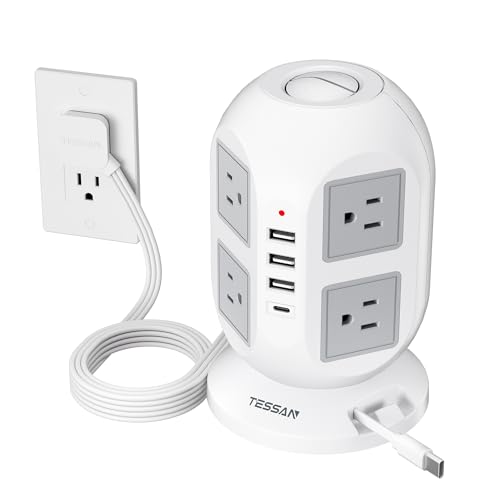 TESSAN Tower Power Strip
|
Premium | 13-in-1: 8 AC + 5 USB (incl. built-in cable) | Dorm desks needing lots of ports | Check Price | ||
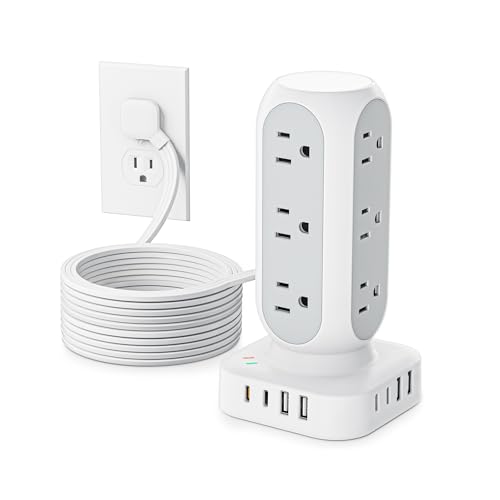 TenTrend Tower (Budget)
|
Budget | Dual PD 20W USB-C fast ports | Buyers on a budget who still need many ports | Check Price | ||
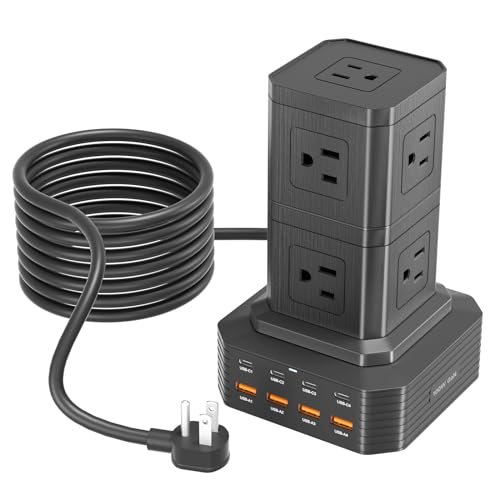 ThunderGo 100W Station
|
Premium | One USB-C can deliver up to 100W | Students who need laptop PD charging | Check Price | ||
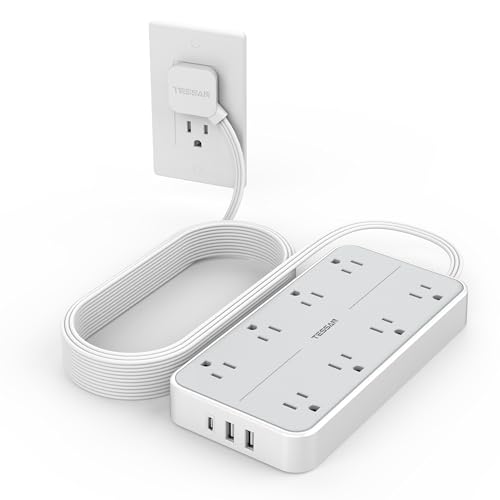 TESSAN 15FT Flat Plug
|
Mid-Range | 15 ft cord with widely spaced outlets | Rooms that need long reach or mounting | Check Price | ||
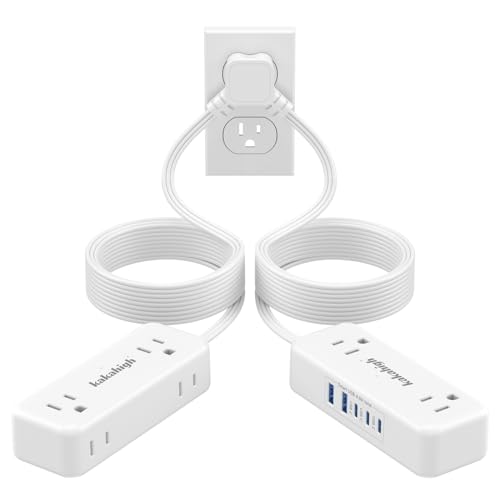 kakahigh Split Extension Cord
|
Budget | Twin 10 ft split design (his & hers) | Rooms sharing one outlet between two sides | Check Price |
1. Tower Power Strip Surge Protector 10 Ft, TESSAN Flat Plug Extension Cord with Multiple Outlets, 8 AC Outlets, 4 USB Ports, 1 Built-in USB Cable, Desk Charging Station for Home Dorm Office
This vertical tower turns one outlet into a 13-device charging station, so roommates can plug in multiple phones, tablets and accessories without blocking sockets. Its long 10 ft flat plug cord reaches awkward outlets and the built-in USB-C/A detection optimizes charging speed; surge and overload protections keep shared gear safer during heavy use.
Key Specs
- 8 widely spaced AC outlets
- 4 USB ports + 1 built-in USB cable (USB-C adapter included)
- 10 ft ultra-thin flat plug extension cord
- Overload, short-circuit and over-current protection
Pros
- Large total port count reduces adapter crowding
- Space-saving vertical footprint keeps bedside/desk tidy
- Surge and overload protection for shared electronics
Cons
- Some users report USB ports failing after months
- Tall design can topple if overloaded or bumped
Best For: Dorm desks needing lots of ports
Check Latest Price on Amazon2. Flat Plug Power Strip Tower 10FT, 40W Total Fast Charging Station, Dual PD 20W USB-C Surge Protector with 12 AC Outlets and 8 USB Ports (4 USB C), Long Extension Cord for Home Office Dorm Room
This budget-friendly charging tower gives you 12 AC outlets plus 8 USB ports (including two PD20W USB-C) so several roommates can charge phones and small tablets quickly. The compact vertical layout saves nightstand space and the 10 ft flat plug reaches distant wall outlets; built-in surge protection helps prevent damage when multiple devices draw power at once.
Key Specs
- 12 AC outlets and 8 USB ports (4 USB-C total)
- Two PD 20W USB-C fast-charge ports
- 10 ft ultra-thin flat plug cord
- 1200J surge protection and on/off switch
Pros
- Excellent port density for the price
- PD ports speed up phone/tablet charging
- Compact, space-saving tower design
Cons
- Lower surge joule rating than some premium units
- Must respect the total rated wattage (do not overload)
Best For: Buyers on a budget who still need many ports
Check Latest Price on Amazon3. Charging Station (100W), 17-in-1 USB C Power Strip with Surge Protection, 6.6Ft Extension Cord, 4 USB C and 4 USB A Ports, 9 AC Outlets for Home Office Dorm Room
ThunderGo's 17-in-1 station is built around strong USB-C power delivery — one USB-C port can supply up to 100W, making it a good choice if roommates need to charge a laptop plus phones and tablets. With nine AC outlets and multiple smart USB ports, it centralizes charging and includes safety protections to reduce the risk of surge damage in shared living spaces.
Key Specs
- 9 AC outlets
- 4 USB-C ports and 4 USB-A ports
- 6.6 ft extension cord
- Over-voltage, over-current and temperature protection
Pros
- High-power USB-C for laptops and fast charging
- Large mix of AC and USB ports for varied devices
- Smart detection optimizes charging speeds
Cons
- Premium feature set comes with a higher price tier
- Some users find convenience or layout mixed depending on setup
Best For: Students who need laptop PD charging
Check Latest Price on Amazon4. Flat Plug 15 FT Extension Cord, TESSAN Surge Protector Power Strip with 8 AC and 3 USB(1USB-C) Ports, 1080J Protection, Wall Mount Widely Spaced Charging Station for Home, Office, School, Dorm Room
This mid-range surge protector focuses on usable outlet spacing and reach: 1.9-inch spacing accommodates bulky adapters and the 15 ft flat plug cord reaches distant outlets or lets you mount the strip under a desk. Built-in USB-A and USB-C ports cover small device charging while the surge protection offers baseline safety for a shared setup.
Key Specs
- 8 widely spaced AC outlets (1.9 in spacing)
- 3 USB ports (including 1 USB-C)
- 15 ft flat plug extension cord
- 1080J surge protection and wall-mount holes
Pros
- Long cord and mountable design for flexible placement
- Well-spaced outlets reduce adapter crowding
- Solid build and practical layout for desks
Cons
- Fewer USB ports than tower-style hubs
- Mid-range price without highest surge rating
Best For: Rooms that need long reach or mounting
Check Latest Price on Amazon5. Split Extension Cord 20FT (10FT on Each Side), Single Flat Plug Twin Extension Cord with 4 AC Outlets, 2 USB-A & 3 USB-C(24W/4.8A), Nightstand Charging Station for Bedroom Dorm Room Home, His and Hers
The kakahigh split cord splits power to two 10 ft heads so two people can have outlets and USB ports on their own sides of the bed or desk — ideal for the classic bunk/side-by-side dorm layout. The flat plug and slim heads hide behind furniture, and multiple USB-C ports let both roommates charge phones without swapping adapters.
Key Specs
- 20 ft total (10 ft on each side) split cord
- 4 AC outlets and 5 USB ports (3 USB-C)
- Slim flat plug and 90° right-angle design
- Fire-resistant PC shell and circuit protections
Pros
- Unique split layout gives two charging zones
- Good value and long reach for bedside setups
- Multiple USB-C ports for modern phones
Cons
- Lower overall wattage limit (check device draw)
- Mixed reports on fastest charging speed for larger devices
Best For: Rooms sharing one outlet between two sides
Check Latest Price on AmazonWhich One Should You Choose?
If budget is tight → TenTrend Flat Plug Power Strip Tower (B0CR9ZD4VV) provides the best port count for the price. If you need portable or split-side bedside charging → kakahigh Split Extension Cord (B0FHJ34L4F) gives two 10 ft heads so both roommates get their own zone. If premium quality and heavy USB-C / laptop charging matter → ThunderGo Charging Station 100W (B0D1CD3PZR) or the TESSAN Tower Power Strip (B0D91T3T7C) for a balance of many AC outlets plus smart USB-C ports.
Best for Specific Scenarios
- Move-in week with many phones and earbuds: TenTrend Tower (B0CR9ZD4VV) because it gives lots of ports at a low price so everyone can charge at once.
- Two roommates who want separate nightstand spots: kakahigh Split Extension Cord (B0FHJ34L4F) because its twin 10 ft heads keep cables on each side of the bed.
- Students who need to fast-charge laptops and phones: ThunderGo 100W Station (B0D1CD3PZR) because a 100W USB-C port handles a laptop while other ports service phones and accessories.
Frequently Asked Questions
How do I prevent slow charging when several roommates plug in at once?
Use a charging station with dedicated USB-C PD ports for devices that support fast charging and a mix of AC outlets for laptops; avoid daisy-chaining strips or plugging high-draw appliances into the same circuit. If charging still feels slow, stagger heavy chargers (laptops) and let phones use the PD ports or USB-A ports designed for faster output.
Is it safe to charge many devices overnight in a dorm?
Yes if you use a surge-protected power strip with overload and short-circuit protection and don’t exceed the strip’s rated wattage. Avoid using strips with visible damage, and don’t plug space heaters or other high-power appliances into a strip meant for electronics.
How can roommates share outlets fairly without arguments?
Agree on simple rules: assign a primary charging hub, set time windows for laptop charging vs phone charging, label cables or sides, and use split cords or multi-port towers so everyone has predictable access. A shared charging schedule during heavy-use times (move-in, late-night studying) minimizes conflicts.
What causes a power strip to trip the breaker and how do I avoid it?
Tripping happens when total draw on the circuit exceeds its limit (often 15A for a typical dorm circuit) or if the strip detects an overload. Avoid plugging in heaters, multiple refrigerators, or other high-draw items alongside many chargers. Check the strip’s rated wattage and distribute heavy loads across different wall outlets when possible.
How We Selected These Products
Our recommendations are based on data-driven analysis: we evaluated 155229+ products across 23916+ brands using a composite scoring system that weighs rating (40%), review volume (30%), price value (20%), and demand signals (10%). Every product is ranked by data, not opinions.
Last updated: August 11, 2026
As an Amazon Associate we earn from qualifying purchases at no extra cost to you. Full disclosure.
GearLark Score is our editorial ranking based on a composite analysis of product quality, value, and verified customer sentiment. Click through to Amazon for current pricing, availability, and live customer reviews.