As an Amazon Associate we earn from qualifying purchases. Learn more.
Mechanical vs Membrane Keyboards for Long Typing Sessions (2026)
If you spend hours typing as a remote worker, the choice between mechanical and membrane (or hybrid) switches affects fatigue, noise, and long-term durability. This head-to-head comparison looks at three distinct models chosen for their different approaches to long sessions: the Razer Tartarus V2 (mecha-membrane keypad), TECWARE Phantom+ (compact mechanical TKL), and RK ROYAL KLUDGE S108 (retro full-size mechanical). Selection was based on objective product specs and consistent customer feedback about build quality, feel, and longevity. Read on to see direct comparisons for durability, typing fatigue, noise, and overall value so you can pick the right keyboard for your workflow.
Quick Answer
For long typing sessions the TECWARE Phantom+ (B0BPLV294G) is the best overall pick for balanced durability, low fatigue and value. If you need heavy macro customization and a softer membrane feel, choose the Razer Tartarus V2 (B07754PYFK). For retro clicky feedback and a full-size layout, the RK ROYAL KLUDGE S108 (B07XVCP7F5) fits niche typewriter lovers.
Our Top Picks
Quick Comparison
Select 2-3 products to compare side-by-side
| Compare | Product | GearLark Score | Price Tier | Key Feature | Best For | Action |
|---|---|---|---|---|---|---|
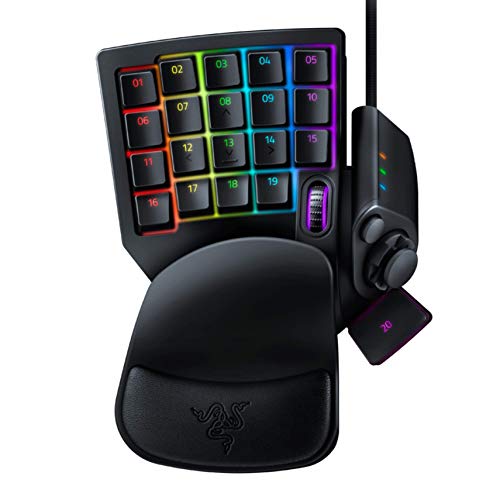 Razer Tartarus V2
|
Premium | 32 programmable mecha-membrane keys | Macro-heavy workflows & gaming | Check Price | ||
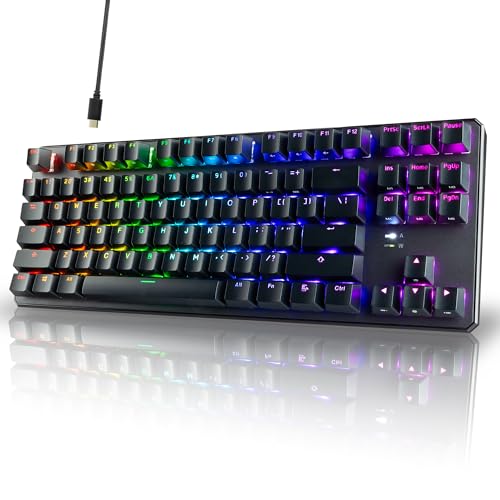 TECWARE Phantom+
|
Budget | Double-shot PBT keycaps & sound dampening | Remote workers who type a lot on a budget | Check Price | ||
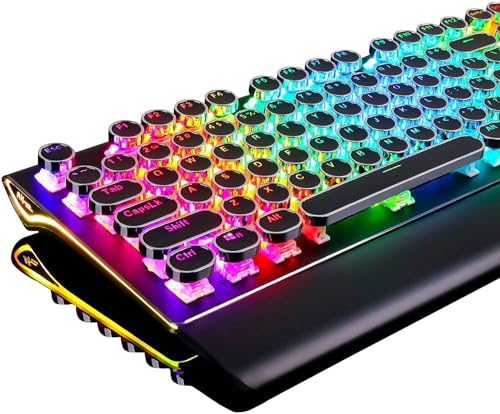 RK ROYAL KLUDGE S108
|
Budget | Retro round keycaps with blue mechanical switches | Typists who prefer tactile, clicky feedback | Check Price |
1. Razer Tartarus V2 Gaming Keypad: Mecha Membrane Key Switches - One Handed Keyboard - 32 Programmable Keys - Customizable Chroma RGB Lighting - Programmable Macros - Snap Tap - Black
A one-handed mecha-membrane keypad that blends soft membrane comfort with tactile feedback and extensive macro programming. Excellent for users who need a large set of hotkeys and deep customization, but not a traditional full keyboard for extended typing.
Key Specs
- Mecha-membrane switches (tactile rubber dome)
- 32 programmable keys + 8-way thumbpad
- Customizable Razer Chroma RGB per key
- Adjustable two-position palm rest; Razer Synapse software
Pros
- More programmable keys and macro depth than the full-size RK and TECWARE
- Softer, lower-force presses reduce finger fatigue compared with clicky blue mechanical switches
- Superior per-key RGB customization compared with both competitors
Cons
- Not a full keyboard — less suitable for continuous full-keyboard typing than TECWARE or RK
- Some users report occasional stickiness or inconsistent functionality compared with higher-built mechanical boards
Best For: Macro-heavy workflows & gaming
Check Latest Price on Amazon2. TECWARE Phantom+ 87 Key Mechanical Gaming Keyboard, RGB led, TKL 75% Keyboard, Thocky Sounding, Wraith Red Switch
A compact 87-key mechanical keyboard that balances a comfortable 'thocky' typing feel with durable PBT keycaps and built-in noise dampening—excellent value for long typing sessions. It targets typists wanting mechanical reliability without premium cost.
Key Specs
- 87-key tenkeyless layout (TKL)
- Wraith Red switches; hot-swap friendly (spare switches included)
- Double-shot PBT keycaps and V3 stabilizers
- 16.8M RGB lighting with 18 preset modes; detachable USB-C cable
Pros
- Stronger build quality and long-term durability than many budget membranes
- Quieter, damped mechanical sound that reduces noise for shared home offices
- Better value for money compared with premium mechanical options
Cons
- Less macro/customization depth than the Razer Tartarus V2’s dedicated keypad
- A small number of customers report isolated functionality issues with keys over time
Best For: Remote workers who type a lot on a budget
Check Latest Price on Amazon3. RK ROYAL KLUDGE S108 Typewriter Keyboard, Retro Mechanical Gaming Keyboard Wired 108 Keys with RGB Backlit Sidelight, Detachable Wrist Rest, Round Keycaps Blue Switches - Black
A full-size, retro-styled mechanical keyboard with loud blue switches and a sturdy aluminum top panel. It’s ideal for users who enjoy an authentic typewriter feel and strong visual design, though it’s louder and more assertive than the TECWARE for long, shared sessions.
Key Specs
- Full-size 108-key layout with number pad
- Blue mechanical switches (clicky & tactile)
- Aluminium alloy top plate and detachable wrist rest
- Per-key RGB and 168 backlight modes; plug-and-play compatibility
Pros
- More satisfying clicky feedback than TECWARE and Razer for tactile typists
- Sturdier metal build and retro styling not offered by the other two
- Full-size layout better for data entry or number-heavy work than the Razer keypad
Cons
- Louder click noise than TECWARE, which may increase typing fatigue in shared spaces
- Reported occasional functionality failures by some users compared with better-engineered models
Best For: Typists who prefer tactile, clicky feedback
Check Latest Price on AmazonWhich One Should You Choose?
If your priority is a balanced, durable keyboard for all-day typing and value, buy the TECWARE Phantom+ (B0BPLV294G). It delivers PBT keycaps, damped mechanical sound, and a TKL layout that reduces desk footprint while staying comfortable for long sessions. If your workflow depends on complex macros, shortcut chains or one-handed control—choose the Razer Tartarus V2 (B07754PYFK). It offers unmatched per-key customization and a softer mecha-membrane feel that can reduce finger strain, but it is not a full keyboard for continuous typing. If you want a full-size, tactile typewriter-style experience and prioritize clicky feedback and retro looks, choose the RK ROYAL KLUDGE S108 (B07XVCP7F5), keeping in mind it’s louder and may not be ideal in shared spaces.
Best for Specific Scenarios
- All-day remote writer/coder: TECWARE Phantom+ because it balances durability, quieter damped sound and comfortable key travel for long sessions.
- Power user with heavy macros: Razer Tartarus V2 because its 32 programmable keys and deep software customization speed up repetitive workflows.
- Retro typist who loves clicky feedback: RK ROYAL KLUDGE S108 because its blue switches and metal panel deliver an authentic typewriter feel and full-size layout.
Frequently Asked Questions
Are mechanical keyboards better for long typing sessions than membrane?
Mechanical keyboards often last longer and provide clearer tactile feedback, which many typists find reduces errors and fatigue over time. However, low-force linear switches or damped mechanicals are usually more comfortable for extended sessions than loud clicky blues, and hybrid mecha-membrane designs can suit those who prefer softer keypresses.
Will a clicky keyboard bother people I work with on calls?
Yes—clicky blue switches (like RK’s S108) are noticeably louder. If you take frequent voice/video calls in shared spaces, choose a damped mechanical (TECWARE Phantom+ with sound dampening) or quieter switch type to minimize distraction.
Do I need a separate keypad for macros if I buy a mechanical keyboard?
Not necessarily—many mechanical keyboards have onboard macro support or software-based remapping. But if you rely heavily on one-handed macros or want many dedicated hotkeys without remapping your main layout, a dedicated keypad like the Razer Tartarus V2 speeds workflows and keeps your main keyboard focused on typing.
How We Selected These Products
Our recommendations are based on data-driven analysis: we evaluated 155229+ products across 23916+ brands using a composite scoring system that weighs rating (40%), review volume (30%), price value (20%), and demand signals (10%). Every product is ranked by data, not opinions.
Last updated: October 04, 2026
As an Amazon Associate we earn from qualifying purchases at no extra cost to you. Full disclosure.
GearLark Score is our editorial ranking based on a composite analysis of product quality, value, and verified customer sentiment. Click through to Amazon for current pricing, availability, and live customer reviews.