As an Amazon Associate we earn from qualifying purchases. Learn more.
Wireless vs Mechanical vs Ergonomic Keyboards (2026): Best Choice for Long Remote Sessions
If your day is full of long remote meetings and hours of writing, the keyboard you choose matters for comfort, noise and how often you recharge. This head-to-head comparison evaluates a compact mechanical option (HK GAMING GK61), a wireless gaming combo with tri-mode connectivity (Redragon S107KS), and a premium split ergonomic keyboard (Perixx Periboard-612). We selected these three because they represent the three approaches shoppers debate most: mechanical responsiveness, wireless convenience, and ergonomic comfort. Read on for direct comparisons of typing comfort, noise, battery life and which one to buy for long remote sessions.
Quick Answer
For responsive, customizable typing the HK GAMING GK61 (ASIN B07T9XBQKZ) is our top pick for most users; if you spend long hours on calls and prioritize wrist relief, the Perixx Periboard-612 (B07TJHDBD1) is the better choice for comfort and lower typing fatigue.
Our Top Picks
Quick Comparison
Select 2-3 products to compare side-by-side
| Compare | Product | GearLark Score | Price Tier | Key Feature | Best For | Action |
|---|---|---|---|---|---|---|
 HK GAMING GK61 |
Budget | Hot‑swappable Gateron optical switches | Writers who want fast, customizable typing | Check Price | ||
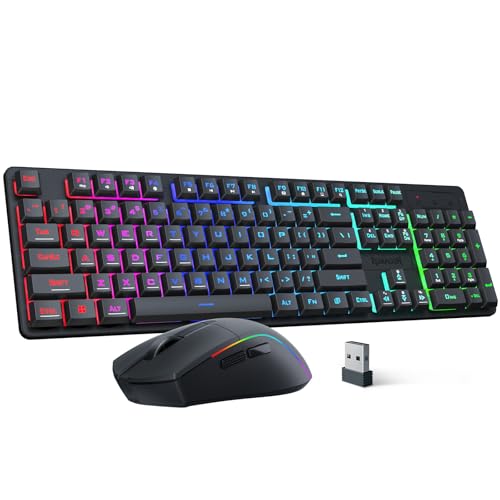 Redragon S107KS |
Mid-Range | Tri‑mode: wired / 2.4GHz / Bluetooth | Users who want wireless flexibility and a bundled mouse | Check Price | ||
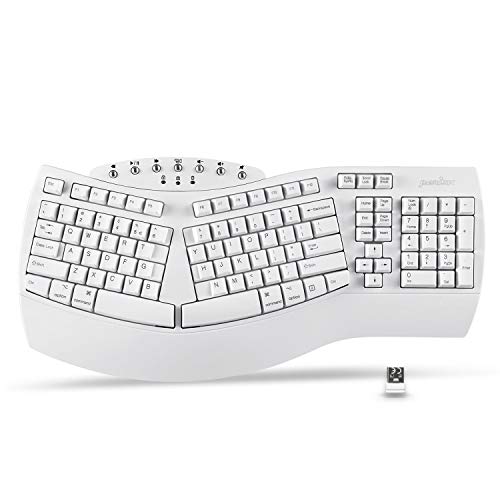 Perixx Periboard-612 |
Premium | Ergonomic split layout with integrated palm rest | People with wrist pain or long writing sessions | Check Price |
1. HK Gaming GK61 Mechanical Gaming Keyboard 60 Percent | 61 RGB Rainbow LED Backlit Programmable Keys | USB Wired | for Mac and Windows PC | Hotswap Gateron Optical Black Switchs | White
The GK61 is a compact 60% mechanical keyboard with hot‑swappable optical switches and full RGB. It gives the snappy, tactile feel many typists and gamers want while offering deep customization, but its small layout and wired-only design make it less ergonomic for long-call comfort.
Key Specs
- 60% layout – 61 programmable keys
- Gateron optical black switches, hot‑swappable
- Full RGB backlight, 16.8M colors
- Detachable USB‑C to Type‑A cable; plug‑and‑play
Pros
- More responsive, customizable typing than the Perixx split board
- Hot‑swappable switches and macro support beat basic wireless options
- Smaller footprint than Perixx — good for limited desk space
Cons
- Wired only — no battery life advantage versus wireless combos
- Less wrist support and comfort for long sessions than Perixx
Best For: Writers who want fast, customizable typing
Check Latest Price on Amazon2. Redragon S107KS Wireless Gaming Keyboard and Mouse, RGB Backlit, 3 Mode (Wired/2.4G/BT), Up to 10,000 DPI Gaming Mouse with Software, Ultra Lightweight 65g, 25 Key Anti-Ghosting Keyboard for PC
The S107KS is a versatile keyboard+mouse combo with wired, 2.4GHz and Bluetooth modes that make it easy to switch devices. It offers solid value and useful software customization; however, some buyers report inconsistent key behavior and the keyboard's lighting can be visually loud during video calls.
Key Specs
- Tri‑mode connectivity: wired / 2.4G / Bluetooth
- Supports up to five devices (keyboard)
- Includes gaming mouse — up to 10,000 DPI and ~200hr mouse battery (usage dependent)
- RGB lighting with multiple modes; 25‑key anti‑ghosting
Pros
- More flexible wireless connectivity than the wired GK61
- Better overall value for a keyboard+mouse bundle than buying separately
- Includes mouse with long battery life compared with wired-only setups
Cons
- Mixed reports of key/lighting functionality compared with HK's simpler plug‑and‑play
- RGB and lighting effects can be distracting on camera compared with Perixx
Best For: Users who want wireless flexibility and a bundled mouse
Check Latest Price on Amazon3. Perixx Periboard-612 Wireless Ergonomic USB Split Keyboard, US English Layout
The Periboard-612 is a full-size split ergonomic keyboard built for comfort: integrated palm rests, natural hand positioning and tactile long-travel keys reduce wrist strain over long sessions. It's designed for remote workers who prioritize ergonomics over mechanical feedback, though a few users report occasional functionality issues.
Key Specs
- Ergonomic split-key layout with integrated palm rest
- Wireless dual mode: 2.4GHz and Bluetooth 4.0; nano receiver storage
- 7 multimedia keys; compatible with Mac & Windows
- Long travel distance tactile keys; extra Mac keycaps included
Pros
- Better wrist support and comfort than the compact GK61 and Redragon
- Dual wireless modes make it more convenient at a desk than wired mechanicals
- Consistently praised for comfort and ease-of-use for long typing sessions
Cons
- Less tactile/mechanical feedback than the GK61 for fast typists
- Some customers report occasional key/functionality problems versus rivals
Best For: People with wrist pain or long writing sessions
Check Latest Price on AmazonWhich One Should You Choose?
If your main goal is ergonomics and long‑term comfort during hours of calls and writing → buy the Perixx Periboard‑612 (B07TJHDBD1). Its split layout and palm rests reduce wrist strain far better than compact mechanical options. If you want the best mechanical typing feel and deep customization at a lower price (and you don’t mind a wired setup) → choose the HK GAMING GK61 (B07T9XBQKZ). If you need wireless flexibility, device switching and the best value for a keyboard+mouse bundle → choose the Redragon S107KS (B0FDVZ5X38). In short: Perixx for comfort, HK for mechanical responsiveness, Redragon for connectivity and value.
Best for Specific Scenarios
- All‑day writers & coders: Perixx Periboard‑612 — split layout and palm rests reduce fatigue for long typing sessions.
- Fast typists who love switches: HK GAMING GK61 — hot‑swappable optical switches and compact layout for responsive typing.
- Remote workers who switch devices: Redragon S107KS — tri‑mode wireless connectivity and included mouse for a tidy, flexible setup.
Frequently Asked Questions
Do ergonomic keyboards like the Perixx take long to get used to?
Most users adapt within a few days to a couple of weeks. The Perixx's split layout may feel odd at first, but it usually reduces wrist strain once you adjust your hand placement and posture.
Are mechanical keyboards too loud for video calls?
Mechanical switches are typically louder than membrane or scissor keys. If call noise is a concern, choose quieter switches, use O‑rings or choose a quieter ergonomic/membrane board like the Perixx. Positioning and a soft desk mat can also help.
How important is wireless battery life for long remote sessions?
Battery life matters if you move your keyboard frequently or dislike recharging. Wired keyboards remove that worry entirely. If you want wireless, prefer models with efficient Bluetooth or a reliable 2.4GHz mode and check whether the manufacturer lists keyboard battery estimates.
How We Selected These Products
Our recommendations are based on data-driven analysis: we evaluated 155229+ products across 23916+ brands using a composite scoring system that weighs rating (40%), review volume (30%), price value (20%), and demand signals (10%). Every product is ranked by data, not opinions.
Last updated: November 01, 2026
As an Amazon Associate we earn from qualifying purchases at no extra cost to you. Full disclosure.
GearLark Score is our editorial ranking based on a composite analysis of product quality, value, and verified customer sentiment. Click through to Amazon for current pricing, availability, and live customer reviews.