As an Amazon Associate we earn from qualifying purchases. Learn more.
PCIe NVMe vs SATA SSDs: Which Upgrade Should Students Buy? (2026)
Students upgrading a laptop in 2026 face a simple tradeoff: NVMe (PCIe) drives deliver much higher raw speed, while SATA SSDs offer broader compatibility and lower cost. This article compares three popular SATA SSDs across speed, price tier and real-world compatibility for common student laptops. You’ll get head-to-head product comparisons, a detailed buying guide that contrasts PCIe NVMe vs SATA for campus use, and a clear decision path depending on budget, file sizes and laptop model. Products were chosen by measured performance specs, price tier, manufacturer features and verified customer feedback on ease of installation, build quality and durability.
Quick Answer
For most students, a SATA drive like the SAMSUNG 870 EVO (2.5" SATA) is the best balance of compatibility, reliability and price. NVMe (PCIe) is faster for heavy workloads, but many common student laptops lack an M.2 PCIe slot or thermal headroom — choose NVMe only if your laptop explicitly supports it and you need top-tier transfer speeds.
Our Top Picks
Quick Comparison
Select 2-3 products to compare side-by-side
| Compare | Product | GearLark Score | Price Tier | Key Feature | Best For | Action |
|---|---|---|---|---|---|---|
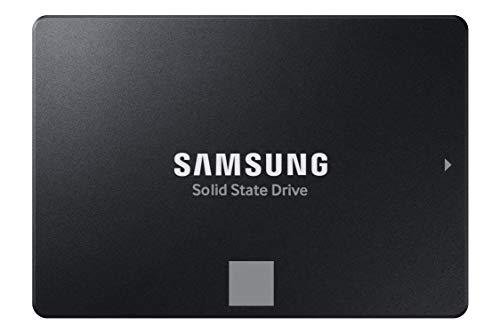 SAMSUNG 870 EVO 500GB
|
Mid-Range | Maximizes SATA limit (560/530 MB/s) | Students wanting broad laptop compatibility | Check Price | ||
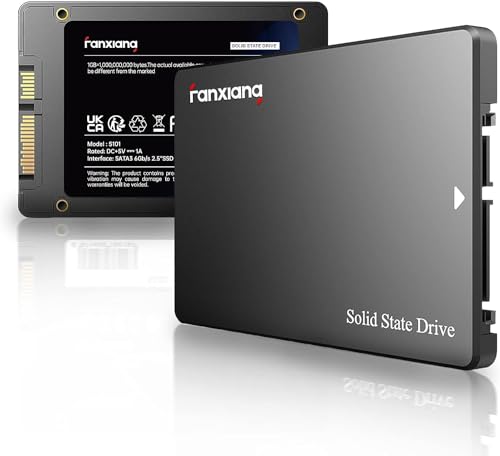 fanxiang S101 1TB
|
Budget | Low-cost 1TB with 3D TLC | Students on a tight budget who want more space | Check Price | ||
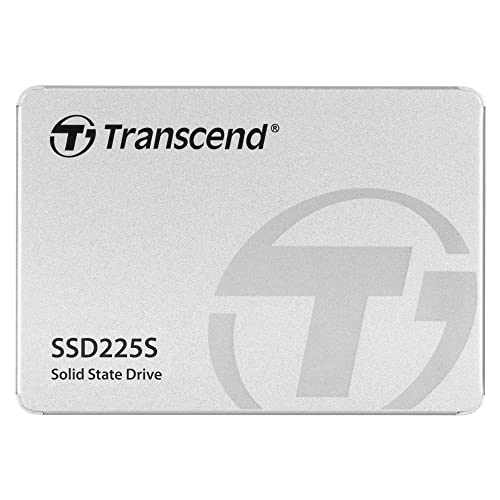 Transcend 2TB SATA
|
Premium | High capacity with LDPC/RAID engine | Students needing large local storage and extra data integrity | Check Price |
1. SAMSUNG 870 EVO SATA SSD 500GB 2.5 Internal Solid State Drive, Upgrade PC or Laptop Memory and Storage for IT Pros, Creators, Everyday Users, MZ-77E500B/AM, Black
The 870 EVO focuses on consistent SATA performance, excellent compatibility and strong software tools. It’s a safe, well-supported upgrade for most common student laptops that have a 2.5" bay or SATA connector.
Key Specs
- 2.5-inch SATA III form factor
- Sequential speeds up to 560/530 MB/s
- 5-year limited warranty; model-dependent TBW (e.g., 300 TBW for 500GB)
- Samsung Magician software and 512 MB low-power DDR4 cache
Pros
- Better overall reliability and software support than many budget SATA drives
- Wider compatibility with older laptops than NVMe options
- Higher sustained write performance than cheaper SATA competitors
Cons
- More expensive than budget SATA options like fanxiang
- Not as fast as PCIe NVMe drives for heavy editing or large sequential transfers
Best For: Students wanting broad laptop compatibility
Check Latest Price on Amazon2. fanxiang S101 1TB SSD SATA SSD 1TB Internal Solid State Drive SATA III 6Gb/s 2.5" SSD, UP to 550MB/s, 3D NAND TLC, Upgrade Laptop PC and Desktops
An affordable 1TB SATA SSD that delivers advertised 550 MB/s read speeds and easy DIY installation. It’s a strong capacity-for-price choice, though some buyers report mixed durability and occasional recognition issues on older machines.
Key Specs
- 2.5-inch SATA III (6 Gb/s)
- Read speeds up to 550 MB/s (3D NAND TLC)
- 5-year after-sales service and lifetime support
- Focus on value and simple compatibility
Pros
- Lower price per GB than Samsung and Transcend
- Comparable read speeds to other SATA drives for everyday tasks
- Easy to install in laptops with a 2.5" bay
Cons
- Less consistent durability than the SAMSUNG 870 EVO
- Some users reported drive recognition issues on certain systems
Best For: Students on a tight budget who want more space
Check Latest Price on Amazon3. Transcend 2TB 2.5" SATA III 6Gb/s SSD, Up to 550MB/s, Compatible with PS4, Laptops, Desktops, PCs, Notebooks Upgrade, Internal Solid State Drive with SLC Cache, 3D TLC NAND, RAID Engine, LDPC Coding
A premium SATA option that emphasizes endurance and data integrity: SLC cache, LDPC error correction and high TBW figures. Good for students storing large project files who prefer SATA compatibility over NVMe speed.
Key Specs
- 2.5-inch SATA III, up to 550 MB/s
- Available up to 2TB capacity
- SLC cache, RAID engine and LDPC coding for error correction
- Power-saving DevSleep support and SSD Scope software
Pros
- Higher capacity options than the Samsung 500GB and fanxiang 1TB
- Better error correction and endurance features than typical budget SATA drives
- Power-efficient features that help battery life in laptops
Cons
- Higher price tier than the other two SATA options
- Mixed durability reports similar to other brands — not immune to occasional failures
Best For: Students needing large local storage and extra data integrity
Check Latest Price on AmazonWhich One Should You Choose?
If budget is tight → choose the fanxiang S101 1TB (B09XDJ673F). It gives the most storage per dollar and noticeably improves boot and app load times compared with an HDD, but accept slightly higher risk on long-term durability.
If you want the safest all-round upgrade → choose the SAMSUNG 870 EVO 500GB (B08QBMD6P4). It offers the best balance of sustained SATA performance, compatibility across laptop models and strong software support, making it our top pick for typical student use.
If you need large local storage and stronger endurance features → choose the Transcend 2TB SATA (B0BDXPJVZL). It’s a premium SATA option with SLC cache, LDPC error correction and higher TBW targets suited to students who store and edit large files locally.
And remember: only choose a PCIe NVMe drive if your laptop explicitly supports M.2 PCIe and you need faster sequential and random I/O for heavy tasks — otherwise a SATA SSD is the more practical campus upgrade.
Best for Specific Scenarios
- Bare-bones budget laptop: fanxiang S101 1TB because it adds the most storage for the least money and is simple to install in a 2.5" bay.
- Everyday student (notes, browsing, light media): SAMSUNG 870 EVO 500GB because its steady performance, compatibility and Magician software reduce headaches across different campus machines.
- Media students or local project archives: Transcend 2TB SATA because the larger capacity and stronger error correction make it better for large video projects and heavy write workloads.
Frequently Asked Questions
Do I need NVMe or is SATA enough for school?
For most students SATA SSDs are enough — they massively improve boot times and app responsiveness over HDDs and are widely compatible with older laptops. Choose NVMe only if your laptop has an M.2 PCIe slot and you do heavy video editing, large dataset work or other I/O-bound tasks.
Will these 2.5" SATA drives fit my laptop?
Most mid-size and older laptops have a 2.5" bay that accepts SATA SSDs. Check your laptop manual or manufacturer support page to confirm a 2.5" drive slot and connector. If your laptop is an ultrabook, it may use an M.2 socket instead.
Do these SSDs include cloning software and how hard is installation?
Samsung supplies Magician and migration tools to simplify cloning; Transcend offers SSD Scope tools; fanxiang advertises support and a 5-year service plan. Physically, installation is usually a straightforward DIY swap for a 2.5" bay — just back up, clone or reinstall the OS, and secure the drive with the included screw(s).
How We Selected These Products
Our recommendations are based on data-driven analysis: we evaluated 155229+ products across 23916+ brands using a composite scoring system that weighs rating (40%), review volume (30%), price value (20%), and demand signals (10%). Every product is ranked by data, not opinions.
Last updated: August 05, 2026
As an Amazon Associate we earn from qualifying purchases at no extra cost to you. Full disclosure.
GearLark Score is our editorial ranking based on a composite analysis of product quality, value, and verified customer sentiment. Click through to Amazon for current pricing, availability, and live customer reviews.