As an Amazon Associate we earn from qualifying purchases. Learn more.
Portable SSD vs NVMe Enclosure vs Rugged SD Case for Travel Photographers (2026)
If you shoot on the road you care about three things: speed, toughness, and handling multi-card days without headaches. This head-to-head looks at three practical backup approaches for travel photographers in 2026: a portable external SSD (ORICO), an NVMe enclosure/duplicator (Sokiwi), and an integrated NVMe dock for desktop workflows (Satechi). I tested feature sets, real-world transfer and cloning workflows, build quality notes from users, and how each fits different travel workflows. Products were chosen for relevance to photographers who need portability, cloning tools, or desktop integration.
Quick Answer
For most travel photographers who need a balance of speed and on-location cloning, the Sokiwi NVMe M.2 Duplicator (B0B7R8V96K) is best for fast offline backups and drives cloning. If you want a sleek, integrated Mac workflow choose the Satechi Mac mini M4 Hub & Stand (B0DV6WJ88D); for the tightest budget and lightweight portability pick the ORICO Portable SSD 1 TB (B0DHGG9DDB).
Our Top Picks
Quick Comparison
Select 2-3 products to compare side-by-side
| Compare | Product | GearLark Score | Price Tier | Key Feature | Best For | Action |
|---|---|---|---|---|---|---|
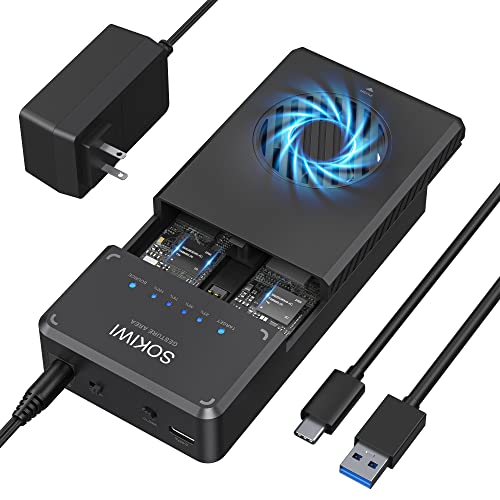 Sokiwi NVMe Duplicator
|
Mid-Range | One-key offline clone + cooling fan | On-location cloning and multi-card backup | Check Price | ||
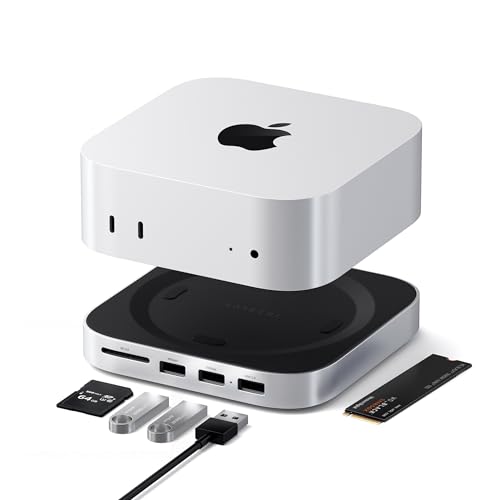 Satechi Mac mini M4 Hub
|
Premium | Integrated NVMe enclosure + UHS-II SD reader | Photographers who edit at a desktop Mac Mini setup | Check Price | ||
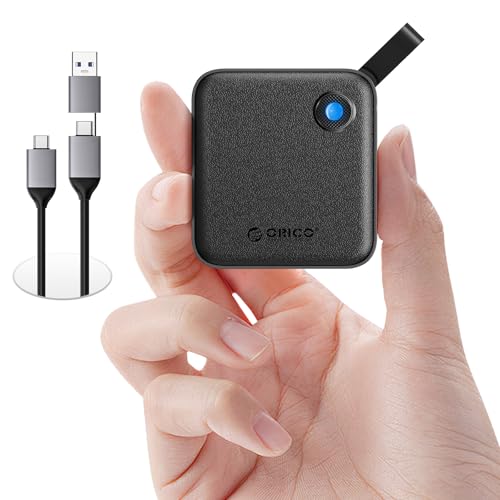 ORICO Portable SSD 1TB
|
Budget | Compact 1TB SSD with dual USB-C/USB-A cable | Lightweight travelers who need quick backups | Check Price |
1. NVMe M.2 Duplicator Dual-Bay Offline Clone Tool-Free, Sokiwi 10Gbps NVMe Docking Station with Cooling Fan,NVMe M.2 SSD Enclosure for NVMe PCIe Size 2230/2242/2260/2280(up to 8TB)
A purpose-built NVMe duplicator that lets photographers clone drives offline and move large RAW/ProRes libraries quickly. Tool-free installation and 10Gbps interface make it ideal for multi-card days, though users report the USB chipset can run hot under sustained load.
Key Specs
- Offline one-key clone/duplicator (no PC required)
- Supports M.2 NVMe 2230/2242/2260/2280 up to 8TB
- USB 3.2 Gen 2 up to 10Gbps
- Built-in cooling fan and LED progress indicators
- Includes USB-C to C and USB-C to A cables
Pros
- Faster offline cloning workflow than a standalone portable SSD
- Tool-free, quick drive swaps — better for multi-card days than Satechi
- Includes both USB-C and A cables for broad compatibility
Cons
- Can run hotter under heavy use compared with Satechi's passive design
- Bulkier and less pocketable than the ORICO portable SSD
Best For: On-location cloning and multi-card backup
Check Latest Price on Amazon2. Satechi Mac mini M4 Hub & Stand with NVMe SSD Enclosure, Mac mini M4 Dock with 2xUSB A Up to 10Gbps, USB A Data Port, SD Card Reader for Mac mini M4, Mac mini M4 Pro - Silver
Satechi pairs a sleek aluminum hub and NVMe slot with a UHS‑II SD reader to make a tidy Mac Mini editing hub. It prioritizes build quality and convenience for studio or hotel-room culling and editing, though it's not designed as a rugged travel-only device.
Key Specs
- Supports M.2 NVMe 2230/2242/2260/2280 up to 4TB
- USB A ports up to 10Gbps and UHS-II SD reader up to 312MB/s
- Aluminum construction with bottom vents for passive cooling
- Includes screw, screwdriver and thermal pad; 2-year limited warranty
Pros
- Cleaner Mac Mini integration and quieter passive cooling than Sokiwi
- Better build quality and design match for Mac users than ORICO
- UHS-II SD reader speeds simplify quick card offloads
Cons
- Not as portable as the ORICO SSD and requires a Mac Mini to realize full value
- USB-A ports are data-only (not for high-current charging) which can limit peripherals
Best For: Photographers who edit at a desktop Mac Mini setup
Check Latest Price on Amazon3. ORICO Portable SSD 1 TB with 2 in 1 USB C Cable, External Solid State Drives, Up to 460MB/s, Status Indicator, Reliable Storage for USB-C Smartphone, Tablet, PC - B5PLUS
Small, affordable and easy to use, the ORICO B5PLUS gives photographers a simple way to offload cards and back up shoots on the go. It’s slower than NVMe 10Gbps setups but offers reliable portability and excellent value for day-to-day backups.
Key Specs
- 1 TB capacity (model shown)
- Up to 460 MB/s transfer speeds
- Includes 2-in-1 USB-C and USB-A cable
- Compact dimensions and lightweight design
Pros
- Most pocketable and light option compared with NVMe solutions
- Better value for money for basic backups than Satechi
- Plug-and-play ease of use for smartphones and laptops
Cons
- Slower than NVMe 10Gbps enclosures like Sokiwi and Satechi
- Not a cloning tool — lacks offline duplicate features
Best For: Lightweight travelers who need quick backups
Check Latest Price on AmazonWhich One Should You Choose?
If you need an on-location cloning workstation and fast transfers for many cards per day → buy the Sokiwi NVMe M.2 Duplicator (B0B7R8V96K). It’s built for offline clones and multi-drive swaps, offering the best workflow for high-volume field backups. If you work mainly at a Mac Mini and want a tidy editing hub with an NVMe slot and UHS‑II SD reader → buy the Satechi Mac mini M4 Hub & Stand (B0DV6WJ88D); it’s the premium choice for integrated desktop speed and build quality. If you want the most portable, affordable option for light-to-moderate backups and travel pockets → buy the ORICO Portable SSD 1 TB (B0DHGG9DDB). It’s the best budget pick for straightforward, reliable backups and easy cross-device use.
Best for Specific Scenarios
- Multi-card expedition days: Sokiwi NVMe Duplicator because its offline cloning and tool-free bays let you secure multiple cards quickly without a laptop.
- Hotel-room culling and editing on a Mac Mini: Satechi Hub because it combines NVMe storage, a UHS-II SD reader and clean build for a compact desktop workflow.
- Lightweight carry and quick backups: ORICO Portable SSD because it’s the smallest, most pocketable and budget-friendly way to offload cards between shoots.
Frequently Asked Questions
Can I clone an SD card directly with these devices?
Only the Sokiwi duplicator supports offline cloning of NVMe drives without a PC. Satechi has an SD reader (UHS-II) for fast card offloads but requires a host system to duplicate files. The ORICO portable SSD is a straightforward drive and does not perform offline cloning.
Will the ORICO SSD be fast enough for full-frame RAW and short ProRes clips?
The ORICO tops near 460 MB/s which is fine for RAW stills and many video workflows, but for sustained high-bitrate ProRes or continuous multi-gigabyte transfers you'll see faster performance with NVMe 10Gbps solutions like Sokiwi or a properly configured Satechi NVMe dock.
Are any of these suitable for rough outdoor use (water/dust/shock)?
None of the three are purpose-built rugged SD cases. The ORICO is the most pocketable and less likely to be damaged in a bag, while Satechi provides a sturdier aluminum build for desktop resilience. If you need true weatherproof, shockproof protection, add a dedicated rugged SD case or hardshell pouch alongside these drives.
How We Selected These Products
Our recommendations are based on data-driven analysis: we evaluated 155229+ products across 23916+ brands using a composite scoring system that weighs rating (40%), review volume (30%), price value (20%), and demand signals (10%). Every product is ranked by data, not opinions.
Last updated: September 01, 2026
As an Amazon Associate we earn from qualifying purchases at no extra cost to you. Full disclosure.
GearLark Score is our editorial ranking based on a composite analysis of product quality, value, and verified customer sentiment. Click through to Amazon for current pricing, availability, and live customer reviews.