As an Amazon Associate we earn from qualifying purchases. Learn more.
Best SD Card Readers for iPad & USB-C Devices for Mobile Editors (2026 Guide)
If you edit photos or video on an iPad or USB‑C laptop, a compact, bus‑powered card reader or multiport hub is one of the simplest productivity upgrades you can make. This guide compares four compact USB‑C hubs with built‑in SD/TF readers that prioritize fast transfers, low power draw and a pocketable footprint. I selected devices by extraction speed claims (USB‑3/5Gbps), pass‑through charging capability, build materials and real user feedback about durability and heat. Read on to find the right reader/hub for quick SD card offloads, live capture workflows and travel editing setups.
Quick Answer
For most mobile editors the USB C HUB for iPad Pro 9-in-1 Adapter (ASIN B0915B3NPY) is the best balance of ports, build quality and bus-powered convenience. If you want the smallest budget option focused on fast SD transfers, the Dockteck 5 in 1 USB-C Dongle (ASIN B09VG7CYQT) is the best value pick.
Our Top Picks
Quick Comparison
Select 2-3 products to compare side-by-side
| Compare | Product | GearLark Score | Price Tier | Key Feature | Best For | Action |
|---|---|---|---|---|---|---|
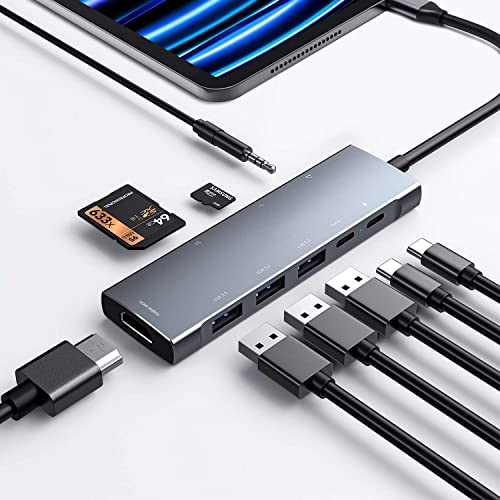 NXPGKEA 9-in-1 USB-C Hub
|
Mid-Range | 9 ports including SD/TF + 100W PD | Mobile editors needing many ports | Check Price | ||
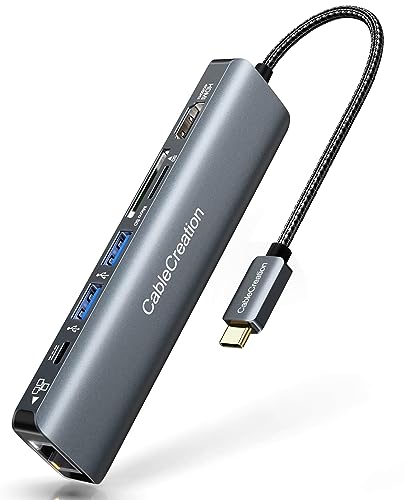 CableCreation 7-in-1 Hub
|
Mid-Range | 4K@60Hz HDMI + 1Gbps Ethernet | Users who need Ethernet + display output | Check Price | ||
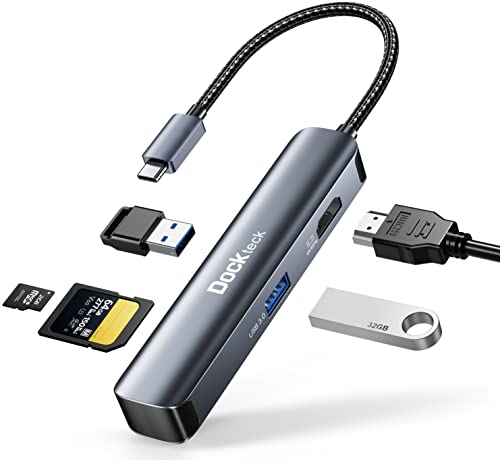 Dockteck 5-in-1 Dongle
|
Budget | Slim aluminum body with SD + microSD | Travel editors & budget buyers | Check Price | ||
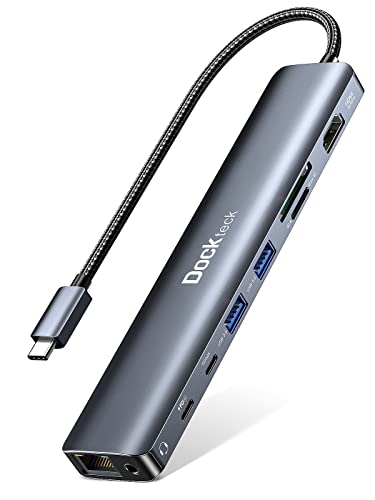 Dockteck 9-in-1 Hub
|
Premium | Most ports + 100W PD | Users who need maximum connectivity | Check Price |
1. USB C HUB for iPad Pro 9-in-1 Adapter iPad Pro M4 M2 M1 13 12.9 11 inch iPad Air 5 4 Docking Station with 4K HDMI, USB-C PD, SD/TF Card Reader, USB 3.0, 3.5mm Headphone Jack, Type C Data, iPad mini 6
A versatile, bus‑powered multiport hub that gives iPad and USB‑C laptop users a wide selection of ports plus an SD/TF slot. Customers praise build quality and connectivity; expect good transfer speeds through USB‑3 ports but watch for mixed reports on charging reliability and long‑term durability.
Key Specs
- Ports: HDMI, USB‑C PD, USB‑C data, 3 × USB‑A 3.0, SD & microSD
- Video: 4K@30Hz (backwards support for 2K/1080p)
- Data: USB‑A & USB‑C data ports claimed 5Gbps
- Audio: 3.5mm jack with built‑in DAC, supports mic
Pros
- Wide set of ports expands a single USB‑C port
- Solid build quality and versatile connectivity
- Convenient for iPad workflows with headphone jack and HDMI
Cons
- Some users report inconsistent pass‑through charging
- Mixed durability reports — treat as travel‑friendly, not rugged
Best For: Mobile editors needing many ports
Check Latest Price on Amazon2. USB C Hub 4K 60Hz, CableCreation 7-in-1 USB-C Hub Multiport Adapter with 1Gbps Ethernet, HDMI, 2 USB 3.0 Ports, 100W PD and SD/TF Cards Reader, Compatible with Steam Deck MacBook Pro/Air, iPad Pro
CableCreation balances a compact design with useful desktop features — 4K@60Hz HDMI, gigabit Ethernet and a 100W PD passthrough. It’s a solid travel hub with good value; expect portability and decent transfer speeds but be aware of reports about heat and occasional power‑delivery quirks on some devices.
Key Specs
- Ports: 4K@60Hz HDMI, 1Gbps Ethernet, USB‑C PD (100W), 2 × USB‑A 3.0, SD/TF reader
- Video: 4K@60Hz (device must support DP1.4 Alt Mode)
- Data: USB 3.0 ports (5Gbps)
- Ethernet: 1Gbps wired LAN
Pros
- Great port mix for desktop and travel setups
- Compact and portable with good value for features
- Supports high‑refresh HDMI where host supports DP Alt Mode
Cons
- Gets warm under sustained load
- Power delivery is inconsistent on some host laptops
Best For: Users who need Ethernet + display output
Check Latest Price on Amazon3. USB C Hub Multiport Adapter - Dockteck 5 in 1 USB-C Dongle Hub with 4K 60Hz HDMI, USB 3.0 5Gbps Data, SD/Micro SD Card Reader for MacBook Pro/Air, iPad Pro/Air, Surface Pro, XPS, Laptops
A slim, pocketable hub focused on core essentials: 4K@60Hz HDMI, two USB‑A 3.0 ports and SD/microSD reader. It’s an excellent budget pick for fast card transfers and on‑the-go editing, though some users report mixed functionality across host models and heat under load.
Key Specs
- Ports: HDMI 4K@60Hz, SD card slot, MicroSD slot, 2 × USB‑A 3.0
- Data: USB 3.0 (up to 5Gbps)
- Body: Aluminum slim shell
- Compatibility: MacBook, iPad Pro, Surface, XPS (plug & play)
Pros
- Very portable with attractive aluminum finish
- Good value for core features and fast SD transfers
- Plug‑and‑play simplicity for iPad and laptops
Cons
- Gets hot during sustained transfers or video output
- Some hosts report inconsistent functionality
Best For: Travel editors & budget buyers
Check Latest Price on Amazon4. Dockteck 9-in-1 USB-C Hub: HDMI 4K@60Hz, Ethernet, 100W PD, Audio, 2x USB-A 5 Gbps, SD/TF Card Reader for MacBook, iPad, XPS, Microsoft
A full‑featured hub aimed at power users who want many ports in a single bus‑powered package. It offers 4K@60Hz HDMI, 1Gbps Ethernet, SD/TF slots and 100W PD passthrough. Expect comprehensive connectivity and solid build, but watch user reports of heat, occasional Ethernet failures and mixed charging behavior.
Key Specs
- Ports: HDMI 4K@60Hz, Ethernet, 100W PD, Audio jack, SD & TF, USB‑C data, 2 × USB‑A 5Gbps
- Data: Multiple USB 3.0/USB‑C data ports up to 5Gbps
- Ethernet: 1Gbps wired LAN
- Warranty: 18 months product care (vendor‑stated)
Pros
- Most complete port set for desktop replacement
- Good build and value for the number of ports
- Includes wired Ethernet and audio jack
Cons
- Can run hot and some users report ethernet failures
- Charging and HDMI compatibility can vary by host
Best For: Users who need maximum connectivity
Check Latest Price on AmazonWhich One Should You Choose?
If budget is tight → choose the Dockteck 5 in 1 USB‑C Dongle (ASIN B09VG7CYQT) for a small, fast, affordable reader. If you need a balance of ports and portability → choose the USB C HUB for iPad Pro 9‑in‑1 Adapter (ASIN B0915B3NPY). If you need maximum wired connectivity and many ports (Ethernet, audio, multiple data ports) → choose the Dockteck 9‑in‑1 USB‑C Hub (ASIN B0B7VQFJ8X).
Best for Specific Scenarios
- On‑the‑road photo/video editors: Dockteck 5 in 1 (B09VG7CYQT) because it’s slim, fast for SD transfers and pocketable.
- iPad creators who want laptop‑style ports: NXPGKEA 9‑in‑1 (B0915B3NPY) because it adds HDMI, audio and multiple USB ports while remaining bus‑powered.
- Desktop replacement with wired networking: Dockteck 9‑in‑1 (B0B7VQFJ8X) because it provides Ethernet, 100W PD and the most ports for a tidy workstation.
Frequently Asked Questions
Will these hubs give me full SD card speeds on an iPad?
These hubs use USB 3.x interfaces (typically up to 5Gbps) which will greatly speed up SD card transfers compared with USB 2.0. However, UHS‑II or UHS‑III cards can exceed the limit of a 5Gbps hub; for peak card speeds use a dedicated UHS‑II/III USB‑C reader. For day‑to‑day offloads and editing on an iPad, the hubs reviewed here are fast and convenient.
Can I charge my laptop through the hub while using the SD reader?
Many of the reviewed hubs include Power Delivery passthrough (some claim up to 100W). That allows simultaneous charging and data transfer, but PD behavior varies across hosts — check compatibility with your laptop model and expect slower or irregular charging on some combinations.
Do I need a powered hub to run external hard drives?
Bus‑powered hubs can run many SSDs and flash drives, but high‑draw 2.5" HDDs or multiple peripherals may exceed the hub’s power budget. If you plan to use several devices at once or unpowered mechanical drives, choose a hub with higher PD passthrough and/or a powered (self‑powered) docking station.
How We Selected These Products
Our recommendations are based on data-driven analysis: we evaluated 155229+ products across 23916+ brands using a composite scoring system that weighs rating (40%), review volume (30%), price value (20%), and demand signals (10%). Every product is ranked by data, not opinions.
Last updated: September 25, 2026
As an Amazon Associate we earn from qualifying purchases at no extra cost to you. Full disclosure.
GearLark Score is our editorial ranking based on a composite analysis of product quality, value, and verified customer sentiment. Click through to Amazon for current pricing, availability, and live customer reviews.