As an Amazon Associate we earn from qualifying purchases. Learn more.
How to Get Reliable Wired Internet in Vacation Rentals for Remote Work (2026 Guide)
Working from a beach house or summer rental is great until the Wi‑Fi drops during a client call or a large file upload. This guide shows practical, step‑by‑step hardware fixes — from USB adapters and multiport hubs to short switches and the right Cat cable — so you can convert flaky rental Wi‑Fi into a rock‑solid wired link. You’ll learn which adapters give you a direct Ethernet connection, when a multiport dock or small switch is the better choice, and which cables and travel tricks save setup time. Products were chosen for real travel use: portability, build quality, Ethernet performance and how well they solve unreliable wireless in rentals.
Quick Answer
Use a USB‑C multiport hub like the Hiearcool USB C Hub (B0B2QYZKFD) to add a wired Gigabit port plus PD charging for a single‑cable remote‑work setup; if you need raw speed on older cabling, the StarTech 2.5GbE USB‑C adapter (B0DM2M78VJ) is the best budget way to get faster, more consistent connections.
Our Top Picks
Quick Comparison
Select 2-3 products to compare side-by-side
| Compare | Product | GearLark Score | Price Tier | Key Feature | Best For | Action |
|---|---|---|---|---|---|---|
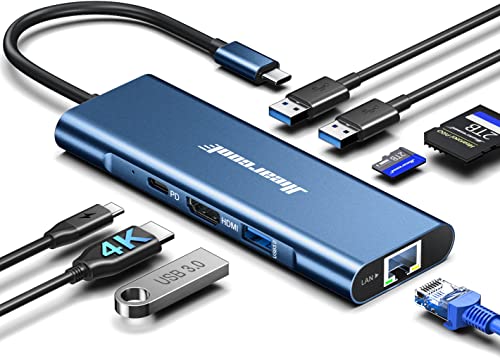 Hiearcool 8‑in‑1 USB‑C Hub
|
Premium | Gigabit Ethernet + 100W PD | MacBook users wanting single‑cable setup | Check Price | ||
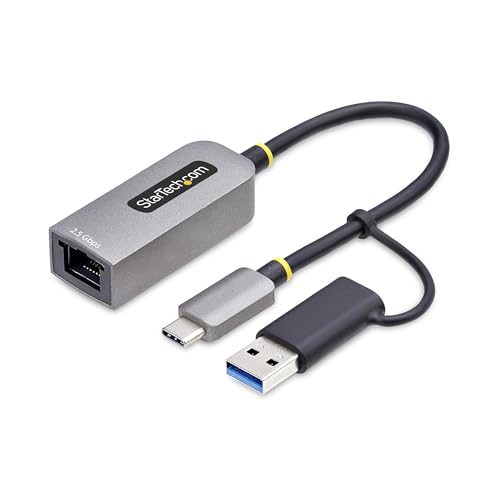 StarTech 2.5GbE USB‑C Adapter
|
Budget | 2.5Gbps over Cat5e | Workloads needing extra throughput | Check Price | ||
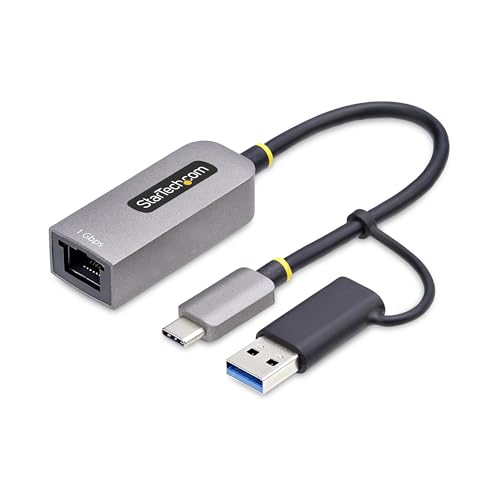 StarTech USB‑C Gigabit Adapter
|
Premium | Gigabit RJ45 + status LEDs | Simple, reliable Gigabit connections | Check Price | ||
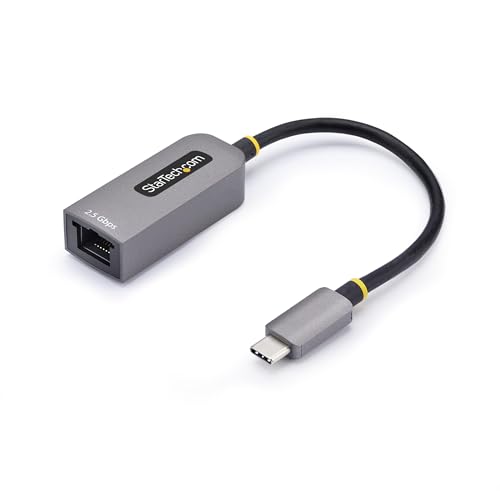 StarTech 2.5GbE USB‑C (Alt ASIN)
|
Budget | 2.5GbE, Thunderbolt compatible | Users with mixed USB/Thunderbolt devices | Check Price | ||
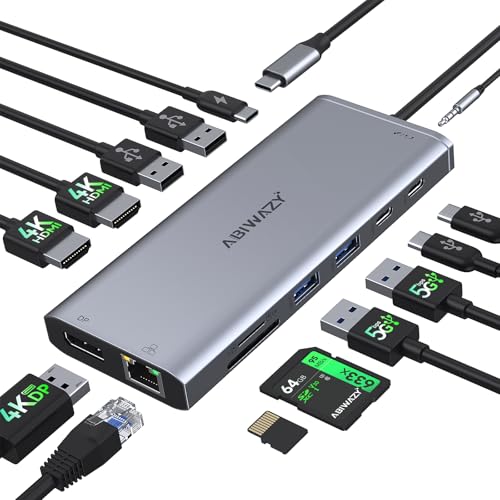 ABIWAZY 14‑in‑1 Dock
|
Premium | 14 ports with 1Gb Ethernet | Users needing multiple displays & ports | Check Price |
1. Hiearcool USB C Hub, 8in1 USB-C to 4K 60Hz HDMI Docking Station, USBC Ethernet Multi-Port Adapter 100W PD Dock Compatible for MacBook Pro Air M1 Dell HP Lenovo and Other C Devices-Midnight Blue
This multiport USB‑C hub adds a reliable 1Gbps Ethernet jack, 100W pass‑through charging and video outputs, letting you replace flaky Wi‑Fi with a wired connection while keeping your laptop charged. It solves the rental Wi‑Fi problem by giving a single, neat plug that provides wired stability for video calls and large uploads while powering your machine.
Key Specs
- 1 x Gigabit Ethernet (10/100/1000 Mbps)
- 1 x 4K@60Hz HDMI, SD/TF card slots
- 100W USB‑C Power Delivery passthrough
- 3 x USB 3.0 (5 Gbps)
Pros
- All‑in‑one travel friendly: Ethernet, video and charging in a small package
- Well‑built ports and easy plug‑and‑play setup
- Good value for a full docking feature set
Cons
- Some users report intermittent HDMI or PD issues over long use
- Larger than single‑purpose adapters — slightly less pocketable
Best For: MacBook users wanting single‑cable setup
Check Latest Price on Amazon2. StarTech.com 2.5GbE USB-C to Ethernet Adapter with USB-A Converter, NBASE-T NIC, USB 3.0 Type-C 2.5/1G Multi Speed Network
This compact USB‑C (with USB‑A dongle) adapter upgrades a laptop to 2.5GbE where the rental’s cabling permits, doubling throughput over Cat5e cable. It directly addresses slow or congested Wi‑Fi by giving you a faster, lower‑latency wired link for big uploads, cloud syncs and higher‑quality video conferencing.
Key Specs
- 2.5GbE NBASE‑T (2.5/1/100 Mbps)
- Built‑in 6in (15cm) cable, USB‑A adapter included
- Realtek chipset; broad OS compatibility
- Bus powered, auto‑negotiation for speed
Pros
- Noticeably faster than standard Gigabit on existing Cat5e cabling
- Plug‑and‑play on most modern OS and devices
- Slim, travel‑friendly form factor
Cons
- Some durability concerns reported with heavy daily travel
- Short attached cable limits placement without an extension
Best For: Workloads needing extra throughput
Check Latest Price on Amazon3. StarTech.com USB-C to Ethernet Adapter w/USB-A Dongle, 10/100/1000Mbps, USB GbE Adapter, 6in/15cm Attached Cable, Status LEDs
A straightforward USB‑C to Gigabit RJ45 adapter with status LEDs and an included USB‑A dongle to cover legacy ports. Use it to swap unstable Wi‑Fi for a consistent wired connection during meetings or while working on latency‑sensitive tasks — minimal setup and broad OS support get you online fast.
Key Specs
- 10/100/1000 Mbps Ethernet
- 6in/15cm attached cable + USB‑A dongle
- Realtek RTL8153B chipset
- Wake‑on‑LAN, 9K Jumbo Frames support
Pros
- Reliable plug‑and‑play Gigabit performance for laptops
- Helpful link/activity LEDs for quick troubleshooting
- Compact and easy to carry
Cons
- Durability concerns after long‑term heavy use
- Not multiport — single device only
Best For: Simple, reliable Gigabit connections
Check Latest Price on Amazon4. StarTech.com 2.5GbE USB-C to Ethernet Adapter, NBASE-T NIC, USB 3.0 Type-C 2.5/1G Multi Speed Network, Thunderbolt Compatible
Another compact 2.5GbE adapter option that gives modern laptops multi‑gigabit access without rewiring a rental. It’s especially useful when you need faster transfers and smoother video conferencing over existing Cat5e cable, and it works with a wide range of systems.
Key Specs
- 2.5Gbps multi‑gigabit Ethernet
- 6in (15cm) attached cable, bus‑powered
- NBASE‑T & 2.5GBASE‑T support
- Realtek chipset, Thunderbolt compatible
Pros
- Affordable way to get multi‑gig speeds on old cabling
- Works across many platforms including ARM and Mac
- Tiny and low‑profile for travel
Cons
- Reports of reduced longevity under heavy use
- Short cable can be awkward without a small patch cable
Best For: Users with mixed USB/Thunderbolt devices
Check Latest Price on Amazon5. USB C Hub USB-C Docking Station Dual Monitor 14 in 1 Triple Display Multiport Adapter with 2 HDMI+DP+7 USB Type C/A Ports+Ethernet+Audio, USBC Dongle for Dell/HP/Lenovo ThinkPad/Surface(Grey)
If your rental setup needs more than one device wired or you want a full workstation with multiple monitors, this 14‑in‑1 dock gives you Gigabit Ethernet, PD charging and dual/tri‑display support. It solves the flaky Wi‑Fi problem by turning a laptop into a full desktop replacement with wired stability and lots of ports for peripherals.
Key Specs
- Gigabit Ethernet (10/100/1000 Mbps)
- 2x HDMI + 1x DisplayPort (multi‑display capable)
- PD charging up to 87W
- Multiple USB‑A/C ports, SD/TF readers, 3.5mm audio
Pros
- Very versatile: display outputs, Ethernet and charging in one unit
- Compact for what it offers and easy to set up
- Good port density for shared workstations
Cons
- Some users report power/compatibility quirks with certain laptops
- A few reports of display ports failing after extended use
Best For: Users needing multiple displays & ports
Check Latest Price on AmazonWhich One Should You Choose?
If budget is tight → StarTech 2.5GbE USB‑C adapter (B0DM2M78VJ) for fast, affordable wired speed. If you need the most portable single‑cable solution with charging and video → Hiearcool USB C Hub (B0B2QYZKFD). If you need a full workstation with multiple monitors and many ports → ABIWAZY 14‑in‑1 Dock (B0D8HX861F). For simple Gigabit reliability in a tiny package → StarTech USB‑C Gigabit Adapter (B0DTZ5TGCJ). If you want multi‑gig on varied devices and Thunderbolt support → StarTech 2.5GbE alternate ASIN (B0DLL8DQFZ).
Best for Specific Scenarios
- One laptop, reliable calls: Hiearcool 8‑in‑1 Hub (B0B2QYZKFD) because it gives wired Ethernet + PD charging in one connection so you stay online and powered.
- Large uploads or multi‑gig needs: StarTech 2.5GbE Adapter (B0DM2M78VJ) because it increases throughput over existing Cat5e cabling for faster cloud syncs.
- Shared workspace or multiple monitors: ABIWAZY 14‑in‑1 Dock (B0D8HX861F) because it provides Ethernet plus several USB and display outputs to replace a desktop setup.
Frequently Asked Questions
Do I need the owner’s permission to run Ethernet cable through a rental?
Short temporary runs (short patch cables from the router to your device or a small switch) usually don't need permission. Permanent changes like drilling or wall wiring do require landlord approval. Always ask before altering property infrastructure.
How do I test whether a rental’s wiring supports 2.5Gb or just Gigabit?
Use a 2.5Gb adapter and check the negotiated link speed in your OS network settings; or run a quick speed test while wired. If the link negotiates at 2.5Gb (or the adapter reports it), the infrastructure supports multi‑gig. Otherwise stick to Gigabit solutions.
Can I fix flaky Wi‑Fi without buying anything?
Sometimes: try repositioning the rental router, ask the host to reboot it, use a short wired connection from the router to your laptop if possible, or prioritize QoS settings if accessible. Hardware fixes are faster and more reliable when you need consistent performance.
Which cables should I pack for travel?
Bring a short Cat6 patch cable (30–50cm) and a longer Cat6A (2–5m) if you expect longer runs or want multi‑gig stability. Also pack a small USB‑C to USB‑A adapter if your devices vary, and a compact travel switch if you’ll share a wired connection with others.
How We Selected These Products
Our recommendations are based on data-driven analysis: we evaluated 155229+ products across 23916+ brands using a composite scoring system that weighs rating (40%), review volume (30%), price value (20%), and demand signals (10%). Every product is ranked by data, not opinions.
Last updated: July 05, 2026
As an Amazon Associate we earn from qualifying purchases at no extra cost to you. Full disclosure.
GearLark Score is our editorial ranking based on a composite analysis of product quality, value, and verified customer sentiment. Click through to Amazon for current pricing, availability, and live customer reviews.