As an Amazon Associate we earn from qualifying purchases. Learn more.
Thunderbolt Dock vs USB-C Hub vs Portable Dock: Which Works Best for Student Photo Editing (2026)
Students who edit photos on laptops or iPads face the same practical choices in 2026: a compact USB-C hub, a higher-performance Thunderbolt-style dock, or a middle-ground portable dock. This article compares three real-world options most students consider — the Anker 541 USB C Hub, the LENTION CB-CE18s, and the Anker 555 USB-C Hub — focusing on photo export workflows, external SSD performance, and driving external monitors. You’ll learn how each handles 4K output, pass-through charging, card readers, heat and durability. Products were selected for relevance to student budgets and portable workflows, and ordered by overall product fit for photo editing tasks.
Quick Answer
For most students editing photos on a laptop or iPad, the Anker USB C Hub 541 (B09XDZKH5P) is the best balance of ports, 4K display support, and ease-of-use. If you need the cheapest option for basic monitor/SSD hookups choose the LENTION CB-CE18s (B0C8NYTDYV); if you want the most ports and highest transfer speeds, the Anker 555 (B087QZVQJX) is the premium choice.
Our Top Picks
Quick Comparison
Select 2-3 products to compare side-by-side
| Compare | Product | GearLark Score | Price Tier | Key Feature | Best For | Action |
|---|---|---|---|---|---|---|
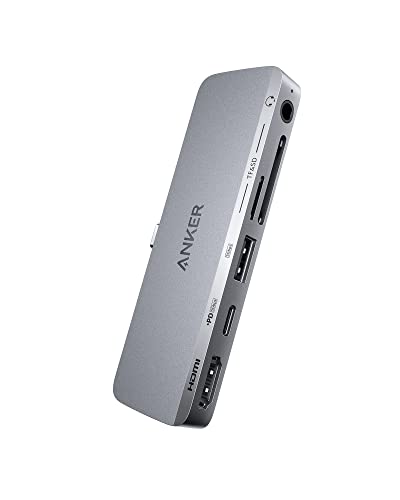 Anker 541 6-in-1 Hub
|
Mid-Range | Designed for USB‑C iPads; 4K@60Hz HDMI | iPad or laptop students needing compact 4K output | Check Price | ||
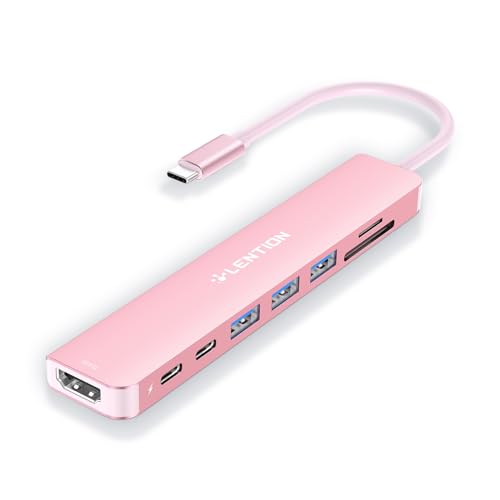 LENTION 8-in-1 Hub
|
Budget | 100W pass-through charging with 4K@60Hz HDMI | Budget-conscious students who need many ports | Check Price | ||
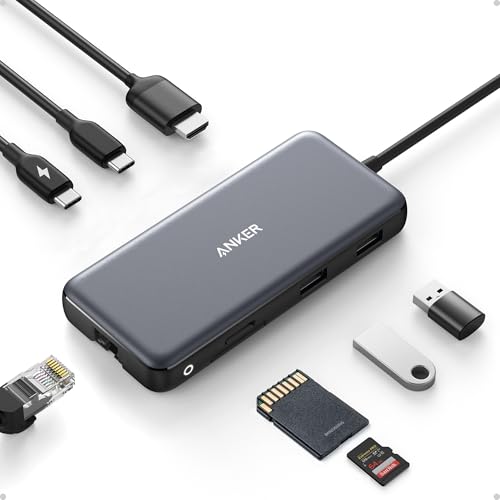 Anker 555 8-in-1 Hub
|
Premium | 10Gbps ports, Ethernet, 85W PD | Students who need top transfer speeds & wired Ethernet | Check Price |
1. Anker USB C Hub for USB-C iPad, 541 USBC Hub (6-in-1) with 4K HDMI Port, Multi-Function USB Port, SD and microSD Card Slots, for iPad Pro 5th Gen/iPad Air 5th Gen/iPad mini 6th and Later (Gray)
A compact, well-built hub that balances 4K video, card readers, and pass-through charging in a student-friendly package. It’s especially handy for iPad users and laptop owners who want plug-and-play simplicity without a heavy dock.
Key Specs
- 4K@60Hz HDMI output (DP Alt Mode required)
- Multi-function USB-C port: charging (30W+), up to 5 Gbps data
- SD + microSD card slots and 3.5 mm audio
- Made to match USB-C iPad dimensions
Pros
- Better iPad fit and aesthetic match than the bulkier Anker 555
- Better value for students than the premium Anker 555
- Easier to install and use than many portable docks
Cons
- Fewer ports than the Anker 555 (less future-proof)
- Some users report mixed fit/sturdiness with cases
Best For: iPad or laptop students needing compact 4K output
Check Latest Price on Amazon2. LENTION 8-in-1 USB-C Hub with 4K 60Hz HDMI, 100W Power Delivery, 5Gbps USB C Data, 3 USB 3.0 and microSD & SD Card Reader for 2023-2016 MacBook Pro, New Mac Air/Surface, More (CB-CE18s, Rose Gold)
A budget-packed hub offering lots of ports and strong charging capability at a compact size. Great for students on tight budgets who still need SD card access and an external monitor, but expect occasional heat and compatibility caveats with some newer M2 devices.
Key Specs
- 4K@60Hz HDMI (requires host DP1.4 support)
- 100W USB-C power delivery pass-through
- One USB-C data port + three USB-A 3.0 ports (5Gbps)
- SD and microSD card readers (SD 2.0 speeds)
Pros
- More USB-A ports than the Anker 541 for peripherals
- Higher pass-through wattage than the Anker 541
- Smaller and cheaper than the Anker 555
Cons
- Runs hotter under load than Anker 541 in some reports
- Mixed compatibility with newer M2 laptops reported
Best For: Budget-conscious students who need many ports
Check Latest Price on Amazon3. Anker 555 USB-C Hub (8-in-1), with 85W Power Delivery, 4K 60Hz HDMI Port, 10Gbps USB C and 2 A Data Ports, Ethernet microSD SD Card Reader, for MacBook Pro More
The most fully featured option here: higher-speed USB ports, Ethernet, and robust pass-through charging make it a great portable dock for heavy photo export workflows. Expect a premium price and some heat during demanding transfers.
Key Specs
- 4K@60Hz HDMI for DP1.4 hosts (4K@30Hz for DP1.2)
- 85W USB-C power delivery pass-through
- 10Gbps-capable USB-C and USB-A ports
- Built-in cable, Ethernet, microSD/SD card reader
Pros
- Higher data speeds for external SSDs than LENTION and Anker 541
- More ports (Ethernet + multiple high-speed ports) than others
- Better build quality feel than typical budget hubs
Cons
- Gets hotter than the Anker 541 under heavy transfer loads
- Higher cost than the LENTION budget pick
Best For: Students who need top transfer speeds & wired Ethernet
Check Latest Price on AmazonWhich One Should You Choose?
If budget is tight → choose the LENTION CB-CE18s (B0C8NYTDYV). It gives the most ports and the highest advertised pass-through wattage for the price, making it the best budget solution for monitor and SSD hookups — accept the tradeoff of potential heat and occasional compatibility issues.
If you want the easiest overall experience for student photo editing (best balance of usability, build, and iPad compatibility) → pick the Anker USB C Hub 541 (B09XDZKH5P). It supports 4K output, has SD/microSD slots, and is designed with portable device fit in mind, which makes day-to-day editing and exporting simpler.
If maximum transfer speed, Ethernet, and the most ports matter most (and you’ll pay more) → go with the Anker 555 USB-C Hub (B087QZVQJX). It’s the most capable for heavy export workflows and external NVMe SSDs, but expect more heat and a premium price.
Best for Specific Scenarios
- On-campus editing and presentations: Anker 541 because it’s compact, plugs into laptops/iPads easily, and gives 4K output for crits and slideshows.
- Lowest-cost multiport setup: LENTION CB-CE18s because it packs many ports and 100W PD into a budget footprint.
- Heavy RAW export and tethered shoots: Anker 555 because of its 10Gbps-capable ports and Ethernet for transfers and stable network connections.
Frequently Asked Questions
Do these hubs support 4K@60Hz for external monitors?
They support 4K output when the host laptop/tablet exposes DP Alt Mode and the specific DP version (DP1.4) required for 4K@60Hz. Expect 4K@30Hz on older DP1.2 hosts. Check your device specs before buying.
Which hub is best for fast external NVMe SSDs?
For the fastest external SSD transfers pick the Anker 555 because it offers 10Gbps-capable ports. If you mainly move photos from SD cards, the Anker 541 or LENTION still handle that well.
Will these hubs charge my laptop while I edit?
Yes — LENTION advertises up to 100W PD, Anker 555 supports up to 85W, and Anker 541 accepts pass-through charging (recommended charger 30W+ for some functions). Confirm the hub’s pass-through wattage meets your laptop’s power needs to avoid slow charging or discharge under load.
How We Selected These Products
Our recommendations are based on data-driven analysis: we evaluated 155229+ products across 23916+ brands using a composite scoring system that weighs rating (40%), review volume (30%), price value (20%), and demand signals (10%). Every product is ranked by data, not opinions.
Last updated: August 22, 2026
As an Amazon Associate we earn from qualifying purchases at no extra cost to you. Full disclosure.
GearLark Score is our editorial ranking based on a composite analysis of product quality, value, and verified customer sentiment. Click through to Amazon for current pricing, availability, and live customer reviews.