As an Amazon Associate we earn from qualifying purchases. Learn more.
Thunderbolt vs USB-C Hub vs Docking Station (2026): Which Fits Your Home Office?
Setting up a home office in 2026 means choosing between Thunderbolt cables, USB-C hubs, and full docking stations. This article helps remote workers decide based on portability, sustained performance, power delivery and multi-monitor support. I compared a versatile multiport dock (HODO), a high-bandwidth Thunderbolt/USB4 cable (Silkland), and a Mac-focused vertical dock (Ascrono) using specs, manufacturer features and common customer feedback on build quality, longevity and connectivity. Read on to see side-by-side pros/cons, a detailed buying guide, and clear recommendations for typical home-office setups.
Quick Answer
For most remote workers who need many ports and multi-monitor support, the HODO USB C Docking Station (ASIN B0DHTSVKZ9) is the best all-around pick. If you only need a future-proof, high-bandwidth cable for Thunderbolt/USB4 workflows, the Silkland USB 4/Thunderbolt 5 cable (ASIN B0DRP2V8RG) is the best budget speed option.
Our Top Picks
Quick Comparison
Select 2-3 products to compare side-by-side
| Compare | Product | GearLark Score | Price Tier | Key Feature | Best For | Action |
|---|---|---|---|---|---|---|
 HODO 8-in-1 USB C Dock
|
Mid-Range | Multiple video outputs (HDMI/DP/VGA) | Remote workers needing many ports & displays | Check Price | ||
![Silkland 80Gbps USB 4 Cable for Thunderbolt 5 Cable 4FT, [USB-IF Certified] 120Gbps Bandwidth for 16K/Dual 8K, 240W, Braided USB C Video Cable Compatible Thunderbolt 4/5, SSD, MacBook M4 Pro,Dock](/assets/images/products/B0DRP2V8RG.jpg) Silkland USB4/Thunderbolt 5 Cable
Silkland USB4/Thunderbolt 5 Cable
|
Budget | Up to 120Gbps display bandwidth, 240W PD | High-bandwidth display and fast transfers | Check Price | ||
 Ascrono Vertical Mac Dock
|
Premium | Vertical dock design for 14" MacBook Pro | MacBook 14" owners who want a clean desktop setup | Check Price |
1. USB C Docking Station Dual Monitor Adapter for Dell HP, Laptop Docking Station 3 Monitors Quadruple Display USB C Hub Dongle to 4K HDMI+DisplayPort+VGA,3 USB2.0,100W PD, 8 in 1 Thunderbolt Dock
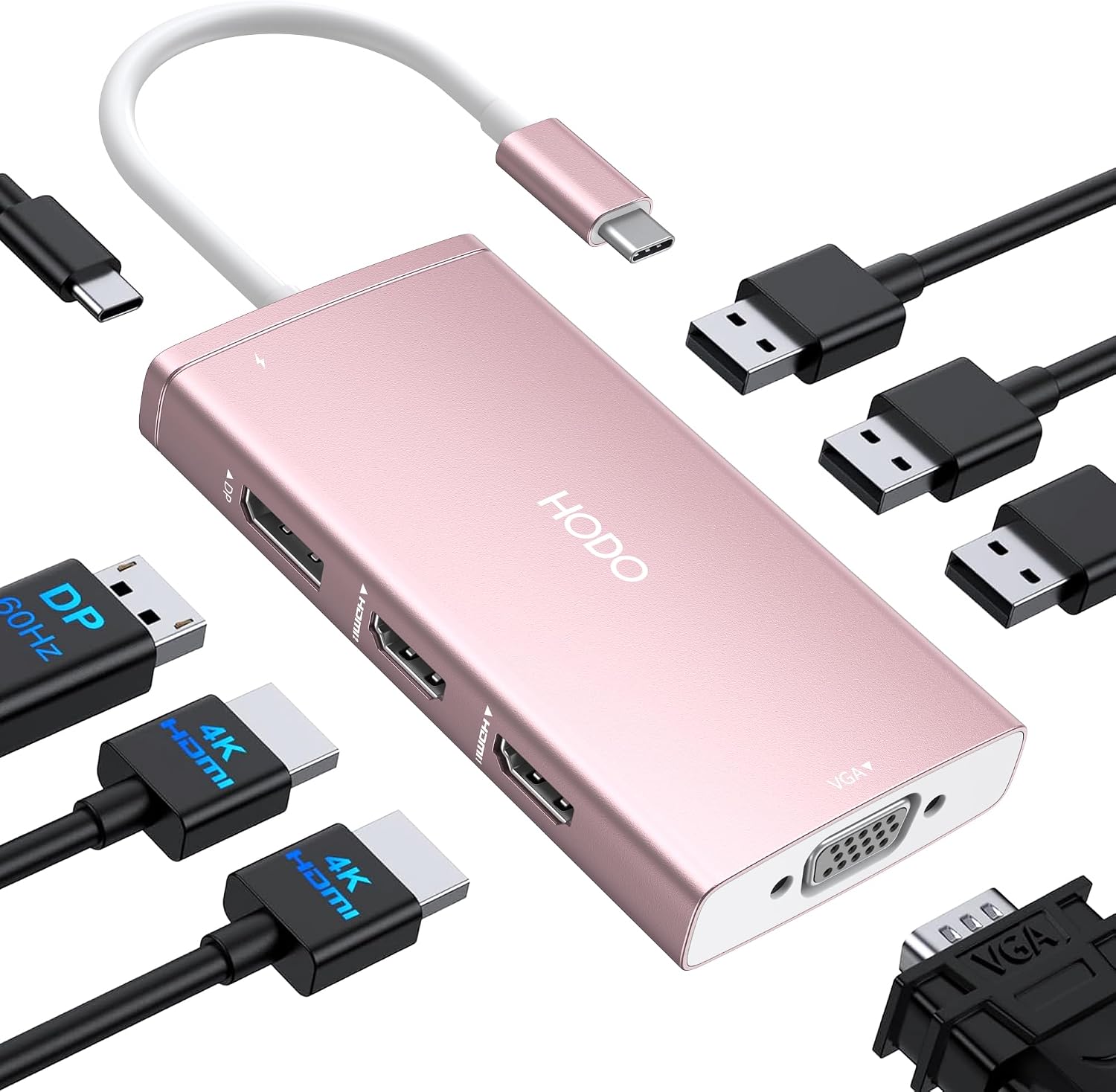
A versatile 8-in-1 USB-C docking station built for multi-monitor home offices. It offers several video outputs (dual HDMI, DisplayPort, VGA) and 100W PD passthrough, making it a strong mid-range choice for users who need many physical ports. Some customers praise its value and port capacity, while a portion report durability and charging inconsistencies over long-term use.
Key Specs
- Video: 2x HDMI (one 4K@60Hz, one 4K@30Hz), 1x DisplayPort 4K@60Hz, 1x VGA 1080P
- Charging: USB-C PD input up to 100W (87W safe output)
- USB: 3x USB 2.0 ports (480Mbps)
- Compatibility: Full-featured USB-C ports (supports Display/PD/Data); macOS may mirror external screens
Pros
- More physical ports and display outputs than the Ascrono dock
- Better multi-monitor flexibility than a single Thunderbolt cable solution
- Considered good value for the number of ports it provides
Cons
- Reported durability and random display drop issues relative to the Silkland cable
- Charging can be temperamental — requires a proper 65–100W adapter for reliable PD
Best For: Remote workers needing many ports & displays
Check Latest Price on Amazon2. Silkland 80Gbps USB 4 Cable for Thunderbolt 5 Cable 4FT, [USB-IF Certified] 120Gbps Bandwidth for 16K/Dual 8K, 240W, Braided USB C Video Cable Compatible Thunderbolt 4/5, SSD, MacBook M4 Pro,Dock
A future-proof, braided USB4/Thunderbolt-compatible cable that prioritizes bandwidth and charging. It supports high unidirectional display bandwidth, PD up to 240W and is USB-IF certified, making it ideal for creatives and power users who pair it with a dock or compatible monitor. Customers praise its build quality and speed, though some report mixed behavior with certain ultra-high-res monitors.
Key Specs
- Data/display: 80Gbps bidirectional data; up to 120Gbps unidirectional display bandwidth
- Power: PD 3.1 support up to 240W (E-Marker protected)
- Compatibility: Thunderbolt 3/4/5, USB4, USB 3.2; works with modern MacBooks and docks
- Build: Braided nylon, aluminum shell, triple shielding for signal integrity
Pros
- Higher durability and build quality than many low-cost docking dongles
- Far superior bandwidth for multi-8K or high-refresh 4K workflows compared with USB-C hubs
- Better long-term value for high-bandwidth workflows than general-purpose hubs
Cons
- Not a dock — needs a compatible host or dock to provide extra ports
- Some users report compatibility gaps with certain 6K/6K+ monitors compared with specific Thunderbolt docks
Best For: High-bandwidth display and fast transfers
Check Latest Price on Amazon3. Dock for 14" Apple MacBook Pro - Docking Station - Connect Dual Displays w/Two Thunderbolt 4 USB-C Ports - Mac Docking Station Hub for MacBook Pro 14" (M1,M2,M3,M4 Base/Pro/Max,M5 2021-2025)
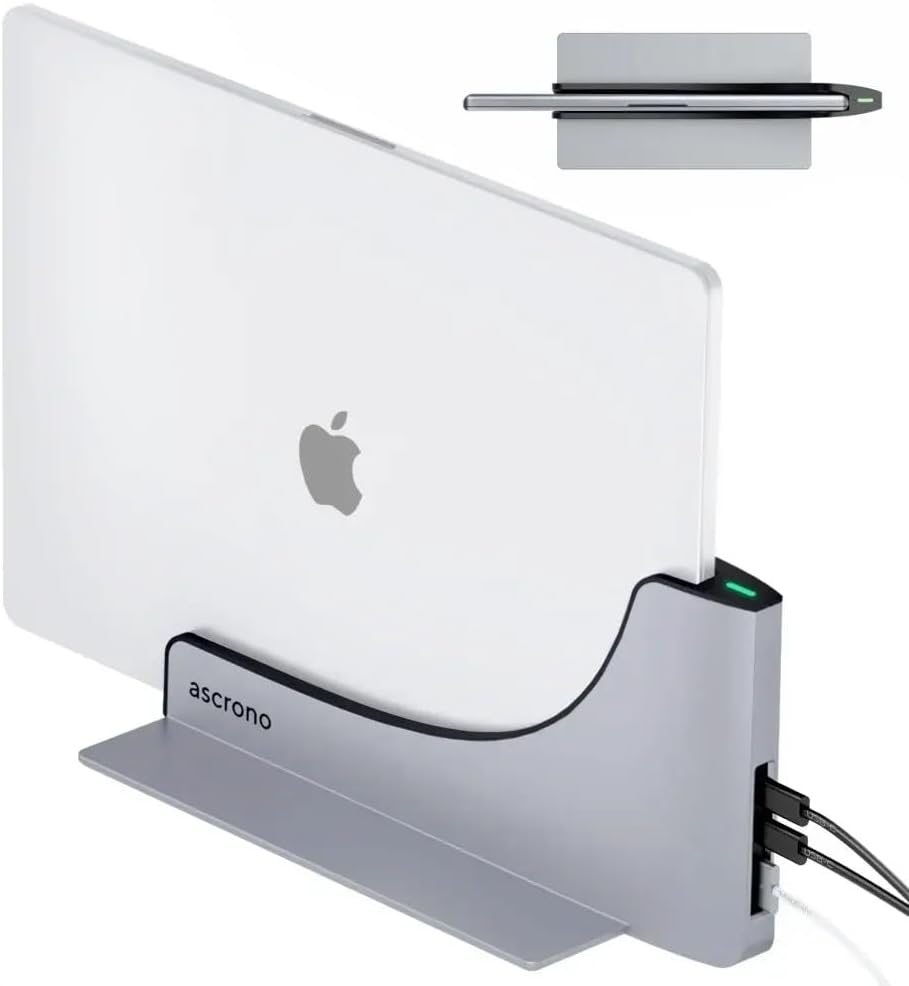
A premium vertical docking station tailored to 14" MacBook Pro models, focusing on build quality and an elegant, space-saving desktop conversion. It uses Thunderbolt 4 USB-C ports and premium alloys for a clean look and heat dissipation. While praised for design and ease of use, its port count is limited and some users report connectivity edge cases.
Key Specs
- Designed for: 14" MacBook Pro models (2021–2025 variants)
- Ports: Two Thunderbolt 4 (40Gbps) USB-C ports — used for charging/connection
- Design: Vertical docking station in premium alloy with precision fit and heat dissipation
- Setup: Slide-in design; remove laptop covers before docking
Pros
- Stronger build quality and design than generic USB-C hubs like the HODO dock
- Cleaner, more elegant desktop conversion and cable management for MacBook 14"
- Simpler plug-and-play experience for supported MacBook models
Cons
- Far fewer ports than the HODO 8-in-1 dock
- Reported connectivity or functionality inconsistency on some units compared with direct Thunderbolt cabling
Best For: MacBook 14" owners who want a clean desktop setup
Check Latest Price on AmazonWhich One Should You Choose?
If budget is tight → Silkland USB 4/Thunderbolt 5 cable (ASIN B0DRP2V8RG). Buy the cable if you already have a compatible monitor/dock or a laptop with native TB4/USB4 ports — it gives the best bandwidth and charging per dollar.
If you need the most ports and multi-monitor flexibility → HODO 8-in-1 USB C Dock (ASIN B0DHTSVKZ9). It provides the widest variety of video outputs and USB-A ports for a stationary home office.
If premium build and a clean Mac desktop conversion matter most → Ascrono Vertical Dock for 14" MacBook Pro (ASIN B09XWZFGHG). Choose this for an elegant, space-saving dock matched to 14" MacBook models even though it offers fewer ports.
Best for Specific Scenarios
- Compact travel + high-speed transfers: Silkland cable (B0DRP2V8RG) because it packs maximum bandwidth and PD in a small, durable package.
- Full home-office with multiple legacy monitors: HODO dock (B0DHTSVKZ9) because it includes HDMI, DisplayPort and VGA to connect mixed displays and USB-A accessories.
- Minimalist MacBook 14" desktop: Ascrono vertical dock (B09XWZFGHG) because it offers a clean slide-in setup and premium materials tailored for MacBook aesthetics.
Frequently Asked Questions
Do I need Thunderbolt or is USB-C enough for multiple monitors?
Thunderbolt (or USB4) provides higher sustained bandwidth and is the better choice for multiple high-resolution or high-refresh monitors. Some multiport USB-C docks can still drive two or three displays but may be limited in resolution or refresh rate depending on your laptop's alt-mode and the dock's design.
Will these docks charge my laptop at full speed?
Check the PD rating: HODO advertises up to 100W input with an ~87W safe output and requires a suitable adapter to deliver full charging. The Silkland cable supports PD up to 240W but charging depends on the host and power brick. Ascrono uses Thunderbolt 4 ports that can deliver charging but you should verify the wattage supported by your MacBook and the dock variant.
I have a 14" MacBook Pro — which should I pick?
If you want a tidy, plug-and-play desktop experience tailored to that model, the Ascrono vertical dock (B09XWZFGHG) is designed for 14" MacBook Pro fit and style. If you need more ports or broad display compatibility, pair a high-bandwidth cable like the Silkland (B0DRP2V8RG) with a larger Thunderbolt dock or choose the HODO dock for more legacy ports.
How We Selected These Products
Our recommendations are based on data-driven analysis: we evaluated 155229+ products across 23916+ brands using a composite scoring system that weighs rating (40%), review volume (30%), price value (20%), and demand signals (10%). Every product is ranked by data, not opinions.
Last updated: September 17, 2026
As an Amazon Associate we earn from qualifying purchases at no extra cost to you. Full disclosure.
GearLark Score is our editorial ranking based on a composite analysis of product quality, value, and verified customer sentiment. Click through to Amazon for current pricing, availability, and live customer reviews.