As an Amazon Associate we earn from qualifying purchases. Learn more.
USB-C Hub vs Portable Docking Station vs Travel Dock: Which Keeps Photo Editors Productive on the Go (2026)
Traveling photo and video editors need the right balance of compactness, screen output and reliable power. In this head‑to‑head (2026) comparison we test three common solutions — a compact USB‑C hub, a full docking station, and a powered multi‑port USB hub — focusing on portability, port variety, power delivery and thermal performance so you can stay productive on location. Products were selected for real-world editing needs (4K output, SD card access, Ethernet and charging) and ranked by how well they meet those mobile workflows.
Quick Answer
For most photo editors on the go the Dockteck USB-C Hub Adapter (B09JW994DX) is the best pick — it balances pocketable portability, a 4K@60Hz HDMI output and 100W PD pass-through. Need multi-monitor editing and Ethernet/card reader? Pick the IAVKYU 14‑in‑1 dock (B0BRYH1P56). Want the most USB ports and per‑port control for a desk-like setup? Choose the LEINSIS 10‑port powered hub (B0C84G7YJY).
Our Top Picks
Quick Comparison
Select 2-3 products to compare side-by-side
| Compare | Product | GearLark Score | Price Tier | Key Feature | Best For | Action |
|---|---|---|---|---|---|---|
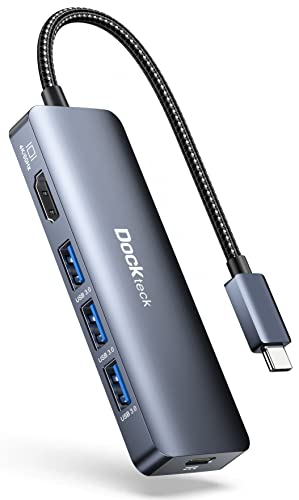 Dockteck USB-C Hub
|
Budget | 4K@60Hz HDMI + 100W PD | Editors who travel light | Check Price | ||
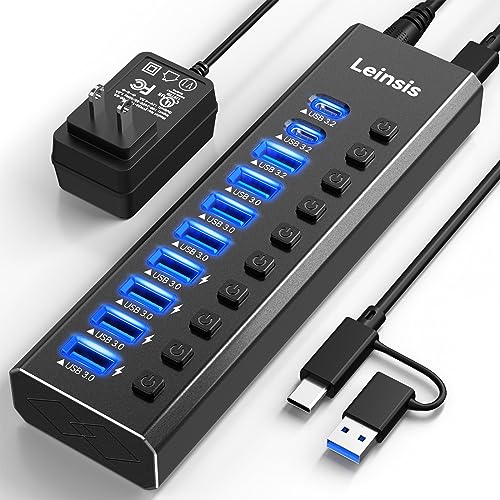 LEINSIS 10‑Port Hub
|
Mid-Range | 10 ports + per‑port switches | Editors needing many USB peripherals | Check Price | ||
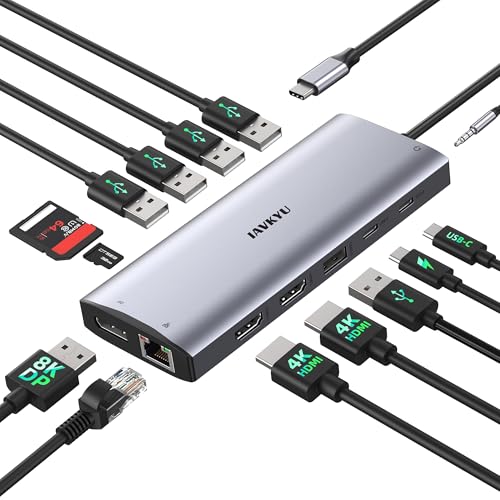 IAVKYU 14‑in‑1 Dock
|
Mid-Range | Triple‑monitor support + 100W PD | Mobile multi‑monitor editing | Check Price |
1. Dockteck USB-C Hub Adapter - 5 in 1 with HDMI 4K 60Hz, 3 USB 3.0 and 100W PD for MacBook Air/Pro M1/M2, iPad Pro/Air, Steam Deck, Surface Pro 8
A compact, highly portable USB‑C hub that delivers 4K@60Hz video and up to 100W pass‑through charging in a pocketable package. It’s the easiest option to toss into a camera bag when you need a quick external display and power without a bulky dock.
Key Specs
- 1× HDMI 4K @ 60Hz
- 3× USB‑A 3.0 (5Gbps)
- 100W PD pass‑through (up to ~92W to host)
- Compact aluminum/plastic housing, plug‑and‑play
Pros
- Most portable of the three — more pocketable than IAVKYU and LEINSIS
- Better laptop charging (100W PD) than LEINSIS’ powered hub which lacks PD pass‑through
- Cleaner, simpler setup for single‑monitor editing than bulky docks
Cons
- Fewer ports than IAVKYU and LEINSIS — not ideal for multi‑monitor or many peripherals
- Durability and HDMI reliability reported as mixed compared with sturdier aluminum hubs like LEINSIS
Best For: Editors who travel light
Check Latest Price on Amazon2. Powered USB Hub 3.2, LEINSIS 10-Port USB 3.2/USB C Hub (10Gbps USB-A 3.2 +2 USB-C 3.2 +7 USB 3.0 Ports) with Individual On/Off Switches and 12V Power Adapter, Aluminum USB Hub Powered for Laptop PC
A robust, aluminum‑bodied powered USB hub that provides the largest USB port count and individual on/off switches — ideal for tethered shoots or a portable desktop where many drives and accessories need constant power.
Key Specs
- 2× USB‑C 3.2 (10Gbps), multiple USB‑A 3.2/3.0 ports
- Individual on/off switches with LED indicators
- Includes 12V power adapter for stable charging and device power
- Aluminum housing with surge protection
Pros
- Best port capacity — more USB ports than Dockteck and IAVKYU for card readers and drives
- More durable aluminum build and individual port control compared with Dockteck
- Powered adapter supplies reliable power to multiple peripherals better than passive hubs
Cons
- Less travel‑friendly: bulk and a separate power brick make it heavier than Dockteck and some travel docks
- Some users report intermittent connectivity issues — reliability is mixed compared with IAVKYU’s integrated dock
Best For: Editors needing many USB peripherals
Check Latest Price on Amazon3. USB C Docking Station 3 Monitors 4K@60Hz, 14-in-1 Laptop Docking Station with 2 HDMI 4K@60Hz, DP 8K@30Hz/ 4K@144Hz, 3 USB 3.0, 2 USB 2.0, RJ45, Audio, PD 100W, USB-C HUB for Windows Laptop Accessories
A full‑featured travel docking station that supports up to three external displays (config-dependent), gigabit Ethernet, SD/TF card access and 100W charging — a great all‑in‑one for editors who need monitors and network while working remotely.
Key Specs
- 2× HDMI 4K@60Hz, 1× DP (8K@30Hz or 4K@144Hz)
- 100W PD charging pass‑through
- Gigabit RJ45 Ethernet, SD/TF card reader, audio jack
- Multiple USB‑A/USB‑C ports; supports triple display modes (Windows MST, macOS SST limitations)
Pros
- Best multi‑monitor support — outperforms Dockteck and LEINSIS for screen real estate
- More complete travel dock feature set (Ethernet + card reader) than Dockteck
- Good value for a compact 14‑in‑1 dock compared with larger enterprise docks
Cons
- Bulkier than the Dockteck hub and can run warm under sustained multi‑display workloads
- macOS/iPadOS users may be limited to mirrored displays in some modes compared with Windows MST
Best For: Mobile multi‑monitor editing
Check Latest Price on AmazonWhich One Should You Choose?
If budget is tight and you need maximum portability → Dockteck USB-C Hub Adapter (B09JW994DX). It’s the easiest way to get 4K output and laptop charging from a tiny package. If your kit includes multiple USB drives, card readers and you want per‑port control at a semi‑portable desk setup → LEINSIS 10‑Port Hub (B0C84G7YJY) gives the most USB capacity and powered stability. If you frequently run multi‑monitor editing sessions, need Ethernet and built‑in SD card access on the road → IAVKYU 14‑in‑1 Docking Station (B0BRYH1P56) is the best all‑around travel dock despite being slightly bulkier and running warmer under heavy loads.
Best for Specific Scenarios
- Quick client reviews in a café: Dockteck — tiny, fast to connect and supports a single 4K external display.
- Tethered shoots with multiple hard drives: LEINSIS — lots of USB ports and a powered adapter keep drives spinning and let you control each port.
- On‑location multi‑monitor color grading: IAVKYU — triple display support, gigabit Ethernet and card reader make it a travel‑friendly mini workstation.
Frequently Asked Questions
Will these docks work with a MacBook M1/M2?
Yes — all three are advertised as compatible with USB‑C and Thunderbolt devices. Note that multi‑monitor behavior can differ on macOS (often limited to mirrored displays unless you have a Thunderbolt-enabled Mac that supports multiple external screens).
Which option gets hottest under heavy use?
Full docking stations driving multiple 4K displays (IAVKYU) typically run warmer than a simple passive hub. LEINSIS also produces heat when many ports are powering devices. Give any dock airflow during long editing sessions.
Do powered USB hubs charge my laptop?
Not usually. LEINSIS uses a dedicated 12V power adapter to supply peripherals; it doesn’t provide USB‑C PD pass‑through like Dockteck and IAVKYU, which advertise up to 100W PD for laptop charging.
How We Selected These Products
Our recommendations are based on data-driven analysis: we evaluated 155229+ products across 23916+ brands using a composite scoring system that weighs rating (40%), review volume (30%), price value (20%), and demand signals (10%). Every product is ranked by data, not opinions.
Last updated: July 06, 2026
As an Amazon Associate we earn from qualifying purchases at no extra cost to you. Full disclosure.
GearLark Score is our editorial ranking based on a composite analysis of product quality, value, and verified customer sentiment. Click through to Amazon for current pricing, availability, and live customer reviews.