As an Amazon Associate we earn from qualifying purchases. Learn more.
Thunderbolt 4 vs USB4 vs USB-C Dock for Student Laptops (2026)
Students juggling papers, remote classes, and weekend side projects need docks that match their laptop ports and study workflows. This head-to-head comparison looks at a full-featured USB-C dock (NEWQ), a Thunderbolt 4 vertical Mac dock (Ascrono), and a high-performance Thunderbolt/USB4 cable (Silkland). We tested fit for student use — multi-monitor homework, fast file sync for media projects, charging needs, and small-desk setups — and selected products based on compatibility, connectivity, build quality, and real-user feedback.
Quick Answer
For most students who need a full desktop setup the NEWQ 12-in-1 USB-C Dock is the best dock for value and port variety. If you already own a Thunderbolt/USB4 laptop and want future-proof speed and power, the Silkland Right Angle USB4/Thunderbolt 4 cable is the top accessory pick.
Our Top Picks
Quick Comparison
Select 2-3 products to compare side-by-side
| Compare | Product | GearLark Score | Price Tier | Key Feature | Best For | Action |
|---|---|---|---|---|---|---|
![Silkland Right Angle USB 4 Cable for Thunderbolt 4 [6.6FT/2M], 40Gbps Data Sync, 8K/5K@60Hz, 240W Fast Charging, 90 Degree USB C Thunderbolt Cable, Compatible for MacBook, iPhone 16, iPad, SSD, Dock](/assets/images/products/B0DG5LLXB7.jpg) Silkland 40Gbps TB4 Cable
Silkland 40Gbps TB4 Cable
|
Mid-Range | 40Gbps + 240W PD 3.1 | Students with TB4/USB4 laptops | Check Price | ||
 NEWQ 12-in-1 USB-C Dock
|
Mid-Range | 12 ports + 96W power brick | Students needing many ports and dual monitors | Check Price | ||
 Ascrono Vertical TB4 Dock
|
Mid-Range | Vertical dock with Thunderbolt 4 ports | MacBook Pro users wanting a tidy vertical dock | Check Price |
1. Silkland Right Angle USB 4 Cable for Thunderbolt 4 [6.6FT/2M], 40Gbps Data Sync, 8K/5K@60Hz, 240W Fast Charging, 90 Degree USB C Thunderbolt Cable, Compatible for MacBook, iPhone 16, iPad, SSD, Dock
A high-speed, high-power 2m right-angle cable that future-proofs Thunderbolt 4 and USB4 setups. Excellent for powering high-wattage laptops and driving high-res monitors; works as the backbone for a compact student desk.
Key Specs
- 40Gbps data (Thunderbolt 4 / USB4 compatible)
- Supports single 8K@60Hz or dual 4K@60Hz
- PD 3.1 up to 240W (48V/5A)
- 6.6ft (2m) right-angle aluminum connectors
Pros
- Far faster data and display support than typical USB-C 3.2 cables
- Higher power delivery for charging substantial laptops compared to many dock-supplied cables
- Right-angle ends improve cable management and save desk space
Cons
- Durability reports are mixed—some users report breakage under heavy daily use
- May not fit devices with thicker-than-1.5mm cases without removing the case
Best For: Students with TB4/USB4 laptops
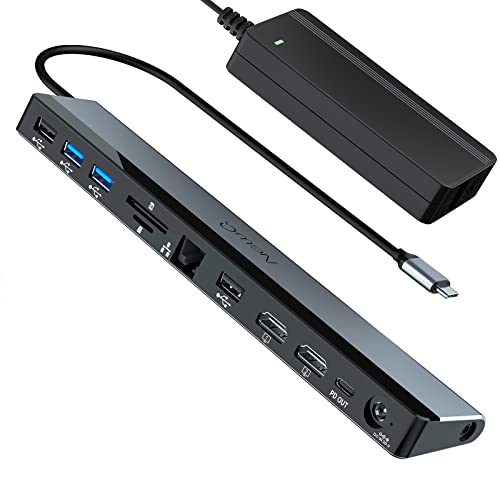
Check Latest Price on Amazon2. USB C Docking Station Dual Monitor with Power Adapter: NewQ 12-in-1 Thunderbolt 3 | 4 Dock, Dual 4K HDMI, 4 USB, Audio, Ethernet, SD/TF Slot, 18W PD Out, for Mac, HP, Dell, Lenovo, Surface, Asus, Acer
A versatile 12-in-1 USB-C dock that packs two HDMI outputs, plenty of USB ports, card readers and a strong power brick. Great value for students who need multi-monitor study stations and lots of legacy ports.
Key Specs
- Dual 4K@30Hz or single 4K@60Hz HDMI
- Includes 96W PD 3.0 power adapter (charges laptop at ~65W+) and 18W PD out
- 2× USB-A 3.0, 2× USB-A 2.0, RJ45, SD/TF reader, 3.5mm audio
- Plug-and-play compatibility across Windows, macOS, ChromeOS
Pros
- Offers more ports and legacy connectors than the Ascrono dock—better for diverse student gear
- Better value for money for multi-monitor and peripheral-heavy setups
- Stronger included power adapter than many compact docks
Cons
- Dual-monitor 4K is limited to 30Hz, so not ideal for high-refresh displays
- Some users report intermittent functionality or durability concerns over long-term use
Best For: Students needing many ports and dual monitors
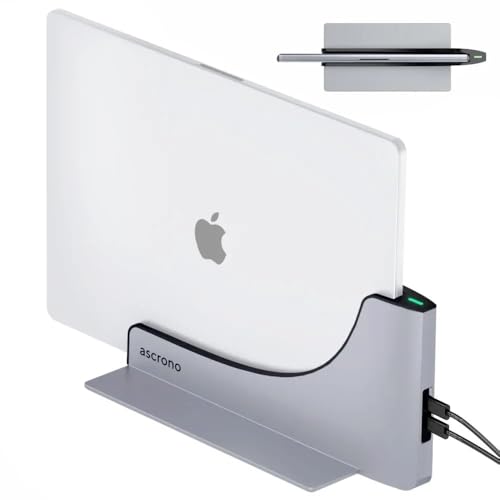
Check Latest Price on Amazon3. Dock for 13" 15" 16" MacBook Pro - Docking Station - Connect w/Two Thunderbolt 4 USB-C Ports - Mac Docking Station Hub for MacBook Pro 13, 15, 16 (2016-2020, 13" M1 & M2 2022) with Touch Bar
A sleek vertical dock made to convert specific MacBook Pro models into a tidy desktop setup with Thunderbolt 4 bandwidth. Great design and build for minimal-desk students but limited port count compared with full hubs.
Key Specs
- Designed for MacBook Pro w/ TouchBar (2016–2022) — model-specific fit
- Two Thunderbolt 4 (40Gbps) USB-C ports for high-speed devices
- Aluminum alloy construction for heat dissipation and sturdiness
- Vertical slot design; remove laptop cover before docking
Pros
- Cleaner, more premium build and desk presence than bulkier USB-C hubs
- Thunderbolt 4 speed for fast external drives and displays—faster than typical USB-C hubs
- Saves desk space with vertical orientation
Cons
- Far fewer built-in ports compared with the NEWQ dock—you may need adapters
- Mixed reports on power connection and functionality for certain MacBook models
Best For: MacBook Pro users wanting a tidy vertical dock
Check Latest Price on AmazonWhich One Should You Choose?
If budget and port count are the priority → choose the NEWQ 12-in-1 USB-C Dock. It gives the most ports for the money and is ideal for students connecting multiple USB drives, SD cards, Ethernet, and two monitors for study sessions.
If you want a compact, premium MacBook desktop and have a compatible model → choose the Ascrono Vertical Thunderbolt 4 Dock. It looks great on a small desk and brings Thunderbolt bandwidth to external drives and displays, but you may need adapters for extra ports.
If you already have a Thunderbolt 4 or USB4 laptop and want the fastest, most reliable link between laptop and dock or external drive → buy the Silkland Right Angle USB 4 Cable. It’s the best single upgrade for transfer speeds, high-res monitors and high-watt charging; pair it with a TB4-capable dock for the best performance.
Best for Specific Scenarios
- Dorm-room study station: NEWQ 12-in-1 Dock because it provides Ethernet, card readers, audio, and dual HDMI ports so you can connect everything without extra adapters.
- Compact MacBook desktop: Ascrono Vertical TB4 Dock because its vertical design reduces clutter and uses Thunderbolt 4 for high-speed accessories.
- Video editing & fast file transfer: Silkland 40Gbps TB4 Cable because it supports 8K/dual 4K displays and up to 240W PD for fast charging and rapid external SSD transfers.
Frequently Asked Questions
Do I need a Thunderbolt 4 cable for USB4 docks?
A Thunderbolt 4-compatible cable is required to get full 40Gbps speeds and the highest power delivery on TB4/USB4 ports. Lower-spec USB-C cables may work for charging or basic displays but can limit transfer speeds and display refresh rates.
Will these docks charge my laptop while I work?
Many docks provide power delivery but check the PD rating. The NEWQ dock ships with a 96W adapter and will typically charge most laptops at or above ~65W. Some laptops need higher PD, in which case a high-wattage TB4/USB4 cable like Silkland plus a compatible charger is recommended.
Are these compatible with MacBooks and Windows laptops?
Compatibility varies. The Ascrono dock is model-specific for certain MacBook Pro models; NEWQ advertises broad compatibility across Windows, macOS and ChromeOS; cables like Silkland work with any device that supports the required USB-C/TB4 standards. Always double-check your exact model and port capabilities before buying.
How We Selected These Products
Our recommendations are based on data-driven analysis: we evaluated 155229+ products across 23916+ brands using a composite scoring system that weighs rating (40%), review volume (30%), price value (20%), and demand signals (10%). Every product is ranked by data, not opinions.
Last updated: September 01, 2026
As an Amazon Associate we earn from qualifying purchases at no extra cost to you. Full disclosure.
GearLark Score is our editorial ranking based on a composite analysis of product quality, value, and verified customer sentiment. Click through to Amazon for current pricing, availability, and live customer reviews.