As an Amazon Associate we earn from qualifying purchases. Learn more.
Best USB-C Hubs for Travel Rentals and Holiday Work-From-Anywhere (2026)
Working from short-term rentals and holiday locations needs a compact, reliable USB-C hub that adds HDMI and wired ethernet without taking up precious luggage space. In this guide we test and compare compact multiport hubs that prioritize display output, Gigabit networking and travel-friendly size. You'll learn which hubs balance build quality, power delivery and real-world compatibility — and which ones to avoid if durability or multi-monitor support matters. Products were chosen for portability, HDMI+Ethernet capability and customer feedback on reliability and value.
Quick Answer
For travel rentals and holiday work-from-anywhere, the SABRENT USB-C Hub & SSD Enclosure (B0CH1N88Y7) is the top pick — it pairs a rugged aluminum build with 4K@60Hz HDMI, Gigabit Ethernet and a built-in M.2 slot for portable storage. If you need a budget option, the TOTU 11-in-1 (B07M8HLGBF) balances ports and price.
Our Top Picks
Quick Comparison
Select 2-3 products to compare side-by-side
| Compare | Product | GearLark Score | Price Tier | Key Feature | Best For | Action |
|---|---|---|---|---|---|---|
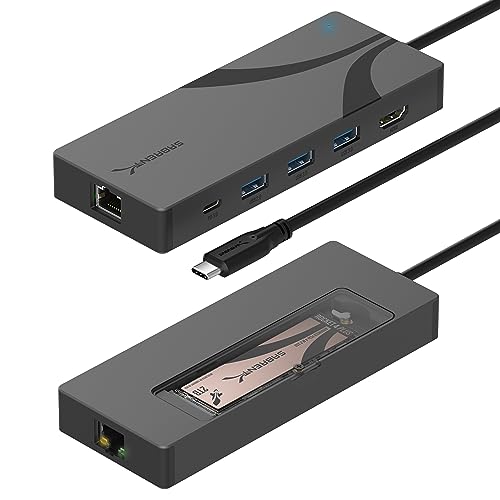 SABRENT 6-Port Hub w/ M.2
|
Premium | Built-in M.2 SSD slot with cooling | Travelers needing portable storage | Check Price | ||
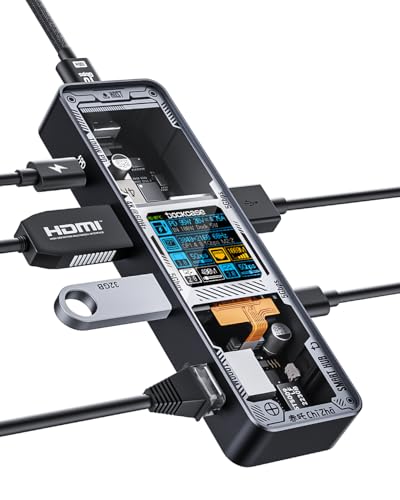 DOCKCASE Explorer Edition
|
Premium | Smart D-Key control & visual temperature readout | Users who want style + functionality | Check Price | ||
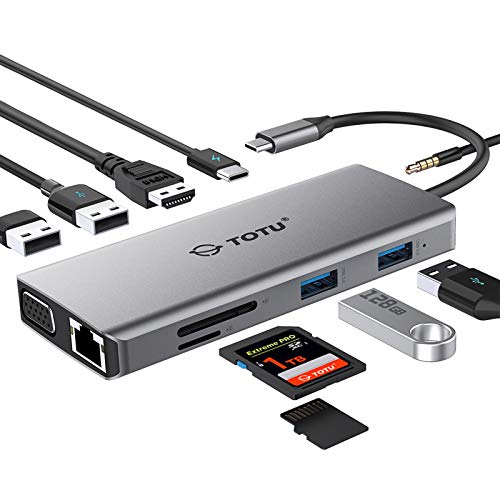 TOTU 11-in-1 Hub
|
Budget | Extensive ports in a compact package | Budget-conscious travelers | Check Price | ||
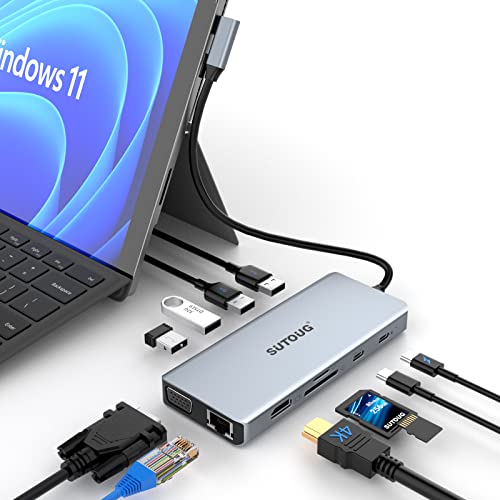 SUTOUG 12-in-1 Dock
|
Budget | Lightweight 3.6 oz aluminum body | Travelers wanting multi-screen plus light weight | Check Price | ||
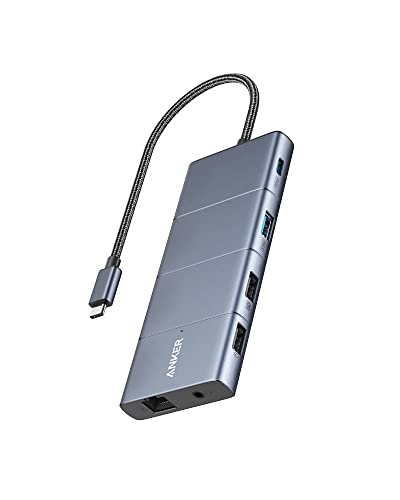 Anker 11-in-1 Dock
|
Premium | 10Gbps data ports and dual video outputs | Power users needing fast transfers | Check Price | ||
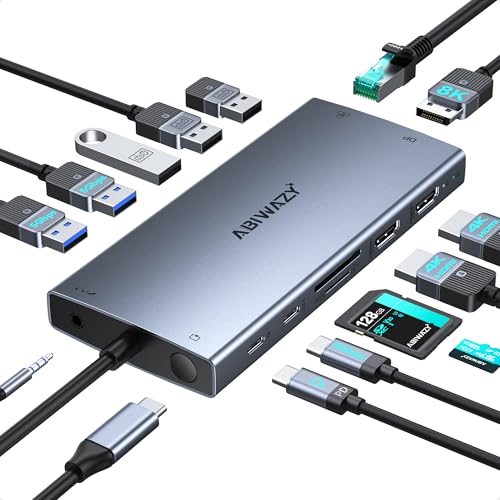 ABIWAZY 15-in-1 Dock
|
Mid-Range | 15 ports with 8K-capable DisplayPort | Creators needing many ports/monitors | Check Price |
1. SABRENT USB-C Hub & SSD Enclosure, 6-Port Dock with M.2 SSD Slot, 90W Power Delivery, USB 3.0 & 2.0 Ports, 4K HDMI, RJ45 Gigabit Ethernet (HB-6PNV)
A rugged aluminum travel hub that adds HDMI, Gigabit Ethernet and a rare internal M.2 slot for on-the-go storage. It offers 90W pass-through charging and fast USB 3.x speeds, making it a strong choice when you need both display, wired networking and extra SSD capacity.
Key Specs
- Integrated USB-C 10Gbps connection (USB 3.2 Gen 2x1)
- 4K@60Hz HDMI 2.0 output
- RJ45 Gigabit Ethernet (1GbE)
- M.2 2242/2260/2280 slot with thermal pad
- Up to 90W Power Delivery (PD 3.0)
Pros
- Unique built-in M.2 slot for portable SSD storage
- Solid aluminum build and compact footprint
- Good mix of HDMI, Ethernet and fast USB ports
Cons
- Some users report compatibility issues with certain external HDDs
- Higher price tier for travelers on a tight budget
Best For: Travelers needing portable storage
Check Latest Price on Amazon2. DOCKCASE Explorer Edition Visual Smart USB C Hub (6-in-1) with HDMI Port 4K@60Hz,Gigabit Ethernet,USB-C and 2 USB-A 5Gbps Data Ports, 100w PD Power Delivery, for MacBook Air/Pro, XPS, and More
A stylish, well-built hub that emphasizes design and usability — tempered-glass or aluminum finishes, a D-Key control and a visual chip temperature readout. It supplies HDMI 4K@60Hz, Gigabit Ethernet and up to 100W PD, though some buyers report intermittent connection issues.
Key Specs
- HDMI 4K@60Hz output
- Gigabit Ethernet port
- 100W Power Delivery passthrough
- 2 x USB-A 5Gbps + 1 x USB-C data port
- Visual temperature/readout and D-Key control
Pros
- Premium build and distinctive visual design
- High-speed USB ports and full 100W PD
- Useful temperature monitoring and control button
Cons
- Mixed reports of occasional connection dropouts
- Some buyers find value for money mixed at this price
Best For: Users who want style + functionality
Check Latest Price on Amazon3. TOTU 11-in-1 USB-C Hub: 4K HDMI, VGA, 2x USB3.0, 2x USB2.0, Ethernet, SD Card Reader, Audio, 3.0 PD, Mac Pro & Laptops Compatible
A travel-friendly hub offering a broad set of ports — HDMI, VGA, Gigabit Ethernet, SD card slots and multiple USB-A/C ports — at a budget price. It’s compact and portable, though a few users experience intermittent connection stability.
Key Specs
- 4K HDMI output; VGA for legacy displays
- 87W PD pass-through charging
- RJ45 Gigabit Ethernet
- 2 x USB3.0 + 2 x USB2.0, SD & microSD card slots
- Includes travel pouch
Pros
- Excellent port variety for the price
- Compact, travel-friendly design and pouch included
- Good build quality for a budget hub
Cons
- Some reports of connections going in and out
- PD and display capabilities depend on host support
Best For: Budget-conscious travelers
Check Latest Price on Amazon4. USB C Hub, SUTOUG 12 in 1 Docking Station with 4K HDMI & 1080P VGA, 92W PD, 1Gbps Ethernet, USB-C 3.0 & 4 USB-A Data Ports, SD TF Card Reader, USB C Adapter for Surface Pro MacBook Pro Air & Windows
A lightweight, pocketable 12-in-1 hub that supports dual displays, Gigabit Ethernet and 92W PD. Its aluminum case keeps weight down for travel, but you should confirm your laptop supports DisplayPort Alt Mode for full video functionality.
Key Specs
- 4K HDMI and 1080p VGA outputs (dual display mode)
- 92W Power Delivery pass-through
- RJ45 Gigabit Ethernet
- 1 x USB-C 3.0, 2 x USB 3.0 Type-A, 4 x total USB-A ports
- SD and TF card readers
Pros
- Very lightweight and pocketable aluminum design
- Dual-display support plus Gigabit Ethernet
- Wide port selection for laptops and Surface devices
Cons
- Requires host USB-C that supports DP Alt Mode and PD
- No notable customer feedback available on long-term durability
Best For: Travelers wanting multi-screen plus light weight
Check Latest Price on Amazon5. Anker USB C Hub, 11-in-1 Docking Station Dual Monitor, 10 Gbps USB-C and USB-A Data Ports, 4K HDMI and DisplayPort, 85W Power Delivery, 2 Data Ports, Ethernet, for XPS
Anker’s 11-in-1 offers very fast 10Gbps ports, HDMI + DisplayPort outputs and up to 85W PD — ideal for heavy file movers and dual-screen setups. It’s well-engineered, though some users report occasional HDMI/display flicker and mixed power delivery experiences on certain laptops.
Key Specs
- 10Gbps USB-C and USB-A high-speed data ports
- 4K HDMI + 4K DisplayPort dual-monitor outputs
- Up to 85W pass-through Power Delivery
- Gigabit Ethernet, AUX, microSD/SD slots
- Supports USB-C, USB4 and Thunderbolt hosts (not Linux)
Pros
- Solid build quality and high-speed data ports
- Excellent for multi-monitor and large file workflows
- Broad compatibility with USB-C/Thunderbolt devices
Cons
- Some reports of display flickering on certain setups
- Not officially compatible with Linux
Best For: Power users needing fast transfers
Check Latest Price on Amazon6. USB C Docking Station Dual Monitor for Dell XPS/HP/Lenovo/Surface, 15 in 1 USB-C Hub 3 Monitor Adapter, Dock with 8K DisplayPort, 2 HDMI 4K@60Hz, 6 USB A/C, 100W PD, Ethernet, SD/MicroSD
A highly capable 15-in-1 docking station that targets creators and power users with 2x HDMI, an 8K-capable DisplayPort, 100W PD and many USB ports. It’s a great value for dense workflows, but there are durability reports around HDMI reliability and occasional charging inconsistencies.
Key Specs
- DisplayPort up to 8K@30Hz / 4K@144Hz; 2x HDMI 4K@60Hz
- 100W Power Delivery (87W output suggested)
- RJ45 Gigabit Ethernet
- Multiple USB-A/C ports plus SD/microSD
- Screen adjustment button and smart status lights
Pros
- Huge port capacity and multi-monitor support
- Strong value for workstation-style setups
- Handy screen switch button and status lights
Cons
- Multiple reports of HDMI failing after short use
- Power delivery/charging can be inconsistent on some laptops
Best For: Creators needing many ports/monitors
Check Latest Price on AmazonWhich One Should You Choose?
If budget is tight → TOTU 11-in-1 (B07M8HLGBF) offers the best combination of HDMI, Ethernet and card readers for the price. If you need the absolute most compact, lightweight option for carry-on travel → SUTOUG 12-in-1 (B09Y598HK4) is very light and pocketable. If you want premium features plus portable SSD storage → SABRENT (B0CH1N88Y7) with its built-in M.2 slot is the standout. If you need the largest port array and multi-monitor workstation for rental setups → ABIWAZY 15-in-1 (B0DSDRJ8GV) delivers the most ports for desktop-style remote work.
Best for Specific Scenarios
- Unstable rental Wi‑Fi: ABIWAZY 15-in-1 (B0DSDRJ8GV) because its Gigabit Ethernet and multiple ports let you plug in wired internet and a wired phone/streaming device for best stability.
- Holiday work + extra storage: SABRENT HB-6PNV (B0CH1N88Y7) because the integrated M.2 slot lets you carry fast, local SSD storage without a separate enclosure.
- Minimalist carry-on packing: SUTOUG 12-in-1 (B09Y598HK4) because its aluminum body and 3.6 oz weight make it easy to slip into a pocket or small travel pouch.
Frequently Asked Questions
Do I need a hub that supports DP Alt Mode?
Yes — DisplayPort Alternate Mode on your laptop’s USB-C port is required for video output (HDMI/VGA) from most USB-C hubs. If your machine doesn’t support DP Alt Mode, the hub can still offer USB and Ethernet, but you won’t get external display functionality.
Will a hub charge my laptop while I use it?
Many hubs support pass-through Power Delivery (PD), but you must match the hub’s PD rating to your laptop’s needs. For example, 60–100W PD is common for Ultrabooks; check the hub’s PD wattage and use a proper USB-C charger rated at that output for reliable charging while running peripherals.
Are all hubs compatible with MacBooks, iPads and Windows laptops?
Most hubs work across macOS and Windows, but features can vary. macOS often limits multi-monitor extension to mirroring with some hubs, and iPads or certain PCs may restrict charging or video over third-party hubs. Always confirm the hub’s listed OS compatibility and that your device supports DP Alt Mode and PD for full functionality.
How We Selected These Products
Our recommendations are based on data-driven analysis: we evaluated 155229+ products across 23916+ brands using a composite scoring system that weighs rating (40%), review volume (30%), price value (20%), and demand signals (10%). Every product is ranked by data, not opinions.
Last updated: October 01, 2026
As an Amazon Associate we earn from qualifying purchases at no extra cost to you. Full disclosure.
GearLark Score is our editorial ranking based on a composite analysis of product quality, value, and verified customer sentiment. Click through to Amazon for current pricing, availability, and live customer reviews.