As an Amazon Associate we earn from qualifying purchases. Learn more.
Thunderbolt 4 vs USB4 vs USB-C: Which Cable Should Student Video Editors Use? (2026)
If you edit video at school or in a dorm, choosing between Thunderbolt 4, USB4 and USB‑C cables can make the difference between a smooth edit and long waits for file transfers. This head-to-head comparison examines real-world speed, device/display compatibility, and build quality for three items useful to student editors: two Thunderbolt 5/USB4-capable cables and a four-port USB switch for sharing drives. Products were selected for relevance to video workflows (high bandwidth, PD charging, display support), vendor specs, and common user feedback on durability and value.
Quick Answer
For most student video editors who need raw speed, display support and high-watt charging, the ZIKNYDO 16K Thunderbolt 5 cable (B0FCMSRJ2J) is the best pick. If you need a lower-cost Thunderbolt 5 option, the Cable Matters 80Gbps TB5 cable (B0CP8JDXL2) balances reliability and value; if you share drives between multiple workstations, Cable Matters 4-Port USB Switch (B083JKDNRJ) is the better fit.
Our Top Picks
Quick Comparison
Select 2-3 products to compare side-by-side
| Compare | Product | GearLark Score | Price Tier | Key Feature | Best For | Action |
|---|---|---|---|---|---|---|
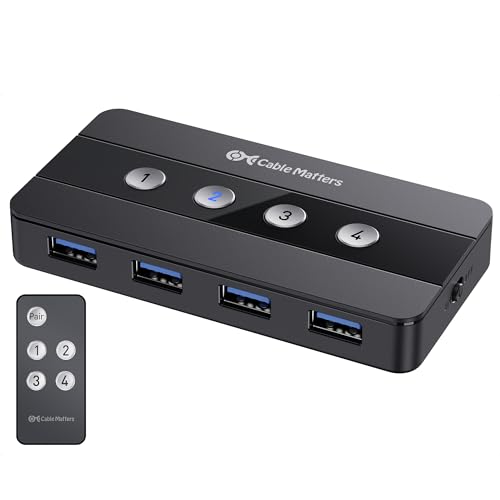 Cable Matters USB 4-Port Switch
|
Mid-Range | Share 4 USB peripherals between 4 hosts | Labs or multi‑host editing setups | Check Price | ||
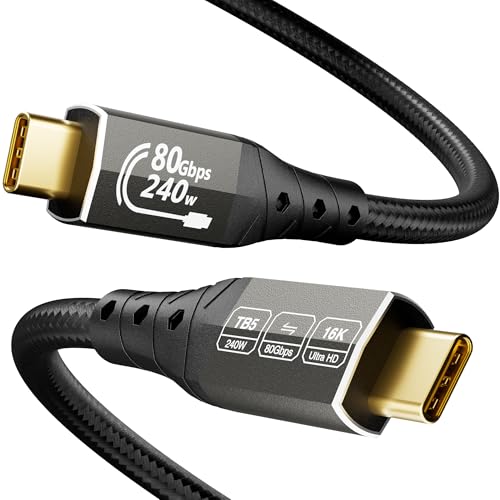 ZIKNYDO 16K TB5 Cable
|
Premium | 80Gbps data + 120Gbps video, 240W PD | High-res editing, eGPU and multi‑monitor setups | Check Price | ||
![Cable Matters [Intel Certified] 80Gbps Thunderbolt 5 Cable with up to 120Gbps Bandwidth Boost and 240W Charging - 1m / 3.3ft, Compatible with Thunderbolt 4, USB4, and USB C, White](/assets/images/products/B0CP8JDXL2.jpg) Cable Matters TB5 Cable
Cable Matters TB5 Cable
|
Budget | Intel-certified TB5 — 80Gbps + 240W PD | Budget-conscious TB5 users who need certified compatibility | Check Price |
1. Cable Matters 4 Port USB 3.0 Switch USB Sharing Switch for 4 Computers and USBA Peripherals - Button or Wireless Remote Control Switching - Includes a USBC Adapter for USBC USB4 and Thunderbolt 4
Not a video cable, but indispensable if you need to share USB drives, keyboards and mice across multiple computers. Supports USB 3.0 (up to 5Gbps), includes a USB-C adapter for USB-C/Thunderbolt hosts, and offers button or remote switching for quick workstation changes. Some users report intermittent device quirks, but it’s a space-saving, cost-effective sharing solution.
Key Specs
- Supports up to 4 host computers
- USB 3.0 speeds up to 5Gbps (backward compatible with USB 2.0)
- Includes USB-C to USB-A adapter for USB-C/Thunderbolt 3 compatibility
- Remote control + front panel button switching; optional AC power
Pros
- Better peripheral sharing than single cables — ideal for swapping drives between machines
- Includes USB-C adapter, making it more versatile than USB-A only solutions
- More space- and cost-efficient than buying multiple docks for a shared lab setup
Cons
- Not suitable for high-bandwidth video or monitor passthrough like Thunderbolt cables
- Some users report intermittent connectivity or remote control lag compared with direct cable connections
Best For: Labs or multi‑host editing setups
Check Latest Price on Amazon2. 16K for Thunderbolt 5 Cable 6.6FT/2m, USB C 80Gbps Data Transfer, 120Gbps Bandwidth for 16K/Dual 8K Displays, PD3.1 240W Charging for Thunderbolt 4, MacBook M4, eGPU, Mac mini M4 Pro, Monitor
A feature-rich cable aimed at intensive creative workflows: 80Gbps bi-directional data, 120Gbps video bandwidth (DP2.1), support for one 16K or multiple 8K displays, and PD3.1 up to 240W. The 2m length and reinforced braided core make it practical for a student workstation. It’s premium‑tier hardware built for demanding display and external GPU setups.
Key Specs
- 80Gbps bi-directional data transfer
- Up to 120Gbps video bandwidth with DP2.1 — supports single 16K or dual 8K displays
- PD3.1 charging up to 240W; 15W reverse power
- Enhanced build: tensile core, aluminum housings, 24K gold-plated plugs, 48-strand braid
Pros
- Better multi-monitor and eGPU support than the USB switch for editing and color grading
- Longer 2m length and reinforced braid offer better physical durability than short, thin cables
- Higher power delivery than many USB-C cables — great for charging powerful laptops
Cons
- Premium price tier compared with budget TB5 cables
- Newer naming/standards can confuse compatibility expectations for some devices
Best For: High-res editing, eGPU and multi‑monitor setups
Check Latest Price on Amazon3. Cable Matters [Intel Certified] 80Gbps Thunderbolt 5 Cable with up to 120Gbps Bandwidth Boost and 240W Charging - 1m / 3.3ft, Compatible with Thunderbolt 4, USB4, and USB C, White
Intel-certified Thunderbolt 5 cable offering 80Gbps data, up to 120Gbps video bandwidth and 240W PD in a compact 1m length. It’s a cost-conscious way to get TB5/USB4 performance, with broad compatibility promised by certification. Some users note mixed experiences on recognition with certain Macs, but overall it’s a pragmatic budget TB5 choice.
Key Specs
- 80Gbps bi-directional data transfer
- Up to 120Gbps video bandwidth; dual 6K/8K or triple 4K @144Hz support
- PD3.1 charging up to 240W
- Intel certification and backward compatibility with Thunderbolt 4/3 and USB4
Pros
- More affordable TB5 option than ZIKNYDO while offering similar headline specs
- Intel certification helps ensure interoperability with a wide set of devices
- Compact 1m length is convenient for laptop-to-dock setups
Cons
- Shorter 1m length than the ZIKNYDO 2m cable, limiting flexibility on some desks
- Some users report occasional compatibility quirks on specific Macs compared with other cables
Best For: Budget-conscious TB5 users who need certified compatibility
Check Latest Price on AmazonWhich One Should You Choose?
If raw throughput for heavy editing and multi‑monitor grading is your priority, buy the ZIKNYDO 16K for Thunderbolt 5 Cable (B0FCMSRJ2J). Its 80Gbps data, 120Gbps video bandwidth and 240W PD plus a 2m braided build make it the most practical premium pick for a student editing station.
If budget is tight but you still want certified Thunderbolt 5 performance for fast external SSDs and a simple dock, choose the Cable Matters 80Gbps Thunderbolt 5 Cable (B0CP8JDXL2). It’s the best value route to TB5/USB4 features though in a shorter 1m length.
If your lab or classroom setup requires sharing drives, keyboards or a single USB peripheral between multiple computers, pick the Cable Matters 4‑Port USB Switch (B083JKDNRJ). It’s not a video cable, but it’s the most efficient way to let several students access the same storage or peripherals without swapping cables.
Best for Specific Scenarios
- On‑campus editing with external NVMe SSD: ZIKNYDO (B0FCMSRJ2J) because its 80Gbps data speed and 2m length let you work from a laptop while keeping the drive on the desk.
- Budget single‑laptop to dock setup: Cable Matters TB5 (B0CP8JDXL2) because it provides certified TB5/USB4 speed and 240W PD in a compact, wallet‑friendly package.
- Computer lab or shared studio: Cable Matters 4‑Port Switch (B083JKDNRJ) because it lets multiple students quickly share the same USB drives and peripherals without repeatedly plugging cables in and out.
Frequently Asked Questions
Do Thunderbolt 5 and USB4 cables both support external NVMe SSD speeds?
Yes — modern TB5 and USB4 cables rated for 40–80Gbps or higher will support high-performance external NVMe SSDs. Check the cable’s advertised bi-directional data rate; 80Gbps cables will deliver the fastest real-world transfers for large media files.
Will these cables charge my laptop and run a monitor at the same time?
If the cable supports PD3.1 up to 240W and DP alt mode/DP2.1 video bandwidth (as listed for the TB5 cables), it can provide high-watt charging while passing video to monitors. Make sure your dock or host also supports simultaneous power delivery and display output.
Can I use a USB 3.0 switch to share a Thunderbolt SSD between computers?
You can share USB mass-storage devices if the SSD exposes a USB protocol and the switch supports the drive’s speed (USB 3.0 = 5Gbps). However, a USB switch cannot pass Thunderbolt or high-bandwidth TB5 links or multiple monitor signals — for fastest single‑user transfers you’re better off with a TB5/USB4 cable.
How We Selected These Products
Our recommendations are based on data-driven analysis: we evaluated 155229+ products across 23916+ brands using a composite scoring system that weighs rating (40%), review volume (30%), price value (20%), and demand signals (10%). Every product is ranked by data, not opinions.
Last updated: September 06, 2026
As an Amazon Associate we earn from qualifying purchases at no extra cost to you. Full disclosure.
GearLark Score is our editorial ranking based on a composite analysis of product quality, value, and verified customer sentiment. Click through to Amazon for current pricing, availability, and live customer reviews.