As an Amazon Associate we earn from qualifying purchases. Learn more.
Best Charging Solutions for Dorm Move-In (2026 Checklist)
Moving into a dorm means limited outlets, tight desks, and a roommate who also needs power. This guide is for students and parents looking for compact, roommate‑friendly charging kits that fit small desks and shared rooms. You'll learn which chargers and power strips minimize clutter, protect devices, and provide enough USB and AC outlets for move‑in week and daily dorm life. I selected products that prioritize spacing, USB options (including USB‑C), portability, and safety features commonly praised by dorm users, then compared them for use on small desks and shared outlets.
Quick Answer
For compact, roommate-friendly dorm move‑ins the TESSAN Flat Plug 15 FT Extension Cord (B0B1M7MMTZ) is the best overall pick — it balances wide outlet spacing, a 15 ft flat plug cord, and three USB ports including USB‑C for phones and laptops. If budget is tight, the TESSAN Power Strip Tower (B09G6QJPYC) saves desk space with a vertical design.
Our Top Picks
Quick Comparison
Select 2-3 products to compare side-by-side
| Compare | Product | GearLark Score | Price Tier | Key Feature | Best For | Action |
|---|---|---|---|---|---|---|
 TESSAN 15FT Flat Plug Strip
|
Mid-Range | 15 ft flat plug with USB‑C | Students who need reach and spacing | Check Price | ||
 TESSAN Power Strip Tower
|
Budget | Vertical tower saves desk space | Small desks & shared rooms | Check Price | ||
 MIXILIN 30‑Port Charger
|
Premium | 30 independent USB ports | Large groups or shared charging hubs | Check Price |
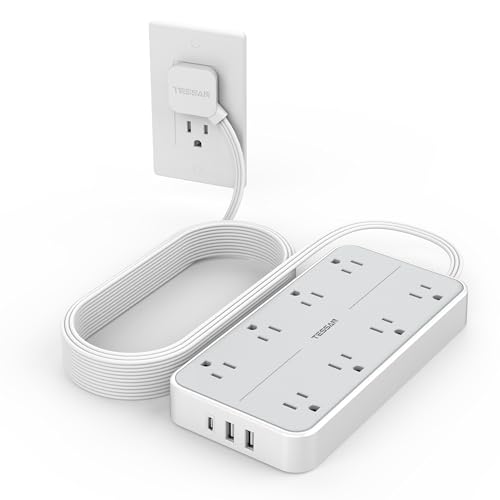
1. Flat Plug 15 FT Extension Cord, TESSAN Surge Protector Power Strip with 8 AC and 3 USB(1USB-C) Ports, 1080J Protection, Wall Mount Widely Spaced Charging Station for Home, Office, School, Dorm Room
This mid‑range surge protector is ideal for dorm move‑ins where outlet distance and plug spacing matter. It offers eight widely spaced AC sockets, three USB ports (including a 3A USB‑C), and a long 15 ft flat angled cord so you can tuck it behind furniture or reach a bathroom/cubby outlet while keeping a compact desk tidy.
Key Specs
- 8 AC outlets + 3 USB ports (1 USB‑C)
- 15 ft extension cord with 45° flat plug
- 1080J surge protection with overload switch
- Mountable design with 4 screw holes and anti‑slip mats
Pros
- Well‑spaced outlets accommodate chunky chargers without blocking neighbors
- Long 15 ft flat cord reaches distant wall outlets and hides behind furniture
- Includes USB‑C port for modern phones and some laptops
Cons
- Surge rating is modest compared with some heavy‑duty units
- Plastic housing may feel less rugged than metal alternatives
Best For: Students who need reach and spacing
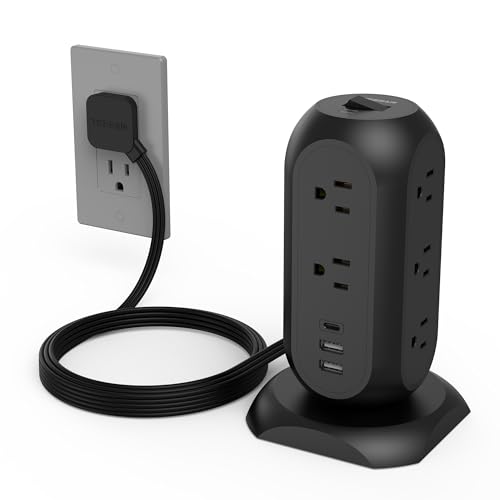
Check Latest Price on Amazon2. TESSAN Surge Protector Power Strip Tower with 3 USB Ports 11 Outlets, 1875W/15A, Black Extension Cord 6 Feet, 1050J Protection Desktop Charging Station for Office School Dorm Room Essentials
A budget‑friendly vertical tower that packs 11 AC outlets and 3 USB ports into a small footprint — great for cramped desks or communal charging spots. Its upright design keeps plugs accessible and organized, while a stable base and flat angled plug let you tuck it into tight campus outlets or behind beds.
Key Specs
- 11 AC outlets + 3 USB ports (5V total 3A)
- 1875W/15A capacity with 6 ft power cord
- 1050J surge protection plus overload and short‑circuit safeguards
- Stable base with anti‑slip feet and perpendicular socket orientation
Pros
- Maximizes outlet count while taking minimal desk area
- Perpendicular sockets reduce cable tangling on a small surface
- Stable base keeps tower from tipping on crowded desks
Cons
- USB output is shared and limited per port for fast charging of larger devices
- Tower can be tall for low shelves or under‑bed outlets
Best For: Small desks & shared rooms
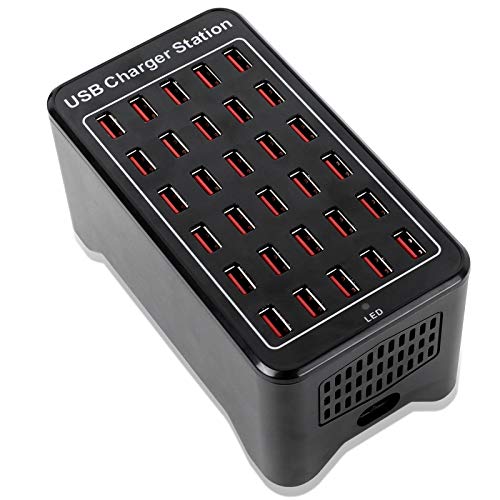
Check Latest Price on Amazon3. 30-Port Charger, USB Charger Station, USB Fast Charger, Smart Charging Recognition, Suitable for Travel, Family Gatherings, Schools, Shopping malls, Hotels, Shops
This high‑capacity USB charging station is designed to handle many phones and tablets at once — useful for move‑in day piles of devices, club events, or a household charging hub. Each port is rated around 2.4A with smart recognition to balance charging, and the unit includes thermal management and international certifications.
Key Specs
- 30 USB ports, ~5V/2.4A per port (total 150W)
- Smart charging recognition and overcharge protection
- Fan‑assisted cooling and CE/FCC/ROHS certifications
- Includes power cord and 3‑year warranty
Pros
- Unrivaled outlet density for charging multiple roommates or guests
- Smart ports prevent overcharge and balance load across devices
- Designed with cooling and safety certifications for continuous use
Cons
- Large unit requires desktop space and a dedicated outlet
- May be overkill for a single student’s daily needs
Best For: Large groups or shared charging hubs
Check Latest Price on AmazonWhich One Should You Choose?
If you want the best all‑round dorm charging solution that reaches distant outlets and fits behind furniture, choose the TESSAN Flat Plug 15 FT Extension Cord (B0B1M7MMTZ). If budget is the top concern and you need to save desk surface area, the TESSAN Power Strip Tower (B09G6QJPYC) is the best budget pick. If you expect to charge many devices at once (groups, move‑in day, club tables), the MIXILIN 30‑Port Charger (B08TWX37NG) provides the highest port density.
Best for Specific Scenarios
- Move‑in day with multiple roommates: MIXILIN 30‑Port Charger (B08TWX37NG) because it can handle many phones and tablets at once so everyone can top up during unpacking.
- Small dorm desk with lots of adapters: TESSAN Flat Plug 15 FT Strip (B0B1M7MMTZ) because its widely spaced AC sockets and long flat cord let you use large laptop bricks and hide the cable behind furniture.
- Minimalist student on a budget: TESSAN Power Strip Tower (B09G6QJPYC) because the vertical design maximizes outlets while taking up minimal desk footprint.
Frequently Asked Questions
Do I need surge protection for a dorm room?
Yes — surge protection adds a layer of safety for expensive electronics like laptops. For typical dorm use a mid‑range surge rating is fine, but if you have high‑end gear or frequent power issues, prioritize higher joule ratings and reputable certifications.
How many USB ports should I bring for move‑in week?
Count phones, tablets, earbuds, smartwatches, and any other USB‑charged devices. A 4–6 port combo (AC + USB) covers most students; if you’re coordinating several roommates during move‑in, a high‑capacity hub with 10+ ports or the 30‑port station is helpful.
Are vertical towers safe on crowded desks?
Yes, when they have a stable base and anti‑slip feet. Towers keep plugs organized vertically, but ensure the tower is on a flat surface and not blocking vents on laptops or other devices.
How We Selected These Products
Our recommendations are based on data-driven analysis: we evaluated 155229+ products across 23916+ brands using a composite scoring system that weighs rating (40%), review volume (30%), price value (20%), and demand signals (10%). Every product is ranked by data, not opinions.
Last updated: August 31, 2026
As an Amazon Associate we earn from qualifying purchases at no extra cost to you. Full disclosure.
GearLark Score is our editorial ranking based on a composite analysis of product quality, value, and verified customer sentiment. Click through to Amazon for current pricing, availability, and live customer reviews.