As an Amazon Associate we earn from qualifying purchases. Learn more.
Best Compact Portable Monitors for Graduates & Remote Workers (2026)
Graduates living in dorms and remote workers who hop between coffee shops and flights need a second screen that's compact, light and quick to set up. This guide tests portable monitors that fit into backpacks and carry-ons, and focuses on features that matter to students and professionals: weight, battery life, phone compatibility, and ease of setup. We chose products based on portability, real-world connectivity (USB-C/HDMI behavior), build quality, and user feedback about durability and value.
Quick Answer
For graduates and remote workers who need a lightweight second screen on the go, the Dopesplay 15.6 inch Lapdock (ASIN B0DPKFK9GX) is the best overall thanks to its built-in keyboard, speakers and a 5000mAh battery. If you want the lightest travel-ready option pick the ASUS ZenScreen MB16ACV (B0966YYP65); for the best budget screen with a large display choose the cocopar 17.3" (B08NWTPZ3N).
Our Top Picks
Quick Comparison
Select 2-3 products to compare side-by-side
| Compare | Product | GearLark Score | Price Tier | Key Feature | Best For | Action |
|---|---|---|---|---|---|---|
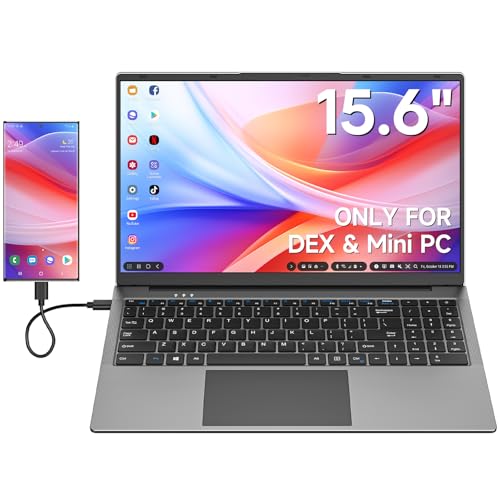 Dopesplay 15.6" Lapdock
|
Premium | Built-in keyboard + 5000mAh battery | Phone-to-laptop users and jetset grads | Check Price | ||
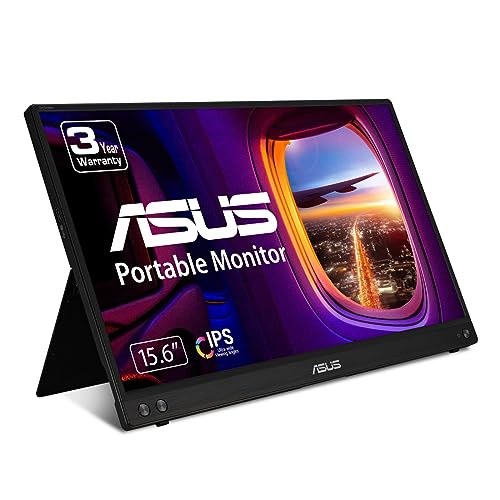 ASUS ZenScreen MB16ACV
|
Premium | Ultra-slim USB-C hybrid connection | Travel-focused grads & remote pros | Check Price | ||
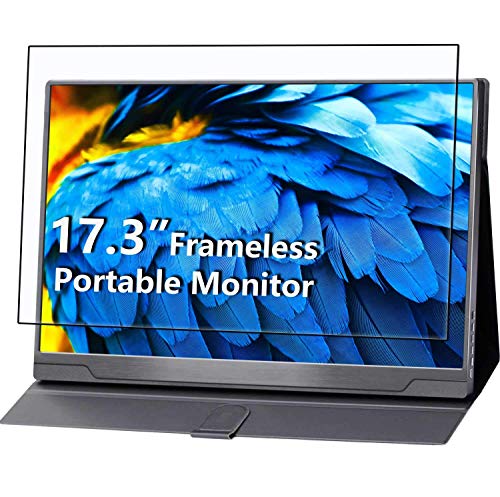 cocopar 17.3" Portable
|
Budget | Large 17.3" 100% sRGB panel | Students who want a big screen on a budget | Check Price |
1. 15.6 inch Lapdock for Samsung DeX and Mac mini, Lap Experience for Samsung Phone and Mini PC, Portable Monitor with Keyboard Compatible with S24/23, Z Fold 6/5, Note 20/10, Steam Deck - Grey
The Dopesplay Lapdock turns many phones and mini PCs into a laptop-like workspace with a built-in keyboard, trackpad and speakers — useful for students in dorms and remote workers who want a compact all-in-one second screen. Its internal 5000mAh battery and wide compatibility (DeX, Steam Deck, laptops) make it versatile for coffee shop work, though some buyers report mixed long-term reliability.
Key Specs
- 15.6" FHD 1080p IPS, 60Hz, HDR and low blue light
- Built-in keyboard & trackpad; double speakers
- 5000mAh internal battery with ~6+ hours and reverse charging
- Type-C for data (needs full-featured port for keyboard/trackpad); charges via included adapter
Pros
- All-in-one lapdock design removes need for separate keyboard
- Good picture quality and HDR mode for media and presentations
- 5000mAh battery can charge your phone on the go
Cons
- Type-C port limitations — keyboard/trackpad need a full-featured USB-C
- Some reports of intermittent functionality and long-term durability
Best For: Phone-to-laptop users and jetset grads
Check Latest Price on Amazon2. ASUS ZenScreen 15.6 1080P Portable Monitor (MB16ACV) - Full HD, IPS, Eye Care, Flicker Free, Blue Light Filter, Kickstand, USB-C Power Delivery, for Laptop, PC, Phone, Console
ASUS packs a slim, featherlight 15.6" IPS display with a hybrid USB-C connection and a built-in kickstand that works in portrait or landscape — ideal for backpack commuters and coffee-shop work sessions. The ZenScreen emphasizes eye-care tech and portability, though a few users caution about the kickstand durability and occasional USB-C quirks with certain laptops or phones.
Key Specs
- 15.6" Full HD anti-glare IPS panel
- Hybrid-signal USB-C supports power + video (single-cable)
- Kickstand for portrait or landscape; tripod hole compatible
- TÜV Rheinland-certified flicker-free and low blue light
Pros
- Extremely lightweight and thin — perfect for carry-ons
- Single USB-C cable setup for many modern laptops and phones
- Eye-care features reduce fatigue during long study sessions
Cons
- Kickstand durability has been questioned by some users
- USB-C behavior can vary; needs a full-featured port for single-cable use
Best For: Travel-focused grads & remote pros
Check Latest Price on Amazon3. cocopar Portable Monitor 17.3 Inch 1080P FHD IPS 100% sRGB FreeSync USB-C Gaming Monitor with Type-C Mini HDMI for Xbox Laptop PC Mac Surface with VESA Mount (Renewed)
If you want the biggest screen for spreadsheets, remote lectures and split-screen work without paying top-tier prices, the cocopar 17.3" delivers strong color coverage, FreeSync and a sturdy aluminum frame. It's heavier than 15.6" options but offers excellent value and ports (USB-C + mini HDMI + VESA), making it a practical dorm-room monitor and a cost-conscious travel companion if you don't mind the extra size.
Key Specs
- 17.3" FHD 1920x1080 IPS, 100% sRGB, HDR and FreeSync
- USB-C single-cable for power+display (DP Alt Mode) and mini HDMI
- Aluminum alloy frame, VESA mount compatible, smart folding case
- Built-in dual speakers and multiple display modes
Pros
- Big, color-accurate screen for multitasking and media
- Great value for the feature set and ports
- Durable aluminum frame and VESA compatibility
Cons
- Larger and heavier — less pocketable for daily carry
- Renewed units vary; check warranty and condition on purchase
Best For: Students who want a big screen on a budget
Check Latest Price on AmazonWhich One Should You Choose?
If budget is tight → cocopar 17.3" (B08NWTPZ3N) for the biggest screen and best value. If you need the lightest daily carry → ASUS ZenScreen MB16ACV (B0966YYP65). If you want an all-in-one lapdock with keyboard, speakers and onboard battery → Dopesplay 15.6" Lapdock (B0DPKFK9GX).
Best for Specific Scenarios
- Late-night study sessions in a dorm: ASUS ZenScreen MB16ACV because its eye-care features and lightweight profile make it comfortable for long use and easy to stash in a dorm closet.
- Coffee-shop client calls and presentations: Dopesplay 15.6" Lapdock because the built-in keyboard, speakers and battery let you set up a polished workspace without carrying extra peripherals.
- Budget-conscious split-screen productivity: cocopar 17.3" because the larger 17.3" panel gives more real estate for spreadsheets, slides and multitasking at a lower price.
Frequently Asked Questions
Will these monitors work with my phone?
Many modern phones support video output via USB-C (DisplayPort Alt Mode) or specific modes like Samsung DeX. Check your phone’s specs for 'video output over USB-C' or 'DeX' support. Some monitors also require a full-featured USB-C to enable keyboard/trackpad features; otherwise you may need an adapter or a secondary cable.
Do I need a power adapter or will the monitor run from my laptop alone?
It depends. Slim hybrid USB-C models (like the ASUS ZenScreen) can run from a single USB-C cable with power delivery if your laptop supplies enough power. Larger or feature-rich units (and some lapdocks) may require their included adapter or have built-in batteries to avoid draining your laptop.
Are these easy to carry on flights and in a backpack?
Yes — 15.6" monitors are designed for backpacks and carry-ons and usually fit in padded sleeves. 17.3" options offer more screen area but are heavier and bulkier. Look for a durable case or smart cover and aluminum frames if you plan frequent travel.
How We Selected These Products
Our recommendations are based on data-driven analysis: we evaluated 155229+ products across 23916+ brands using a composite scoring system that weighs rating (40%), review volume (30%), price value (20%), and demand signals (10%). Every product is ranked by data, not opinions.
Last updated: June 23, 2026
As an Amazon Associate we earn from qualifying purchases at no extra cost to you. Full disclosure.
GearLark Score is our editorial ranking based on a composite analysis of product quality, value, and verified customer sentiment. Click through to Amazon for current pricing, availability, and live customer reviews.