As an Amazon Associate we earn from qualifying purchases. Learn more.
Best Compact Portable Monitors for Grads Working Remotely (2026)
Just graduated and starting remote work? A compact portable monitor is one of the quickest productivity boosters you can buy — extra screen space makes multitasking, interviews, and coding far easier. In this guide I reviewed six lightweight, travel-friendly external displays that suit a graduate's budget and lifestyle. Products were selected for portability, connectivity (USB-C/HDMI), build quality, and real-world ease of use reported by customers — with a focus on what recent grads need most: value, battery-free plug-and-play workflows, and durable travel-ready materials.
Quick Answer
For most new grads working remotely, the cocopar Portable Monitor Dual 15.6 Inch (ASIN B0CDLGXWNW) is the best pick for expanding screen real estate on the go thanks to its dual 15.6" FHD panels and built-in speakers. If you want the cheapest ultra-light option, choose the ForHelp 14" FHD1200P (ASIN B0D7PVJGVQ).
Our Top Picks
Quick Comparison
Select 2-3 products to compare side-by-side
| Compare | Product | GearLark Score | Price Tier | Key Feature | Best For | Action |
|---|---|---|---|---|---|---|
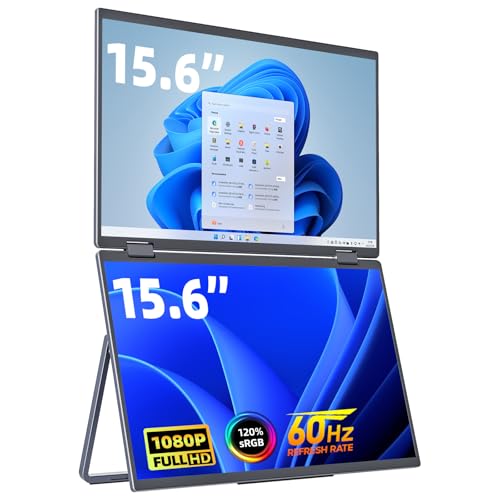 cocopar Dual 15.6"
|
Premium | Foldable dual 15.6" FHD displays | Grads who multitask and share screens | Check Price | ||
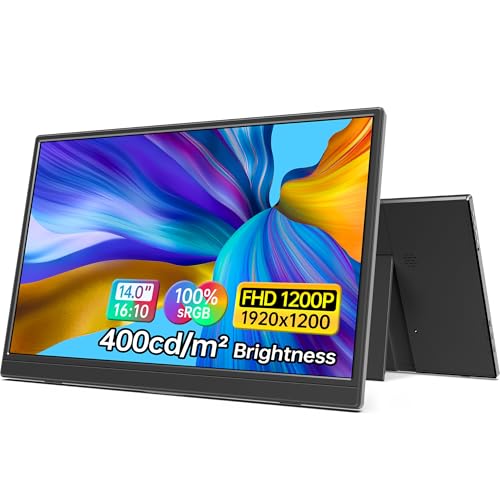 ForHelp 14" FHD1200P
|
Budget | Ultra-light 14" 1920x1200 IPS | Graduates on a tight budget who travel | Check Price | ||
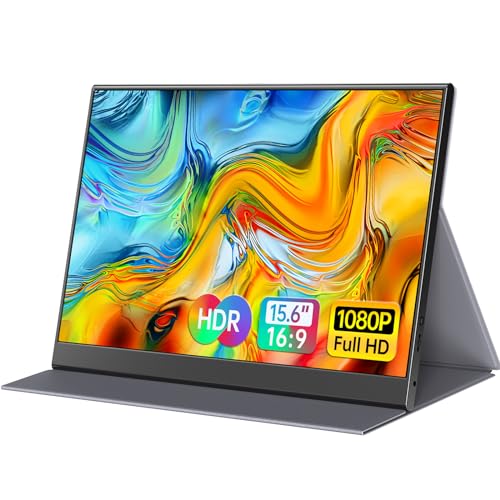 ForHelp 15.6"
|
Budget | Aluminum body with PU leather smart cover | Grads who want balance of size and portability | Check Price | ||
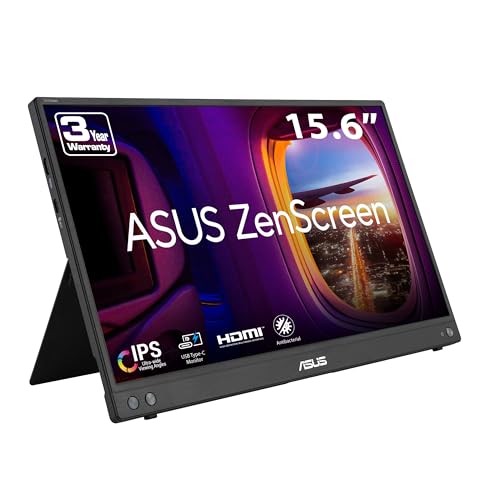 ASUS ZenScreen 16
|
Mid-Range | Slim 15.6" design with dual USB-C ports | Grads needing a lightweight, reliable second screen | Check Price | ||
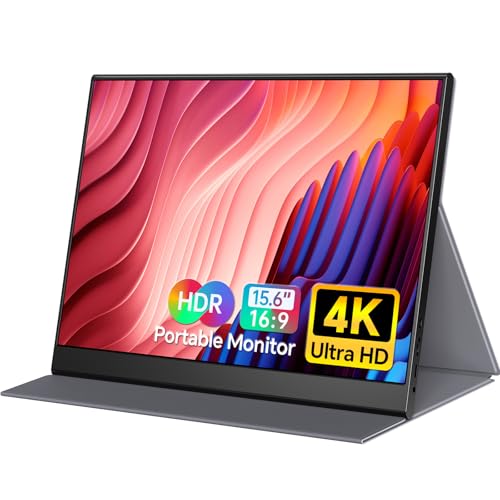 Yxk 15.6" 4K
|
Premium | 15.6" 4K UHD IPS with HDR | Grads who need high-res photo/video work | Check Price | ||
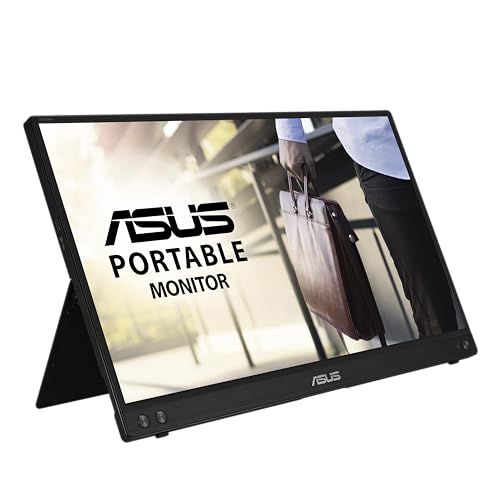 ASUS ZenScreen MB16ACVR
|
Mid-Range | USB-C hybrid-signal single-cable connection | Grads who value simplicity and eye care | Check Price |
1. cocopar Portable Monitor Dual 15.6 Inch 1080P Travel Monitor with Speaker HDMI USB-C External Display for Laptop MacBook Surface PC Xbox PS4/5, VESA Mountable, with Stand
A foldable dual-screen portable monitor that expands to a 23.8" dual display, offering FHD IPS panels, HDR, and built-in speakers. It’s heavier than single-panel options but gives recent grads the multitasking power of two monitors in a single travel-friendly package.
Key Specs
- Two 15.6" FHD (1920x1080) IPS panels
- 120% color gamut, HDR, Low Blue Light
- Built-in speakers and 4 VESA mounting holes
- Integrated adjustable kickstand; weighs 3.26 lbs
Pros
- Dual-screen setup in one lightweight foldable unit
- Good color and clear built-in speakers for calls
- Foldable design fits into a laptop bag for travel
Cons
- Requires a driver on first setup (adds setup step)
- Heavier and thicker than single-panel monitors
Best For: Grads who multitask and share screens
Check Latest Price on Amazon2. 14 Inch Portable Monitor FHD1200P Ultra-Slim for Laptop Monitor, USB-C&HDMI Plug&Play,100% SRGB,Dual Speakers Extender Display. Built-in Stand,for Laptop,PC Phone Xbox PS4/5
Extremely portable and affordable, this 14" monitor delivers a 1920x1200 matte IPS panel with 100% sRGB and two full-feature USB-C ports for plug-and-play use. Customers highlight its picture quality and value — it’s ideal for grads packing light and needing a reliable second screen.
Key Specs
- 14" FHD+ 1920x1200 IPS matte display
- 100% sRGB, 400 cd/m² brightness
- Two full-feature USB-C ports + Mini HDMI
- Weight: ~1.15 lbs; built-in stand and case
Pros
- Very lightweight and easy to slip into a backpack
- Excellent value for the price and clear picture
- Simple plug-and-play setup with USB-C
Cons
- Requires device support for USB-C DP Alt Mode
- Smaller screen may feel cramped for heavy multitasking
Best For: Graduates on a tight budget who travel
Check Latest Price on Amazon3. 15.6inch Portable Monitor,1080P USB-C HDMI Second External Monitor for Laptop,PC,Mac Phone,PS,Xbox,Swich,IPS Ultra-Thin Zero Frame Gaming Display/Premium Smart Cover
A roomy 15.6" FHD portable monitor built with an aluminum alloy body and a durable PU leather smart cover that doubles as a stand. It’s a budget-friendly choice that balances screen real estate and carry convenience for remote work or student projects.
Key Specs
- 15.6" FHD 1920x1080 IPS display
- Aluminum alloy body; weight ~1.52 lbs
- 2 full-feature Type-C ports + Mini HDMI
- Magnetic smart cover made of PU leather
Pros
- Sturdy aluminum construction feels premium
- Smart cover protects and propping for multiple angles
- Good picture quality and easy setup
Cons
- USB-C features require DP Alt Mode / Thunderbolt support
- Cover offers limited angle adjustment compared to some stands
Best For: Grads who want balance of size and portability
Check Latest Price on Amazon4. ASUS ZenScreen 16 (15.6 inch viewable) 1080P USB-C Portable Monitor (MB16AHV) - Full HD, IPS, Blue Light Filter, Anti-glare, Mini HDMI, Kickstand, Tripod Mountable, Protective Sleeve, 3 year warranty
A thin, travel-ready 15.6" FHD monitor from ASUS with anti-glare IPS, blue light filter, and two full-function USB-C ports for tidy cable management. Customers praise its portability and display quality, making it a dependable mid-range pick for remote work and interviews.
Key Specs
- 15.6" Full HD IPS anti-glare display
- Two full-function USB-C ports + Mini HDMI
- 10.5 mm slim profile; weight ~0.9 kg
- Tripod mountable and includes protective sleeve
Pros
- Very lightweight and easy to carry in a backpack
- Well-engineered display with eye-care features
- Good connectivity options for tidy setups
Cons
- Some compatibility quirks with certain phones or older USB ports
- A few users report mixed results on cable power behavior
Best For: Grads needing a lightweight, reliable second screen
Check Latest Price on Amazon5. Yxk 4K Portable Monitor 15.6" 3840x2160 UHD USB-C HDMI Laptop, 100% RGB IPS Computer Gaming Display HDR Travel Speakers & Smart Cover for Laptop Xbox PS5 Switch PC Phone
A premium 15.6" 4K portable monitor offering UHD resolution, 100% RGB coverage, HDR support, and a smart cover. It’s ideal for creative grads doing photo or video editing on the go, though 4K can demand more from laptops and cables.
Key Specs
- 15.6" 3840x2160 UHD IPS display
- 100% RGB color coverage; HDR support
- USB-C and HDMI connectivity; built-in speakers
- Includes smart cover for protection
Pros
- Exceptionally sharp 4K display for detailed work
- Lightweight and travel-friendly for a 4K unit
- Strong connectivity and easy setup reported
Cons
- 4K can be power-hungry and needs compatible ports/cables
- Higher price and may be overkill for basic office tasks
Best For: Grads who need high-res photo/video work
Check Latest Price on Amazon6. ASUS ZenScreen 15.6 1080P Portable Monitor (MB16ACVR) - Full HD, IPS, Eye Care, Flicker Free, Blue Light Filter, Kickstand, USB-C Power Delivery, for Laptop, PC, Phone, Console
This ZenScreen model emphasizes easy single-cable connections with hybrid-signal USB-C and integrated eye-care tech (flicker-free, low blue light). It’s a solid mid-range option for grads who want a reliable travel monitor, though some users report mixed sturdiness in the kickstand area over long-term use.
Key Specs
- 15.6" Full HD IPS anti-glare display
- Hybrid-signal USB-C for power and video
- TUV-certified eye-care tech (flicker free, low blue light)
- Includes sleeve and tripod compatibility
Pros
- Simple single-cable setup with many laptops
- Comfort-focused display for long remote work sessions
- Good portability and packable sleeve
Cons
- Some reports of back support or stand durability issues
- USB-C behavior can vary between devices
Best For: Grads who value simplicity and eye care
Check Latest Price on AmazonWhich One Should You Choose?
If budget is tight → ForHelp 14 Inch FHD1200P (ASIN B0D7PVJGVQ). It’s lightweight, inexpensive, and excellent for basic remote work. If you need the most portable, reliable daily driver → ASUS ZenScreen 16 (ASIN B0CGGLZ8YT) for its slim profile, two USB-C ports, and eye-care tech. If you want maximum multitasking or a mobile dual-monitor setup → cocopar Portable Monitor Dual 15.6 Inch (ASIN B0CDLGXWNW) gives you two full 15.6" panels in one foldable device. If you’re doing creative work and need high resolution → Yxk 4K 15.6" (ASIN B0DG2WCS8M) excels at detail but requires compatible ports and cables.
Best for Specific Scenarios
- Remote job interviews & presentations: ASUS ZenScreen 16 (B0CGGLZ8YT) because its anti-glare panel, blue-light filter, and tidy cable management help you look professional on video and avoid reflections during screen shares.
- Managing multiple apps while freelancing: cocopar Dual 15.6" (B0CDLGXWNW) because the foldable dual displays let you keep a reference document and an editor/chat window open at once without carrying two separate monitors.
- Lightweight student-to-professional commute: ForHelp 14" (B0D7PVJGVQ) because it’s the smallest, lightest, and best value for grads who move between dorms, apartments, and cafés.
Frequently Asked Questions
Do portable monitors need a power adapter or battery?
Most portable monitors draw power from your laptop via USB-C (requires DP Alt Mode or Thunderbolt). Some higher-resolution or dual-screen models may need an external power source or a second cable — check the product's connectivity details before buying.
Will a portable monitor work with my phone or tablet?
Possibly—if your phone or tablet supports USB-C video output (DisplayPort Alt Mode) or the monitor accepts HDMI and your device can output via an adapter. Check device specs for video-over-USB support.
Which size is best for productivity when working remotely?
15.6" is the sweet spot for most grads: large enough for comfortable multitasking but still portable. Choose 14" only if you prioritize the lightest possible carry; pick 4K if you need pixel-level detail for creative work.
How We Selected These Products
Our recommendations are based on data-driven analysis: we evaluated 155229+ products across 23916+ brands using a composite scoring system that weighs rating (40%), review volume (30%), price value (20%), and demand signals (10%). Every product is ranked by data, not opinions.
Last updated: June 19, 2026
As an Amazon Associate we earn from qualifying purchases at no extra cost to you. Full disclosure.
GearLark Score is our editorial ranking based on a composite analysis of product quality, value, and verified customer sentiment. Click through to Amazon for current pricing, availability, and live customer reviews.