As an Amazon Associate we earn from qualifying purchases. Learn more.
Best Low-Light Webcams for Parents Hosting Holiday Calls (2026 Guide)
If your living room turns into a soft, warm-but-dim holiday scene, standard laptop webcams often produce dark, grainy faces on video calls with grandparents. This guide is written for parents hosting holiday calls who want better picture quality without hauling extra lamps or setting up complex lighting. You'll get four tested options — two webcams, one webcam+light combo and one clip-on light — chosen for low-light performance, ease of use, and family-friendly features like automatic framing and plug-and-play setup. We selected devices based on sensor sensitivity, built-in low-light correction, microphone usefulness for noisy homes, and real-user feedback about durability and value.
Quick Answer
For most parents who want clear holiday video calls in dim living rooms, the OBSBOT Tiny PTZ 4K is the best all-around pick for 4K HDR, AI low-light correction and hands-free framing. If you need a lower-cost, ultra-sensitive option, the SVPRO 1080P (0.01 lux) delivers surprisingly good low-light capture for the price.
Our Top Picks
Quick Comparison
Select 2-3 products to compare side-by-side
| Compare | Product | GearLark Score | Price Tier | Key Feature | Best For | Action |
|---|---|---|---|---|---|---|
 SVPRO 1080P Low-Light
|
Budget | Ultra low-light sensitivity (0.01 lux) | Budget-conscious parents in dim rooms | Check Price | ||
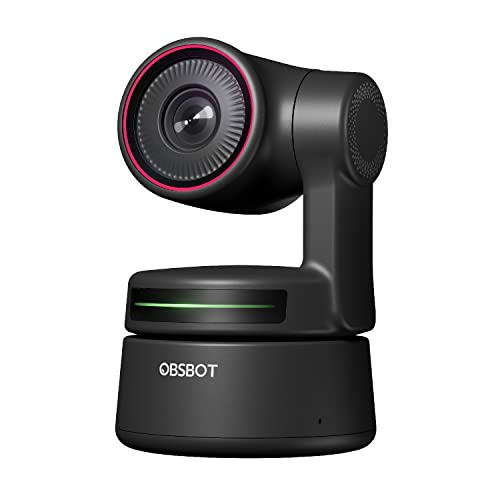 OBSBOT Tiny PTZ 4K
|
Premium | 4K HDR with AI low-light correction | Parents who want premium image + auto-framing | Check Price | ||
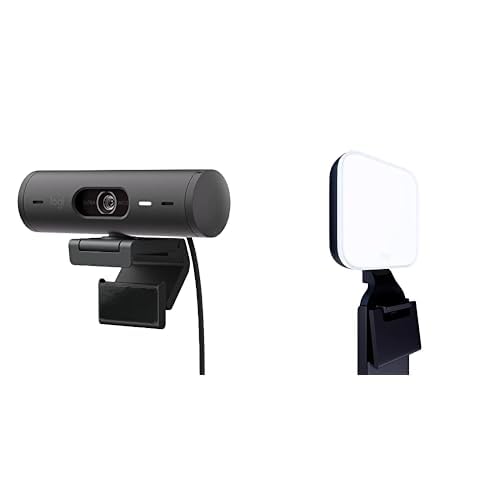 Logitech Brio 501 + Litra
|
Premium | Built-in Litra Glow soft LED lighting | Parents wanting simple, flattering light | Check Price | ||
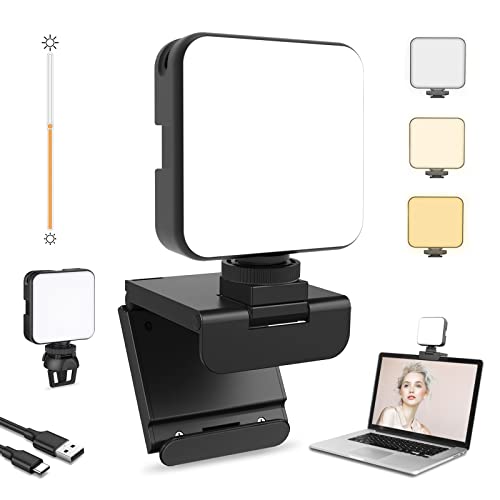 NexiGo Glow Clip Light
|
Budget | Clip-on dimmable LED, 2500K–6500K | Parents wanting portable, lamp-free fill light | Check Price |
1. SVPRO USB Web Camera 1080P Full HD Webcam with Zoom Lens, 5-50mm Telephoto Webcam Manual Focus with Sony IMX323 Sensor, H.264 0.01lux Low Light Camera for Industrial Machine Vision,UVC Free Drive
The SVPRO is a budget-friendly, ultra-low-light webcam with a Sony IMX323 sensor and a 5–50mm manual varifocal lens that delivers usable video in very dark living rooms without extra lamps. It fits parents who prioritize value and extreme low-light capture and who don't mind manual focus or occasional color quirks.
Key Specs
- Sensor: Sony IMX323, 2MP (1920x1080) at 30fps
- Low-light sensitivity: 0.01 lux
- Lens: 5–50mm varifocal, 10x optical zoom, manual focus
- Interface: USB2.0, UVC plug-and-play
Pros
- Exceptionally sensitive to very low light — good for dim holiday living rooms
- Optical zoom and varifocal lens for flexible framing
- Strong value for money and compact aluminum build
Cons
- Manual focus can be fiddly for parents juggling kids and calls
- Mixed color reproduction; skin tones may need adjusting
Best For: Budget-conscious parents in dim rooms
Check Latest Price on Amazon2. OBSBOT Tiny PTZ 4K Webcam, AI Powered Framing & Autofocus, 4K Video Conference Camera with Dual Omni-Directional Microphones, Auto tracking with 2 axis gimbal,HDR,60 FPS,Low-Light Correction,Streaming
The OBSBOT Tiny PTZ 4K balances high-resolution imaging, HDR and AI-powered low-light correction — great for parents who move during calls, host multi-room sessions, or want a hands-free setup while managing kids. Its tracking and clear picture keep faces centered and visible even when the room lighting is soft.
Key Specs
- Resolution: 4K, up to 60 fps
- Sensor: Sony 1/2.8" with HDR and auto low-light correction
- Controls: AI tracking, gesture control, 2-axis gimbal
- Audio: Dual omni-directional microphones with noise reduction
Pros
- Outstanding image clarity and HDR-based low-light improvement
- Auto-framing/AI tracking keeps you centered during lively family calls
- Easy plug-and-play setup with gesture controls
Cons
- Premium price and mixed reports about long-term durability
- Some users find zoom and optical features inconsistent
Best For: Parents who want premium image + auto-framing
Check Latest Price on Amazon3. Logitech Brio 501 Full HD Webcam with Auto Light Correction + Litra Glow Premium LED Streaming Light with TrueSoft, adjustable monitor mount
This bundle pairs a reliable Full HD webcam with an integrated Litra Glow LED light that produces flattering, soft illumination — ideal for parents who want a natural, warm on-screen look without setting up room lamps. The combo simplifies setup and gives balanced skin tones in dim living rooms.
Key Specs
- Resolution: Full HD 1080p with RightLight 4 auto correction
- Lighting: Litra Glow adjustable TrueSoft LED
- Framing: Auto-framing (RightSight)
- Mount: 3-way adjustable monitor mount
Pros
- Includes a wide, soft LED diffuser that flatters faces in low light
- Auto light correction reduces fiddling with settings
- Well-engineered mounting and ease of setup
Cons
- Higher price tier for a 1080p camera instead of 4K
- Some users report occasional platform compatibility quirks
Best For: Parents wanting simple, flattering light
Check Latest Price on Amazon4. NexiGo Glow Light for Streamers, Enhanced Video Conference Lighting Kit with Webcam Style Clip, Built-in Battery, Dimmable & Rechargeable, for Streaming, Photography, Vlogging
The NexiGo Glow is a compact clip-on LED with adjustable color temperature and battery power — a simple way for parents to add flattering fill light to laptops during evening family calls. It’s portable and inexpensive, but clip stability and battery longevity can vary.
Key Specs
- LED units: 64 dimmable LEDs, 2500K–6500K
- Power: Built-in 2000mAh rechargeable battery or USB power
- Mount: Webcam-style clip fits thin monitors and laptops
- Weight: ~0.4 lb, portable with carrying bag
Pros
- Affordable, bright, and adjustable color temp for cozy holiday tones
- Battery-powered for quick setups without room lamps
- Lightweight and easy to clip on and remove
Cons
- Clip stability and long-term battery/charging reliability reported inconsistent
- Not a camera — pairs with your existing webcam and needs positioning
Best For: Parents wanting portable, lamp-free fill light
Check Latest Price on AmazonWhich One Should You Choose?
If budget is tight → SVPRO USB Web Camera (B08YRCCPWD) is the best low-light value and will give surprisingly usable video in dim rooms. If you want a portable light to carry between rooms → NexiGo Glow (B09J8R8RWZ) is small, battery-powered and quick to clip on. If premium image, AI framing and hands-free use matter → OBSBOT Tiny PTZ 4K (B09MVVVWS8) is the most capable overall. If you prefer a plug-and-play 1080p camera with flattering built-in LED lighting → Logitech Brio 501 + Litra Glow (B0BXG3THZY) is ideal for natural skin tones without extra lamps.
Best for Specific Scenarios
- Multigenerational evening calls: Logitech Brio 501 + Litra Glow because its soft TrueSoft LED produces flattering, natural skin tones for grandparents joining from dim rooms.
- Parents who move around while chatting: OBSBOT Tiny PTZ 4K because AI auto-framing and tracking keep you centered while you juggle kids and snacks.
- Quick, no-setup lighting for last-minute calls: NexiGo Glow Clip Light because it clips to a laptop and runs on battery, giving instant fill without turning on room lamps.
- Lowest-cost improvement in very dark living rooms: SVPRO 1080P because its 0.01 lux sensitivity captures faces in near-dark conditions where typical webcams fail.
Frequently Asked Questions
Will these webcams make my dim living room look bright without extra lamps?
Webcams with auto low-light correction and HDR (like OBSBOT) or a built-in diffuser light (Logitech + Litra) will significantly improve visibility without additional room lamps. Clip-on lights (NexiGo) add direct, adjustable fill when needed. Results vary by how dim the room is and the camera’s sensor — extremely low-light scenes may still be improved most by adding even a small directional light.
Do I need a separate microphone for family holiday calls?
For casual family calls, the built-in mics on OBSBOT and many webcams are usually fine, especially models with noise reduction. If you want crisper audio for a larger group or plan to record, a dedicated USB microphone or a small lavalier will make a noticeable improvement.
Are these plug-and-play for Windows and Macs?
Most of the reviewed webcams use UVC/USB standards and are plug-and-play on current Windows and macOS systems. The SVPRO and OBSBOT advertise broad compatibility; Logitech products are widely compatible but check any platform notes in the product listing. Clip-on lights like NexiGo typically use USB power and require no drivers.
How We Selected These Products
Our recommendations are based on data-driven analysis: we evaluated 155229+ products across 23916+ brands using a composite scoring system that weighs rating (40%), review volume (30%), price value (20%), and demand signals (10%). Every product is ranked by data, not opinions.
Last updated: October 07, 2026
As an Amazon Associate we earn from qualifying purchases at no extra cost to you. Full disclosure.
GearLark Score is our editorial ranking based on a composite analysis of product quality, value, and verified customer sentiment. Click through to Amazon for current pricing, availability, and live customer reviews.