As an Amazon Associate we earn from qualifying purchases. Learn more.
Best Low-Light Webcams for Cozy Winter Video Calls (2026 Best Roundup)
As winter evenings get longer, many of us are left making video calls from dim, lamp-lit rooms. This guide highlights webcams and companion lights that perform well in low-light, cozy environments—so you look natural without blasting your space with harsh light. You should read this if you want better video quality for remote meetings, streaming, or casual calls from bedrooms and living rooms. Products were selected for low-light imaging, ease of setup, mic performance, build quality, portability and overall value, and each entry reflects real customer feedback about picture quality, functionality and durability.
Quick Answer
For the coziest low-light video calls the Logitech C925-E + Litra Glow bundle is the best all-around pick — it pairs a sharp 1080p webcam with Logitech's TrueSoft lighting for flattering, natural skin tones in dim rooms. Budget-minded users who need portable lighting should consider the NexiGo Glow light for its rechargeable clip-on design.
Our Top Picks
Quick Comparison
Select 2-3 products to compare side-by-side
| Compare | Product | GearLark Score | Price Tier | Key Feature | Best For | Action |
|---|---|---|---|---|---|---|
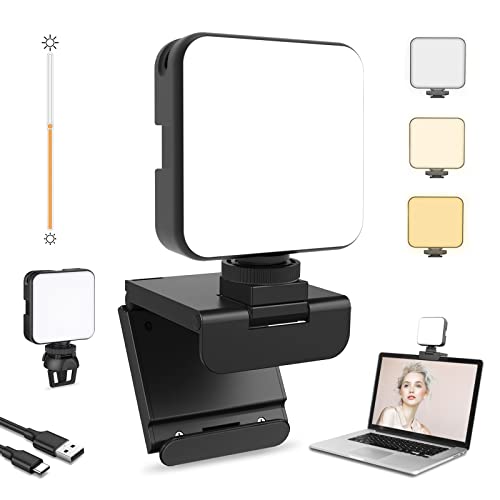 NexiGo Glow Light
|
Budget | Rechargeable, clip-on dimmable LED | Budget-friendly portable lighting | Check Price | ||
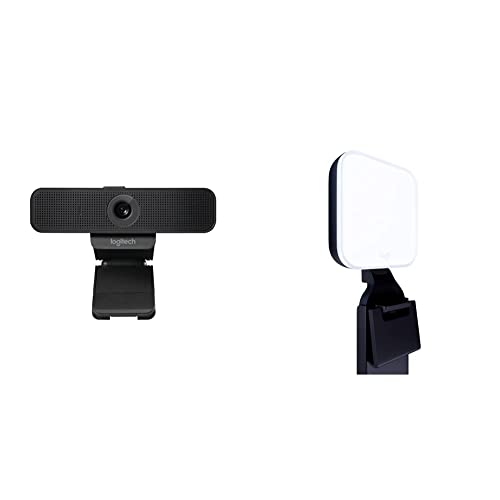 Logitech C925-E + Litra
|
Premium | TrueSoft light + 1080p webcam bundle | Natural skin tones in dim rooms | Check Price | ||
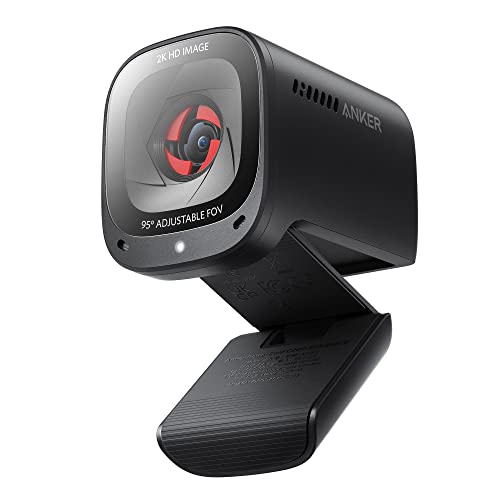 AnkerWork C200 (2K)
|
Mid-Range | 2K resolution with low-light correction | Portable high-res video calls | Check Price | ||
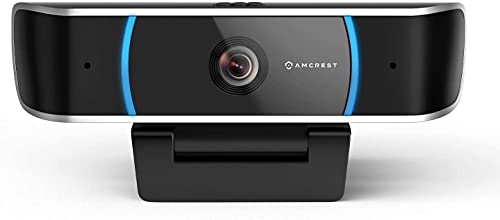 Amcrest 5MP Webcam
|
Budget | 5MP sensor for low-light detail | Higher-resolution budget webcam | Check Price |
1. NexiGo Glow Light for Streamers, Enhanced Video Conference Lighting Kit with Webcam Style Clip, Built-in Battery, Dimmable & Rechargeable, for Streaming, Photography, Vlogging
A lightweight, clip-on LED panel that brightens faces in dim rooms with adjustable color temperature and 64 dimmable LEDs. It’s an inexpensive way to dramatically improve video appearance without a full lighting setup, and the built-in battery makes it travel friendly.
Key Specs
- 64 dimmable LED units
- Color temp: 2500K–6500K
- Brightness range: 10%–100%
- Built-in 2000mAh battery; clip fits up to 0.33"
Pros
- Warm-to-cool color range for natural looks
- Firm clip mount for laptops and monitors
- Excellent value for a portable light
Cons
- Battery life and charging reliability are mixed
- Clip can be unstable on some monitors
Best For: Budget-friendly portable lighting
Check Latest Price on Amazon2. Logitech C925-E Webcam + Litra Glow Premium LED Streaming Light Bundle
Combines a sharp 1080p webcam with Logitech’s Litra Glow TrueSoft lighting, offering flattering, full‑spectrum illumination and reliable plug-and-play webcam performance. The bundle is well-suited to remote professionals and streamers who want a polished on-camera look without complex setup.
Key Specs
- Webcam: 1080p / 30fps; 78° FOV; autofocus
- Litra Glow: adjustable brightness and color temp
- H.264 encoding and broad app compatibility
- Adjustable monitor mount for the light
Pros
- Balanced, natural-looking light with TrueSoft tech
- Clear webcam image that outperforms many built-in cameras
- Easy setup and desktop app control for lighting
Cons
- Microphone/audio performance is mixed for some users
- Some compatibility issues reported after OS updates
Best For: Natural skin tones in dim rooms
Check Latest Price on Amazon3. AnkerWork Anker PowerConf C200 2K Webcam with Microphone for Laptop, Computer Camera, Web Camera with AI-Noise Canceling Mics, Stereo Mics, Adjustable Field of View, Low-Light Correction (Renewed)
A compact 2K webcam built for clearer video in lower light thanks to a larger aperture and software low-light correction. It includes AI noise-cancelling mics and an adjustable field of view, making it a strong pick for mobile workers and small home offices.
Key Specs
- 2K UHD resolution
- Adjustable FOV: 65° / 78° / 95°
- Built-in privacy cover
- AI noise-canceling dual microphones
Pros
- Excellent picture clarity in most lighting
- Privacy shutter and solid build feel
- Good mic performance with noise suppression
Cons
- Autofocus and some features receive mixed feedback
- Software feature set varies by platform
Best For: Portable high-res video calls
Check Latest Price on Amazon4. Amcrest 5-Megapixel Webcam with Microphone, Web Cam USB Camera, Computer HD Streaming Webcam for PC Desktop & Laptop w/Mic, Wide Angle Lens & Large Sensor for Superior Low Light (AWC5100)
A budget-friendly 5-megapixel webcam with a larger CMOS sensor designed to capture more light and deliver cleaner images in dim environments. Plug-and-play compatibility and a built-in privacy cover make it a practical choice for webinars and everyday calls.
Key Specs
- 5-megapixel CMOS 1/4" sensor
- Wide 65° viewing angle
- Built-in privacy cover
- Dual noise-reducing microphones; USB 2.0
Pros
- Sharp image and wider field of view for its price
- Easy plug-and-play setup across platforms
- Handy privacy shutter included
Cons
- Autofocus can be slow or hunt in low light
- Images can soften in very dim conditions without additional light
Best For: Higher-resolution budget webcam
Check Latest Price on AmazonWhich One Should You Choose?
If budget is tight → NexiGo Glow Light (B09J8R8RWZ) is a low-cost way to brighten cozy rooms without replacing your webcam. If you need a portable all-in-one webcam with great low-light correction → AnkerWork PowerConf C200 (B09YPRY6TB) balances resolution and portability. If premium quality and flattering light matter most → Logitech C925-E + Litra Glow bundle (B0B688C1ZZ) offers the most polished, natural look for dim environments.
Best for Specific Scenarios
- Cozy evening team calls: Logitech C925-E + Litra Glow because the TrueSoft light preserves warm skin tones while improving clarity.
- Working from cafes or switching rooms: AnkerWork C200 because its compact 2K sensor and adjustable FOV adapt well to changing light.
- Quick, budget lighting upgrade: NexiGo Glow Light because the rechargeable, clip-on LED instantly fixes dim camera images without complex setup.
Frequently Asked Questions
Do I need extra lighting if my webcam has low-light correction?
Low-light correction helps, but an external light usually produces the best, most natural-looking results. A small clip-on LED or soft-panel decreases noise and improves color more reliably than software alone.
Will these webcams work with my Mac or Windows PC?
Most modern webcams are plug-and-play with Windows and macOS; check product specs for any software features that are platform-specific. Bundled lights that use USB power typically work across systems without drivers.
How can I make my video look warm and cozy without looking washed out?
Use a light with adjustable color temperature and dial it toward warm (around 2700K–3500K), avoid pointing a bright white lamp directly at your face, and place the light slightly above or behind the camera for softer shadows. Reduce in-software overexposure to keep skin tones natural.
How We Selected These Products
Our recommendations are based on data-driven analysis: we evaluated 155229+ products across 23916+ brands using a composite scoring system that weighs rating (40%), review volume (30%), price value (20%), and demand signals (10%). Every product is ranked by data, not opinions.
Last updated: October 05, 2026
As an Amazon Associate we earn from qualifying purchases at no extra cost to you. Full disclosure.
GearLark Score is our editorial ranking based on a composite analysis of product quality, value, and verified customer sentiment. Click through to Amazon for current pricing, availability, and live customer reviews.