As an Amazon Associate we earn from qualifying purchases. Learn more.
Best Multiport USB-C Hubs for Remote Workers (2026 Guide)
If your workspace is a cramped desk at home, a coffee shop table, or a small standing setup, you need a multiport USB-C hub that acts like a compact dock — minimal footprint, reliable video, and enough power to keep calls and peripherals running. This guide tests practical features for remote workers in 2026: real-world video output, pass-through charging, Ethernet stability for meetings, and build that survives daily setup and teardown. Products were chosen for their docking-like layouts, port mix, real-world functionality, and customer feedback on reliability and value.
Quick Answer
For remote workers who need a compact, docking-like hub that supports reliable video calls and laptop charging, the tounee Laptop Stand with Detachable USB-C Hub (ASIN B0DZG9NMBL) is the best blend of value, build quality, and a 4K@60Hz HDMI output. If you need a full desktop docking station with multi-monitor support, consider the IAVKYU 14-in-1 (ASIN B0BRYH1P56).
Our Top Picks
Quick Comparison
Select 2-3 products to compare side-by-side
| Compare | Product | GearLark Score | Price Tier | Key Feature | Best For | Action |
|---|---|---|---|---|---|---|
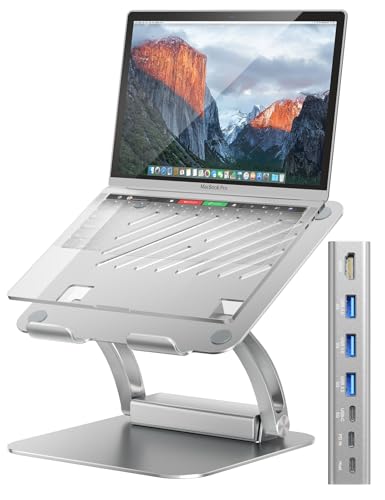 tounee Stand + Detachable Hub |
Mid-Range | Detachable USB-C hub with 100W PD | Remote workers with tight desks | Check Price | ||
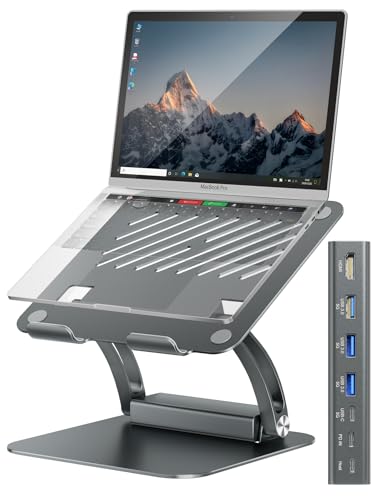 tounee Stand (Gray) |
Mid-Range | Same detachable hub in gray finish | Home office users who want style + function | Check Price | ||
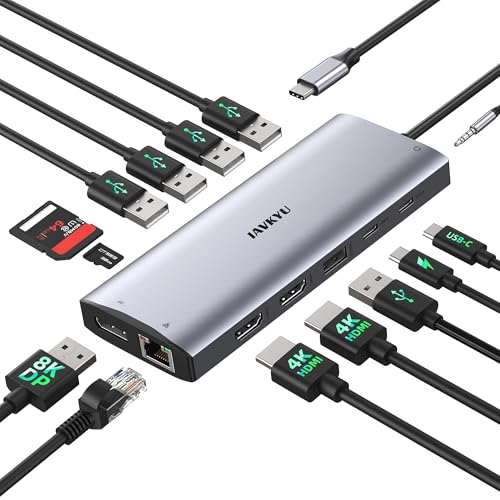 IAVKYU 14-in-1 Dock |
Premium | Triple-monitor support + 100W PD | Power users needing many displays | Check Price | ||
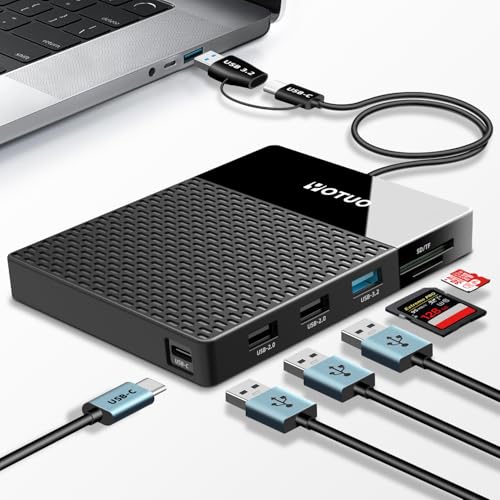 YOTUO 2TB Docking Hub |
Premium | Built-in 2TB HDD + hub ports | Creators who need on-the-go storage | Check Price |
1. tounee Laptop Stand with Detachable USB-C Hub, 100W PD Charging, 4K@60Hz HDMI, 3 USB Ports, Ergonomic Laptop Holder Docking Station for 10-17" Laptops, MacBook & More - Silver
This tounee model combines an ergonomic aluminum laptop stand and a detachable USB-C hub that keeps a small desk tidy while delivering 4K@60Hz video and up to 100W pass-through charging. The integrated stand reduces desktop clutter and raises your screen for better video-call framing, while the removable hub gives portability when you need to work elsewhere.
Key Specs
- Detachable USB-C hub
- 100W Power Delivery passthrough
- 4K@60Hz HDMI output
- Multiple USB-A/USB-C ports
- Supports 10–17" laptops; aluminum build
Pros
- Integrated stand + hub saves desk space and improves webcam angle
- 100W PD keeps most laptops topped up during long calls
- Aluminum construction feels sturdy and premium
Cons
- Adds weight compared with a simple dongle — not ideal if you need ultra-light travel
- Detachable hub introduces one more mechanical connection that may wear with heavy daily detach/attach
Best For: Remote workers with tight desks
Check Latest Price on Amazon2. tounee Laptop Stand with Detachable USB-C Hub, 100W PD Charging, 4K@60Hz HDMI, 3 USB Ports, Ergonomic Laptop Holder Docking Station for 10-17" Laptops, MacBook & More - Gray
Functionally the same as the silver variant, this gray tounee stand/hub is for remote workers who want an attractive, robust aluminum stand that doubles as a docking hub. It’s built to keep cables organized and your display crisp at 4K@60Hz, which is helpful when you share high-res screens during meetings.
Key Specs
- Detachable USB-C hub
- 100W PD passthrough
- 4K@60Hz HDMI
- USB-A 3.0 and USB-C data ports
- Ergonomic, adjustable aluminum stand
Pros
- Improves laptop ergonomics and webcam framing for calls
- Good port mix for peripherals without a separate hub
- Detachable design suits hybrid workers who move between desks
Cons
- Mid-range price — not the cheapest dongle option
- Durability of the detachable connector is unproven over many months of daily use
Best For: Home office users who want style + function
Check Latest Price on Amazon3. USB C Docking Station 3 Monitors 4K@60Hz, 14-in-1 Laptop Docking Station with 2 HDMI 4K@60Hz, DP 8K@30Hz/ 4K@144Hz, 3 USB 3.0, 2 USB 2.0, RJ45, Audio, PD 100W, USB-C HUB for Windows Laptop Accessories
IAVKYU’s 14-in-1 dock is a full desktop replacement: multiple 4K HDMI outputs, DisplayPort options up to 8K@30Hz, Gigabit Ethernet, and a broad USB array. Remote workers who juggle multi-window workflows, virtual backgrounds, and frequent video calls will benefit from the stable network and the capacity to drive two or three external displays.
Key Specs
- Supports up to 3 monitors (two 4K@60Hz + one 4K@30Hz in triple mode)
- DisplayPort up to 8K@30Hz or 4K@144Hz
- 100W Power Delivery passthrough
- Gigabit RJ45 Ethernet; SD/TF card slots
- Multiple USB 3.0 and USB 2.0 ports; audio jack
Pros
- Extensive port selection replaces a bulky dock and adapts to complex setups
- Strong wired Ethernet and multiple display outputs for stable video calls
- Users report straightforward setup and solid connectivity
Cons
- Larger footprint than compact hubs — less ideal for very tight desks
- Some multi-monitor modes depend on OS and laptop GPU support (macOS vs Windows differences)
Best For: Power users needing many displays
Check Latest Price on Amazon4. 2TB Docking Station External Hard Drive Storage, USB-C Hub + HDD 7-in-1, USB 3.0, SD/TF Card, HDD for Windows, Mac, Android, TV, Phone, Laptop, Desktop, PC
YOTUO combines a 2TB external HDD with a compact multiport hub — a single device for storage and connectivity. For remote workers who move between rooms or travel and need fast access to large project files and camera cards, it’s a tidy one-stop solution, though some users mention mixed transfer speeds in real-world use.
Key Specs
- Built-in 2TB external HDD
- USB-C and USB 3.2 / USB 2.0 ports
- SD and TF card slots
- Dual socket data cable for compatibility
- Supports Windows, macOS, Android, Linux
Pros
- Combines storage and a hub so you carry one device instead of two
- Wide compatibility and card slots ease content import
- Compact and portable for hybrid remote work
Cons
- Some users report inconsistent transfer speeds compared with dedicated SSDs
- A few reports of initial units not working — check return policy and test on receipt
Best For: Creators who need on-the-go storage
Check Latest Price on AmazonWhich One Should You Choose?
If you want the best mix of desk-friendly ergonomics, reliable video calls, and value → choose the tounee Laptop Stand with Detachable USB-C Hub (ASIN B0DZG9NMBL). If you need a full desktop dock that can drive two or three monitors and gives you wired Ethernet for rock-solid calls → go with the IAVKYU 14-in-1 Dock (ASIN B0BRYH1P56). If you regularly move large media files and prefer a single device for storage plus connectivity → the YOTUO 2TB Docking Station (ASIN B0FJFBZD37) is the one to consider.
Best for Specific Scenarios
- Tight home-office desk with frequent video calls: tounee Stand + Detachable Hub because it raises your laptop for better webcam framing while providing 4K video and 100W PD without taking extra desk space.
- Multi-monitor productivity setup: IAVKYU 14-in-1 because it supports dual/triple 4K displays, Gigabit Ethernet, and a wide USB array — ideal for traders, editors, or analysts who need many windows open.
- Content creators who move between locations: YOTUO 2TB Docking Hub because the built-in 2TB drive plus SD/TF slots and USB-C connectivity let you ingest footage and work without carrying a separate drive and hub.
Frequently Asked Questions
Will these hubs charge my laptop while I’m using external monitors?
Most hubs in this guide offer passthrough Power Delivery (PD). Verify the PD wattage (many provide up to 100W) and match it to your laptop’s required charger wattage — heavy laptops may still charge more slowly under full load if PD is below the original adapter wattage.
Can I run two or three monitors from a single USB-C hub?
Yes, premium docking stations (like the IAVKYU 14-in-1) support dual or triple displays, but exact modes depend on your laptop’s GPU and OS. Windows often uses MST to drive separate content on multiple monitors, while some macOS/iPadOS configurations use SST or mirror modes — check the dock’s display mode notes for your OS.
How can I ensure a stable video call connection when using a hub?
For the most reliable calls use the hub’s wired Gigabit Ethernet when possible, keep the hub well ventilated to avoid thermal throttling, and connect USB webcams to USB 3.0 ports. Also ensure your hub’s firmware/drivers are up to date and avoid running heavy graphics tasks on the same machine during important calls.
How We Selected These Products
Our recommendations are based on data-driven analysis: we evaluated 155229+ products across 23916+ brands using a composite scoring system that weighs rating (40%), review volume (30%), price value (20%), and demand signals (10%). Every product is ranked by data, not opinions.
Last updated: November 12, 2026
As an Amazon Associate we earn from qualifying purchases at no extra cost to you. Full disclosure.
GearLark Score is our editorial ranking based on a composite analysis of product quality, value, and verified customer sentiment. Click through to Amazon for current pricing, availability, and live customer reviews.