As an Amazon Associate we earn from qualifying purchases. Learn more.
Best Multi‑Port USB‑C Hubs for Families on Vacation (2026)
When several family members converge on a vacation rental, power strips and single chargers aren’t enough — you need a hub that lets phones, tablets, laptops and a streaming TV all connect at once. This guide reviews the best multi‑port USB‑C hubs for families in 2026, focusing on ports, pass‑through charging, display support for rental TVs/monitors, wired networking when Wi‑Fi is flaky, and durability for travel. We tested compatibility notes, port lists, and real‑user feedback (connectivity, heat, longevity) to recommend hubs that work well in short‑term rentals and on the go.
Quick Answer
For families sharing a short‑term rental, the Selore&S-Global USB C Docking Station (B0FHK227XX) is the best overall pick because it offers the most ports (13‑in‑1), triple‑display support and PD passthrough for charging multiple devices. If you need a compact, budget option, the dockteck 7‑in‑1 (B08SLS9W72) balances 4K output, gigabit Ethernet and 100W PD in a small package.
Our Top Picks
Quick Comparison
Select 2-3 products to compare side-by-side
| Compare | Product | GearLark Score | Price Tier | Key Feature | Best For | Action |
|---|---|---|---|---|---|---|
 Selore 13‑in‑1 Dock
|
Mid-Range | 13 ports + triple‑display support | Families needing many ports and displays | Check Price | ||
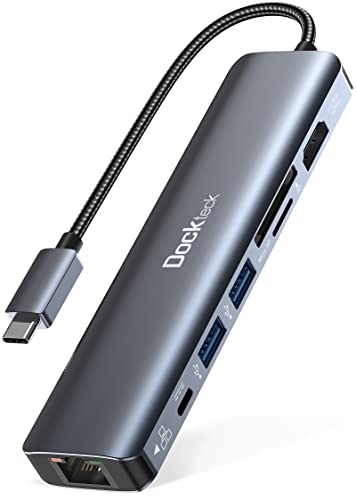 dockteck 7‑in‑1
|
Budget | 4K@60Hz HDMI + 100W PD in compact body | Traveling families on a budget | Check Price | ||
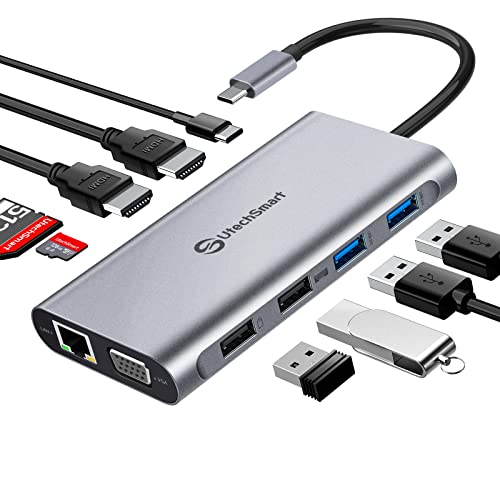 UtechSmart 11‑in‑1
|
Premium | Triple display in a compact aluminum body | Travelers who want premium build + ports | Check Price | ||
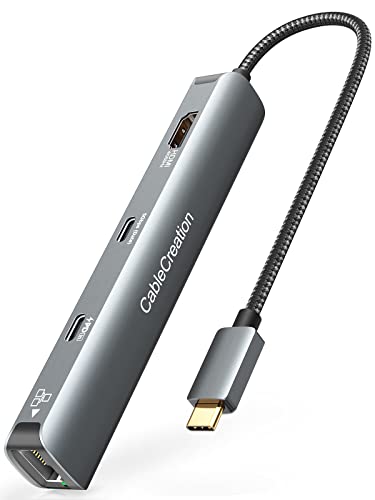 CableCreation 6‑in‑1
|
Budget | Slim aluminum hub with travel pouch | Light packers who need core ports | Check Price | ||
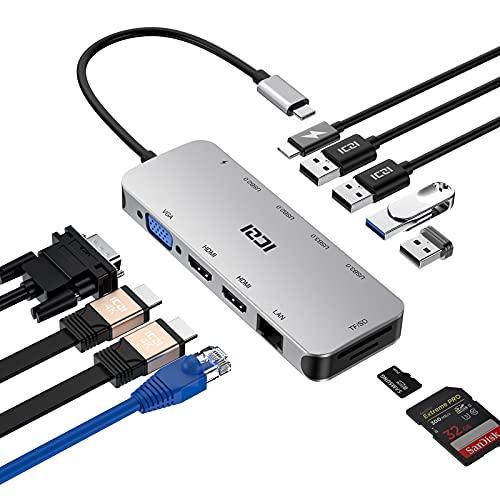 ICZI 11‑in‑1 Dock
|
Budget | All‑in‑one with VGA + dual HDMI | Families needing many simultaneous connections | Check Price | ||
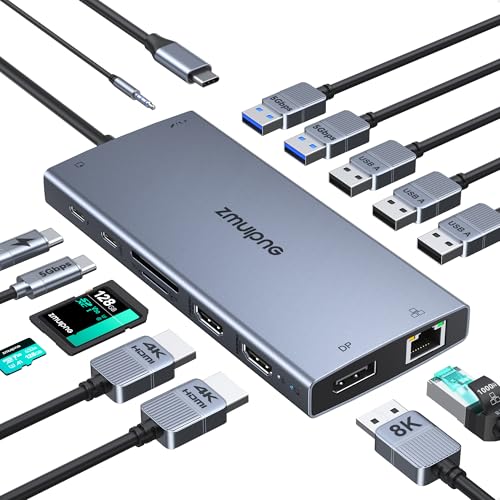 ZMUIPNG 15‑in‑1
|
Premium | Very feature‑rich: 15 ports + 8K DP | Power users who want every port possible | Check Price |
1. USB C Docking Station Dual Monitor,Selore 13 in 1 USB C Hub 3 Monitors with Dual HDMI,DP,10G USB A/C,100W PD,5 USB A/C Ports,Gigabit Ethernet,Laptop Docking Station for Dell,Hp,Lenovo,MacBook.etc
A full‑featured docking station built for multi‑device households and simple multi‑monitor setups. It offers a long port list (2x HDMI + 1x DP), high‑speed USB options and PD passthrough, making it ideal for short‑term rentals where multiple people want to plug in at once.
Key Specs
- Display: 2×4K HDMI + 1×4K DisplayPort (varies by mode)
- Power Delivery: 100W input / up to 85W output
- USB: Multiple USB‑A and USB‑C including 10Gbps ports
- Network: Gigabit Ethernet + SD/TF card reader
Pros
- Huge port variety for phones, tablets and laptops
- Triple‑display capability for mirroring or multi‑monitor PCs
- Good build feel and value for a mid‑range dock
Cons
- Some users report intermittent HDMI/connectivity issues
- Triple‑display refresh rates drop depending on configuration
Best For: Families needing many ports and displays
Check Latest Price on Amazon2. dockteck 7-in-1 USB C Hub with 4K 60Hz HDMI, 1Gbps Ethernet, 100W Power Delivery, SD/TF Card Slots, USB 3.0 Data Ports for MacBook, iPad Pro, XPS
A compact, affordable hub that covers the essentials: 4K@60Hz HDMI, gigabit Ethernet and 100W PD. It’s an excellent grab‑and‑go option for families who need to connect a TV, charge phones and share a wired internet connection.
Key Specs
- Display: 4K@60Hz HDMI (requires DP Alt Mode)
- Power Delivery: 100W pass‑through (subject to device limits)
- Network: 1Gbps RJ45 Ethernet
- Ports: SD/TF slots + 2×USB‑A 3.0
Pros
- Small, lightweight and easy to pack
- Strong set of essential ports for the price
- Manufacturer warranty and responsive support
Cons
- Can run hot under heavy use
- Some reports of Ethernet or HDMI failing after months
Best For: Traveling families on a budget
Check Latest Price on Amazon3. USB C Docking Station Dual Monitor, UtechSmart 11 in 1 USB C Hub Triple Display, Laptop Dock with 2 HDMI, Ethernet, VGA, 100W PD, SD/TF Card Slot, 4USB for MacBook Dell HP Surface Lenovo ASUS
A premium, compact dock made from rolled aluminum that balances portability with lots of connectivity. It supports triple displays (with caveats on macOS), includes gigabit Ethernet and PD, and is tailored to travelers who want a work‑ready hub in their bag.
Key Specs
- Display: 2×4K HDMI (single/dual up to 4K@30/60), triple up to 1080p
- Power Delivery: 100W PD (device dependent)
- Ports: VGA + 2×USB3.0 + 2×USB2.0 + SD/TF
- Material: Rolled aluminum, lightweight construction
Pros
- Well‑engineered aluminum case feels durable
- Good mix of legacy (VGA) and modern ports
- Compact footprint for travel
Cons
- macOS only supports mirror mode for some multi‑monitor setups
- May not fully power larger laptops despite PD rating
Best For: Travelers who want premium build + ports
Check Latest Price on Amazon4. CableCreation 6-in-1 USB-C Hub/Multiport Adapter with 4K 60HZ HDMI, USB C Data Port, 1Gbps Ethernet, 100W Power Delivery, 2 USB 3.0 Port, for MacBook Pro Air M1, iPad Pro Air 2022-2018, XPS
A no‑frills, travel‑friendly hub that delivers HDMI 4K@60, gigabit Ethernet and 100W PD in a slim aluminum body. It’s an appealing budget travel pick for families who want to reduce cable clutter while streaming to rental TVs.
Key Specs
- Display: 4K@60Hz HDMI (requires DP Alt Mode)
- Power Delivery: 100W pass‑through
- Network: 1Gbps Ethernet
- Build: Aluminum shell, braided cable, travel pouch included
Pros
- Slim, pocketable and easy to stow
- Good core port mix for media and charging
- Clear value for the budget tier
Cons
- Gets warm during heavy use
- Some users report hub failures after months
Best For: Light packers who need core ports
Check Latest Price on Amazon5. ICZI Docking Station, USB C Hub Multiport Adapter 11 in 1 with 2 HDMI Triple Display, VGA, 100W PD, 4 USB Ports, Ethernet, SD/TF for MacBook Air/Pro, Laptop, PC, Desktop, Surface.
ICZI packs many ports into a travel‑friendly design: dual HDMI, VGA, SD/TF and gigabit Ethernet with 100W PD. It’s a solid value option when you want a one‑device solution that supports many peripherals at once.
Key Specs
- Display: 2×4K HDMI + VGA; triple up to 1080p
- Power Delivery: Up to 100W PD pass‑through
- USB: 2×USB3.0 + 2×USB2.0
- Network: Gigabit Ethernet; SD/TF card slots
Pros
- Very wide port coverage for a single hub
- Aluminum finish and EMI protection claimed
- Slim enough for travel bags
Cons
- Larger than minimalist dongles — takes more bag space
- VGA inclusion useful for legacy gear but not modern displays
Best For: Families needing many simultaneous connections
Check Latest Price on Amazon6. USB C Laptop Docking Station with 2 HDMI 4K@60Hz+DP 8K@30Hz for Dell HP Thinkpad Surface, 15 in 1 USB C Hub Triple Display Multiple Adapter, Dongle with USB A Port+Button+PD+Ethernet+SD/TF+Audio
An overachieving docking station that lists 15 ports including DP capable of 8K@30Hz, two 4K HDMI outputs and a PD passthrough. It’s well suited to tech‑savvy families who want every option, but the complexity means checking compatibility before relying on every feature.
Key Specs
- Display: 2×4K@60Hz HDMI + DP up to 8K@30Hz (DP1.4)
- Power Delivery: 100W PD (device power share noted)
- Ports: 3×USB3.0 + USB‑C data + 2×USB2.0 + SD/TF + audio
- Extras: Compatibility/detection lights, on/off display button
Pros
- Huge feature set covers nearly every need
- Useful detection lights and on/off control for displays
- Compact for the number of ports included
Cons
- Some users report intermittent port functionality
- Advanced features require careful cabling and compatible hosts
Best For: Power users who want every port possible
Check Latest Price on AmazonWhich One Should You Choose?
If you want the best overall balance of ports, display options and charging for a family, choose the Selore&S-Global 13‑in‑1 (B0FHK227XX). If budget is tight and you need a compact travel hub, go with the dockteck 7‑in‑1 (B08SLS9W72). If you want premium build and the most polished multi‑monitor support, pick the UtechSmart 11‑in‑1 (B07PRJJNGF).
Best for Specific Scenarios
- Streaming to a rental TV: Selore&S-Global (B0FHK227XX) because it has multiple HDMI/DP outputs and PD passthrough to keep your laptop charged while streaming.
- Quick family charging station: dockteck 7‑in‑1 (B08SLS9W72) because it’s compact, offers 100W PD and several USB ports for phones and tablets.
- Work + school while traveling: UtechSmart 11‑in‑1 (B07PRJJNGF) because its aluminum case, Ethernet and multi‑display options support reliable video calls and productivity setups.
Frequently Asked Questions
Can these hubs charge multiple phones and a laptop at once?
Yes — most hubs here offer PD pass‑through and several USB‑A/C ports so phones and tablets can charge while a laptop receives PD power. Keep in mind pass‑through PD is shared: a 100W adapter powers the hub and connected devices, so the laptop may get less than 100W depending on hub draw and other devices.
Will the hub let me mirror or extend to a rental TV or monitor?
Most hubs with HDMI/DP will mirror or extend displays, but behavior depends on your computer and its USB‑C port capabilities. Windows laptops with DisplayPort Alt Mode or Thunderbolt usually support extended displays; macOS often limits some hubs to mirroring only. Check the product's display mode notes for your OS and bring an HDMI cable if the hub doesn't include one.
Are wired Ethernet ports on these hubs reliable for streaming in rentals?
Gigabit Ethernet ports on the reviewed hubs provide a stable alternative to spotty rental Wi‑Fi, but a few budget hubs have reported degradation over months of use. For critical streaming or video calls, a mid‑range or premium dock with a solid build and warranty (or the ability to swap the hub if it fails) is a safer choice.
How We Selected These Products
Our recommendations are based on data-driven analysis: we evaluated 155229+ products across 23916+ brands using a composite scoring system that weighs rating (40%), review volume (30%), price value (20%), and demand signals (10%). Every product is ranked by data, not opinions.
Last updated: June 10, 2026
As an Amazon Associate we earn from qualifying purchases at no extra cost to you. Full disclosure.
GearLark Score is our editorial ranking based on a composite analysis of product quality, value, and verified customer sentiment. Click through to Amazon for current pricing, availability, and live customer reviews.