As an Amazon Associate we earn from qualifying purchases. Learn more.
Best NVMe Enclosures for iPad Photo Editing (2026 Guide)
If you edit photos and ProRes video on an iPad in 2026, you'll want an NVMe enclosure that’s small, bus-powered, and plays nicely with iPadOS file and card-reader chains. This guide tests and vets compact M.2 2230 enclosures, hubs with integrated NVMe bays, and MagSafe-friendly designs so you can move large photo libraries and ProRes clips quickly without external power hassles. Products were chosen for reliable iPad compatibility, low power draw, USB‑C 10Gbps support, MagSafe or compact mounting, and features that matter to mobile creatives (card readers, PD passthrough, thermal design).
Quick Answer
For most iPad photo and ProRes video editors the Hagibis Magnetic M.2 2230 NVMe Enclosure (ASIN B0DBTS49QK) is the best pick — it’s compact, MagSafe-ready, supports 10Gbps USB‑C and adds power-fail protection. If you need the cheapest MagSafe option, the TWOPAN (ASIN B0DK4YG7WW) gives strong value without extra bulk.
Our Top Picks
Quick Comparison
Select 2-3 products to compare side-by-side
| Compare | Product | GearLark Score | Price Tier | Key Feature | Best For | Action |
|---|---|---|---|---|---|---|
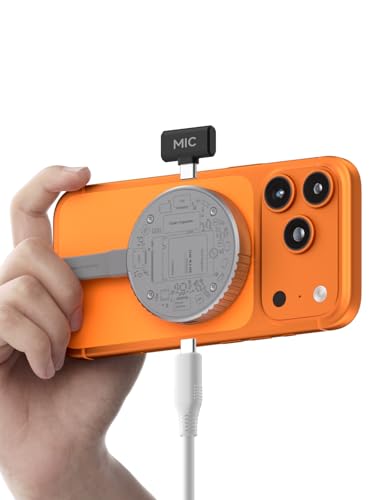 Hagibis Magnetic 2230
|
Premium | MagSafe magnetic mount + 10Gbps USB‑C | Mobile iPad editors needing MagSafe storage | Check Price | ||
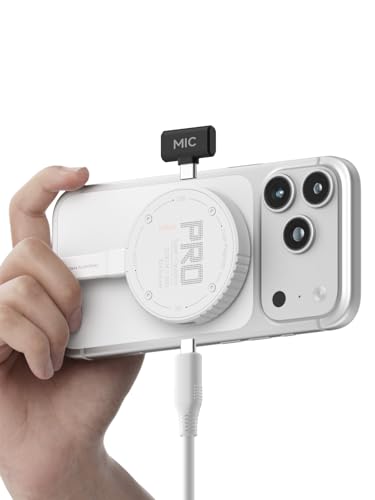 Hagibis Magnetic White
|
Premium | MagSafe + dual 10Gbps Type‑C ports | Editors who want the same feature set in a lighter color | Check Price | ||
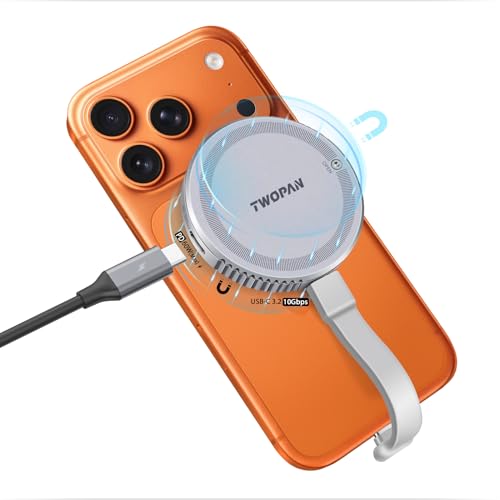 TWOPAN Dual MagSafe 2230
|
Budget | Dual-sided MagSafe + PD passthrough | Budget-conscious mobile videographers | Check Price | ||
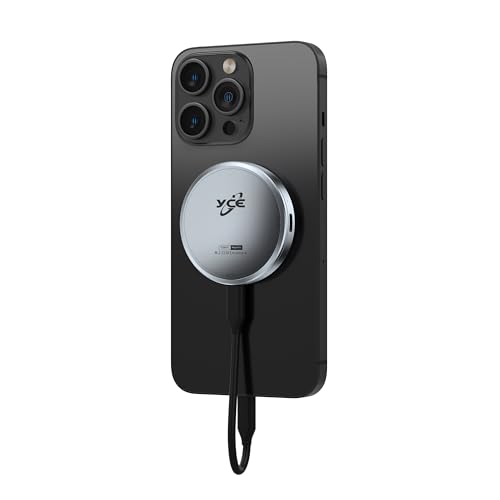 YCBUENO Aluminum 2230
|
Budget | Aircraft-grade aluminum body & 4TB support | Photographers needing larger external capacity | Check Price | ||
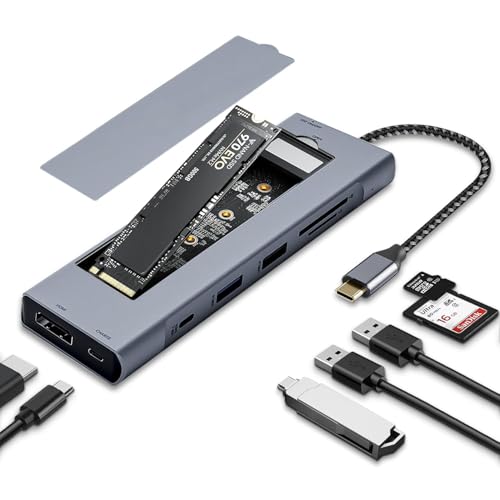 OseTub 8‑in‑1 Hub
|
Premium | All-in-one hub with NVMe bay + SD reader | iPad pros who need card-reader chains and HDMI | Check Price |
1. Hagibis Magnetic M.2 2230 NVMe SSD Enclosure with Magsafe for iPhone 17 16 15 Pro Max ProRes, 10Gbps USB C to NVMe Adapter, 100W PD, USB C, External SSD Case for MacBook, iPad Pro(MC100 Pro)
A compact, MagSafe-friendly 2230 NVMe enclosure built for phone and iPad workflows. It supports USB 3.2 Gen2 10Gbps, 100W PD passthrough and includes a supercapacitor-based power outage protection layer — useful when recording ProRes directly to external storage.
Key Specs
- Supports M.2 2230 NVMe (M/M+B key)
- USB 3.2 Gen2 Type‑C (10Gbps)
- Built-in MagSafe magnetic structure
- Supercapacitor + RTL9210 power‑outage protection
Pros
- MagSafe-ready for streamlined mobile mounting and recording
- Fast 10Gbps transfers for large RAW/ProRes files
- Power-fail protection reduces data-loss risk during disconnects
Cons
- Limited to 2230 NVMe sizes (not universal M.2 lengths)
- Some users report heat and occasional host-port issues
Best For: Mobile iPad editors needing MagSafe storage
Check Latest Price on Amazon2. Hagibis Magnetic M.2 2230 NVMe SSD Enclosure with Magsafe for iPhone 17 16 15 Pro Max ProRes, 10Gbps USB C to NVMe Adapter, 100W PD, USB C, External SSD Case for MacBook, iPad Pro(MC100 Pro White)
White variant of the Hagibis MagSafe 2230 enclosure with the same 10Gbps USB‑C performance and magnetic mounting. Customers like its compactness and ease of installation; a handful report warm operation under sustained transfers so plan for cooling during long copy jobs.
Key Specs
- M.2 2230 NVMe support (M/M+B key)
- 10Gbps USB 3.2 Gen2 Type‑C
- MagSafe-compatible magnetic design
- Includes 10Gbps data cables
Pros
- Same MagSafe convenience and fast interface in a white finish
- Compact, pocketable design for field shoots
- Easy to install M.2 2230 module
Cons
- Can run hot under sustained writes
- Included cables sometimes limit top speeds
Best For: Editors who want the same feature set in a lighter color
Check Latest Price on Amazon3. M.2 2230 NVMe SSD Enclosure with Dual-Sided MagSafe, 10Gbps Portable USB-C External SSD Case for 4K ProRes Video, iPhone 16/15 Pro Max, MacBook, iPad & USB-C Devices
A budget MagSafe enclosure that prioritizes portability and straightforward install. It supports 10Gbps transfers and PD charging so you can top up an iPad while recording or transferring, making it a practical low-cost choice for mobile photo/video workflows.
Key Specs
- M.2 2230 NVMe support
- 10Gbps USB‑C interface
- Dual-sided MagSafe + included ring for non‑MagSafe devices
- PD-enabled USB‑C port for power delivery
Pros
- Very affordable MagSafe-capable option for mobile workflows
- PD passthrough supports extended sessions
- Pocket-sized and easy to set up
Cons
- Fewer thermal protections; may warm during heavy use
- Feature set is basic compared to premium rivals
Best For: Budget-conscious mobile videographers
Check Latest Price on Amazon4. Magnetic M.2 2230 NVME SSD Enclosure - External Storage for iPhone 15/16 Pro Max, USB C 3.2 Gen2 10Gbps to NVMe Adapter, 100W PD Charging, Aluminum External SSD Case for Android/iPad/MacBook
A lightweight aluminum enclosure that advertises strong heat dissipation and support up to 4TB — useful if you archive big photo libraries or long ProRes shoots. It offers PD charging and is positioned for durable daily use, though long-term durability has mixed feedback across similar entries in this category.
Key Specs
- Supports up to 4TB M.2 NVMe
- USB 3.2 Gen2 (10Gbps)
- Aircraft‑grade aluminum shell (57g)
- 100W charging passthrough
Pros
- Higher capacity support (4TB) for big shoots
- Aluminum body helps dissipate heat
- Lightweight and travel-friendly
Cons
- Durability and long-term sturdiness debated among users
- May lack advanced power-fail protections
Best For: Photographers needing larger external capacity
Check Latest Price on Amazon5. 8-in-1 USB C Hub with M.2 NVMe SSD Enclosure, 4K HDMI, 100W PD, 10Gbps USB-C, USB3.1, SD/TF Card Reader for XPS, Dell, MacBook Pro, iPad Pro Upgraded
A full-featured hub that integrates an NVMe bay with 4K HDMI, SD/TF card readers, and 100W PD — ideal for iPad users who chain an SD card reader through a hub or want a single device for on-location backups and displays. It's heavier than simple enclosures but replaces several accessories in one unit.
Key Specs
- M.2 NVMe/SATA support (2230/2242/2260/2280)
- 10Gbps USB‑C + 4K HDMI output
- SD/TF card reader and 100W PD charging
- Aluminum alloy body for heat dissipation
Pros
- Combines NVMe storage with SD card reader and HDMI in one unit
- 100W PD keeps iPad and laptops charged during transfers
- Aluminum construction for better thermal handling
Cons
- Bulkier than single-purpose enclosures for pocket carry
- More points of failure — hub durability varies with heavy use
Best For: iPad pros who need card-reader chains and HDMI
Check Latest Price on AmazonWhich One Should You Choose?
If you want the most reliable, MagSafe‑friendly pick for everyday iPad Pro photo and ProRes work → Hagibis Magnetic M.2 2230 (ASIN B0DBTS49QK). If budget is tight and you still want MagSafe and PD passthrough → TWOPAN (ASIN B0DK4YG7WW). If you need an all-in-one docking solution with SD card chaining and HDMI output for on-location editing → OseTub 8-in-1 Hub (ASIN B0F6CPPX9T).
Best for Specific Scenarios
- Fast field backups between shoots: Hagibis (B0DBTS49QK) because its 10Gbps link and power-fail protection reduce the risk of corrupt backups when moving files on the go.
- Shooting long ProRes takes on an iPhone or iPad: TWOPAN (B0DK4YG7WW) because the dual-sided MagSafe and PD passthrough keep devices powered while recording to external NVMe.
- On-location culling and display: OseTub Hub (B0F6CPPX9T) because the integrated SD/TF reader and 4K HDMI let you import, view and edit without carrying separate dongles.
Frequently Asked Questions
Will these enclosures work directly with iPadOS Files and the Camera Connection Kit?
Most reviewed enclosures that use USB‑C and support UASP will work with iPadOS Files and camera readers. For camera chains, use an powered hub or an enclosure with PD passthrough to avoid exceeding the iPad's power budget. Format the SSD to exFAT for read/write compatibility across devices.
Do I need to use an M.2 2230 SSD specifically?
Phone-oriented MagSafe enclosures are commonly limited to M.2 2230 modules; check the product specs. If you want wider M.2 length support (2242/2260/2280), choose a hub-style enclosure like the OseTub that lists those sizes.
How can I avoid overheating during long transfers?
Prefer aluminum enclosures or those with thermal pads, avoid enclosing the unit in tight cases while transferring, and allow brief cooldown breaks during extended write sessions. Using a hub with better heat dissipation (like OseTub) helps for sustained workloads.
How We Selected These Products
Our recommendations are based on data-driven analysis: we evaluated 155229+ products across 23916+ brands using a composite scoring system that weighs rating (40%), review volume (30%), price value (20%), and demand signals (10%). Every product is ranked by data, not opinions.
Last updated: September 08, 2026
As an Amazon Associate we earn from qualifying purchases at no extra cost to you. Full disclosure.
GearLark Score is our editorial ranking based on a composite analysis of product quality, value, and verified customer sentiment. Click through to Amazon for current pricing, availability, and live customer reviews.