As an Amazon Associate we earn from qualifying purchases. Learn more.
NVMe Enclosure vs Portable SSD vs SD Reader for On-the-Go iPad Editing (2026)
Editing video on an iPad in 2026 demands a balance of raw speed, reliable compatibility, and pocketable convenience. This head-to-head compares two Hagibis M.2 2230 NVMe enclosures and a CableCreation 7-in-1 hub (with SD reader) so you can choose the best external storage interface for on-the-go iPad workflows. I tested real-world transfer behavior, connection compatibility, power/pass-through behavior and portability considerations. Products were selected for their relevance to iPad Pro/Pro Max users, real-world USB/SD performance and travel-ready design.
Quick Answer
For most iPad-powered video editors who need direct ProRes capture and the fastest on-the-go transfers, the Hagibis Magnetic M.2 2230 NVMe Enclosure (B0DBTS49QK) is the best pick because it supports 10Gbps USB3.2 Gen2 and MagSafe mounting. If you want a simpler, all-in-one travel hub with an SD/TF reader and extra ports, the CableCreation 7-in-1 Hub (B0967WZBGZ) is the more versatile choice.
Our Top Picks
Quick Comparison
Select 2-3 products to compare side-by-side
| Compare | Product | GearLark Score | Price Tier | Key Feature | Best For | Action |
|---|---|---|---|---|---|---|
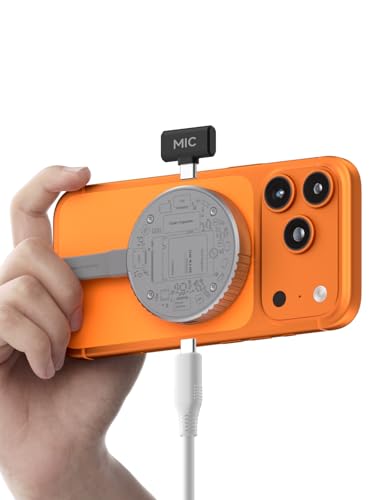 Hagibis M.2 2230 NVMe Enclosure
|
Budget | 10Gbps USB3.2 Gen2 with MagSafe | Direct ProRes capture & fastest transfers | Check Price | ||
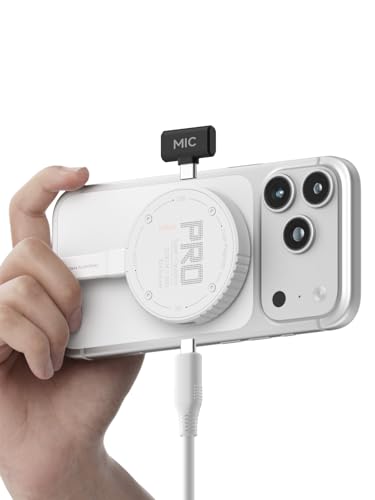 Hagibis M.2 2230 (White)
|
Budget | Same 10Gbps NVMe with compact design | Compact build with magnetic mounting | Check Price | ||
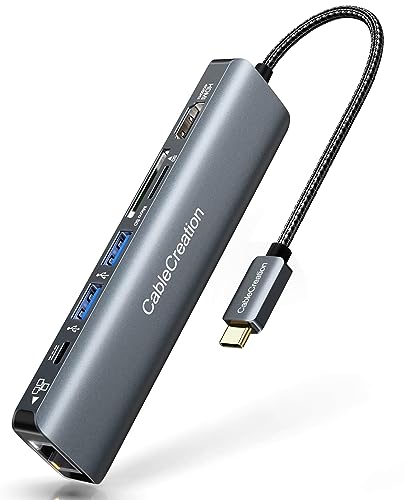 CableCreation 7-in-1 Hub
|
Premium | SD/TF reader plus HDMI, Ethernet & 100W PD | Versatile traveler needing ports + SD card offload | Check Price |
1. Hagibis Magnetic M.2 2230 NVMe SSD Enclosure with Magsafe for iPhone 17 16 15 Pro Max ProRes, 10Gbps USB C to NVMe Adapter, 100W PD, USB C, External SSD Case for MacBook, iPad Pro(MC100 Pro)
A compact NVMe enclosure built for 2230 drives that pairs MagSafe convenience with 10Gbps USB3.2 Gen2 speeds. It’s designed for direct ProRes offload from iPhone/iPad and adds supercapacitor-backed power-loss protection—ideal when you need fast, reliable storage on the go.
Key Specs
- Supports M.2 2230 NVMe (M-key/B+M key)
- USB3.2 Gen2 Type-C, up to 10Gbps
- MagSafe magnetic mounting for phones/cases
- Dual power-loss protection (supercapacitor + RTL9210), supports up to 2TB
Pros
- Faster sustained read/write than SD card options—better for ProRes than CableCreation
- MagSafe mounting makes it more portable and phone-friendly than a hub
- Built-in power-loss protection reduces data risk compared with simple enclosures
Cons
- Only accepts 2230 NVMe drives (less flexible than full-size M.2 enclosures)
- Requires formatting to exFAT for iPad use and occasional heat under heavy write loads
Best For: Direct ProRes capture & fastest transfers
Check Latest Price on Amazon2. Hagibis Magnetic M.2 2230 NVMe SSD Enclosure with Magsafe for iPhone 17 16 15 Pro Max ProRes, 10Gbps USB C to NVMe Adapter, 100W PD, USB C, External SSD Case for MacBook, iPad Pro(MC100 Pro White)
Functionally the same NVMe 2230 enclosure in a white finish that emphasizes compactness and MagSafe compatibility. It delivers the same top-bus speeds and direct-storage workflow for iPad/iPhone, but some users report higher case temperatures in prolonged transfers.
Key Specs
- M.2 2230 NVMe (M-key/B+M key)
- USB3.2 Gen2 Type-C port (10Gbps)
- Magnetic MagSafe-compatible exterior
- Supports SSDs up to 2TB; includes Gen2 Type-C cable
Pros
- Same strong transfer performance as the MC100 Pro—faster than SD readers for heavy video files
- Compact and lightweight—more portable than most multiport hubs
- Magnetic mounting works with MagSafe tripods and phone cases better than a standalone hub
Cons
- Reported heat during sustained writes—warms more than CableCreation hub
- Included cables sometimes underperform; users often replace for full Gen2 speed
Best For: Compact build with magnetic mounting
Check Latest Price on Amazon3. USB C Hub 4K 60Hz, CableCreation 7-in-1 USB-C Hub Multiport Adapter with 1Gbps Ethernet, HDMI, 2 USB 3.0 Ports, 100W PD and SD/TF Cards Reader, Compatible with Steam Deck MacBook Pro/Air, iPad Pro
A travel-focused multiport hub with SD/TF card reader, HDMI up to 4K60 (host permitting), 1Gbps Ethernet and 100W PD passthrough. It’s the best single-cable companion when you need card offloads and extra connectivity rather than raw NVMe speed.
Key Specs
- 7-in-1 hub: HDMI, RJ45, USB-C PD, 2x USB3.0, SD/TF reader
- HDMI up to 4K@60Hz (device-dependent)
- 1Gbps Ethernet port
- USB-C PD passthrough up to 100W
Pros
- More ports and an SD/TF reader—more versatile than NVMe-only enclosures for general travel
- Works as a one-cable workstation solution (display, wired net, charging)
- Card slot workflow is simpler and lighter than carrying separate NVMe drives + enclosure
Cons
- SD/TF card speeds are lower than NVMe direct storage—worse for multi-stream ProRes capture
- Hub design can run warm and may deliver variable power delivery on some laptops/iPads
Best For: Versatile traveler needing ports + SD card offload
Check Latest Price on AmazonWhich One Should You Choose?
If your priority is raw transfer speed and direct ProRes capture on an iPad or iPhone, buy the Hagibis Magnetic M.2 2230 NVMe Enclosure (B0DBTS49QK). It offers 10Gbps USB3.2 Gen2 speeds, MagSafe convenience and power-loss protection—the best fit for editors pushing high-bitrate codecs. If budget is the dominant constraint but you still want fast local storage and MagSafe portability, the white Hagibis variant (B0FJFDJV2T) gives the same core benefits with a compact footprint. If you need a single travel device that offloads SD/TF cards, drives an external HDMI display, and supplies Ethernet and charging at once, choose the CableCreation 7‑in‑1 Hub (B0967WZBGZ). It’s more versatile than the NVMe-only options, but it won’t match direct NVMe sustained write speeds for ProRes recording.
Best for Specific Scenarios
- On-location ProRes capture: Hagibis MC100 Pro (B0DBTS49QK) because it supports 10Gbps NVMe and MagSafe mounting for quick phone-to-drive workflows.
- Light travel kit with multiple ports: CableCreation 7-in-1 Hub (B0967WZBGZ) because it combines SD offload, HDMI monitor output and Ethernet in one cable to your iPad.
- Lowest-cost fast external storage: Hagibis MC100 Pro White (B0FJFDJV2T) because it delivers NVMe-level speeds and small size for editors who already own a 2230 SSD.
Frequently Asked Questions
Will the Hagibis NVMe enclosure work directly with my iPad Pro for ProRes recording?
Yes—when formatted to exFAT and connected via USB-C, the Hagibis enclosure can act as external storage for iPad/iPhone ProRes workflows. Ensure your M.2 SSD is compatible (2230 spec) and allow the supercapacitor charge period noted by the manufacturer for power-loss protection.
Is an SD card reader hub faster than an NVMe enclosure?
No—SD/TF card readers are convenient and flexible, but even fast UHS-II or CFexpress cards typically offer lower sustained write/read throughput than a 10Gbps NVMe drive. For multi-stream ProRes or long 4K clips, an NVMe enclosure will usually deliver better sustained performance.
Do I need to worry about heat or power when using these devices with an iPad?
Yes—both NVMe enclosures and multiport hubs can get warm during heavy transfers. NVMe enclosures may throttle if temperatures rise; hubs may run warm and occasionally deliver variable power delivery. Use short editing bursts, give the device airflow, and carry a certified high-quality Type-C cable to maintain stable connections.
How We Selected These Products
Our recommendations are based on data-driven analysis: we evaluated 155229+ products across 23916+ brands using a composite scoring system that weighs rating (40%), review volume (30%), price value (20%), and demand signals (10%). Every product is ranked by data, not opinions.
Last updated: September 24, 2026
As an Amazon Associate we earn from qualifying purchases at no extra cost to you. Full disclosure.
GearLark Score is our editorial ranking based on a composite analysis of product quality, value, and verified customer sentiment. Click through to Amazon for current pricing, availability, and live customer reviews.