As an Amazon Associate we earn from qualifying purchases. Learn more.
Best Portable SSD Enclosures for NVMe Drives (2026)
If you move large files, edit video, or need a fast portable scratch disk, choosing an NVMe enclosure with good thermal design is crucial — throttling kills workflow. This guide reviews five enclosures selected for 2026 based on build quality, thermal strategy (passive vs active cooling), interface bandwidth, and real-user feedback about reliability and ease of use. You'll learn which enclosures keep sustained speeds high, which suit cloning or desktop use, and which are best for travel. Products were chosen from recent models that emphasize heat management, solid construction, and consistent performance.
Quick Answer
The ACASIS 40Gbps M.2 NVMe SSD Enclosure (ASIN B0BB74BQVN) is the best overall pick for 2026 — it combines a JHL7440+RTL9210 dual-chip design with an aluminum, fanless thermal solution to deliver very high sustained transfers. If you need a budget-friendly option, the FREEGENE ACASIS M.2 Docking Station (ASIN B084ZKLQR8) offers solid 10Gbps speeds and good passive cooling.
Our Top Picks
Quick Comparison
Select 2-3 products to compare side-by-side
| Compare | Product | GearLark Score | Price Tier | Key Feature | Best For | Action |
|---|---|---|---|---|---|---|
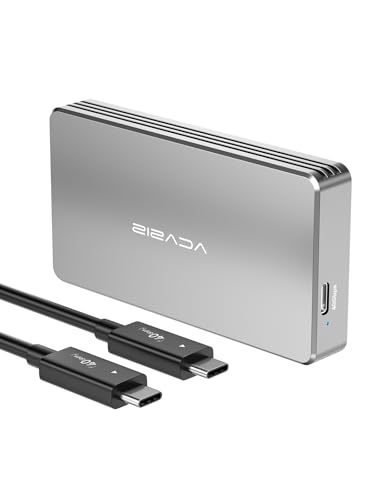 ACASIS 40Gbps Enclosure
|
Premium | JHL7440+RTL9210 dual chipset | Pro users needing USB4 speeds | Check Price | ||
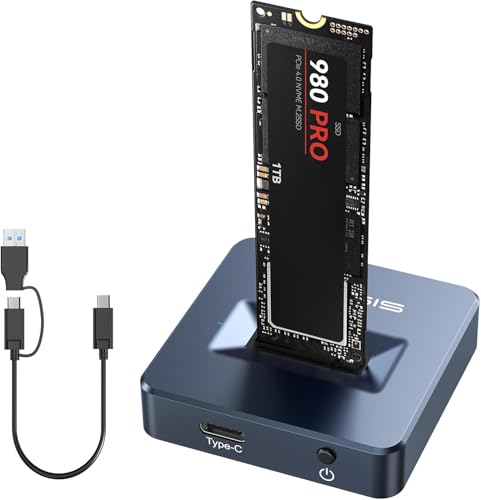 ACASIS M.2 Docking Station
|
Budget | Toaster-style open dock with aluminum body | Versatile NVMe+SATA workflows | Check Price | ||
![ineo M.2 NVMe 20G USB 3.2 Gen 2x2 Type-C to NVMe PCIe M-Key SSD Enclosure with Built-in Cooling Fan [C2598-NVMe, 20Gbps]](/assets/images/products/B082D1FF76.jpg) ineo Fan-Cooled Enclosure
ineo Fan-Cooled Enclosure
|
Mid-Range | Built-in PWM cooling fan | Sustained high-speed transfers | Check Price | ||
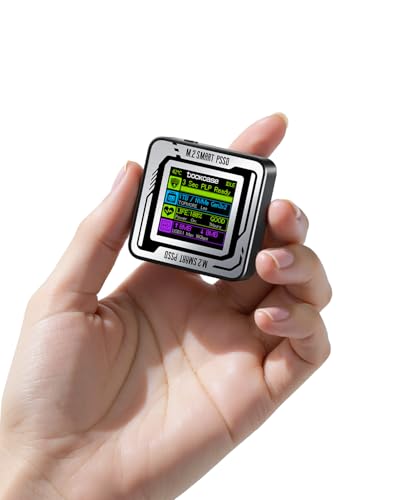 DOCKCASE 2230 Pocket
|
Mid-Range | HD display with SSD health & live transfer readout | 2230 drive owners and data safety | Check Price | ||
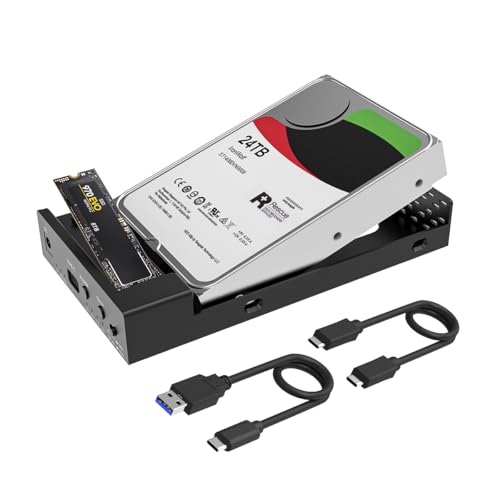 MAIWO Dual-Bay Cloner
|
Budget | Standalone offline cloning + multi-drive support | Drive cloning and desktop backups | Check Price |
1. ACASIS 40Gbps M.2 NVMe SSD Enclosure, Tool Free Installation, NVMe Enclosure for M1/M2/ Pro/Max,Compatible with USB4/3.2/3.1/3.0/2.0, Support 2280/2260/2242/2230 B+M M-Key (TBU401)
A premium, tool-free NVMe enclosure built around a JHL7440+RTL9210 dual-chipset and an aluminum body with thermal paste. It aims for USB4/40Gbps-class transfers and delivers excellent short- and long-run speeds for editing and backup work, though some users note it can become warm to the touch under heavy sustained loads.
Key Specs
- USB4 compatible (backward with USB3.x/2.0)
- Supports M/B+M key NVMe 2230/2242/2260/2280 up to 8TB
- JHL7440 + RTL9210 dual chipset with UASP
- Rugged aluminum casing with silicone thermal paste; tool-free install; certified 40Gbps cable included
Pros
- Very high sustained transfer potential with dual-chip design
- Tool-less installation and broad OS compatibility
- Solid aluminum build and passive thermal paste for quiet use
Cons
- Can feel hot during long sustained transfers
- Premium tier — some buyers debate value for money
Best For: Pro users needing USB4 speeds
Check Latest Price on Amazon2. ACASIS M.2 NVMe & SATA to USB C Docking Station, NVME SSD Enclosure Adapter, USB 3.2 Gen 2(10 Gbps), Aluminium Alloy Housing, Support M.2 (M Key) NVMe and (B+M Key) SATA-Based SSD
A budget-friendly, toaster-style M.2 dock that supports both NVMe and SATA drives at USB 3.2 Gen 2 (10Gbps). Its aluminum body and open layout promote airflow and keep drives cooler than many plastic alternatives, making it an excellent value pick for everyday backups and quick swaps.
Key Specs
- USB 3.2 Gen 2 (10Gbps)
- Supports M.2 PCIe NVMe (M Key) and SATA (B+M) 2230–2280 up to 8TB
- Aluminum alloy housing and toaster-style open layout for airflow
- Tool-free, driver-free plug-and-play; broad OS compatibility
Pros
- Great value with both NVMe and SATA support
- Good passive heat dissipation due to aluminum and open layout
- Easy, tool-free insertion and immediate use
Cons
- Max bandwidth limited to 10Gbps
- Open design offers less physical protection for travel
Best For: Versatile NVMe+SATA workflows
Check Latest Price on Amazon3. ineo M.2 NVMe 20G USB 3.2 Gen 2x2 Type-C to NVMe PCIe M-Key SSD Enclosure with Built-in Cooling Fan [C2598-NVMe, 20Gbps]
A mid-range enclosure that adds an active PWM fan plus a silicone thermal pad to prevent thermal throttling during long transfers. It aims at 20Gbps class performance and is a strong choice when sustained throughput matters, although fan audible levels vary between units according to users.
Key Specs
- USB 3.2 Gen 2x2 (20Gbps)
- Built-in PWM fan (3.3V, ~6000 RPM) and silicone thermal pad
- Supports M.2 NVMe PCIe M-Key only
- Easy installation; designed to reduce thermal throttling
Pros
- Active cooling is effective at preventing throttling
- Near-PCIe speeds for sustained workloads
- Generally easy to set up and use
Cons
- Fan noise reported inconsistently — some find it loud
- Does not support SATA M.2 drives
Best For: Sustained high-speed transfers
Check Latest Price on Amazon4. DOCKCASE Pocket M.2 2230 NVMe SSD Enclosure,Support 3s PLP Prevents Write Data Loss,USB 3.2 Gen 2 Type-C (10 Gbps), fits NVMe PCIe, Exclusive to Size 2230,Support M-Key B+M Key UASP (Black)
A specialized pocket enclosure for M.2 2230 NVMe drives with an HD display that reports drive health, life, and live transfer metrics. It adds read-only mode and short power-loss protection to prevent write loss — unique security and monitoring features for sensitive workflows, though it's limited by size compatibility.
Key Specs
- Exclusive fit for M.2 2230 NVMe (up to 2TB)
- USB 3.2 Gen 2 (10Gbps)
- HD display for SSD health, live transfer readout, and read-only mode
- Approx. 3s Power Loss Protection (PLP) feature
Pros
- Useful smart diagnostics and live transfer readouts
- Read-only mode and PLP add data-safety options
- Compact and easy to swap drives
Cons
- Limited to 2230 size — not a universal enclosure
- Some users report intermittent connectivity or warmth under load
Best For: 2230 drive owners and data safety
Check Latest Price on Amazon5. MAIWO USB C M.2 NVMe SSD Enclosure to 3.5'' 2.5'' SATA Enclosure with Offline Clone, USB 3.2 GEN 2 10Gbps Dual Bay External Hard Drive Enclosure Duplicator Standalone Cloner
A flexible dual-bay enclosure and standalone cloner that handles M.2 NVMe and 2.5/3.5 SATA drives and offers offline cloning modes. Its aluminum body and ventilation support heat dissipation for desktop cloning tasks, but some users report occasional disconnects with high-capacity drives.
Key Specs
- Supports M.2 NVMe up to 4TB and 2.5/3.5 SATA up to 24TB
- USB 3.2 Gen 2 (10Gbps)
- Two offline clone modes; 12V DC power supply included
- Aluminum alloy construction with ventilation holes
Pros
- Versatile — works with NVMe and large SATA drives and clones without a PC
- Good passive cooling and solid build for desktop use
- Strong value for multi-drive workflows
Cons
- Some reports of spontaneous disconnections with certain drives
- Bulky compared with single-drive portable enclosures
Best For: Drive cloning and desktop backups
Check Latest Price on AmazonWhich One Should You Choose?
If budget is tight → ACASIS M.2 Docking Station (B084ZKLQR8). If you need portable high-end speed → ACASIS 40Gbps Enclosure (B0BB74BQVN). If you need the best sustained cooling for long transfers → ineo Fan-Cooled Enclosure (B082D1FF76). If you work with tiny 2230 drives or need drive health indicators → DOCKCASE 2230 Pocket (B0CB3HWPZD). If you clone drives or manage many SATA/NVMe disks → MAIWO Dual-Bay Cloner (B0BTN87LF9).
Best for Specific Scenarios
- Video editing / high-resolution footage: ACASIS 40Gbps Enclosure because its USB4 compatibility and dual-chip design give top sustained throughput for large timelines.
- Long, uninterrupted transfers: ineo Fan-Cooled Enclosure because the built-in fan and thermal pad prevent throttling during extended workloads.
- Drive cloning and backups: MAIWO Dual-Bay Cloner because it supports both NVMe and SATA, and offers standalone offline cloning without a PC.
Frequently Asked Questions
Do I need an enclosure with a fan for NVMe drives?
Not always. For short bursts or casual use, a well-designed aluminum passive enclosure with good thermal pad/paste will be fine and quieter. If you routinely perform long, sustained transfers (large video projects, frequent backups) an active fan or a chassis engineered for airflow will keep speeds consistent.
Will any M.2 NVMe SSD fit in these enclosures?
Check both the physical length (2230, 2242, 2260, 2280) and the keying (M-key vs B+M). Some enclosures are size-specific (for example the DOCKCASE is exclusive to 2230). Also confirm whether the enclosure supports NVMe only or both NVMe and SATA M.2 drives.
How much does the interface (USB4/20Gbps/10Gbps) matter?
Interface determines the maximum throughput your enclosure can deliver. USB4 offers the highest ceiling for modern PCIe 4.0 NVMe drives, 20Gbps is a strong mid-step for faster sustained transfers, and 10Gbps still provides excellent performance for many users. Match the interface to your SSD speed and the ports on your computer.
How We Selected These Products
Our recommendations are based on data-driven analysis: we evaluated 155229+ products across 23916+ brands using a composite scoring system that weighs rating (40%), review volume (30%), price value (20%), and demand signals (10%). Every product is ranked by data, not opinions.
Last updated: August 18, 2026
As an Amazon Associate we earn from qualifying purchases at no extra cost to you. Full disclosure.
GearLark Score is our editorial ranking based on a composite analysis of product quality, value, and verified customer sentiment. Click through to Amazon for current pricing, availability, and live customer reviews.