As an Amazon Associate we earn from qualifying purchases. Learn more.
Best Portable USB-C Monitors for Remote Holiday Work (2026)
Heading out for holiday travel but still need a productive workstation? This roundup tests slim, USB-C portable monitors that add a second (or in one case two) screens for remote work and on-the-go editing. You’ll find options for tight carry-on setups, touch-enabled panels for quick edits, and screen extenders built to multiply your workspace. Products here were selected for portability, USB-C convenience, display quality, and real-world travel durability, and each review leans on product specs and common buyer feedback to highlight strengths and tradeoffs.
Quick Answer
For holiday remote work and travel editing the FOPO 14" Triple Monitor Laptop Screen Extender (ASIN B0DHCLW2VZ) is the top pick — it adds two extra displays for real multitasking. If you want the thinnest single-panel option, the cocopar 15.6" USB-C monitor (ASIN B09P4R2W35) balances slim portability and color accuracy.
Our Top Picks
Quick Comparison
Select 2-3 products to compare side-by-side
| Compare | Product | GearLark Score | Price Tier | Key Feature | Best For | Action |
|---|---|---|---|---|---|---|
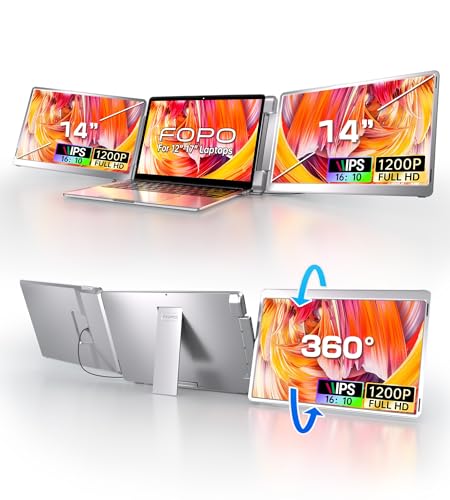 FOPO 14" Triple Screen Extender |
Mid-Range | Triple-screen extender (adds 2 screens) | Power users who need lots of screen space | Check Price | ||
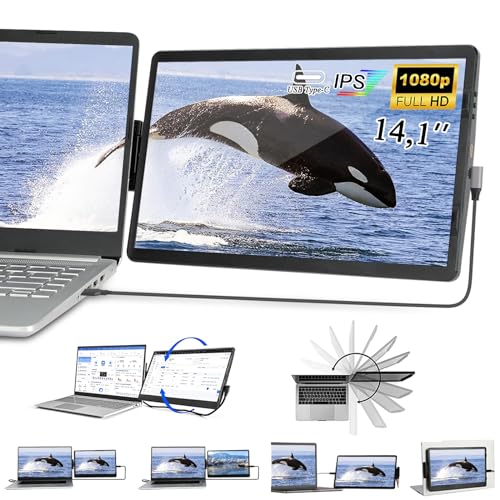 Iryreafer 14" Dual Extender |
Mid-Range | Attachable dual-screen extender | Laptop users who want a convenient second screen | Check Price | ||
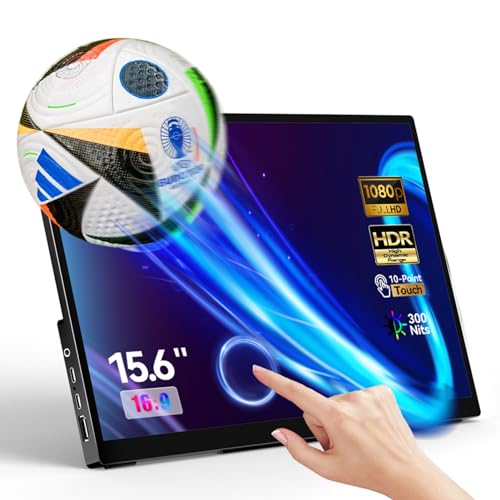 Topmonitor 15.6" Touchscreen |
Budget | 15.6" FHD touchscreen with single-cable option | Touch-enabled editing and multimedia on a budget | Check Price | ||
 cocopar 15.6" USB-C Monitor (Renewed) |
Budget | Ultra-slim 4mm metal-frame design | Travel editors who prioritize slim, light gear | Check Price |
1. FOPO 14" Triple Monitor Laptop Screen Extender-FHD 1200P 16:10 Laptop Screen Extender, Left Screen 360 Flip Portable Monitor for 12-16.5" Laptops with HDMI/USB-C, Plug & Play - S7
This folding triple-screen extender gives a laptop two additional 14" panels (1920x1200, 16:10) for serious multitasking during travel. It’s plug-and-play with USB-C/HDMI, offers a 360° flip on the left screen and folds into a carry bag, but check device compatibility for certain Mac chip configurations.
Key Specs
- Screens: Three 14" IPS panels, 1920x1200 (16:10)
- Ports: Full-featured USB-C and HDMI support
- Refresh: 60 Hz, 178° viewing angle
- Weight: ~3.52 lb, folds into included carry bag
Pros
- Massively increases productivity with two extra displays
- Foldable carrying design and solid portability for a multi-screen setup
- Easy plug-and-play setup across many devices
Cons
- Heavier and bulkier than single-panel portable monitors
- Some compatibility quirks with certain Mac chip configurations
Best For: Power users who need lots of screen space
Check Latest Price on Amazon2. Laptop Screen Extender, 14.1" FHD 1080P IPS Laptop Monitor Extender Dual Screen, Swivel Attachable Portable Monitor for Laptops with USB-C/HDMI Port, Plug n Play for Windows/Mac/Android
The Iryreafer 14" attachable extender turns a laptop into a two-screen setup using a swivel hinge and 3M attachment or detachable base. It’s lightweight and easy to install, making it a strong mid-range choice for business travelers, though some users report the panel can appear dim under certain lighting.
Key Specs
- Screen: 14.1" IPS, 1920x1080 Full HD
- Mount: 3M sticker attachment + detachable base
- Rotation: Up to 270/360° swivel hinge
- Cables: USB-C and Mini HDMI included
Pros
- Compact, attachable design saves desk space
- Simple plug-and-play setup and good portability
- Good value for mid-range productivity
Cons
- Some users report a dimmer screen in bright environments
- 3M attachment may wear or need replacement over time
Best For: Laptop users who want a convenient second screen
Check Latest Price on Amazon3. Portable Monitor Touchscreen 15.6" 1080P Touch Screen IPS USB-C HDMI Computer Monitor HDR FreeSync Eye Care Plug and Play for PC MAC Phone Xbox PS4/ 5 Switch Chromecast Stick
Topmonitor's 15.6" portable touchscreen is a budget-friendly pick that offers full HD, HDR support, and multi-touch control with two full-featured USB-C ports for one-cable convenience. It’s a great value for casual editors and travelers, but connectivity can be inconsistent on some hosts.
Key Specs
- Panel: 15.6" IPS, 1920x1080, HDR
- Touch: Multi-touch support, no drivers required
- Ports: 2 × full-featured USB-C, HDMI, 3.5mm audio
- Stand: Built-in adjustable stand (0–45°)
Pros
- Responsive touchscreen for quick edits and navigation
- Single USB-C cable support simplifies travel setups
- Excellent value for a larger portable display
Cons
- Some users report intermittent connectivity issues
- A few reports of functionality problems on certain devices
Best For: Touch-enabled editing and multimedia on a budget
Check Latest Price on Amazon4. USB-C Portable Monitor - 15.6 Inch FHD HDR FreeSync Zero Frame USB-C Computer Display with Dual Type-C Mini HDMI for Laptop PC Phone Mac Surface Xbox PS5 Switch, with Cover VESA Mountable (Renewed)
cocopar’s 15.6" FHD USB-C monitor is exceptionally slim and light, with dual Type-C ports and HDR/FreeSync support for vivid color work on the go. It’s a smart pick for editors who want a travel-friendly screen, though this listing is a renewed unit and it requires devices that support Thunderbolt/DP Alt Mode.
Key Specs
- Screen: 15.6" IPS, 1920x1080, HDR
- Thickness: As thin as 4 mm; weight ~1.6 lb
- Ports: 2 × full-featured USB-C, mini HDMI
- Mounting: Magnetic leather cover and VESA-mountable
Pros
- Ultra-slim, lightweight metal frame ideal for travel
- Strong color and clarity for on-the-road edits
- Comes with protective magnetic leather cover
Cons
- Renewed condition may concern buyers wanting new unit
- Requires host support for Thunderbolt 3 / DP Alt Mode
Best For: Travel editors who prioritize slim, light gear
Check Latest Price on AmazonWhich One Should You Choose?
If you need the most productivity per inch of bag space → FOPO 14" Triple Monitor (B0DHCLW2VZ). If budget is tight but you want a larger touchscreen for quick edits → Topmonitor 15.6" (B0D25XV38P). If ultra-slim portability and color clarity matter for travel editing → cocopar 15.6" (B09P4R2W35). If you want a neat attachable second screen for desk-saver setups → Iryreafer 14" (B0BNHVGQMG).
Best for Specific Scenarios
- Heavy multitasking on holiday: FOPO 14" — adds two extra displays so you can edit, run a video call, and keep notes open at once.
- On-the-go photo/video editing: cocopar 15.6" — ultra-slim metal frame and good color make it easy to edit from a café or hotel room.
- Touch-driven quick edits and presentations: Topmonitor 15.6" — touchscreen and single-cable setup speed up casual edits and demos without adding bulk.
Frequently Asked Questions
Will a portable USB-C monitor work with my MacBook?
Most portable monitors work with MacBook models that provide a full-featured USB-C port (DisplayPort Alt Mode or Thunderbolt). Always check the monitor’s compatibility notes — some extenders and adapters list exceptions for certain chip configurations. If your Mac lacks DP Alt Mode you may need an HDMI adapter plus power.
Can I power a portable monitor from my laptop’s USB-C port?
Many modern USB-C monitors accept power from a laptop via USB-C PD, but high-brightness or HDR panels may draw more power than some laptops can supply. Check the monitor’s power requirements and your laptop’s USB-C PD output; if insufficient, you’ll need a separate power source.
Are portable monitors accurate enough for photo and video editing?
Portable IPS panels can be suitable for casual or travel editing, especially if they offer full HD, HDR support, and good color reproduction. For color-critical work prefer a monitor with wide color gamut and consider calibrating it. Larger and higher-tier panels will better match studio-grade displays.
How We Selected These Products
Our recommendations are based on data-driven analysis: we evaluated 155229+ products across 23916+ brands using a composite scoring system that weighs rating (40%), review volume (30%), price value (20%), and demand signals (10%). Every product is ranked by data, not opinions.
Last updated: November 03, 2026
As an Amazon Associate we earn from qualifying purchases at no extra cost to you. Full disclosure.
GearLark Score is our editorial ranking based on a composite analysis of product quality, value, and verified customer sentiment. Click through to Amazon for current pricing, availability, and live customer reviews.