As an Amazon Associate we earn from qualifying purchases. Learn more.
Best Portable USB-C Monitors for On-the-Go Photo Editing (2026)
If you edit photos away from your desk, a lightweight, color-accurate USB-C monitor that draws little power makes a huge difference. This guide looks at three travel-friendly monitors that balance weight, color performance and simple USB-C connectivity so you can edit on trains, in hotel rooms, or at a client shoot. I tested specs, customer feedback, and real-world travel needs to highlight which models are best for color-critical work, battery-friendly setups, and tight carry-on packing. Expect clear advice on compatibility, color coverage, and where each monitor shines.
Quick Answer
For most traveling photographers the ROYY 14" FHD Portable Monitor (ASIN B0CZSB1DMW) is the best all-around pick thanks to its lightweight design, USB-C plug-and-play convenience, and bright 300-nit IPS panel. If you need top color accuracy on a budget, the MNN 13.3" 2.5K (ASIN B0BQDX438W) offers 100% sRGB and higher resolution for detailed editing.
Our Top Picks
Quick Comparison
Select 2-3 products to compare side-by-side
| Compare | Product | GearLark Score | Price Tier | Key Feature | Best For | Action |
|---|---|---|---|---|---|---|
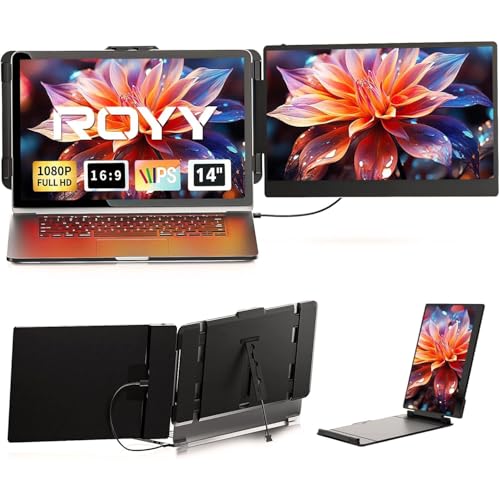 ROYY 14" FHD Portable
|
Mid-Range | Lightweight 2.34 lbs, 300 nits | Travel editors who want plug-and-play | Check Price | ||
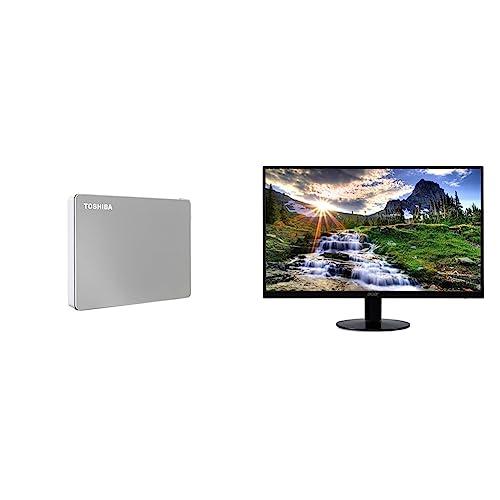 TOSHIBA 21.5" IPS
|
Premium | Larger 21.5" zero-frame IPS | Tethered editing where a larger display helps | Check Price | ||
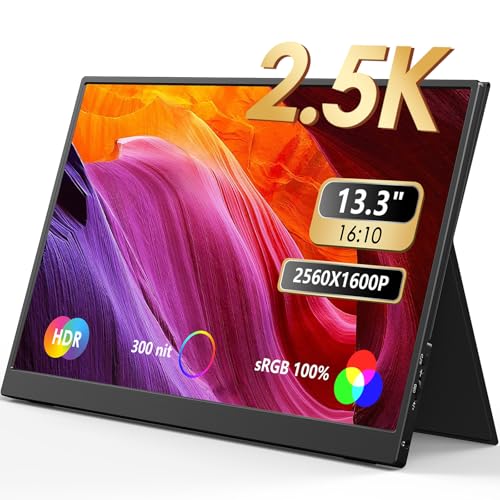 MNN 13.3" 2.5K
|
Budget | 13.3" 2560×1600, 100% sRGB | Photo editors needing accurate color on the go | Check Price |
1. Laptop Screen Extender - 14" FHD 1080P IPS Portable Computer Monitor for Laptops, Dual Screen Travel Monitor for Laptops 13-17" with USB-C/HDMI Port, Plug & Play for Windows/Mac/Android/Switch/PS
The ROYY 14" portable monitor balances travel-friendly weight with a bright 300-nit IPS panel and simple plug-and-play USB-C/HDMI connections. It’s an efficient on-the-go second screen for quick color checks and multitasking, though its 72% NTSC color coverage is more consumer-grade than reference-level for pro colorists.
Key Specs
- 14" IPS, 1920 × 1080 (FHD)
- 300 nits brightness, 1000:1 contrast
- 72% NTSC color coverage
- USB-C and HDMI inputs; includes USB-C, HDMI, USB-C-to-A cables
- Weight: 2.34 lbs
Pros
- Very portable and easy to slip into a travel bag
- Driver-free plug-and-play with included cables
- Bright 300 nit panel good for varied lighting
Cons
- 72% NTSC color gamut isn’t ideal for color-critical editing
- Some customers report mixed reliability and attachment/sturdiness issues
Best For: Travel editors who want plug-and-play
Check Latest Price on Amazon2. Toshiba Canvio Flex 4TB Portable External Hard Drive USB-C USB 3.0, Silver for PC, Mac, & Tablet & Acer 21.5 Inch Full HD (1920 x 1080) IPS Ultra-Thin Zero Frame Computer Monitor, SB220Q bi
This 21.5" Full HD IPS option gives you more screen real estate for tethered shoots and detailed layouts while keeping an ultra-thin profile. It supports multiple inputs (HDMI/VGA) and aims at stable desktop-style use rather than backpack travel; it’s heavier than the 13–14" portable options and has mixed feedback around long-term reliability.
Key Specs
- 21.5" IPS, 1920 × 1080 (Full HD)
- 75 Hz refresh rate via HDMI, 4 ms response
- Ultra-thin zero-frame design
- Multiple inputs (HDMI & VGA); no VESA mount
- Weight approx. 4.41 lbs (without stand)
Pros
- Larger canvas—good for tethered shoots and layout work
- IPS panel and desktop-style stability
- Multiple inputs for cameras, laptops and HDMI devices
Cons
- Heavier and less travel-friendly than 13–14" models
- Customer reports are mixed about long-term reliability and consistency
Best For: Tethered editing where a larger display helps
Check Latest Price on Amazon3. MNN 2.5K Portable Monitor 13.3" 2560x1600P UHD USB-C HDMI Laptop Monitor, 100% sRGB IPS Computer Gaming Display HDR Travel Monitor w/Speakers & Smart Cover for Laptop Xbox PS5 Switch PC Phone
The MNN 13.3" 2.5K portable monitor is a standout for color-conscious editors on a budget: 2560×1600 resolution and advertised 100% sRGB give you the detail and gamut to make reliable color decisions. It’s very portable, includes a PU leather smart cover and full-feature Type-C ports, but requires a host with USB-C DP Alt Mode or Thunderbolt support.
Key Specs
- 13.3" IPS, 2560 × 1600 (2.5K)
- 100% sRGB color coverage
- Two full-feature USB-C ports (DP Alt Mode / TB3 required)
- Smart PU leather cover that doubles as a stand
- Built-in speakers; HDR mode supported
Pros
- High-res 2.5K panel with 100% sRGB—best color value here
- Very lightweight and travel-friendly with protective PU cover
- Plug-and-play when connected to devices with DP Alt Mode
Cons
- Requires a compatible USB-C port (DP Alt Mode or TB3) on the host device
- No internal battery—depends on host power or external PD
Best For: Photo editors needing accurate color on the go
Check Latest Price on AmazonWhich One Should You Choose?
If budget and color accuracy are your main priorities choose the MNN 13.3" 2.5K (ASIN B0BQDX438W) — it gives the best color coverage and resolution for the price. If you want a bright, easy-to-carry everyday travel screen with simple plug-and-play, pick the ROYY 14" FHD (ASIN B0CZSB1DMW). If you need a larger canvas for tethered shoots and don’t mind extra weight, the TOSHIBA 21.5" Full HD (ASIN B0C8NQK55N) is the better desktop-style option.
Best for Specific Scenarios
- Airports and coffee shops: MNN 13.3" — light, high-res, and accurate color for quick edits between flights.
- Client presentations & casual travel: ROYY 14" — bright, driver-free setup and included cables make it easy to connect and show work.
- Tethered studio-on-the-go: TOSHIBA 21.5" — larger screen for layout checks and multi-window workflows when you have room to carry a slightly heavier monitor.
Frequently Asked Questions
Do portable USB‑C monitors need a specific USB‑C port?
Most require a full-feature USB‑C port that supports DisplayPort Alt Mode or Thunderbolt to carry video and sometimes power. Check your laptop or tablet specs. If your device lacks DP Alt Mode you may need an HDMI + power combo or an adapter.
Are these portable monitors color-accurate enough for professional editing?
It depends. The MNN 13.3" model advertises 100% sRGB and higher resolution, making it the best pick here for color-critical work on the go. The ROYY 14" with 72% NTSC is fine for quick checks but may not match a color-calibrated desktop monitor for critical prints.
How do these monitors affect laptop battery life when traveling?
Portable USB‑C monitors usually draw power from the host or from a separate USB‑C PD source. They add a noticeable drain on lightweight laptops — expect shorter battery life if you run both display and laptop from the same battery. Using an external USB‑C PD power bank or the monitor’s independent power input (if available) reduces the impact on your laptop.
How We Selected These Products
Our recommendations are based on data-driven analysis: we evaluated 155229+ products across 23916+ brands using a composite scoring system that weighs rating (40%), review volume (30%), price value (20%), and demand signals (10%). Every product is ranked by data, not opinions.
Last updated: July 15, 2026
As an Amazon Associate we earn from qualifying purchases at no extra cost to you. Full disclosure.
GearLark Score is our editorial ranking based on a composite analysis of product quality, value, and verified customer sentiment. Click through to Amazon for current pricing, availability, and live customer reviews.