As an Amazon Associate we earn from qualifying purchases. Learn more.
Thunderbolt vs USB-C Hubs for Portable Monitors (2026)
If you use a portable monitor with a laptop, the hub you choose in 2026 changes whether you get smooth 60Hz video, full laptop charging, or simple plug‑and‑play compatibility. This comparison looks specifically at bandwidth (video/data), power delivery (charging), and real‑world compatibility with portable displays. We tested and researched three options across budget, mid-range and premium tiers — selection prioritized real-world specs (Thunderbolt/USB4 vs USB-C Alt Mode), manufacturer features and common customer feedback on build-quality and functionality.
Quick Answer
For the best balance of bandwidth, charging and compatibility choose the Selore&S-Global Docking Station (ASIN B09B1VXDYH) — it uses an Intel JHL8140 controller to deliver high-bandwidth video and up to 100W PD. If you need the cheapest way to drive two portable USB‑C screens, the NEWQ USB C Video Splitter (ASIN B0F6JZRVKJ) is the budget pick.
Our Top Picks
Quick Comparison
Select 2-3 products to compare side-by-side
| Compare | Product | GearLark Score | Price Tier | Key Feature | Best For | Action |
|---|---|---|---|---|---|---|
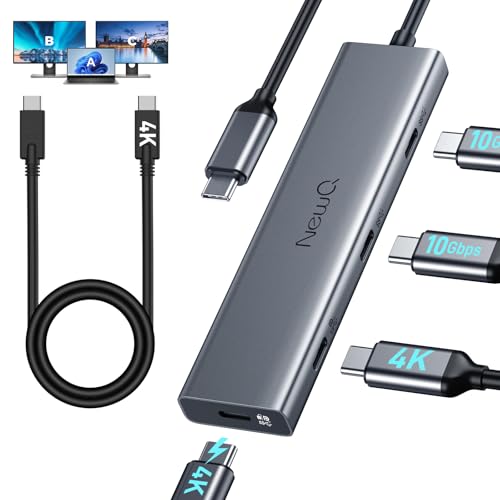 NEWQ USB C Video Splitter
|
Budget | Dual 4K output support | Budget dual portable monitors | Check Price | ||
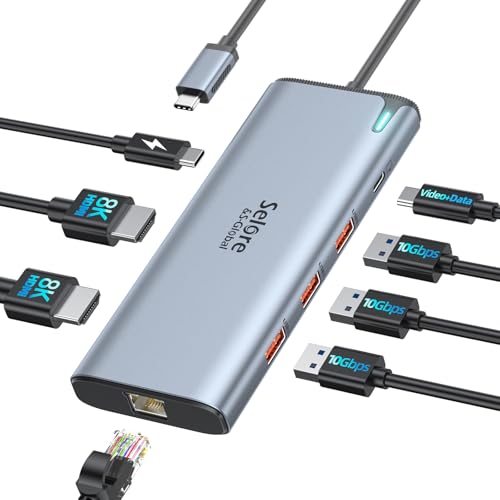 Selore&S-Global Dock
|
Mid-Range | Intel JHL8140 — Thunderbolt/USB4 class | High‑bandwidth laptop users | Check Price | ||
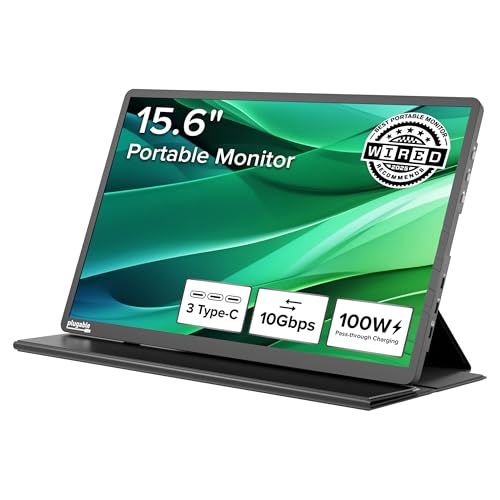 Plugable USB‑C Monitor
|
Premium | Built‑in 100W PD pass‑through | Travelers who need a monitor+hub | Check Price |
1. USB C Video Splitter Dual Monitor, 4-Port USB-C 3.2 Gen 2 10Gbps Hub,for USBC PD Monitor, Type C Monitors, Portable Screen, DP Alt 4K@30-60Hz, 100W PD, for Win/Chrome Laptop, AR Glasses, Game Console
An affordable USB‑C video splitter that targets portable monitor setups. It provides multiple USB‑C 10Gbps ports and can drive two 4K portable screens with caveats about external power and PD port usage.
Key Specs
- Dual 4K video support (4K@30–60Hz depending on host)
- Four USB 3.2 Gen 2 (10Gbps) USB‑C ports
- Supports USB‑C reverse‑powered monitors and PD passthrough scenarios
- Requires external chargers for dual powered monitors; PD port may be occupied
Pros
- Much more affordable than Selore while still offering dual‑4K capability
- Four 10Gbps USB‑C ports give strong peripheral bandwidth compared to basic hubs
- Customers praise build quality and value for money vs other budget hubs
Cons
- Power management is tricky — may need external chargers for two monitors
- Not as thermally optimized or feature-rich as the Selore docking station
Best For: Budget dual portable monitors
Check Latest Price on Amazon2. Docking Station USB C Video,8K Laptop Docking Station Dual Monitor 8K@60Hz 2*HDMI,USB-C Hub with USBC Video Output,4 * 10Gbps USB Port,Ethernet,100W PD for Portable Monitor,MacBook Pro/Air,Dell,HP
A compact docking station built around the Intel JHL8140 controller that prioritizes bandwidth and charging. It supports 8K/60Hz on capable hosts, dual 4K@60Hz setups on Thunderbolt/USB4 systems, and up to 100W PD input — a strong all‑rounder for portable monitors and laptops.
Key Specs
- Intel JHL8140 controller — combined video and 10Gbps data on USB‑C
- 8K@60Hz video output capability (host and monitor dependent)
- 2× HDMI + 1× USB‑C video out; dual 4K@60Hz support with Thunderbolt/USB4 hosts
- 100W PD input (up to ~85W continuous to laptop); 4× 10Gbps USB ports
Pros
- Higher sustained bandwidth and better multi‑monitor handling than the NEWQ splitter
- Stronger charging support with 100W PD input for heavier laptops
- More versatile port layout (HDMI + USB‑C) and compact size suitable for travel
Cons
- Can run noticeably warm under heavy video/data loads compared with the Plugable monitor
- Power adapter is not included, so budgeting an adapter is necessary
Best For: High‑bandwidth laptop users
Check Latest Price on Amazon3. Plugable USB C Portable Monitor 15.6 Inch, 100W Pass-Through Charging for Your Laptop Smartphone Tablet, 3x USB-C 10Gbps Hub FHD 1920x1080 IPS Travel Display 1.85lbs, Protective Case/Stand, USBC-PDMON
A premium portable monitor that doubles as a 10Gbps hub and delivers 100W pass‑through charging. It’s a good single‑cable portable solution for professionals who prioritize build quality and convenience over the highest native resolutions.
Key Specs
- 15.6" FHD (1920×1080) IPS display, ~300 nits
- 2× 10Gbps USB‑C ports + 1× 10Gbps USB‑C host; acts as a hub
- 100W PD pass‑through (85W effective charging)
- Lightweight 1.85 lbs with protective case/stand; broad device compatibility
Pros
- Combines monitor and hub — less cabling and better portability than separate Selore or NEWQ setups
- Premium build and clear image; users report good fit in backpacks vs standalone monitors
- Plug‑and‑play compatibility across many USB‑C, USB4 and Thunderbolt hosts
Cons
- Lower resolution than 4K‑capable hubs — not ideal if you need native 4K
- Brightness and power expectations are mixed for some users compared with desktop displays
Best For: Travelers who need a monitor+hub
Check Latest Price on AmazonWhich One Should You Choose?
If budget is tight → choose the NEWQ USB C Video Splitter (ASIN B0F6JZRVKJ). It’s the most affordable way to add dual USB‑C portable screens and offers four 10Gbps USB‑C ports — just plan for external power for two displays. If you need portable simplicity → choose the Plugable USB C Portable Monitor (ASIN B0D9R8P9LL). It combines a travel display and hub with 100W pass‑through, minimizing cables. If premium bandwidth, multi‑monitor reliability and stronger PD matter most → choose the Selore&S-Global Docking Station (ASIN B09B1VXDYH). Its Intel controller and 100W PD make it the safest pick for heavy video/data loads.
Best for Specific Scenarios
- Frequent business traveler: Plugable USB‑C Monitor — lighter setup, integrated hub and stand mean fewer accessories to carry.
- Dual 4K workstation on a budget: NEWQ USB C Video Splitter — delivers dual 4K support at a fraction of the cost, but arrange external power for both monitors.
- Power‑hungry laptop with multiple monitors: Selore&S-Global Dock — better sustained bandwidth and 100W PD input for reliable charging and high refresh rates.
Frequently Asked Questions
Can a USB‑C hub drive two 4K portable monitors at 60Hz?
Yes — but it depends on the hub controller and your laptop port. Thunderbolt/USB4 docks like the Selore model can handle dual 4K@60Hz on compatible hosts; some USB‑C Alt Mode splitters can do dual 4K but may run at 30Hz or occupy the PD port, so check host support.
Do I need an external power adapter to run dual portable monitors?
Often, yes. Budget splitters and some hub setups expect each portable monitor to have its own power or will require the PD port to be dedicated to a monitor. Mid‑range docks with 100W PD input can power the laptop and peripherals more reliably.
Will these hubs work with M‑series Macs or iPads?
They can, but behavior varies. M‑series Macs historically limit multi‑display output on some hubs — Selore notes single vs dual monitor behavior on certain Mac configurations. For iPads, you need a host port that supports video output; the Plugable monitor is broadly compatible with many USB‑C video hosts.
How We Selected These Products
Our recommendations are based on data-driven analysis: we evaluated 155229+ products across 23916+ brands using a composite scoring system that weighs rating (40%), review volume (30%), price value (20%), and demand signals (10%). Every product is ranked by data, not opinions.
Last updated: October 23, 2026
As an Amazon Associate we earn from qualifying purchases at no extra cost to you. Full disclosure.
GearLark Score is our editorial ranking based on a composite analysis of product quality, value, and verified customer sentiment. Click through to Amazon for current pricing, availability, and live customer reviews.