As an Amazon Associate we earn from qualifying purchases. Learn more.
Best Power Banks That Include a USB-C Hub for On-the-Go Editing (2026)
If you edit photos or video away from a desk, a hybrid power bank with a built‑in USB‑C hub can save you minutes (and headaches) by powering your laptop while letting you plug in an SSD and a portable monitor. This guide reviews three Duracell portable charging hubs that target mobile creators in 2026. I evaluated them for power delivery, port mix, weight, build quality and real‑world functionality for editing workflows (SSD access, powering monitors, and simultaneous device charging). The products were chosen from the latest Duracell charging hubs and ordered by performance and consistency of customer feedback.
Quick Answer
For on-the-go editing, the Duracell M100 is the best pick: it balances a 92W USB‑C output with a lightweight, travel-friendly design and wireless charging, making it ideal for powering laptops and running portable SSDs and USB‑C monitors during quick edits.
Quick Comparison
Select 2-3 products to compare side-by-side
| Compare | Product | GearLark Score | Price Tier | Key Feature | Best For | Action |
|---|---|---|---|---|---|---|
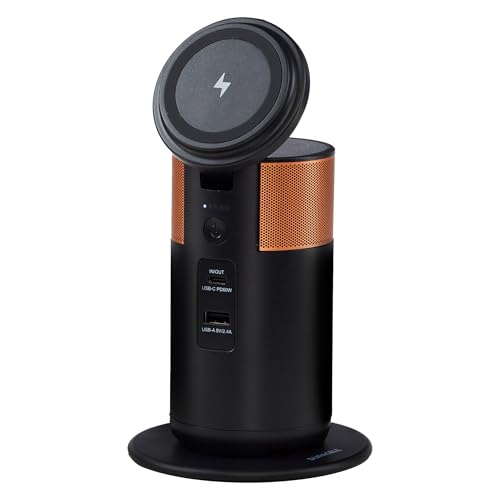 Duracell M100
|
Mid-Range | 92W USB‑C output in a 1.5 lb body | Lightweight mobile editors | Check Price | ||
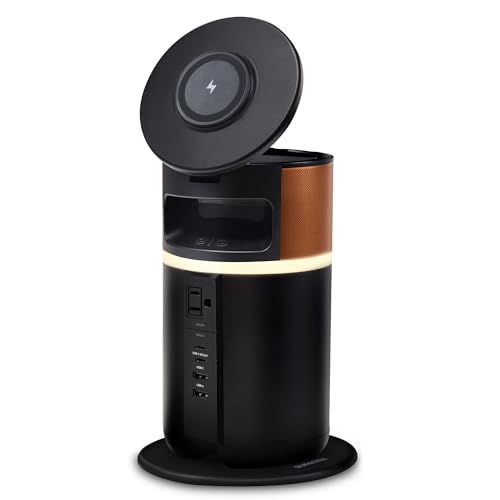 Duracell M250
|
Premium | 250W total output with AC port | Power‑hungry portable workstations | Check Price | ||
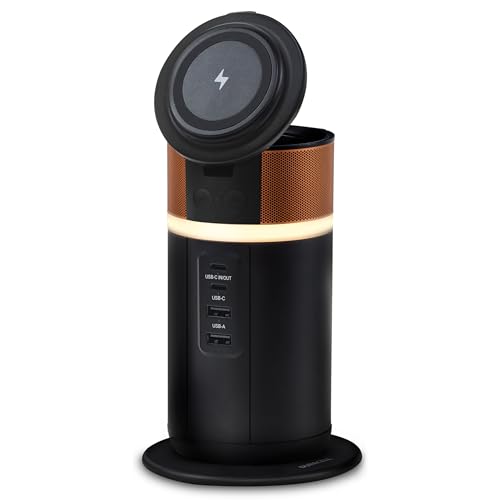 Duracell M150
|
Premium | 150W output in a 1.8 lb pack | Balanced power and portability | Check Price |
1. Duracell M100 Portable Charging Hub 92W Charger for Laptops & Tablets, Wireless Charging for Cell Phones & Earbuds Light & Compact Power Bank Station w/ USB-C & USB-A Ports, Charging Dock
The M100 is a compact, travel‑friendly hybrid that delivers up to 92W over USB‑C while offering wireless charging and a tiltable lid for hands‑free phone use. Its light weight and FAA compliance make it an easy carry for photographers and editors who need to run a portable SSD and a small USB‑C monitor while topping up a laptop.
Key Specs
- Output: up to 92W USB‑C power delivery
- Weight: ~1.5 pounds; backpack friendly
- Wireless charging pad and tiltable lid
- FAA‑compliant for carry‑on; ~3 hours recharge
Pros
- Light, easy to pack for travel and shoots
- Strong charging speed for most laptops (92W)
- Wireless charging and handy tiltable lid for phone/earbuds
Cons
- Not as much total wattage for powering larger monitors
- Some users report occasional functionality issues
Best For: Lightweight mobile editors
Check Latest Price on Amazon2. Duracell M250 Portable Charging Hub 250W Charger for Laptops & Tablets, Wireless Charging for Cell Phones & Earbuds Light & Compact Power Bank Station w/ USB-C, USB-A & AC Ports, Charging Dock
The M250 is the heaviest but most powerful unit here, offering a 250W power station design with an AC outlet plus multiple USB‑C and USB‑A ports and up to 100W fast charging on USB‑C. It's a good choice when you need to power a full laptop and a bus‑powered monitor or SSD simultaneously and still have headroom for phones and accessories.
Key Specs
- Total capacity: 250W power station form factor
- Ports: AC outlet, 2 USB‑C, 2 USB‑A
- USB‑C fast charging up to 100W
- Weight: ~4.5 pounds; cord storage and tiltable lid
Pros
- High total output; can run laptop plus peripherals
- Includes an AC outlet for legacy devices or larger monitors
- Thoughtful design: cord storage and ring light for hands‑free work
Cons
- Heavier and bulkier to carry for long trips
- Some customers report mixed functionality over long term
Best For: Power‑hungry portable workstations
Check Latest Price on Amazon3. Duracell M150 Portable Charging Hub 150W Charger for Laptops & Tablets, Wireless Charging for Cell Phones & Earbuds Light & Compact Power Bank Station w/ USB-C & USB-A Ports, Charging Dock
The M150 sits between the M100 and M250: it offers higher total wattage (150W) than the M100 while remaining fairly light at about 1.8 pounds. It supports wireless charging, a tiltable lid, and fast recharge via the dock or USB‑C, making it a strong option for creators who need more headroom than 92W but don't want the bulk of a full power station.
Key Specs
- Total power: 150W output
- Battery: ~25,000 mAh (portable hub format)
- Weight: ~1.8 pounds; fast recharge ~3 hours
- FAA‑compliant for carry‑on travel
Pros
- Good balance of power and portability for field editing
- Fast recharge and wireless charging convenience
- Compact design with cord storage to reduce clutter
Cons
- Functionality reports are mixed—some users experienced failures
- May not provide enough sustained power for larger monitors
Best For: Balanced power and portability
Check Latest Price on AmazonWhich One Should You Choose?
If budget is tight → choose the Duracell M150 for a balanced mix of power and portability. If you need the lightest travel setup and mostly edit on a laptop that accepts ~92W → choose the Duracell M100. If premium power and the ability to run heavier peripherals or an AC monitor matter most → choose the Duracell M250.
Best for Specific Scenarios
- Quick photo edits between shoots: Duracell M100 because it’s light, FAA‑compliant, and provides enough power for most laptops and SSDs.
- Streaming or editing with multiple peripherals: Duracell M250 because its higher total output and AC outlet let you run a laptop, portable monitor and accessories at once.
- Longer field sessions without heavy hauling: Duracell M150 because it strikes a middle ground—more power than the M100 but still reasonably portable.
Frequently Asked Questions
Can these power banks run a USB‑C monitor and an external SSD at the same time?
Yes—provided the unit has enough total output and multiple active USB‑C ports. The M250 offers the most headroom and an AC outlet for larger monitors; the M150 and M100 can run many portable USB‑C monitors and SSDs, but check your monitor’s power/data requirements and the bank’s total wattage.
Are these safe to bring on planes?
The M100 and M150 are described as FAA‑compliant for carry‑on; follow airline rules about battery capacity and always carry power banks in your hand luggage. Check the current airline policies before you travel.
Will a power bank damage my SSD or laptop?
No—these hubs use standard USB‑C Power Delivery and common charging ports designed for consumer electronics. To minimize risk, use good quality USB‑C cables rated for data and power, confirm the power profile matches your laptop, and avoid using damaged cables.
How We Selected These Products
Our recommendations are based on data-driven analysis: we evaluated 155229+ products across 23916+ brands using a composite scoring system that weighs rating (40%), review volume (30%), price value (20%), and demand signals (10%). Every product is ranked by data, not opinions.
Last updated: July 21, 2026
As an Amazon Associate we earn from qualifying purchases at no extra cost to you. Full disclosure.
GearLark Score is our editorial ranking based on a composite analysis of product quality, value, and verified customer sentiment. Click through to Amazon for current pricing, availability, and live customer reviews.