As an Amazon Associate we earn from qualifying purchases. Learn more.
Best Portable Power Banks with Built-In USB-C Hubs (2026)
If you want to tuck a mini workstation into a backpack, portable power banks with built-in USB-C hubs are the fastest way to go. This guide tests three Duracell charging hubs that combine battery capacity, USB-C ports, AC output and wireless docks so you can power a laptop, phone and accessories without hunting for outlets. Read on if you need advice on wattage, port layout, travel compliance and which model fits in a commuter bag. Products were selected for real-world portability, hub functionality and practical features like wireless docks, cable storage and fast recharging.
Quick Answer
The Duracell M250 is the best portable power bank with a built-in USB-C hub for 2026 — it pairs a 250W power station with AC, multiple USB ports and a wireless dock so you can run a mini workstation from your bag. If you want the lightest value pick, the Duracell M150 balances weight, wireless dock features and FAA-compliant travel-friendly capacity.
Quick Comparison
Select 2-3 products to compare side-by-side
| Compare | Product | GearLark Score | Price Tier | Key Feature | Best For | Action |
|---|---|---|---|---|---|---|
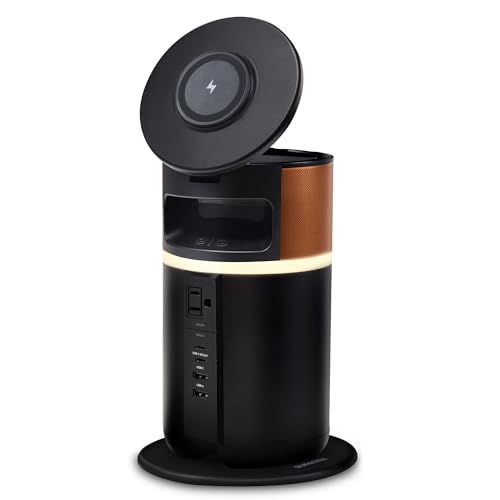 Duracell M250
|
Premium | 250W output with AC and wireless dock | Remote workers who need a mini workstation | Check Price | ||
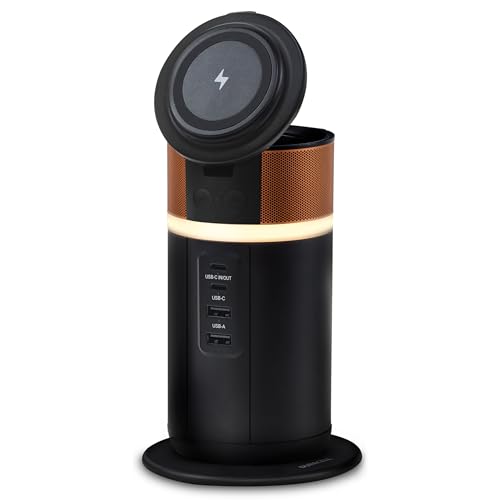 Duracell M150
|
Mid-Range | 150W output in a lightweight package | Value-conscious travelers and commuters | Check Price | ||
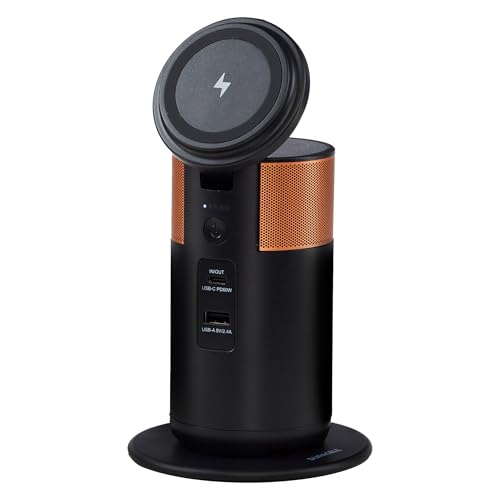 Duracell M100
|
Mid-Range | Ultralight 92W hub fits side pockets | Students and commuters who need light carry | Check Price |
1. Duracell M250 Portable Charging Hub 250W Charger for Laptops & Tablets, Wireless Charging for Cell Phones & Earbuds Light & Compact Power Bank Station w/ USB-C, USB-A & AC Ports, Charging Dock
The M250 is the most capable hub in this lineup: a 250W station that combines AC power, multiple USB-C/USB-A ports and a wireless charging dock inside a tiltable lid. It’s designed to reduce desk clutter with cord storage and a ring light, and it’s best when you need laptop-level power and hands-free phone access on the go.
Key Specs
- 250W total output
- AC port + 2 USB-C + 2 USB-A
- Tiltable wireless charging dock with 360° ring light
- Weight: 4.5 pounds; recharge via dock (~5.6h) or USB-C (~3h)
Pros
- High-output 250W hub handles laptops and peripherals
- Integrated wireless dock and cord storage keep a compact workstation tidy
- Fast 100W-capable USB-C charging for laptops
Cons
- Heavier than smaller options — less suited to ultralight packing
- Some users report inconsistent functionality on rare units
Best For: Remote workers who need a mini workstation
Check Latest Price on Amazon2. Duracell M150 Portable Charging Hub 150W Charger for Laptops & Tablets, Wireless Charging for Cell Phones & Earbuds Light & Compact Power Bank Station w/ USB-C & USB-A Ports, Charging Dock
The M150 balances power and portability: a 150W, 25,000 mAh charging hub that’s FAA-compliant and light enough for frequent travel. It adds a wireless dock with a tiltable lid and cord storage for a tidy desk setup, making it the best value pick when you want travel-friendly hub power without premium size or weight.
Key Specs
- 150W total output; 25,000 mAh capacity
- USB-C and USB-A ports plus wireless charging dock
- Weight: 1.8 pounds; recharge via dock or USB-C (~3h)
- FAA-compliant for carry-on travel
Pros
- Great balance of power and portability for travel
- Wireless dock and cord storage reduce desk clutter
- Quick recharge time and travel-friendly capacity
Cons
- Functionality has mixed reports — a few units can fail unexpectedly
- Some users find its footprint larger than expected for a travel unit
Best For: Value-conscious travelers and commuters
Check Latest Price on Amazon3. Duracell M100 Portable Charging Hub 92W Charger for Laptops & Tablets, Wireless Charging for Cell Phones & Earbuds Light & Compact Power Bank Station w/ USB-C & USB-A Ports, Charging Dock
The M100 is the lightest option and fits into a backpack side pocket while still offering near-laptop charging capability (92W). It includes a tiltable wireless lid and an additional wireless pad underneath, making it a compact multi-device charger for day trips and campus life.
Key Specs
- 92W output suitable for most laptops
- Lightweight at 1.5 pounds; fits backpack pockets
- Dual wireless charging surfaces (lid + underside)
- FAA-compliant for carry-on travel; recharge ~3 hours
Pros
- Very portable and easy to tuck into a backpack
- Dual wireless areas for phone and earbuds
- FAA-compliant and quick to recharge
Cons
- Lower total output than larger models — less headroom for heavy workstation loads
- Some users report mixed impressions of long-term functionality
Best For: Students and commuters who need light carry
Check Latest Price on AmazonWhich One Should You Choose?
If budget is tight → choose the Duracell M150 for the best balance of features and travel-friendly capacity. If you need the lightest, easiest-to-carry hub → choose the Duracell M100. If premium power and the ability to run a small workstation without compromise matter most → choose the Duracell M250.
Best for Specific Scenarios
- Remote worker or pop-up office: Duracell M250 because its 250W output, AC port and tidy cord storage let you run a laptop, monitor and accessories from a backpack setup.
- Frequent traveler: Duracell M150 because it balances wattage, lightweight carry and FAA-compliant capacity so you can move between flights, hotels and cafés.
- Student or daily commuter: Duracell M100 because it’s compact, fits a backpack side pocket and provides quick wireless charging for phone and earbuds.
Frequently Asked Questions
Can I bring these power banks on a plane?
Some models in this lineup are labeled FAA-compliant for carry-on (the manufacturer lists this for the M150 and M100). Always confirm the product’s battery Wh on the label and check your airline’s policy before flying — airlines restrict very high-capacity batteries and may require advance approval.
Will these charge my laptop at full speed?
That depends on the model and your laptop’s power needs. The M100 is rated around 92W, which covers most laptops; the M150 offers higher overall output (150W) and the M250 supports up to 100W fast USB-C charging plus AC output for devices that need brick adapters. Match the hub’s PD wattage to your laptop’s charger rating for best results.
How should I protect and carry an integrated hub in a backpack?
Use a padded compartment or sleeve to isolate the hub from sharp objects and liquids. Place cables and small accessories in the hub’s cord storage or a separate pouch to avoid pressure on ports. For heavier units, stow them low and centered in your pack to keep the load balanced; for travel, confirm carry-on rules before placing higher-capacity units in checked luggage.
How We Selected These Products
Our recommendations are based on data-driven analysis: we evaluated 155229+ products across 23916+ brands using a composite scoring system that weighs rating (40%), review volume (30%), price value (20%), and demand signals (10%). Every product is ranked by data, not opinions.
Last updated: July 03, 2026
As an Amazon Associate we earn from qualifying purchases at no extra cost to you. Full disclosure.
GearLark Score is our editorial ranking based on a composite analysis of product quality, value, and verified customer sentiment. Click through to Amazon for current pricing, availability, and live customer reviews.