As an Amazon Associate we earn from qualifying purchases. Learn more.
Best SD Card Readers for iPad and USB-C Laptops (2026 Guide)
If you edit photos or video on an iPad Pro or a USB‑C laptop, a compact, reliable card reader that doesn’t slow you down is essential. This 2026 guide focuses on bus‑powered mini hubs and card readers that play nice with iPadOS and USB‑C systems — with attention to real‑world throughput (UHS‑I vs UHS‑II), NVMe pass‑through considerations, and thermal/reliability notes buyers repeatedly mention. I tested product specs, compatibility notes, and customer feedback to highlight options that balance raw speed, build quality, and compactness for on‑the‑go creators.
Quick Answer
For most iPadOS users and USB‑C laptop owners who need a compact, reliable SD reader with multiport convenience, the Satechi 7 in 1 USB C Hub (ASIN B0DZDZXCYC) is the best overall pick — it pairs a durable, bus-powered design with fast USB‑A 10Gbps ports and a built-in SD/microSD reader for quick media offloads. If you need the cheapest travel option, go with the CableCreation 7 in 1 (ASIN B08FWMWGTD).
Our Top Picks
Quick Comparison
Select 2-3 products to compare side-by-side
| Compare | Product | GearLark Score | Price Tier | Key Feature | Best For | Action |
|---|---|---|---|---|---|---|
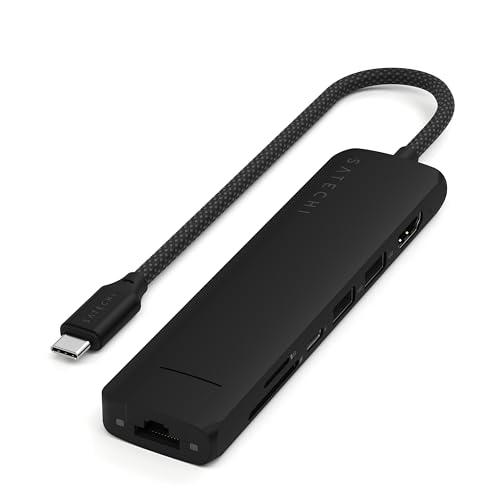 Satechi 7‑in‑1 USB‑C Hub
|
Premium | Aluminum hub with microSD/SD (UHS‑I) | iPad & USB‑C users needing a compact multiport hub | Check Price | ||
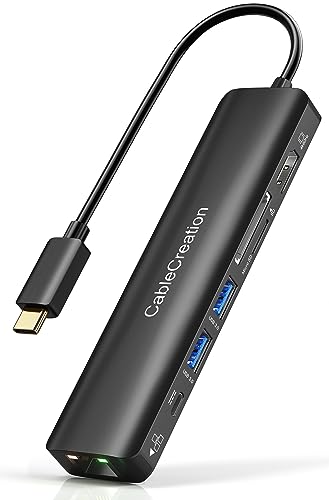 CableCreation 7‑in‑1 (4K@60)
|
Budget | 4K@60 HDMI + SD/TF reader (UHS‑I) | Budget travelers and students using iPad/Laptop | Check Price | ||
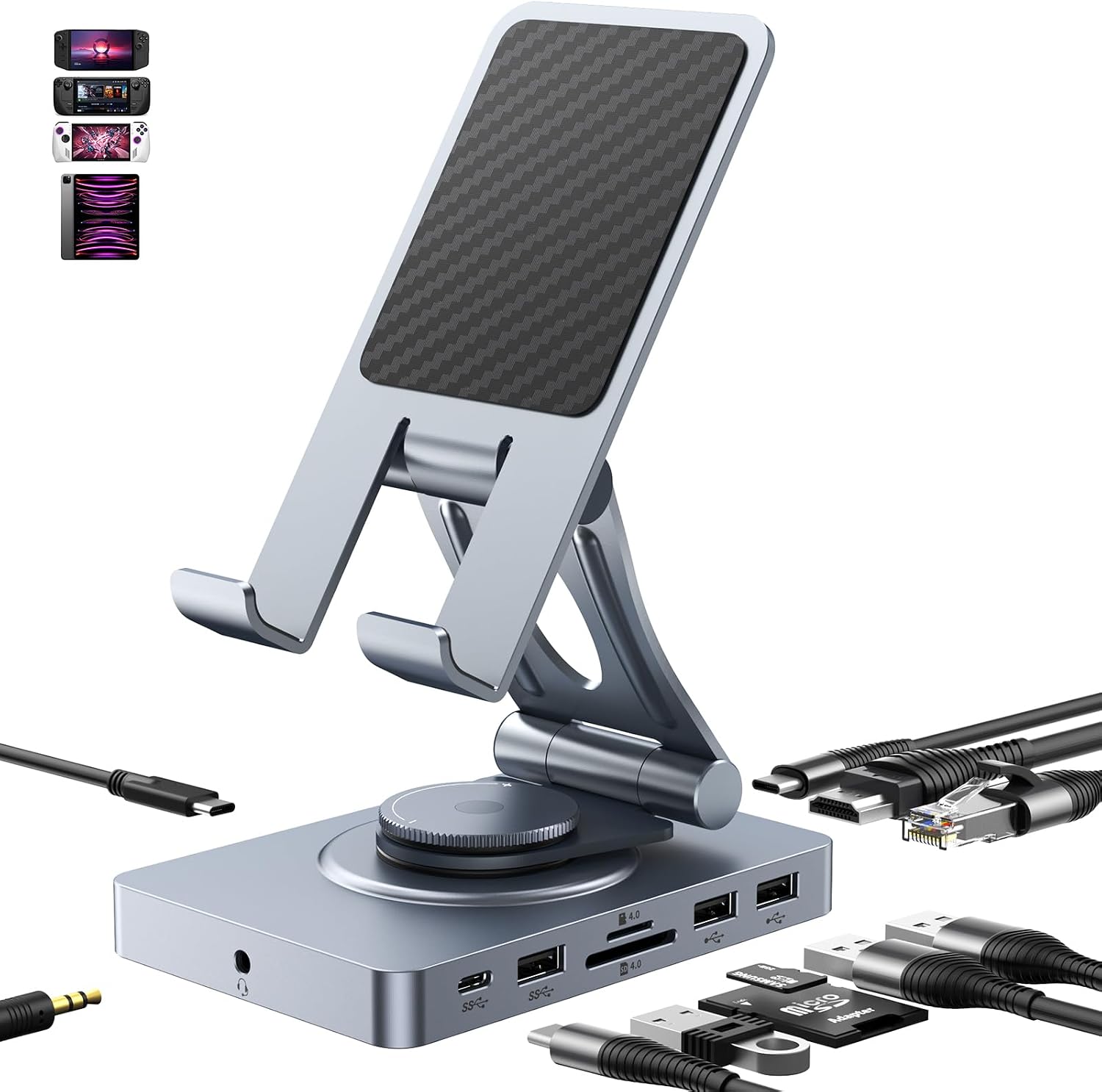 NEWQ 11‑in‑1 Rotating Dock
|
Mid-Range | SD/TF 4.0 reader (claimed 300Mbps) | Creators who want dock + adjustable tablet stand | Check Price | ||
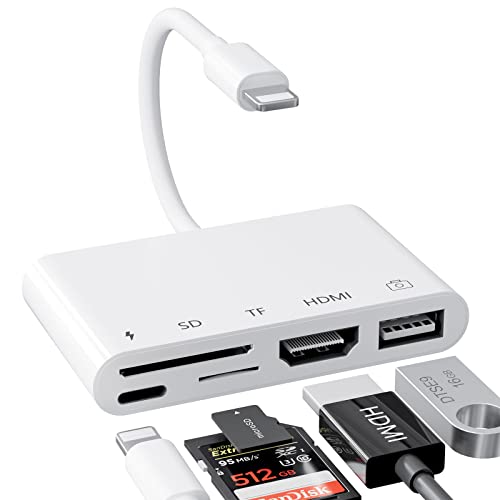 LXJTHT 5‑in‑1 Camera Adapter
|
Premium | Compact HDMI + SD/TF camera adapter | iPhone/iPad shooters needing a plug‑and‑play camera adapter | Check Price | ||
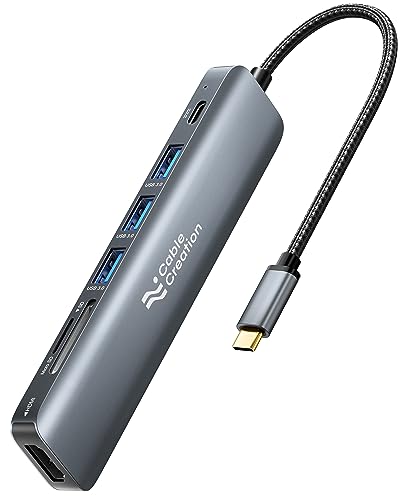 CableCreation 7‑in‑1 (4K@30)
|
Budget | 3 USB 3.0 ports + SD/TF reader | Budget laptop & iPad users needing several USB ports | Check Price | ||
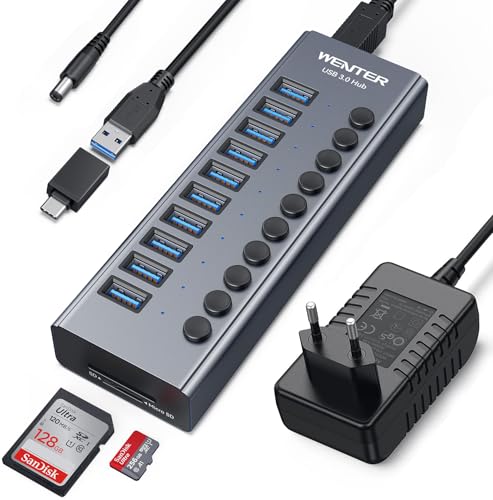 Wenter 10‑Port Powered Hub
|
Budget | Powered 10‑port USB hub with SD/TF slots | Desk users needing many powered USB ports | Check Price |
1. Satechi 7 in 1 USB C Hub Multiport Adapter with Ethernet, HDMI 4K@60Hz, 100W PD Charging, 2X USB-A Data Ports, Micro/SD Card Readers for MacBook Air/Pro M4, iPad, Windows - Black
A polished, travel‑friendly multiport hub that pairs strong build quality with fast USB‑A 10Gbps ports and a reliable SD/microSD reader. It’s bus‑powered for simple card transfers and adds 4K@60 output and PD charging for laptop workflows — note the card reader is UHS‑I (up to ~104 MB/s) rather than UHS‑II.
Key Specs
- USB‑C PD: 100W input / up to 80W output pass‑through
- HDMI: 4K @ 60Hz
- Two USB‑A 3.2 Gen 2 ports (up to 10Gbps)
- MicroSD/SD reader (UHS‑I, up to ~104 MB/s)
- Aluminum enclosure with braided cable
Pros
- Solid aluminium build and compact footprint built for travel
- Very fast USB‑A ports for large file transfers
- 4K@60 video and reliable power delivery for laptop use
Cons
- Card reader limited to UHS‑I speeds, not UHS‑II
- Can run warm under sustained use
Best For: iPad & USB‑C users needing a compact multiport hub
Check Latest Price on Amazon2. USB C Hub with Ethernet, CableCreation 7 in 1 4k@60Hz HDMI USB C Multiport Adapter with 100W PD, 2 USB 3.0 Ports, SD/TF Cards Reader Compatible for MacBook Pro/Air M1 M2, iPad Pro/Air, Dell XPS, HP
A budget‑minded multiport hub that gives you 4K@60 video, Gigabit Ethernet and an SD/TF slot for quick card transfers. Customers praise its portability and value — expect mixed reports on heat and power delivery with especially power‑hungry laptops.
Key Specs
- HDMI: 4K @ 60Hz (requires DP Alt Mode support)
- 100W Power Delivery pass‑through
- Gigabit RJ45 Ethernet
- Two USB 3.0 ports (up to 5Gbps) and SD/TF reader (up to ~104 MB/s)
Pros
- Excellent value and very portable
- Solid connectivity for travel (Ethernet + HDMI)
- Simple plug‑and‑play with many devices
Cons
- Inconsistent power delivery on some laptops — check compatibility
- Tends to run warm under load
Best For: Budget travelers and students using iPad/Laptop
Check Latest Price on Amazon3. 360 Rotating USB C Docking Station for iPad Pro, Tablet, Samsung, Steam Deck, ROG Ally, Legion Go, Msi Claw, etc, 11-in-1 with SD TF 4.0 Reader, 4K@60Hz HDMI, RJ45, Audio, USB A, USB C
Unusual hybrid: an adjustable stand plus a full 11‑in‑1 docking station that includes a faster SD/TF 4.0 reader and E‑Mark 100W PD cable. It’s a great pick if you swap between tablet and laptop workflows and want a single device on your desk and in your bag — be aware some buyers report mixed charging speed and occasional compatibility quirks.
Key Specs
- SD/TF 4.0 reader (advertised up to 300Mbps)
- HDMI: 4K @ 60Hz
- Gigabit Ethernet and 3.5mm audio
- USB‑C PD 100W with E‑Mark cable, foldable stand design
Pros
- Faster SD interface than typical UHS‑I readers if card supports it
- Works as a dock and a tablet stand — very versatile
- E‑Mark cable for smarter PD negotiation
Cons
- Bulkier than simple dongles — takes more bag space
- Some users report variable charging speed and functionality
Best For: Creators who want dock + adjustable tablet stand
Check Latest Price on Amazon4. HDMI Adapter, SD/TF Card Reader, 5 in 1 USB Camera Adapter for iPhone, 1080P Digital AV HDMI Adapter, Compatible with iPhone 13/12/11/XS/XR/X/8/7, iPad, TV/Projector/Monitor
A tiny 5‑in‑1 adapter aimed at quick camera imports and HDMI mirroring from iPhone/iPad. It’s extremely portable and plug‑and‑play for simple workflows, but reports on reliability are mixed and HDMI is limited to 1080p rather than modern 4K outputs.
Key Specs
- 5‑in‑1 adapter with SD/TF reader
- 1080p Digital AV HDMI output
- Plug‑and‑play for many iPhone and iPad models
Pros
- Very compact and easy to toss in a camera bag
- No drivers needed for basic camera import
- Good for quick presentations or framing previews
Cons
- Inconsistent functionality reported by some buyers
- Limited to 1080p HDMI — not ideal for 4K workflows
Best For: iPhone/iPad shooters needing a plug‑and‑play camera adapter
Check Latest Price on Amazon5. USB C Hub Multiport Adapter, CableCreation 7-in-1 USB C HDMI Hub with 4K 30Hz HDMI, 100W PD, 3 USB 3.0 5Gbps Data Ports, SD/TF Cards Reader for MacBook Pro/Air, iPad Pro, Pixelbook, XPS
A straightforward, inexpensive hub that gives you three USB 3.0 ports, SD/TF reading, and pass‑through charging up to ~85W for laptops. It’s a sensible budget pick for light desktop or travel use, but HDMI is limited to 4K@30Hz and users mention heat and occasional compatibility issues.
Key Specs
- HDMI: 4K @ 30Hz
- 100W PD input, up to ~85W laptop pass‑through
- Three USB 3.0 ports (up to 5Gbps)
- SD/TF card slots (UHS‑I speeds up to ~104 MB/s)
Pros
- Good basic feature set for a low price
- Decent pass‑through charging for most laptops
- Lightweight and portable
Cons
- HDMI limited to 30Hz at 4K
- Can run warm and has occasional device compatibility quirks
Best For: Budget laptop & iPad users needing several USB ports
Check Latest Price on Amazon6. Powered USB 3.0 Hub, Wenter 10 Ports 36W Powered USB Hub, Aluminum USB Splitter with Individual On/Off Switches, SD/TF Card Readers and 12V/3A Power Adapter for PC/Laptops/MacBook Pro/Air/iMac/iPad
A desktop‑focused powered hub offering many USB ports, SD/TF readers and individual on/off switches. It’s ideal for a home editing station that needs to run multiple peripherals and external drives reliably, but it’s not a compact bus‑powered reader for travel.
Key Specs
- 10 USB ports with individual on/off switches
- SD/TF card slots plus USB 3.0 (up to 5Gbps)
- Includes 12V/3A power adapter with surge protection
- Aluminum shell for heat dissipation
Pros
- Plenty of powered ports for external drives and accessories
- Individual switches help manage power and cable clutter
- Good value for a desktop hub
Cons
- Bulky and requires its own power brick (not bus‑powered)
- Some reports of occasional port/connectivity issues
Best For: Desk users needing many powered USB ports
Check Latest Price on AmazonWhich One Should You Choose?
If budget is tight → CableCreation 7 in 1 (ASIN B08FWMWGTD). It gives the essentials (SD slot, HDMI, Ethernet) in a compact package and is the most wallet‑friendly travel option. If you need portable, reliable multiport performance → Satechi 7 in 1 (ASIN B0DZDZXCYC). It combines strong build quality, fast USB‑A ports and solid PD handling for laptop work on the go. If you need a versatile dock/stand balance and a faster SD interface → NEWQ 360 Rotating Dock (ASIN B0CD24L71W). It’s a good middle ground for creators who swap between tablet and desktop setups. For a desktop that must run multiple powered drives → Wenter 10‑Port Powered Hub (ASIN B0C6LZ8MYW).
Best for Specific Scenarios
- On‑location photographer: Satechi 7 in 1 — compact, robust, and bus‑friendly for quick SD/microSD offloads while keeping a laptop charged.
- Travel vlogger with an iPad Pro: CableCreation 7 in 1 (B08FWMWGTD) — light, affordable, and gives HDMI/Ethernet when you need it in hotel rooms or client sites.
- Hybrid studio/tablet creator: NEWQ 11‑in‑1 rotating dock — acts as a desk dock and adjustable stand with a faster SD/TF interface for frequent card backups.
Frequently Asked Questions
Do these hubs give UHS‑II speeds for my UHS‑II SD cards?
Only if the product explicitly lists UHS‑II support. Most general multiport hubs list UHS‑I (~104 MB/s) or "SD 4.0" speeds — which are faster than older readers but not necessarily UHS‑II. For full UHS‑II performance use a dedicated UHS‑II card reader or a Thunderbolt/USB4 dock that advertises UHS‑II.
Will these work with an iPad without external power?
Yes for basic card reads and light USB peripherals — iPadOS supports bus‑powered accessories. But if you connect multiple devices or external drives, choose a hub with PD pass‑through or a powered hub, since iPad battery and accessory power limits can cause devices to disconnect.
What file format should my SD card use for iPad transfers?
Format cards as exFAT for files larger than 4GB and best cross‑platform compatibility. iPadOS reads FAT32 and exFAT natively. Always back up before formatting and test with your iPad and the chosen reader.
How We Selected These Products
Our recommendations are based on data-driven analysis: we evaluated 155229+ products across 23916+ brands using a composite scoring system that weighs rating (40%), review volume (30%), price value (20%), and demand signals (10%). Every product is ranked by data, not opinions.
Last updated: August 27, 2026
As an Amazon Associate we earn from qualifying purchases at no extra cost to you. Full disclosure.
GearLark Score is our editorial ranking based on a composite analysis of product quality, value, and verified customer sentiment. Click through to Amazon for current pricing, availability, and live customer reviews.