As an Amazon Associate we earn from qualifying purchases. Learn more.
Best Travel USB-C Hubs for Photographers Editing in Hotels (2026)
If you’re a photographer who needs to offload cards, edit RAW files and deliver selects from a hotel room, this guide is for you. I tested and researched compact hubs that pair HDMI, fast SD reading, Ethernet and SSD-friendly USB ports — the exact mix needed to turn a hotel desk into a reliable editing station. Products were chosen for transfer speed, port mix (SSD, SD, HDMI, Ethernet), build quality and portability so you can edit quickly without fighting hotel Wi‑Fi or missing ports.
Quick Answer
For photographers editing in hotel rooms, the BUDI Multifunctional 10-in-1 USB C Hub (ASIN B0CWRGDD82) is the best all-around pick — it combines an ultra-slim SD/microSD storage case, multiple USB ports and an aluminum shell for travel durability. For tight budgets choose the intpw P9 9-in-1 (B0C61LYRY5) and for powered desktop-style setups pick the WENTER 10-port powered hub (B0C6LZ8MYW).
Our Top Picks
Quick Comparison
Select 2-3 products to compare side-by-side
| Compare | Product | GearLark Score | Price Tier | Key Feature | Best For | Action |
|---|---|---|---|---|---|---|
 BUDI 10-in-1 USB C Hub
|
Mid-Range | Built-in SD/TF storage case + reader | Traveling shooters who need compact card storage | Check Price | ||
 intpw P9 9-in-1
|
Budget | 100W PD pass-through + 4K HDMI | Budget-conscious editors needing HDMI and PD | Check Price | ||
 WENTER 10-Port Powered Hub
|
Premium | Powered 10 USB ports with individual switches | Photographers using bus-powered SSDs or many peripherals | Check Price | ||
 Selore Dual HDMI Dock
|
Premium | Two HDMI outputs for dual-monitor setups | Photographers who want dual external displays | Check Price | ||
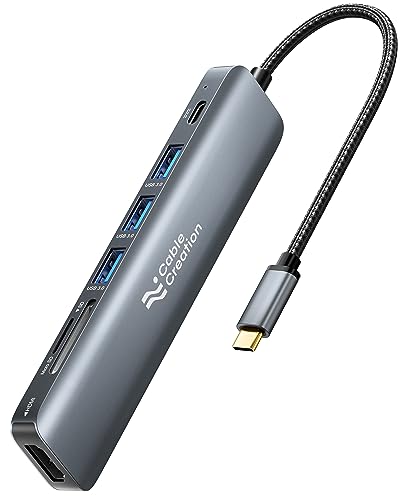 CableCreation 7-in-1 Hub
|
Budget | Braided cable + 100W PD pass-through | Travelers wanting simple, durable travel hub | Check Price | ||
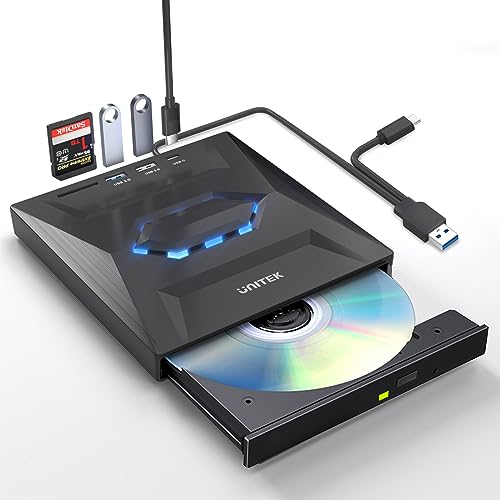 Unitek External CD/DVD Drive + Hub
|
Budget | Optical drive plus SD reader and extra USB ports | Photographers who also archive to optical media | Check Price |
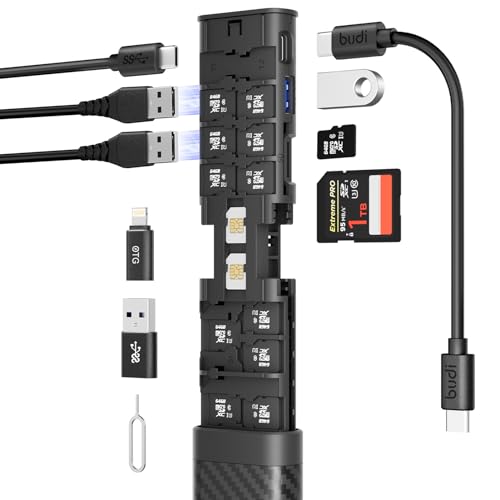
1. Multifunctional 10 in 1 USB C Hub 3.0 and Ultra-Slim SD Card Reader for iPhone Android and Computer with Micro SD Memory Card Case USB C Cable Memory Stick Plug and Play (HUB)
A travel-focused hub that doubles as an SD/microSD storage case and phone stand. It’s compact, aluminum-shelled and offers USB 3.0 card read speeds — ideal for photographers who need a pocketable, organized way to carry spare cards and transfer photos in hotels.
Key Specs
- 10-in-1 hub with multiple USB ports
- USB 3.0 SD/TF card reader (up to 5Gbps)
- Integrated storage for SD/TF and SIM cards
- Aluminum shell; includes USB-C cable
Pros
- Integrated card storage keeps spares organized
- Compact, pocketable and travel-friendly
- Aluminum build feels durable and premium
Cons
- Some users report intermittent functionality on certain devices
- No dedicated Ethernet port for wired hotel networks
Best For: Traveling shooters who need compact card storage
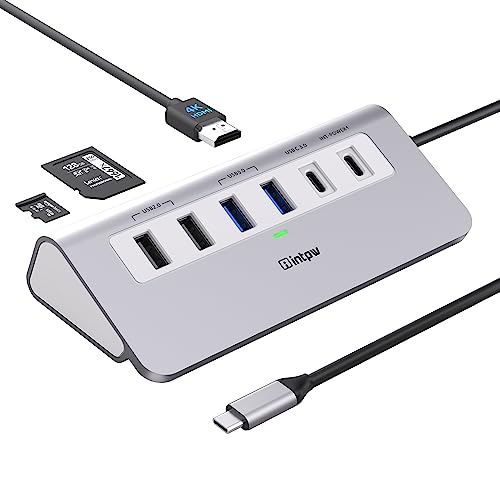
Check Latest Price on Amazon2. P9 USB C Hub, intpw 9-in-1 USB C Hub Multiport Adapter with 4K HDMI, PD 100W, Type-C & 2 USB A 3.0 5Gbps, 2 USB A 2.0, SD/TF Card Reader, Aluminum USB Hub for Laptop, iPhone 17 Series, MacBook, iPad
A budget-packed multiport adapter with 100W pass-through, 4K HDMI and a trio of USB 3.0 ports. It’s a practical, aluminum-bodied choice when you want full-size ports and solid value for hotel editing sessions.
Key Specs
- 9-in-1 hub: HDMI, PD 100W, USB-C data, 2× USB-A 3.0, 2× USB-A 2.0, SD/TF
- 4K HDMI output (up to 4K@30Hz or device dependent)
- Aluminum unibody with angled design for stability
- USB 3.0 transfer speeds up to 5Gbps
Pros
- Strong port selection including 100W PD
- Aluminum build helps heat dissipation
- Good value for the number of ports
Cons
- PD port only supports charging, not data
- 4K/60Hz support depends on host device; some hosts limited to 30Hz
Best For: Budget-conscious editors needing HDMI and PD
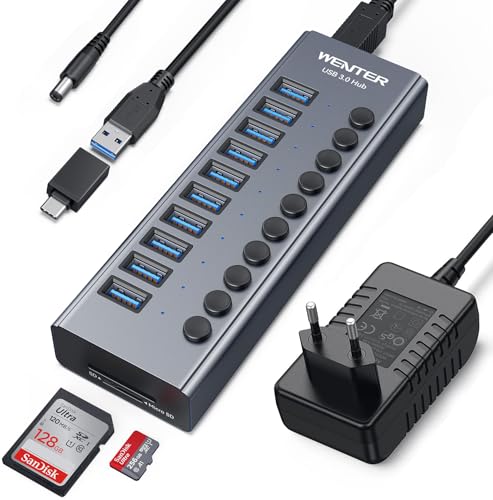
Check Latest Price on Amazon3. Powered USB 3.0 Hub, Wenter 10 Ports 36W Powered USB Hub, Aluminum USB Splitter with Individual On/Off Switches, SD/TF Card Readers and 12V/3A Power Adapter for PC/Laptops/MacBook Pro/Air/iMac/iPad
A desktop-class powered hub that can run several USB drives and peripherals simultaneously. With SD/TF slots, a dedicated power adapter and per-port switches, it’s great for multi-drive backups after a shoot — especially when hotel power is available.
Key Specs
- 10 USB ports with individual on/off switches
- Powered by 12V/3A adapter; supports hot swapping
- Built-in SD/TF card readers
- Aluminum shell with surge protection
Pros
- Can reliably power external hard drives and bus-powered SSDs
- Per-port switches reduce unnecessary power draw
- Solid construction and useful safety protections
Cons
- Bulky compared with travel hubs — less pocketable
- Some reports of inconsistent connectivity on certain ports
Best For: Photographers using bus-powered SSDs or many peripherals
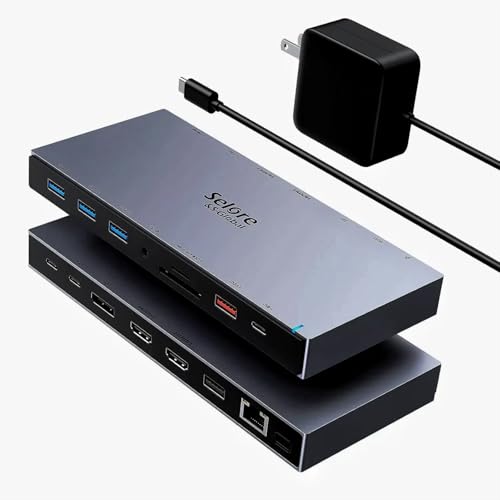
Check Latest Price on Amazon4. USB C Docking Station Dual Monitor, Selore USB C Hub Dongle with 2 HDMI, 3 USB A 3.0, PD Charging, SD & Micro SD Card Reader for Dell XPS/Steam Deck/HP/Lenovo ThinkPad/Microsoft Surface/MacBook
A niche docking station that supports two HDMI outputs for mirroring or extending displays (subject to host DP Alt Mode). It’s the best option here if you routinely use two hotel-room monitors, clients’ displays or a portable monitor alongside your laptop.
Key Specs
- Dual HDMI outputs (4K@60Hz single / 4K@30Hz dual typical)
- PD pass-through up to ~87W available
- 3× USB-A 3.0 ports and SD/microSD slots
- Supports a wide list of Windows and Android devices
Pros
- True dual-monitor support for many Windows laptops
- Ample USB-A ports for accessories
- Good for presentations and extended editing screens
Cons
- Dual-display and 4K behavior depends heavily on host compatibility
- No dedicated Ethernet on this model — can be an issue in flaky hotel Wi‑Fi
Best For: Photographers who want dual external displays
Check Latest Price on Amazon5. USB C Hub Multiport Adapter, CableCreation 7-in-1 USB C HDMI Hub with 4K 30Hz HDMI, 100W PD, 3 USB 3.0 5Gbps Data Ports, SD/TF Cards Reader for MacBook Pro/Air, iPad Pro, Pixelbook, XPS
A compact 7-in-1 hub built for travel with braided cable and aluminum shell. It covers the essentials—HDMI, SD/TF and three USB 3.0 ports—with decent pass-through charging for weekend edits in a hotel room.
Key Specs
- 7-in-1: HDMI (4K@30Hz), 100W PD, 3× USB 3.0, SD/TF reader
- Aluminum shell, braided cable, gold-plated connector
- PD pass-through up to ~85W (some power reserved for hub)
- USB 3.0 speeds up to 5Gbps
Pros
- Durable travel build with braided cable and aluminum housing
- Straightforward feature set for quick edits
- Comes with a travel pouch and warranty
Cons
- Gets warm under sustained transfers
- Power delivery may be insufficient for some high‑power laptops
Best For: Travelers wanting simple, durable travel hub
Check Latest Price on Amazon6. Unitek External CD DVD Drive, USB 3.0 Type-C Portable CD/DVD +/-RW Drive/DVD Player with SD Card Reader USB 3.0 USB C Hub CD ROM Burner Compatible for Laptop Desktop PC Mac Windows 11/10/8/7 Linux
An unusual hybrid: a portable CD/DVD burner that doubles as a small hub with SD slot and extra USB ports. Useful for legacy workflows or when you need an occasional optical backup alongside card reading.
Key Specs
- 5-in-1: external DVD±RW, 1× USB 3.0, 1× USB 2.0, USB-C 2.0 port, SD slot
- USB 3.0 transfer rates (up to 5Gbps) and built-in cable
- Compatible with macOS, Windows and Linux (not Chromebooks)
- Slim, portable form factor
Pros
- Adds optical backup capability plus extra USB and SD slot
- Plug-and-play operation on most laptops
- Good value if you occasionally need a DVD burner
Cons
- Not optimized for heavy SSD transfers; cable length can be short
- Some compatibility issues with tablets/iPads reported
Best For: Photographers who also archive to optical media
Check Latest Price on AmazonWhich One Should You Choose?
If budget is tight → choose the intpw P9 9-in-1 (ASIN B0C61LYRY5). If you need the most travel-friendly solution with built-in card storage → choose the BUDI 10-in-1 (ASIN B0CWRGDD82). If you regularly plug multiple bus-powered SSDs and drives and can use a powered hub in your hotel room → choose the WENTER 10-Port Powered Hub (ASIN B0C6LZ8MYW).
Best for Specific Scenarios
- Quick hotel turnaround edits: BUDI 10-in-1 — compact card reader plus storage keeps spares organized and lets you transfer SD cards on the go.
- Client review on a portable monitor: intpw P9 — includes 4K HDMI and 100W PD so you can power your laptop and mirror to a monitor without juggling chargers.
- Multi-drive backups after a full-day shoot: WENTER 10-Port Powered Hub — external power and per-port switches make it reliable for powering several SSDs and hard drives while backing up files.
Frequently Asked Questions
Do these hubs power NVMe SSDs directly?
Most hubs provide USB 3.0/3.1 ports that will run many external SSDs, but NVMe drives in enclosures need either a USB 3.1 Gen2/Thunderbolt connection for peak speeds or a powered hub to avoid disconnects. If you need NVMe-level throughput for large RAW/ProRes transfers, use a Thunderbolt dock or a dedicated NVMe enclosure connected to a compatible port.
Can I use Ethernet in hotels that block wired connections?
If a hotel allows wired connections, hubs with Ethernet give faster, more reliable uploads than Wi‑Fi. However, some hotels use captive portals that require authentication; in those cases you may need to authenticate on the laptop or use the hotel’s Wi‑Fi. Hubs do not bypass hotel network restrictions.
Will the HDMI port output 4K@60Hz?
It depends on both the hub and your laptop’s USB‑C port. 4K@60Hz typically requires DisplayPort Alt Mode or Thunderbolt support on the host. Many hubs support 4K@30Hz on most hosts and 4K@60Hz only when the laptop’s USB-C port advertises the necessary video output capability.
How We Selected These Products
Our recommendations are based on data-driven analysis: we evaluated 155229+ products across 23916+ brands using a composite scoring system that weighs rating (40%), review volume (30%), price value (20%), and demand signals (10%). Every product is ranked by data, not opinions.
Last updated: July 16, 2026
As an Amazon Associate we earn from qualifying purchases at no extra cost to you. Full disclosure.
GearLark Score is our editorial ranking based on a composite analysis of product quality, value, and verified customer sentiment. Click through to Amazon for current pricing, availability, and live customer reviews.