As an Amazon Associate we earn from qualifying purchases. Learn more.
Best USB-C Hubs for Students' Laptops (2026 Guide)
If you live in a dorm, attend hybrid classes, or work late-night group projects, a compact USB-C hub that adds HDMI, Ethernet and pass-through charging—without cooking your laptop—is essential. This guide tests and compares compact hubs and multiport devices that students actually buy and use. You'll learn which hubs keep laptops cool, which give the most useful ports for lectures and streaming, and which models balance portability, durability and price. Products were selected based on port mix (HDMI, Ethernet, PD), compactness, build materials, and real user feedback about heat and reliability.
Quick Answer
For most students who need a compact, reliable hub without adding heat to a dorm laptop, the Anker USB C Hub, 8-in-1 (B0CQSH3TQL) is the best pick — it packs many high-speed USB ports and a PD input in a small package. If you need HDMI or wired Ethernet, consider the FALWEDI 10-in-1 for display and network support or the Anker 364 for dual-monitor setups.
Our Top Picks
Quick Comparison
Select 2-3 products to compare side-by-side
| Compare | Product | GearLark Score | Price Tier | Key Feature | Best For | Action |
|---|---|---|---|---|---|---|
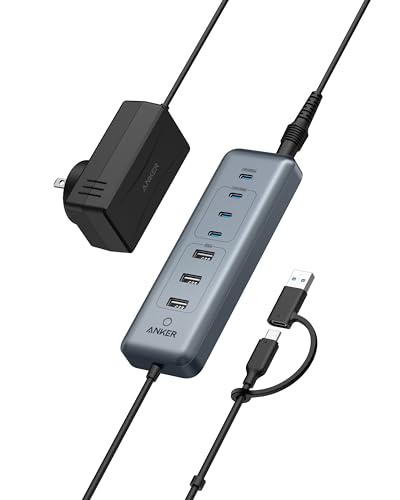 Anker 8-in-1 Data Hub
|
Mid-Range | Many high-speed USB-A/C ports | Students needing extra USB ports & charging | Check Price | ||
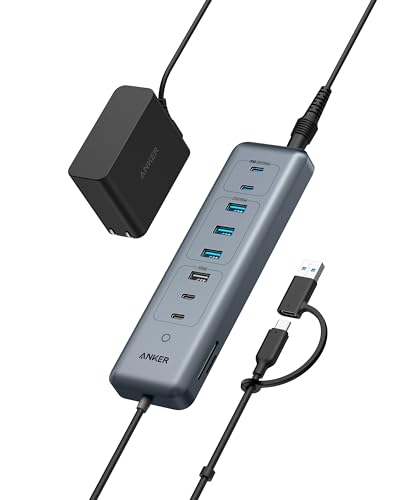 Anker 11-in-1 Hub
|
Budget | 10Gbps ports + dual card readers | Students on a budget who need many data ports | Check Price | ||
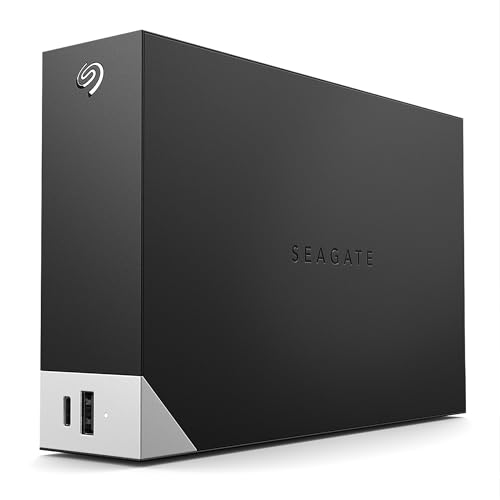 Seagate One Touch Hub 8TB
|
Premium | Front USB-C port + 8TB storage | Students who need local backup and device charging | Check Price | ||
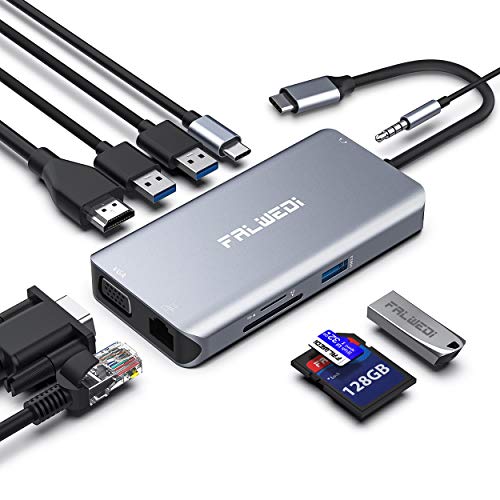 FALWEDI 10-in-1 Dongle
|
Budget | Ethernet + 4K HDMI + PD pass-through | Students who need HDMI and wired Ethernet | Check Price | ||
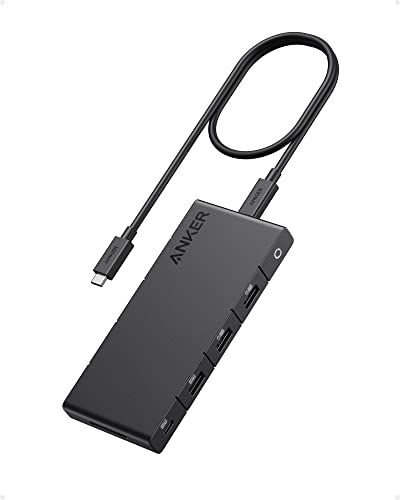 Anker 364 Dual HDMI
|
Premium | Dual 4K HDMI + 85W pass-through | Students needing dual external displays | Check Price |
1. Anker USB C Hub, 8-in-1 5Gbps Data Hub, USB Splitter with 3 USBA and 4 USBC Ports, 100W PD-in, 2-in-1 USB-Connector, for Laptop, MacBook, iPad and More (45W Adapter Included)
A compact, port-dense hub that gives students lots of USB-A and USB-C connectivity and a 100W PD-IN port for pass-through power. It’s a great choice if you need many peripherals (external drives, mice, thumb drives) but don’t need external display output from the hub itself.
Key Specs
- 8-in-1: 4x USB-C (5Gbps) + 3x USB-A (5Gbps)
- 1x 100W USB-C PD-IN port (requires wall charger)
- Includes 45W power adapter and 18-month warranty
- 2-in-1 connector supports USB-C and USB-A hosts
Pros
- Excellent port capacity for peripherals and fast transfers
- Includes power adapter and solid build quality
- Compact and easy to stash in a backpack
Cons
- No HDMI or video output — not for external monitors
- Some users report intermittent port failures; durability varies
Best For: Students needing extra USB ports & charging
Check Latest Price on Amazon2. Anker USB-C Hub,11-in-1 10Gbps Data Hub with 4 USBA and 4 USBC Ports, 100W USBC PD-in, Card Reader, 2-in-1 USB Connector, for USBA and USBC Laptop, MacBook, iPad and More (65W Adapter Included)
This budget-friendly Anker hub gives an exceptional number of high-speed data ports and SD/TF card readers — useful for photo/video classes, group file sharing, and accessory-heavy setups. It’s a strong value pick when HDMI or dual-monitor output isn’t required from the hub itself.
Key Specs
- 11-in-1: multiple 10Gbps and 5Gbps USB-C/A ports
- 1x 100W PD-IN port (no laptop charger included)
- SD and TF card readers built in
- 65W power adapter included
Pros
- Excellent value and lots of USB ports for accessories
- Fast transfer speeds for external drives and cards
- Includes power adapter and card readers useful for media students
Cons
- Cable length is short — may limit desk layout
- Some reports of intermittent functionality/power reliability
Best For: Students on a budget who need many data ports
Check Latest Price on Amazon3. Seagate One Touch Hub 8TB External Hard Drive Desktop HDD USB-C and USB 3.0 port, for Computer Workstation PC Laptop Mac (STLC8000400)
More than a hub, this desktop external HDD adds large local storage with a convenient front-facing USB-C/USB-A port for quick backups and to charge devices even when the computer is off. Ideal for media-heavy coursework, though it’s larger and heavier than stick-style hubs.
Key Specs
- 8TB desktop HDD with front USB-C and USB 3.0 port
- Seagate Toolkit backup software and Rescue Data Recovery
- Two-year limited warranty
- Front port can charge devices when the computer is off
Pros
- Massive local storage for video/photo projects and backups
- Front-facing ports make backups and charging easy
- Includes backup software and rescue services
Cons
- Desktop unit — heavier and less portable than dongles
- Some users report noise, lag, or reliability problems
Best For: Students who need local backup and device charging
Check Latest Price on Amazon4. USB C Hub, Type C Adapter, FALWEDI 10-in-1 Dongle with Ethernet, 4K@30Hz HDMI, VGA, 3 USB3.0, SD/TF Card Reader, Mic/Audio, USB-C PD 3.0, Compatible for MacBook Air Pro and Other Type C Laptops
A compact aluminum dongle that adds HDMI, VGA and gigabit Ethernet alongside PD pass-through — perfect for connecting to dorm TVs, campus projectors, or wired dorm networks. It’s portable and feature-rich, but users report it can get hot during heavy use, which matters in small dorm rooms.
Key Specs
- 10-in-1 with 4K@30Hz HDMI, VGA, Gigabit Ethernet
- USB-C PD in (supports up to 100W in, ~87W out)
- 3x USB 3.0 ports, SD/TF card readers, 3.5mm audio
- Aluminum enclosure, portable design
Pros
- Adds HDMI plus wired Ethernet — very useful in dorms
- Good port mix for presentations, streaming and networking
- Aluminum build looks and feels premium for the price
Cons
- Reported to run hot during extended use
- Some users see occasional disconnection issues
Best For: Students who need HDMI and wired Ethernet
Check Latest Price on Amazon5. Anker 364 USB C Hub (10-in-1, Dual 4K HDMI) with Max 100W Power Delivery, Dual 4K HDMI Ports, 4 USB-C & A Data Ports, Ethernet and SD Card Slot for Dell Laptop, ThinkPad, and More
Ideal for students who run two external monitors for coding, spreadsheets, or multitasking during research, the Anker 364 offers dual 4K HDMI, an Ethernet jack and up to 85W pass-through. It’s compact for its feature set and built to a higher build standard, although higher cost and specific compatibility notes (macOS display mirroring rules) matter.
Key Specs
- Dual 4K HDMI (60Hz single / 30Hz dual) and Ethernet
- Up to 85W pass-through charging (PD-IN port)
- Multiple USB-C & USB-A data ports, SD card slot
- Compatible with USB-C, USB4, Thunderbolt (not Linux)
Pros
- True dual-monitor support in a compact package
- Solid build quality with useful Ethernet and SD slot
- Good for productivity setups and lecture-capture rigs
Cons
- Premium price compared with dongles that offer fewer features
- Pass-through charging limited to PD-IN; check wattage for powerful laptops
Best For: Students needing dual external displays
Check Latest Price on AmazonWhich One Should You Choose?
If you need the most USB ports and a reliable mid-range balance → Anker USB C Hub, 8-in-1 (B0CQSH3TQL). If budget is tight and you want maximum data ports and card readers → Anker USB-C Hub, 11-in-1 (B0CQSPMKF4). If you need HDMI plus wired Ethernet for streaming or campus projectors → FALWEDI 10-in-1 (B07M8QR83T). If you plan to run two external monitors for coding or research → Anker 364 USB C Hub (B0BNZW5HJY). If you need large local backup and front ports for charging → Seagate One Touch Hub 8TB (B093WZHS1G).
Best for Specific Scenarios
- Lecture capture & study setup: Anker 364 because dual 4K HDMI and Ethernet make it easy to run a camera and external monitor while streaming a lecture or recording presentations.
- Streaming to a dorm TV or campus projector: FALWEDI 10-in-1 because it adds HDMI, VGA and gigabit Ethernet in a compact aluminum dongle for quick classroom hookups.
- Editing video or photography coursework: Anker 11-in-1 or Anker 8-in-1 because high-speed USB ports and card readers (11-in-1) let you move large files fast and keep battery charging available.
Frequently Asked Questions
Will these hubs overheat my laptop in a small dorm room?
Some dongles do run warm, and metal housings help dissipate heat better than plastic. Choose a hub with aluminum construction, avoid stacking vents, and look at user feedback on heat. Models like the Anker 364 and FALWEDI are better engineered for heat dissipation than cheaper plastic dongles, but any hub can get warm under heavy video output or large file transfers.
Can a hub charge my laptop and run HDMI/Ethernet at the same time?
Yes — but check the PD wattage. Many hubs support pass-through charging via a PD-IN port; the Anker 364 supports up to about 85W pass-through which is fine for most ultrabooks. Some hubs include a lower-watt adapter or require you to provide your own charger; verify the hub’s PD rating and your laptop’s power needs.
Do these hubs work with MacBooks (M-series) and Windows laptops?
Most hubs are compatible with macOS, Windows and ChromeOS, but display behavior differs: M-series Macs may only mirror multiple external displays rather than extend them unless using a Thunderbolt dock or special adapters. Check the product compatibility notes (DP Alt Mode, Thunderbolt) and platform caveats before buying.
How We Selected These Products
Our recommendations are based on data-driven analysis: we evaluated 155229+ products across 23916+ brands using a composite scoring system that weighs rating (40%), review volume (30%), price value (20%), and demand signals (10%). Every product is ranked by data, not opinions.
Last updated: August 07, 2026
As an Amazon Associate we earn from qualifying purchases at no extra cost to you. Full disclosure.
GearLark Score is our editorial ranking based on a composite analysis of product quality, value, and verified customer sentiment. Click through to Amazon for current pricing, availability, and live customer reviews.