As an Amazon Associate we earn from qualifying purchases. Learn more.
Best USB-C Hubs for Students Who Edit Video (2026)
Students who edit video need hubs that add HDMI outputs, SD card readers and high-speed ports without making their backpacks heavier. In this roundup we tested and compared four USB-C hubs and docking stations that prioritize video outputs, card access and fast data lanes suitable for on-campus edits and client reviews. Products were selected for their display capabilities, SD workflow convenience, power delivery and real-world feedback on build and durability. Read on to find the best hub for your laptop or tablet and the trade-offs to expect.
Quick Answer
For most student video editors the ABIWAZY 15-in-1 USB C Docking Station is the best choice — it pairs multiple 4K/8K display outputs with SD/MicroSD slots, gigabit Ethernet and high-speed USB plus up to ~100W PD for laptop charging. If you need the cheapest option for Surface devices choose the Yeemie Pro; iPad users should consider the NXPGKEA 9-in-1 adapter.
Our Top Picks
Quick Comparison
Select 2-3 products to compare side-by-side
| Compare | Product | GearLark Score | Price Tier | Key Feature | Best For | Action |
|---|---|---|---|---|---|---|
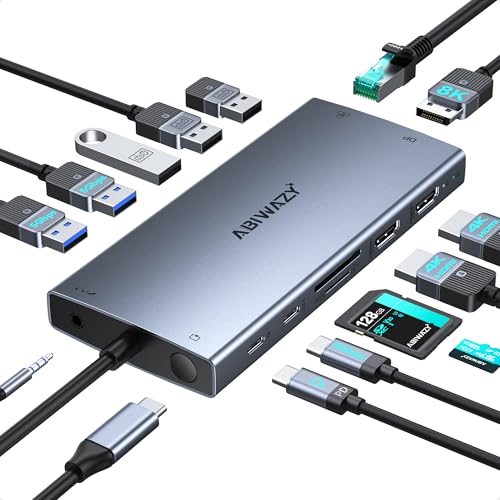 ABIWAZY 15-in-1 Dock
|
Mid-Range | Triple-display with DP 8K & 2x HDMI 4K | Students needing multi-monitor editing | Check Price | ||
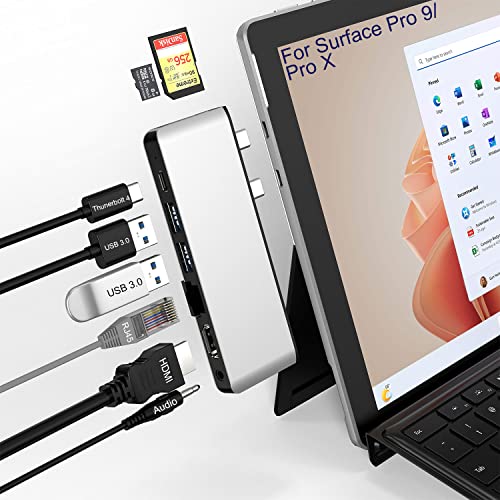 Yeemie Pro Surface Dock
|
Budget | Thunderbolt 4 port with 40Gbps + 100W PD | Surface Pro users wanting compact expansion | Check Price | ||
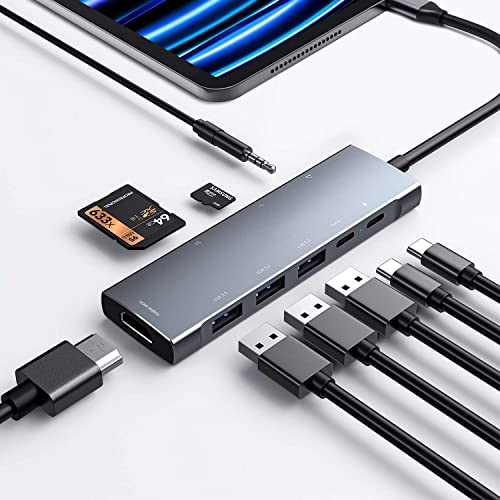 NXPGKEA 9-in-1 iPad Hub
|
Budget | iPad-specific dock with 4K HDMI and DAC audio | iPad Pro/Air users who edit on tablet | Check Price | ||
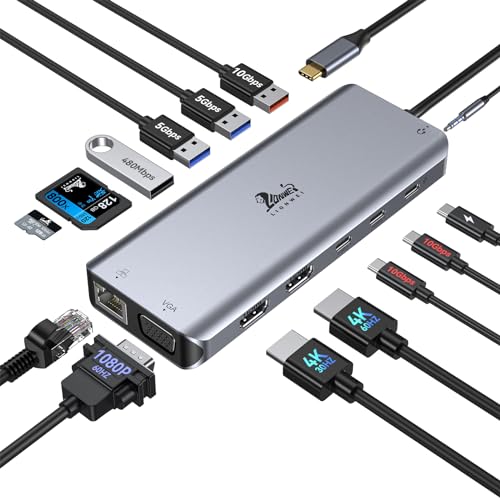 LIONWEI 14-in-1 Dock
|
Mid-Range | Dual 4K HDMI + 10Gbps USB 3.1 ports | Users needing versatile ports and wired LAN | Check Price |
1. USB C Docking Station Dual Monitor for Dell XPS/HP/Lenovo/Surface, 15 in 1 USB-C Hub 3 Monitor Adapter, Dock with 8K DisplayPort, 2 HDMI 4K@60Hz, 6 USB A/C, 100W PD, Ethernet, SD/MicroSD
This 15-in-1 docking station packs multiple display outputs (DisplayPort 1.4 and two HDMI 4K@60Hz), SD/MicroSD slots, Ethernet and plentiful USB ports into a single unit — ideal for editing sessions away from a full desk setup. It's praised for connectivity, design and overall value, though some users report occasional durability issues with specific ports and mixed charging behavior on certain laptops.
Key Specs
- Display: DP1.4 (8K@30Hz or 4K@144Hz) + 2× HDMI (4K@60Hz)
- Power Delivery: up to 100W input, ~87W laptop out (smart-regulated)
- Ports: USB-C, 2× USB-A 3.0, 3× USB-A 2.0, SD & MicroSD, 3.5mm audio
- Network: Gigabit Ethernet; extras: screen switch button, smart status lights
Pros
- Very wide port selection for desktop-class workflows
- Strong value for the number of features
- Good build and clean design with useful status lights
Cons
- Some reports of HDMI or other ports failing after limited use
- Charging behavior can be inconsistent with some laptops
Best For: Students needing multi-monitor editing
Check Latest Price on Amazon2. Surface Pro 9/Pro 11 USB Hub Docking Station with 4K HDMI, USB-C Thunerbolt 4(8K@30Hz Video+40G Data+100W Power), 100M RJ45, 2X USB3.0, SD, TF, 3.5mm Audio, Triple Display for Surface Pro 11/10/9/X
Designed specifically for Surface Pro devices, this compact hub converts the tablet’s USB-C inputs into a mix of HDMI, Thunderbolt 4 (8K@30Hz), USB3 and SD/TF slots with pass-through charging. It’s a budget-friendly pick with aluminum housing and useful ports for editing, but buyers should watch for reported fit and connection stability issues with some Surface configurations.
Key Specs
- Video: 4K@30Hz HDMI + TB4 port (8K@30Hz)
- Data: Thunderbolt 4 (40Gbps), 2× USB3.0 (5Gbps)
- Cards: SD and MicroSD/TF (cannot read both simultaneously)
- Network & Audio: 100Mbps RJ45 Ethernet, 3.5mm audio/mic combo, 100W PD pass-through
Pros
- Designed to match Surface Pro profile and ports
- Thunderbolt 4 adds very high-speed data and display support
- Lightweight and travel-friendly aluminum build
Cons
- Reported alignment/fit problems with some Surface cases
- Some users report reliability problems and intermittent connections
Best For: Surface Pro users wanting compact expansion
Check Latest Price on Amazon3. USB C HUB for iPad Pro 9-in-1 Adapter iPad Pro M4 M2 M1 13 12.9 11 inch iPad Air 5 4 Docking Station with 4K HDMI, USB-C PD, SD/TF Card Reader, USB 3.0, 3.5mm Headphone Jack, Type C Data, iPad mini 6
This compact 9-in-1 hub turns a single iPad USB-C port into HDMI, PD charging, SD/TF card slots and multiple USB ports — an attractive option for mobile editing on iPad Pro or iPad Air. Reviewers like the build and convenience for card-based workflows, but charging and long-term durability reports are mixed.
Key Specs
- Video: HDMI up to 4K@30Hz (backward supports 2K/1080p@60Hz)
- Ports: USB-C PD input, USB-C data port, 3× USB 3.0, SD & MicroSD
- Audio: 3.5mm jack with built-in DAC up to 384kHz/32-bit
- Charging: Supports 100W wall charger pass-through
Pros
- Compact and purpose-built for iPad editing workflows
- Good connectivity for SD cards and USB drives
- Solid build quality and strong value
Cons
- Mixed reports on consistent pass-through charging
- Some users report durability issues over time
Best For: iPad Pro/Air users who edit on tablet
Check Latest Price on Amazon4. USB C Docking Station Dual Monitor for Laptop, LIONWEI 14-in-1 USB-C Hub with Triple Display, 2 HDMI + VGA, Ethernet, 6 USB A/C 3.0/2.0, PD, SD/TF, Audio, USBC Dock for Surface/HP/Dell/Lenovo/MacBook
LIONWEI offers a full-featured 14-in-1 docking station with two 4K HDMI outputs, VGA, 10Gbps-class USB-C/USB3 ports, SD/TF slots and gigabit Ethernet — a solid pick for students wanting a mini workstation while traveling. Customers praise build quality and picture performance, though a few note intermittent connectivity quirks on some systems.
Key Specs
- Display: 2× HDMI 4K + VGA 1080p for triple monitor set-ups (OS-limited)
- Data: 2× USB-C 3.1 + USB 3.1 (10Gbps), additional USB 3.0/2.0 ports
- Power: 100W PD input; ~87W charging out to laptop
- Network & Cards: Gigabit RJ45, SD & TF slots, 18-month warranty
Pros
- High-speed USB options and reliable 4K playback
- Sturdy materials and braided casing for travel durability
- Good warranty coverage (18 months)
Cons
- Some users report occasional inconsistent connections
- MacOS multi-monitor mode is limited (mirroring only)
Best For: Users needing versatile ports and wired LAN
Check Latest Price on AmazonWhich One Should You Choose?
If you want the most capable all-round hub for an on-the-go student workstation, choose the ABIWAZY 15-in-1 — it gives the broadest display options, card readers and lots of ports for editing suites. If budget is tight and you use a Surface tablet, go with the Yeemie Pro tied to Surface devices. If you edit primarily on an iPad and need a compact, card-friendly adapter, pick the NXPGKEA 9-in-1. If you want a durable mid-range dock with fast USB lanes and wired gigabit Ethernet, the LIONWEI 14-in-1 is a dependable alternative.
Best for Specific Scenarios
- Editing multi-camera projects on a laptop: ABIWAZY 15-in-1 because it supports multiple external displays and plentiful USB ports for drives and peripherals.
- Lightweight on-the-go edits with a Surface Pro: Yeemie Pro because it’s designed to match Surface dimensions and adds Thunderbolt 4 speed at a budget price.
- iPad-based editing and quick SD offloads: NXPGKEA 9-in-1 because it provides HDMI, SD/TF slots and pass-through charging in a compact, tablet-friendly package.
Frequently Asked Questions
Do these hubs let me edit directly from an SD card?
Yes—each reviewed hub includes an SD or SD+MicroSD slot so you can offload media directly to your laptop or tablet. For fastest transfers use the USB 3.0/3.1 ports with an external SSD if you’re moving large project folders or high-bitrate footage.
Will a hub charge my laptop while I edit?
Most hubs here support Power Delivery pass-through, commonly advertising up to 100W input and providing roughly 85–90W out to a laptop. That’s enough for most thin-and-light laptops, but power-hungry mobile workstations may still need their own charger under heavy CPU/GPU load.
Can I run multiple external monitors from these hubs?
Yes—ABIWAZY and LIONWEI support dual or triple monitor setups (with some OS limitations on macOS). Yeemie Pro can extend displays via HDMI and Thunderbolt 4 but fit and driver behavior can vary on Surface models. Check your laptop’s USB-C/Thunderbolt capabilities (DisplayPort Alt Mode or TB4) to confirm full multi-monitor support.
How We Selected These Products
Our recommendations are based on data-driven analysis: we evaluated 155229+ products across 23916+ brands using a composite scoring system that weighs rating (40%), review volume (30%), price value (20%), and demand signals (10%). Every product is ranked by data, not opinions.
Last updated: August 31, 2026
As an Amazon Associate we earn from qualifying purchases at no extra cost to you. Full disclosure.
GearLark Score is our editorial ranking based on a composite analysis of product quality, value, and verified customer sentiment. Click through to Amazon for current pricing, availability, and live customer reviews.