As an Amazon Associate we earn from qualifying purchases. Learn more.
Best USB-C to HDMI Adapters for Travel Presentations (2026)
Travel presenters need adapters that are small, plug-and-play, and dependable with projectors and hotel/meeting-room displays. This roundup tests and compares compact USB-C to HDMI hubs and dongles available in 2026, emphasizing 4K/60Hz output, pass-through charging, and stable connections for on-the-road use. Products were selected based on real-world features (HDMI refresh rate, PD wattage, Ethernet), verified customer feedback (build quality, durability, heat), and overall value — so you can pick the adapter that fits your travel kit and keeps presentations running smoothly.
Quick Answer
For the most reliable compact adapter for travel presentations choose the Hiearcool USB C Hub (ASIN B0F6LF8QKQ) — it combines 4K@60Hz HDMI, Gigabit Ethernet and 100W PD in a durable, well-reviewed package. If you need the smallest, travel-ready dongle, the Dockteck 5-in-1 (ASIN B09VG7CYQT) is the best budget pick.
Our Top Picks
Quick Comparison
Select 2-3 products to compare side-by-side
| Compare | Product | Rating | Price Tier | Key Feature | Best For | Action |
|---|---|---|---|---|---|---|
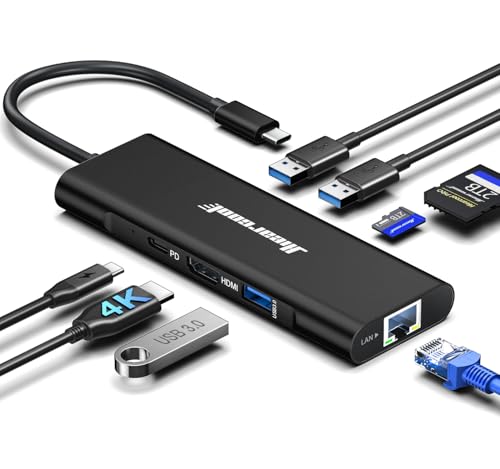 Hiearcool 8-in-1
|
(4.5K+ ratings) | Budget | 4K@60Hz HDMI + Gigabit Ethernet | Frequent presenters needing stable wired networking | Check Price | |
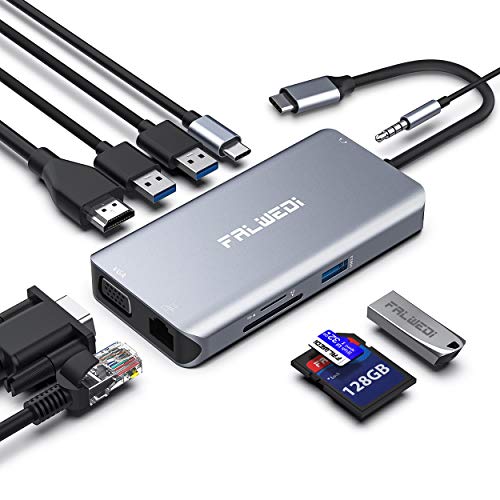 FALWEDI 10-in-1
|
(3.7K+ ratings) | Premium | Includes VGA + 3.5mm audio jack | Presenters who need legacy projector and audio support | Check Price | |
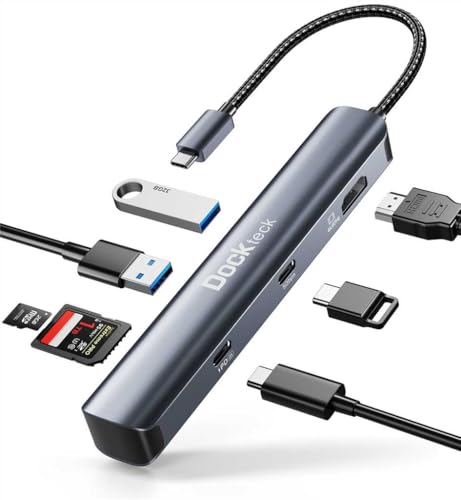 dockteck 7-in-1
|
(2.2K+ ratings) | Mid-Range | 4K@60Hz HDMI + 100W PD | Value-focused travelers needing fast video and charging | Check Price | |
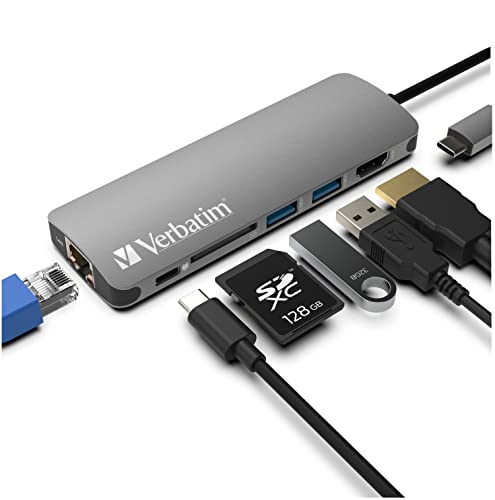 Verbatim 6-in-1
|
(400+ ratings) | Mid-Range | Compact with Ethernet and 4K HDMI | Travelers who want compact size with wired network | Check Price | |
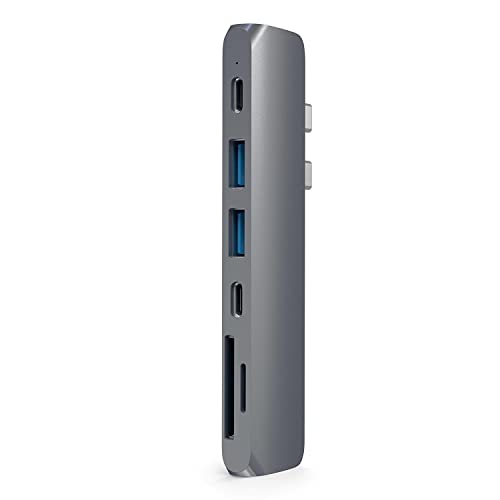 Satechi 7-in-1
|
(2.5K+ ratings) | Premium | Aluminum design with USB-C data up to 40Gbps | MacBook users wanting premium finish and fast data | Check Price | |
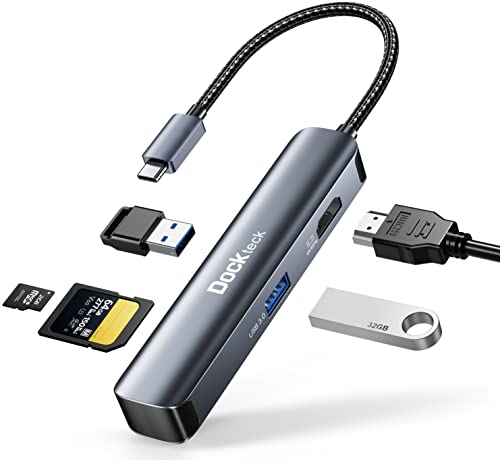 Dockteck 5-in-1
|
(450+ ratings) | Budget | Ultra-compact 4K@60Hz dongle | Minimalist travelers who need HDMI + cards | Check Price |
1. Hiearcool USB C Hub, USBC to 4K@60 Hz HDMI Adapter with 100W PD, 8-in-1 USB-C Dongle Multiport Dock Compatible for MacBook Dell Lenovo HP Laptops-Midnight Black
The Hiearcool 8-in-1 is a feature-packed, well-reviewed hub that pairs 4K@60Hz HDMI output with Gigabit Ethernet and 100W PD — useful for hotel conference rooms and wired setups. Customers praise its build quality, port selection and value; occasional reports mention mixed results with charging capacity or specific device compatibility.
Key Specs
- 4K@60Hz HDMI output
- 10/100/1000 Gigabit Ethernet
- 100W USB-C Power Delivery pass-through
- 3 × USB 3.0, SD/TF card slots
Pros
- Reliable 4K@60Hz HDMI for crisp presentations
- Includes Gigabit Ethernet for stable wired connections
- Generous port selection — ideal for multi-device setups
Cons
- Some users report inconsistent charging/compatibility on certain laptops
- Larger than tiny single-port dongles if you only need HDMI
Best For: Frequent presenters needing stable wired networking
Check Latest Price on Amazon2. USB C Hub, Type C Adapter, FALWEDI 10-in-1 Dongle with Ethernet, 4K@30Hz HDMI, VGA, 3 USB3.0, SD/TF Card Reader, Mic/Audio, USB-C PD 3.0, Compatible for MacBook Air Pro and Other Type C Laptops
FALWEDI's 10-in-1 hub is the most fully featured adapter here — it adds VGA and a 3.5mm audio/mic jack alongside Ethernet and multiple USB ports, making it great for older projectors and conference-room setups. It’s built from aircraft-grade aluminum and praised for port capacity, though HDMI tops out at 4K@30Hz and some buyers report heat or intermittent disconnections under heavy use.
Key Specs
- HDMI up to 4K@30Hz (1080p@60Hz when HDMI & VGA used)
- VGA port (up to 1080p@60Hz)
- 1000Mbps Ethernet; USB-C PD input (supports up to 100W in)
- 3 × USB 3.0, SD/TF card reader, 3.5mm audio/mic jack
Pros
- Very complete port set including VGA and audio for legacy gear
- Premium aluminum build and high port capacity
- Stable Ethernet and SD card support for media-heavy presenters
Cons
- HDMI limited to 4K@30Hz (not ideal for 4K60 displays)
- Runs hot in some setups and occasional disconnection reports
Best For: Presenters who need legacy projector and audio support
Check Latest Price on Amazon3. dockteck USB C Hub Multiport Adapter, 7 in 1 USB C Dongle with 4K@60Hz HDMI, 100W PD, USB-C, 2 USB-A 5Gbps Data Slots and TF/SD Card Reader, Dongle for MacBook Air/Pro, Dell XPS, Lenovo HP, Surface
Dockteck’s 7-in-1 hub offers 4K@60Hz HDMI, pass-through charging up to 100W (device charge often ~85W), and a fast USB-C data port — a solid combination for road warriors who want performance without premium pricing. Users like the port quality and price, but watch for heat buildup and a few durability complaints over long-term heavy use.
Key Specs
- 4K@60Hz HDMI output
- 100W USB-C Power Delivery (pass-through up to ~85W)
- USB-C + 2 × USB-A 3.0 (5Gbps); SD/TF card reader
- Plug-and-play compatibility with major OSes
Pros
- Supports 4K@60Hz for crisp projector/monitor output
- Good balance of ports and pass-through charging
- Strong value for features offered
Cons
- Can run noticeably hot under sustained use
- Some reports of failures after several months — durability concerns
Best For: Value-focused travelers needing fast video and charging
Check Latest Price on Amazon4. Verbatim 6-in-1 USB C Hub w/Dongle - USB Hub for Laptop w/ 2 USB 3.0, USB C, SD Card Reader, 4K HDMI, Ethernet, Compact & Portable USB-C Hub
Verbatim’s compact 6‑in‑1 hub is lightweight and easy to slip in a bag while still offering Ethernet and HDMI output for meetings. Buyers praise its size and value, though HDMI/monitor compatibility can be hit-or-miss on some setups and it tends to run warm under load.
Key Specs
- 4K HDMI up to 30Hz
- 100W PD pass-through
- 2 × USB 3.0 ports; SD card reader
- Gigabit Ethernet; weighs ~90g
Pros
- Very compact and travel-friendly
- Includes Ethernet for more reliable hotel/venue internet
- Good value with essential ports
Cons
- HDMI limited to 4K@30Hz (not 60Hz)
- Some users report HDMI compatibility issues and heat
Best For: Travelers who want compact size with wired network
Check Latest Price on Amazon5. Satechi USB C Hub Adapter, USBC Dongle 7 in 1, USB-C with 4K HDMI, 87W PD Charging, USBC Data, 2 USB-A Data, Micro/SD Card Readers, for MacBook Pro/Air M1 M2 M3 M4 - Space Gray
Satechi pairs a refined aluminum finish with 4K@60Hz HDMI and an 87W PD port — a polished, Apple‑friendly option for presenters who care about looks and fast data. Customers like the design and functionality, though some call out fit issues with certain laptop cases and debate whether it’s worth the premium price.
Key Specs
- 4K@60Hz HDMI output
- USB-C PD charging up to 87W
- USB-C data port (up to 40Gbps), 2 × USB 3.0
- Micro/SD card readers; brushed aluminum finish
Pros
- Premium aluminum finish that matches MacBooks
- High-speed USB-C data port for fast file transfers
- Reliable 4K@60Hz output for crisp displays
Cons
- Mixed feedback on long-term durability and value
- May not fit well with some laptop cases
Best For: MacBook users wanting premium finish and fast data
Check Latest Price on Amazon6. USB C Hub Multiport Adapter - Dockteck 5 in 1 USB-C Dongle Hub with 4K 60Hz HDMI, USB 3.0 5Gbps Data, SD/Micro SD Card Reader for MacBook Pro/Air, iPad Pro/Air, Surface Pro, XPS, Laptops
The Dockteck 5-in-1 is an ultra-compact, pocketable adapter that still delivers 4K@60Hz HDMI and two USB 3.0 ports — a top-rated budget pick for simple presentation needs. Users love the size and portability, but some report heat during use and mixed functionality on certain laptops.
Key Specs
- 4K@60Hz HDMI
- 2 × USB 3.0 (5Gbps); SD and Micro SD slots
- Aluminum shell; plug-and-play compatible
Pros
- Extremely portable — pocket friendly for travel
- Supports 4K@60Hz for sharp projector/monitor output
- Excellent value for a minimal travel kit
Cons
- Can get hot during extended use
- Some users report it fails on a subset of devices
Best For: Minimalist travelers who need HDMI + cards
Check Latest Price on AmazonWhich One Should You Choose?
If budget is tight → Dockteck 5-in-1 (ASIN B09VG7CYQT). It’s the most compact, travel-ready dongle and delivers 4K@60Hz at a very low price. If you need portability with extra ports → Hiearcool 8-in-1 (ASIN B0F6LF8QKQ) — it adds Ethernet and more connectivity while remaining pocketable. If premium quality and legacy support matter → FALWEDI 10-in-1 (ASIN B07M8QR83T) because it includes VGA and audio along with many ports for unpredictable conference-room setups.
Best for Specific Scenarios
- Hotel conference with flaky Wi‑Fi: Hiearcool (B0F6LF8QKQ) because it has Gigabit Ethernet for a reliable wired connection.
- Light carry-on presenter: Dockteck 5-in-1 (B09VG7CYQT) because it’s pocket-sized yet supports 4K@60Hz and SD cards.
- Universities or older meeting rooms: FALWEDI 10-in-1 (B07M8QR83T) because the VGA and 3.5mm audio jack solve legacy projector and sound-system headaches.
Frequently Asked Questions
Will these adapters drive a projector?
Yes — all products reviewed output HDMI; several (like FALWEDI) also include VGA for older projectors. Verify your laptop supports DisplayPort Alt Mode over USB‑C or Thunderbolt and that the adapter supports the resolution you need (4K@60Hz vs 4K@30Hz).
Do these hubs require drivers?
Most modern USB‑C to HDMI hubs are plug-and-play on Windows, macOS, Chrome OS and Linux. Ethernet and card-reader functions usually work without extra drivers, but check the manufacturer notes for any platform-specific limitations.
Can I charge my laptop through the adapter while presenting?
Yes — several adapters include USB‑C Power Delivery pass-through (many up to 100W). Note that actual delivered charge to your laptop can be slightly lower (e.g., ~85W) depending on the hub and safety limits; check device power needs to ensure full-speed charging.
How We Selected These Products
Our recommendations are based on data-driven analysis: we evaluated 155229+ products across 23916+ brands using a composite scoring system that weighs rating (40%), review volume (30%), price value (20%), and demand signals (10%). Every product is ranked by data, not opinions.
Last updated: May 01, 2026
As an Amazon Associate we earn from qualifying purchases at no extra cost to you. Full disclosure.
Ratings and review counts reflect data at time of writing and may have changed. Click through to Amazon for current information.