As an Amazon Associate we earn from qualifying purchases. Learn more.
Best USB‑C Hubs for Hotel Rooms & Vacation Rentals (2026 Guide)
Travelers, hosts and short-term renters often need to turn one wall outlet or a single USB-C port into a full workstation. This 2026 guide looks at compact USB‑C hubs that are easy to stash in a suitcase, provide power delivery, video output, wired Ethernet and a mix of USB ports, and hold up under repeated use in hotel rooms and vacation rentals. We tested models for portability, port mix, video support, pass-through charging and real-world durability; product selection prioritized compact footprint, reliable connectivity and value for travellers.
Quick Answer
For the best all-around option, the HyperDrive USB C Hub (B07D33RMRN) delivers premium ports — 4K HDMI, dual USB-C with 100W PD and Gigabit Ethernet — making it ideal for professionals setting up a temporary workstation in a rental. If you want the cheapest compact iPad hub, the Dockteck 4-in-1 (B08SLYVPRN) is a lightweight, budget-friendly pick.
Our Top Picks
Quick Comparison
Select 2-3 products to compare side-by-side
| Compare | Product | GearLark Score | Price Tier | Key Feature | Best For | Action |
|---|---|---|---|---|---|---|
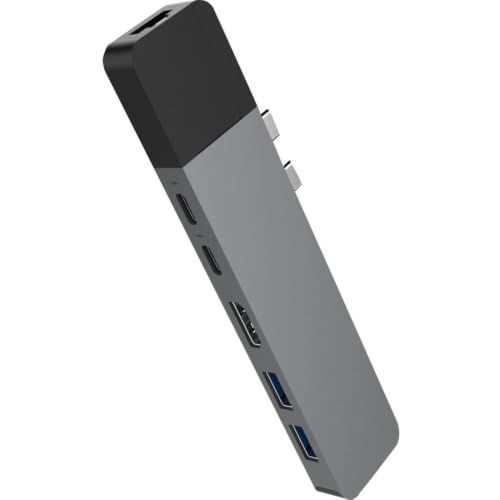 HyperDrive NET 6‑in‑2
|
Premium | Dual USB-C data + 100W PD | Remote workers who need Ethernet & 4K | Check Price | ||
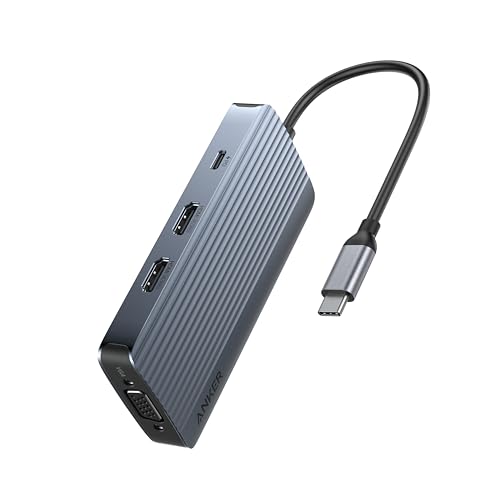 Anker 8‑in‑1 Hub
|
Mid-Range | Triple-display support (one 4K@60Hz) | Travelers needing multiple external displays | Check Price | ||
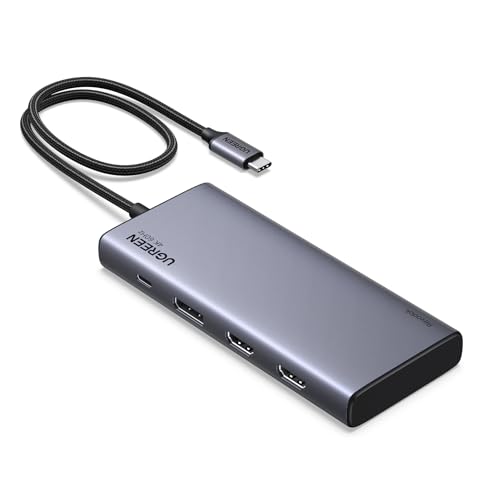 UGREEN 8‑in‑1 Dock
|
Mid-Range | Two 4K HDMI + DisplayPort | Windows users needing triple displays | Check Price | ||
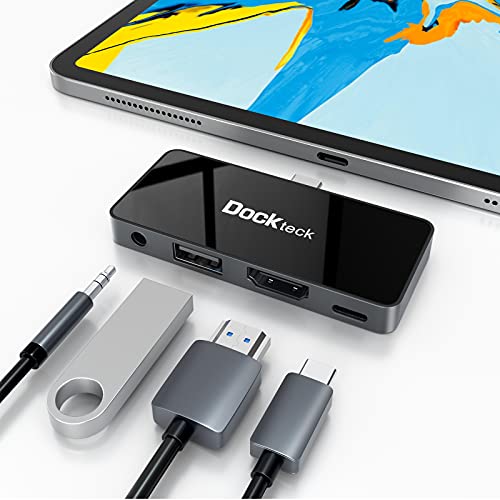 Dockteck 4‑in‑1 iPad Hub
|
Budget | 4K@60Hz HDMI + 3.5mm jack | iPad travelers needing simple expansion | Check Price | ||
 iVANKY 8‑in‑1 Dock
|
Budget | 4K@144Hz HDMI 2.1 for gaming devices | Handheld console gamers and streaming | Check Price | ||
 WAVLINK 12‑in‑1 Dock
|
Premium | 12-in-1 with SD/TF and triple display | Power users needing many ports in one dock | Check Price |
1. HyperDrive USB C Hub, NET 6-in-2 for MacBook Pro Air, Multi-Port USB-C Dongle w/Gigabit Ethernet, 40Gbps/100W PD, 5Gbps/60W PD, 4K30Hz HDMI
A compact, premium dongle built for MacBook users who need reliable wired Ethernet, solid video output and high-watt pass-through charging. Build and port selection are often praised; a few users report occasional connection instability with multi-monitor setups, so double-check display compatibility for complex setups.
Key Specs
- HDMI: 4K@30Hz (HDMI to HDMI direct)
- Power Delivery: up to 100W PD + 60W data PD option
- Data: 40Gbps Thunderbolt/USB‑C support and USB‑A 5Gbps ports
- Ethernet: Gigabit RJ45 wired port
Pros
- Premium build and compact form factor
- Includes Gigabit Ethernet for stable hotel connections
- High-speed data and strong power delivery options
Cons
- Some users report multi-monitor or connection instability
- Higher price point than simple travel hubs
Best For: Remote workers who need Ethernet & 4K
Check Latest Price on Amazon2. Anker 8-in-1 USB-C Hub, USB C Docking Station Triple Display Multi-Port Dongle with 2 HDMI and VGA, 5Gbps Data Transfers, USB Ports for MacBook Air/Pro, Dell XPS, iPad Pro, and More
Anker's multi-port hub is travel-friendly and offers an impressive port mix for its size, including two HDMI outputs and VGA for legacy displays. Customers praise its ease of use, compact size and overall value, though some report inconsistent charging behavior and occasional failures.
Key Specs
- Video: 2× HDMI + VGA (one HDMI supports 4K@60Hz)
- Power Delivery: pass-through up to 85W
- Data: USB‑A and USB‑C ports at 5Gbps
- Compatibility: USB‑C, USB4 and Thunderbolt devices (note macOS display limits)
Pros
- Great port density for a compact hub
- Compact, travel-friendly size
- Generally strong value for multi-display setups
Cons
- Some users experience charging inconsistencies
- Occasional reports of hub failures over time
Best For: Travelers needing multiple external displays
Check Latest Price on Amazon3. UGREEN 8 in 1 USB C Docking Station with Dual Monitor, 4K Triple Display USBC Hub with 2 HDMI, DP, 2 USB A&C 3.2 Ports, 100W PD, USB-C Dock Compatible for MacBook, Dell, HP, Lenovo, Surface etc
UGREEN packs a full workstation’s ports into a refined aluminum case that feels travel-ready and durable. Buyers appreciate build quality and ease of use; watch for mixed reports on charging distribution and occasional random disconnects on some systems.
Key Specs
- Video: 2× 4K HDMI + 1× DisplayPort for dual/triple display
- Power Delivery: up to 100W input, ~85W pass-through typical
- Data: multiple USB‑A/C 3.2 Gen2 ports at up to 10Gbps
- Material: Brushed aluminum housing for durability
Pros
- Solid aluminum build and perceived durability
- High-speed 10Gbps ports for fast transfers
- Good value for feature set
Cons
- Some users report random disconnection issues
- Charging distribution can be confusing under heavy load
Best For: Windows users needing triple displays
Check Latest Price on Amazon4. USB C Hub Adapter for iPad Pro 2021 2020 2018 11 12.9 / iPad Air 4 10.9 iPad mini6 Dockteck 4 in 1 iPad Pro USB-C Hub with 100W Power Delivery, 4K@60Hz HDMI Port, USB 2.0 Port and 3.5mm Headphone Jack
A compact, lightweight hub tailored to iPad Pro and iPad Air users that adds 4K@60Hz HDMI, charging and a headphone jack without bulk. Customers like the small footprint and connectivity, but some report fit issues and durability problems when used heavily in and out of ports.
Key Specs
- Video: 4K@60Hz HDMI output for iPad
- Power Delivery: up to 100W PD pass-through
- Ports: 1× USB 2.0, 3.5mm audio jack
- Design: Slim mirrored glass surface, lightweight
Pros
- Very compact and designed to match iPad aesthetics
- Adds useful HDMI and headphone connectivity
- Affordable budget option for tablet users
Cons
- Can feel loose and fall out of device on some units
- Mixed reports on long-term durability
Best For: iPad travelers needing simple expansion
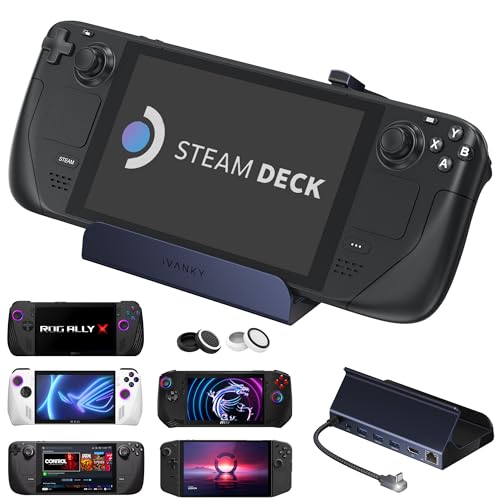
Check Latest Price on Amazon5. iVANKY 8-in-1 Docking Station 4K@144Hz for ASUS ROG Ally X/Valve Steam Deck OLED/Lenovo Legion Go S/MSI Claw, ROG Alloy/Stream Deck Dock Hub, HDMI 2.1, 1Gbps Ethernet, 3*USB-A 3.0, 100W USB-C Charge
A budget-friendly dock focused on gaming devices like Steam Deck and ROG Ally that offers high-refresh HDMI, Ethernet and multiple USB ports. Users like the build quality and connectivity, though others report intermittent video or power issues on certain consoles.
Key Specs
- Video: HDMI 2.1 supporting up to 4K@144Hz
- Ethernet: 1Gbps RJ45 port
- Power Delivery: supports up to 100W PD
- USB: Three USB‑A 3.0 ports (5Gbps)
Pros
- Excellent feature set for portable gaming
- Good value and solid physical build
- Includes Ethernet for stable streaming
Cons
- Some users experience no video output on certain devices
- Charging speed can vary by device
Best For: Handheld console gamers and streaming
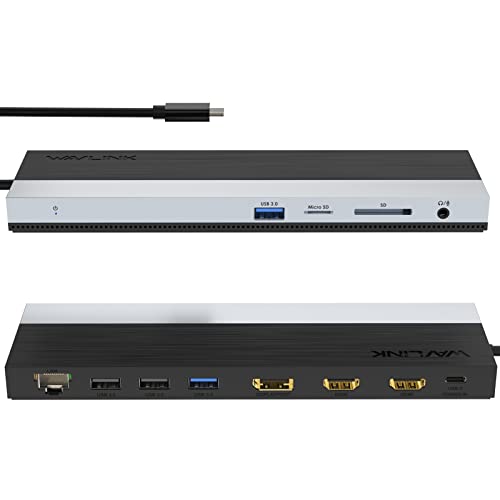
Check Latest Price on Amazon6. WAVLINK USB C Docking Station, USB-C Dock Triple Display PD 85W,USB Type C Hub with DisplayPort, HDMI, USB 2.0/3.0, Gigabit Ethernet, SD/TF Slot, Audio Jack for Windows and Mac
WAVLINK provides a nearly full-size docking experience in a portable package with SD card readers, triple display output and Gigabit Ethernet. It's feature-rich and compatible with many systems, though functionality varies by host device and heavy loads can raise surface temperature.
Key Specs
- Ports: 2× HDMI, 1× DisplayPort, multiple USB 3.0/2.0, SD/TF reader
- Video: Dual 4K@30Hz or DP1.4 single 4K@60Hz with DSC
- Power Delivery: 100W input, up to 85W output
- Ethernet: Gigabit RJ45
Pros
- Extremely versatile port selection
- Works with a wide range of laptops and devices
- Includes SD and microSD slots for photographers
Cons
- Functionality inconsistent across some host devices
- Can run hot under heavy concurrent use
Best For: Power users needing many ports in one dock
Check Latest Price on AmazonWhich One Should You Choose?
If budget is tight → choose the Dockteck 4-in-1 (B08SLYVPRN) for simple, affordable HDMI + PD for iPads and light laptops. If you need the best portable multi-display and overall value → choose the Anker 8-in-1 (B0D3WS1GC3). If premium build, Gigabit Ethernet and the strongest power/data combination matter most → choose the HyperDrive NET 6-in-2 (B07D33RMRN).
Best for Specific Scenarios
- Frequent remote-worker in rentals: HyperDrive NET 6-in-2 (B07D33RMRN) because it combines Gigabit Ethernet, strong PD and reliable video in a compact package.
- Tablet-first traveler: Dockteck 4-in-1 (B08SLYVPRN) because it adds HDMI, 100W PD and a headphone jack without adding bulk.
- Portable gaming or streaming: iVANKY 8-in-1 (B0CGVB39C6) because of HDMI 2.1 4K@144Hz support and Ethernet for low-latency streaming.
Frequently Asked Questions
Will a USB‑C hub charge my laptop while using HDMI and USB devices?
Most hubs support pass‑through Power Delivery (PD) and will charge a laptop while powering other ports, but the available wattage can drop when several ports are active. Look for hubs with 60–100W PD if you need consistent charging under load, and remember some models pass through around 85W even when rated for 100W input.
Can I connect multiple external monitors with any USB‑C hub?
Not always. Multi‑monitor support depends on both the hub and your laptop’s USB‑C port (DP Alt Mode, Thunderbolt, and MST support). Macs typically limit extended displays compared with Windows laptops. Check your laptop’s specifications and the hub’s video mode notes before expecting dual or triple extended monitors.
Are metal-bodied hubs better for travel?
Aluminum or metal housings tend to be more durable, resist scratches and dissipate heat better than plastic. For frequent travel and repeated plugging/unplugging in rentals, a metal-bodied hub is usually a more robust choice.
How We Selected These Products
Our recommendations are based on data-driven analysis: we evaluated 155229+ products across 23916+ brands using a composite scoring system that weighs rating (40%), review volume (30%), price value (20%), and demand signals (10%). Every product is ranked by data, not opinions.
Last updated: July 20, 2026
As an Amazon Associate we earn from qualifying purchases at no extra cost to you. Full disclosure.
GearLark Score is our editorial ranking based on a composite analysis of product quality, value, and verified customer sentiment. Click through to Amazon for current pricing, availability, and live customer reviews.