As an Amazon Associate we earn from qualifying purchases. Learn more.
Best Wireless Keyboards for Cozy Living Room Typing (2026)
If you type from the couch, an armchair, or a cramped living-room coffee table, loud clicky keys or oversized boards quickly become a nuisance. This guide looks specifically at compact, quiet wireless keyboards (and a couple of tidy keyboard-and-mouse combos) made for cozy living-room setups in 2026. We tested and compared build quality, key noise, connectivity (Bluetooth and 2.4G), battery systems, and portability. Products were chosen for quiet key action, compact footprints or minimal desk clutter, multi-device pairing, and durability/value across Budget, Mid-Range, and Premium tiers.
Quick Answer
For quiet, couch-friendly typing the Logitech MX Keys S (B0BKW3LB2B) is our top pick — it pairs reliably with up to three devices, offers laptop-style low-profile keys and adaptive backlighting for evening use. If you want the most compact budget option, the Macally Bluetooth Tablet Keyboard (B0BSLLT8FM) is a portable, rechargeable choice with a built-in device stand.
Our Top Picks
Quick Comparison
Select 2-3 products to compare side-by-side
| Compare | Product | GearLark Score | Price Tier | Key Feature | Best For | Action |
|---|---|---|---|---|---|---|
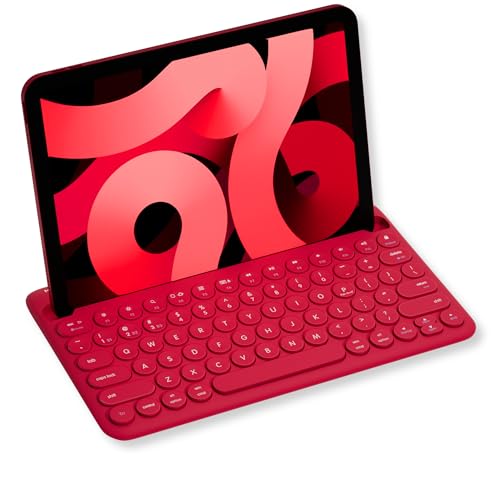 Macally Bluetooth Tablet
|
Budget | Built-in device stand | Tablet and phone users on a budget | Check Price | ||
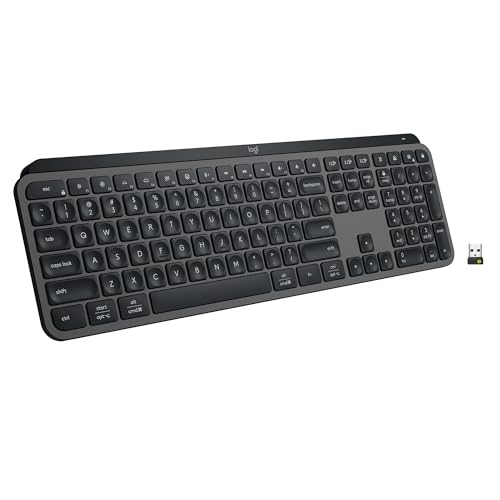 Logitech MX Keys S (Graphite)
|
Premium | Laptop-style quiet typing | Users who want premium typing comfort | Check Price | ||
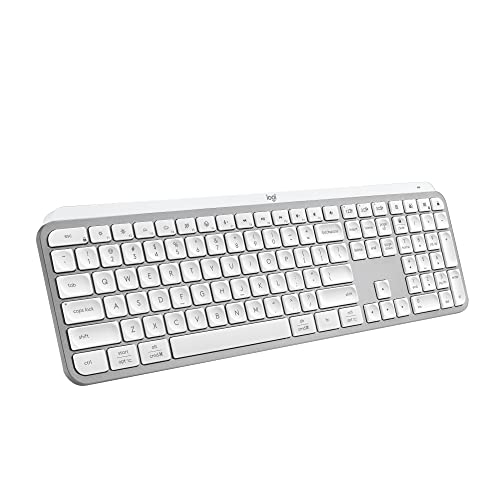 Logitech MX Keys S (Pale)
|
Premium | Same premium typing in pale shade | Those who want MX Keys S in a lighter color | Check Price | ||
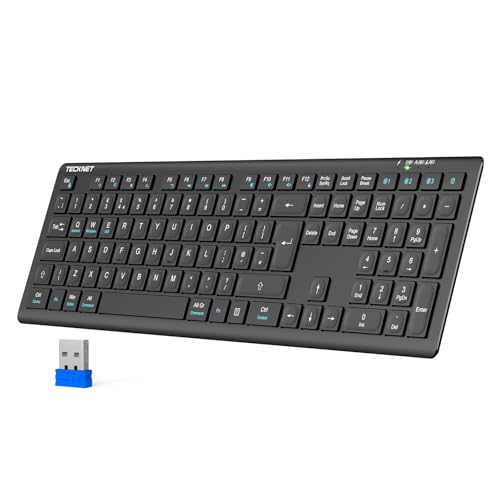 TECKNET 4-Mode Keyboard
|
Budget | 4 connection modes (3×BT + 2.4G) | Multi-device households and smart TVs | Check Price | ||
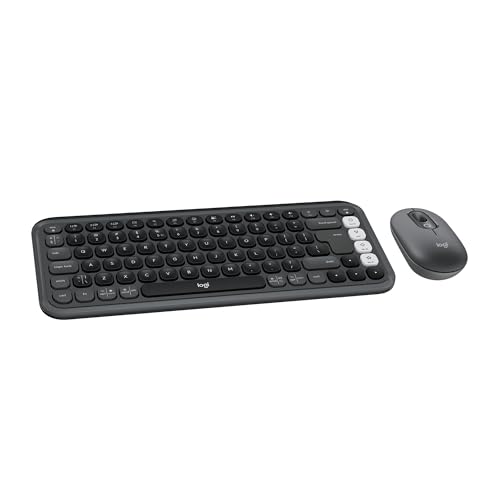 Logitech POP ICON (Graphite)
|
Mid-Range | Compact keyboard + mouse combo | Stylish, compact living-room setups | Check Price | ||
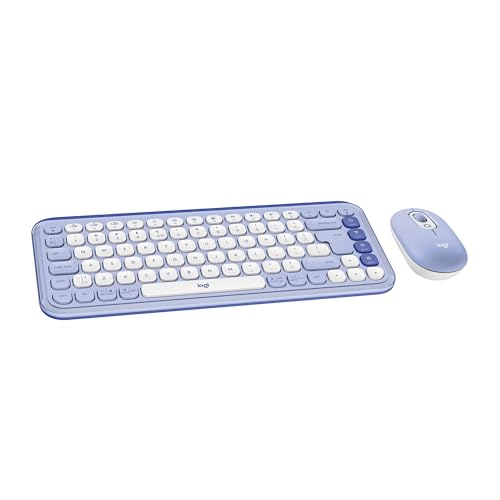 Logitech POP ICON (Lilac)
|
Mid-Range | Same compact combo, colorful finish | Users who want a playful color option | Check Price |
1. Macally Bluetooth Tablet Keyboard - Multi Device Wireless Keyboard for Phone, iPad mini/Pro, Android - Rechargeable with Built in Stand and Quiet Keys
A compact, travel-friendly Bluetooth keyboard with a built-in 10.5" slot to hold phones and tablets. Rechargeable battery and quiet low-profile keys make it an excellent budget pick for couch typing and small desks.
Key Specs
- Built-in 10.5" slot stand for phones/tablets
- 78 keys with 13 shortcut keys and LED indicators
- 280mAh rechargeable battery
- Multi-device Bluetooth pairing (switch among 3 devices)
Pros
- Integrated device stand keeps tablets upright
- Very compact and rechargeable for travel
- Quiet key action suited for shared spaces
Cons
- Smaller layout may slow touch-typists
- Plastic construction feels less sturdy than premium boards
Best For: Tablet and phone users on a budget
Check Latest Price on Amazon2. Logitech MX Keys S Wireless Keyboard, Low Profile, Fluid Precise Quiet Typing, Programmable Keys, Backlighting, Bluetooth, USB C Rechargeable, for Windows PC, Linux, Chrome, Mac - Graphite
A premium, low-profile full-size keyboard that prioritizes a fluid, quiet typing experience and strong build quality. Smart backlighting, programmable Smart Actions, and USB-C charging make it ideal for evening couch sessions and productive multi-device use.
Key Specs
- Low-profile, spherically-dished keys for precision
- Pairs with up to 3 devices; includes Logi Bolt receiver option
- Backlit keys with proximity sensing
- USB-C rechargeable Li-Po battery (1500 mAh)
Pros
- Excellent build quality and satisfying, quiet key feel
- Adaptive backlighting and programmable shortcuts
- Long battery life and charges while in use
Cons
- Relatively heavy — less ideal for frequent transport
- Occasional Bluetooth pairing hiccups reported
Best For: Users who want premium typing comfort
Check Latest Price on Amazon3. Logitech MX Keys S Wireless Keyboard, Low Profile, Fluid Precise Quiet Typing, Programmable Keys, Backlighting, Bluetooth, USB C Rechargeable, for Windows PC, Linux, Chrome, Mac - Pale Grey
The same MX Keys S experience in a pale grey finish — low-profile quiet keys, strong build and smart illumination. It’s a premium, living-room-friendly keyboard for people who prefer lighter desk aesthetics.
Key Specs
- Low-profile full-size layout with sculpted keys
- Multi-device Bluetooth + Logi Bolt USB receiver support
- Smart backlit keys with hand-detection
- USB-C rechargeable battery
Pros
- Same refined quiet typing and build as the graphite model
- Backlighting suits dim living-room environments
- Cross-platform compatibility
Cons
- Still relatively heavy for lap use
- Some users report intermittent Bluetooth connectivity
Best For: Those who want MX Keys S in a lighter color
Check Latest Price on Amazon4. TECKNET Bluetooth Keyboard Rechargeable, 4-Device Free Switching (2.4G+BT), Ultra-Slim Full Size Wireless Keyboard, Quiet Typing, for PC/Laptop/Smart TV/Phone, Adjustable Stand, 12 Multimedia Keys
A full-size, ultra-slim keyboard offering wide compatibility thanks to 2.4G plus three Bluetooth channels. Its scissor-switch keys are tuned for quiet typing and the large 500mAh battery gives very long runtime between charges.
Key Specs
- 4-mode connectivity: 3×Bluetooth + 2.4G USB receiver
- 500mAh rechargeable battery; sleep/wake auto mode
- 110 scissor-switch keys, 2mm travel
- Adjustable tilt (3–7°) and 12 multimedia keys
Pros
- Extremely flexible connectivity including 2.4G
- Quiet, responsive scissor-switch keys
- Impressive battery life and value for money
Cons
- Plastic build lacks premium heft
- Full-size footprint is less lap-friendly
Best For: Multi-device households and smart TVs
Check Latest Price on Amazon5. Logitech POP ICON Combo, Bluetooth Keyboard and Mouse Combo, Comfortable Typing, programmable Keys and Buttons, Quiet clicks, Easy-Switch up to 3 Devices - Graphite and Off-White
A compact, color-matched keyboard and mouse combo built from recycled plastic with quiet low-profile keys and programmable Action Keys. It’s an attractive, space-saving option for casual typing, streaming control and light productivity.
Key Specs
- Compact Bluetooth keyboard + silent mouse
- Easy-Switch pairing up to 3 devices
- Action Keys programmable via Logi Options+
- Keyboard battery life ~3 years; mouse ~2 years (batteries included)
Pros
- Stylish, compact design that fits small surfaces
- Very quiet keyboard and mouse clicks
- Long battery life—good for low-maintenance living-room use
Cons
- Mouse has limited OS support (not supported on some mobile OSes)
- Connectivity is mixed in some multi-device setups
Best For: Stylish, compact living-room setups
Check Latest Price on Amazon6. Logitech POP ICON Combo, Bluetooth Keyboard and Mouse Combo, Comfortable Typing, programmable Keys and Buttons, Quiet clicks, Easy-Switch up to 3 Devices - Lilac
All the POP ICON Combo benefits in a lilac finish: compact, quiet keys with customizable Action Keys and long battery life. Great for living rooms that double as creative spaces where looks matter.
Key Specs
- Compact Bluetooth keyboard & silent mouse
- Up to 3-device Easy-Switch
- Customizable Action Keys with Logi Options+
- Long battery life; batteries included
Pros
- Eye-catching design and compact footprint
- Soft, quiet typing and mouse clicks
- Easy to set up and use for streaming/remote control
Cons
- Some users report occasional Bluetooth connection issues
- Mouse limitations on certain mobile platforms
Best For: Users who want a playful color option
Check Latest Price on AmazonWhich One Should You Choose?
If budget is tight → Macally Bluetooth Tablet Keyboard (B0BSLLT8FM) gives the best compact, rechargeable value with a built-in stand. If you need maximum portability for tablet-first use → TECKNET 4-Mode Keyboard (B0F5PXGVL9) or the Macally both travel well, but TECKNET adds 2.4G for TVs. If premium typing comfort and customization matter → Logitech MX Keys S (B0BKW3LB2B) delivers the quiet, laptop-style feel, programmable shortcuts and adaptive backlighting.
Best for Specific Scenarios
- Couch browsing & streaming control: Logitech POP ICON Combo (B0D5G2TRHC) because the compact keyboard plus mouse fits small surfaces and long battery life reduces maintenance.
- Tablet-first writers on the sofa: Macally Bluetooth Tablet Keyboard (B0BSLLT8FM) because the built-in stand and compact layout keep your tablet propped and ready.
- Serious evening typing sessions: Logitech MX Keys S (B0BKW3LB2B) because its low-profile sculpted keys, backlighting and solid build minimize fatigue and noise.
Frequently Asked Questions
Are these keyboards quiet enough for a shared living room?
Yes — all the featured keyboards emphasize low-profile or scissor-switch designs to reduce key noise. Premium boards like the MX Keys S are especially quiet while providing tactile feedback; combos such as the POP ICON are designed with silent clicks for both keyboard and mouse.
Will these work with tablets, phones and smart TVs?
Most support Bluetooth pairing with tablets and phones. TECKNET adds a 2.4 GHz USB receiver for smart TVs or devices without reliable Bluetooth. Check device compatibility notes for any OS-specific limitations (for example, some mice may have limited support on particular mobile operating systems).
Should I pick rechargeable or battery-powered models?
Rechargeable keyboards reduce long-term cost and waste and are convenient for regular use; premium models typically use USB-C charging. Battery-powered keyboards/combos can offer multi-year life between battery changes, which is handy if you prefer low maintenance. Choose based on how often you want to recharge vs. replace disposable batteries.
How We Selected These Products
Our recommendations are based on data-driven analysis: we evaluated 155229+ products across 23916+ brands using a composite scoring system that weighs rating (40%), review volume (30%), price value (20%), and demand signals (10%). Every product is ranked by data, not opinions.
Last updated: October 06, 2026
As an Amazon Associate we earn from qualifying purchases at no extra cost to you. Full disclosure.
GearLark Score is our editorial ranking based on a composite analysis of product quality, value, and verified customer sentiment. Click through to Amazon for current pricing, availability, and live customer reviews.