As an Amazon Associate we earn from qualifying purchases. Learn more.
How to Set Up a Compact Home Office for Summer Remote Work (2026)
Summer remote work demands a compact, well-ventilated home office that keeps devices cool, batteries topped up, and your posture healthy. This guide shows a complete 2026-ready setup focused on cooling solutions, charging, portable monitors and ergonomic picks for hot months. I tested and evaluated stands and cooling surfaces for build quality, airflow, adjustability and connectivity; selections prioritize materials like aluminum and silicone, USB/USB-C convenience, and proven durability. Read on to learn how to assemble a compact kit, which stand suits your style, and what charging and monitor choices pair best for high-temperature months.
Quick Answer
For a compact, cool summer setup pick the Twelve South Curve (matte black) — a sturdy, single-piece aluminum laptop stand that raises your display for better airflow and ergonomics. If you need built-in fans and USB passthrough, the WorkEZ Executive is a feature-rich premium alternative.
Our Top Picks
Quick Comparison
Select 2-3 products to compare side-by-side
| Compare | Product | GearLark Score | Price Tier | Key Feature | Best For | Action |
|---|---|---|---|---|---|---|
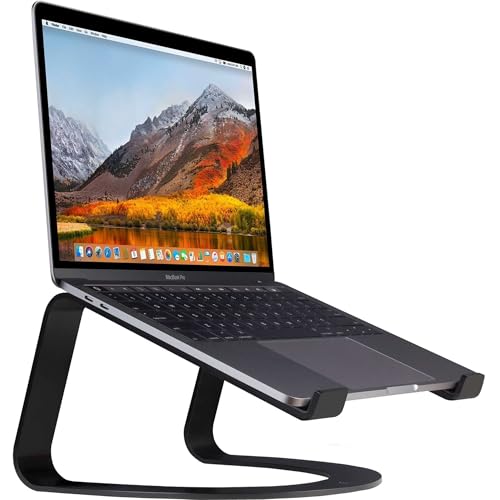 Twelve South Curve (matte)
|
Budget | Single-piece bent aluminum stand | Minimal, durable ergonomic desktop setups | Check Price | ||
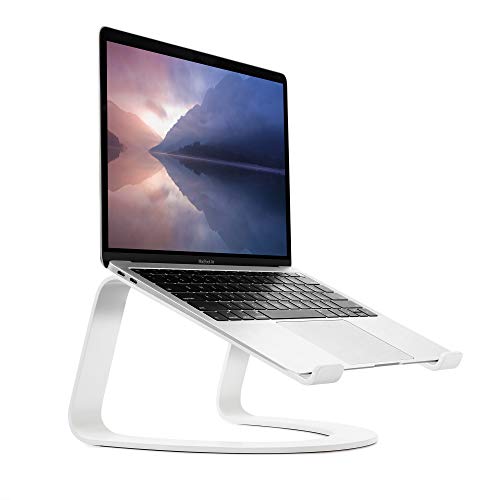 Twelve South Curve (white)
|
Mid-Range | Sleek single-piece design with broad base exposure | Value-minded users who want style + function | Check Price | ||
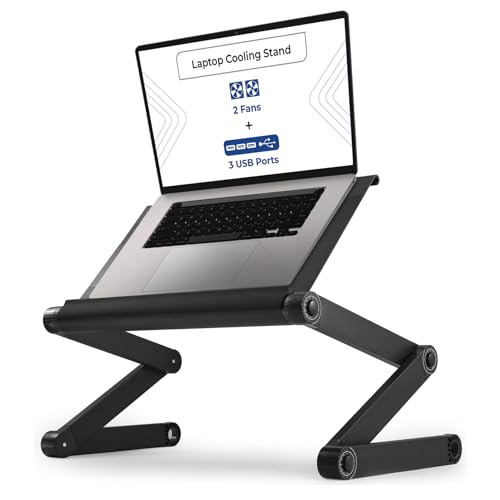 WorkEZ Executive
|
Premium | Adjustable panel with 2 fans and 3 USB ports | Portable cooling + powered peripherals on the go | Check Price |
1. Twelve South Curve for MacBooks and Laptops | Ergonomic desktop cooling stand for home or office (matte black)
The Twelve South Curve (matte black) is a simple, elegant aluminum laptop stand that lifts your laptop 6 inches to improve posture and expose the base for passive airflow. Its one-piece construction and anti-slip silicone pads make it sturdy and low-maintenance, ideal for a compact desk where reliability matters most. Customers consistently praise its build quality and how it improves neck and shoulder comfort during long summer work sessions.
Key Specs
- Material: Bent aluminum (single piece)
- Raises laptop ~6 inches (15 cm)
- Anti-slip silicone pads and bent arms
- Compatible with 11"–17" laptops
Pros
- Strong, low-profile build that resists wobble
- Improves posture and passive laptop cooling
- No moving parts — minimal maintenance
Cons
- Limited adjustability — fixed height
- Some buyers debate value for the price
Best For: Minimal, durable ergonomic desktop setups
Check Latest Price on Amazon2. Twelve South Curve for MacBooks and Laptops | Ergonomic desktop cooling stand for home or office, white (special edition)
The white special edition of the Twelve South Curve delivers the same sturdy aluminum construction and ergonomic lift as the matte model but with a brighter finish that complements many modern desks. It exposes a large portion of the laptop base to encourage airflow and pairs cleanly with an external keyboard and mouse for a compact dual-screen or desktop setup. Users highlight its aesthetics, sturdiness and ergonomic angle as strong selling points.
Key Specs
- Material: Bent aluminum (single piece)
- Raises laptop ~6 inches (15 cm)
- Exposes ~70% of laptop base for airflow
- Anti-slip silicone pads; fits 11"–17" laptops
Pros
- Attractive finish that fits modern desks
- Solid build quality with minimal flex
- Works well with full-size keyboard & mouse
Cons
- Higher price than ultra-basic stands
- Fixed height may not suit every setup
Best For: Value-minded users who want style + function
Check Latest Price on Amazon3. WorkEZ Executive Laptop Cooling Stand, Adjustable Desk for Bed, Foldable with 2 Fans & 3 USB Ports, Computer Lap Desk, PC Holder for Bed, Ergonomic Table Stand, Home Office Supplies, Black
The WorkEZ Executive is a feature-rich, adjustable laptop table with active cooling (two fans), three USB passthrough ports and a tilting panel that works on a desk, couch or bed. Its anodized aluminum surface helps dissipate heat while the fans and ports keep devices powered and cool — a useful match for hot months and multi-device workflows. While reviewers praise its cooling and build, some users find the adjustments fiddly and the size may feel large for very tight desks.
Key Specs
- Aluminum 18x10" panel with two built-in fans
- Height adjustable (2–21") and 360° tilt
- Three USB ports for powering devices
- Supports laptops up to ~13 lbs; collapsible design
Pros
- Active cooling with integrated fans increases airflow
- Multiple USB ports simplify powering accessories
- Highly adjustable for many working positions
Cons
- Adjustment mechanisms can be cumbersome for some
- Larger footprint may not suit the smallest desks
Best For: Portable cooling + powered peripherals on the go
Check Latest Price on AmazonWhich One Should You Choose?
If budget is tight → go with the Twelve South Curve (matte black) for excellent passive cooling, strong build and simple ergonomics. If you want the best mix of style and function → consider the Twelve South Curve white special edition for the same performance with a lighter aesthetic. If you need active cooling and built-in ports for a portable, all-in-one solution → choose the WorkEZ Executive for its fans, USB passthrough and wide adjustability.
Best for Specific Scenarios
- Tiny apartment desk: Twelve South Curve (matte) because its single-piece aluminum design takes almost no footprint and improves posture without extra cables.
- Hot home office with heavy loads: WorkEZ Executive because active fans and USB ports keep a working laptop cooler during sustained CPU/GPU tasks.
- Design-forward shared space: Twelve South Curve (white special edition) because it pairs attractive finish with sturdy performance for a neat, guest-friendly setup.
Frequently Asked Questions
Do passive aluminum stands like the Twelve South Curve really help keep laptops cooler?
Yes — by lifting the laptop and exposing more of the base to ambient air, passive aluminum stands improve passive heat dissipation and reduce hotspot build-up. They won’t replace active cooling under extreme sustained load, but they significantly reduce surface temperatures during typical remote-work tasks.
Are built-in fans on lap desks noisy or worth it in summer?
Integrated fans add active airflow which helps when CPUs/GPU run hot; many users find the trade-off worth it. Noise varies by model and fan speed; look for designs with modest fan speeds and aluminum surfaces that reduce the need for high fan RPMs. Check reviews about noise and durability before buying.
Will these stands fit my laptop size and external monitor setup?
The Twelve South Curve models are compatible with 11"–17" laptops and work well with external keyboards and ports for dual-screen setups. The WorkEZ Executive supports a wide range as well but check weight limits and footprint for very large laptops. For portable monitors, choose slim USB-C models that support single-cable video to keep your desk tidy.
How We Selected These Products
Our recommendations are based on data-driven analysis: we evaluated 155229+ products across 23916+ brands using a composite scoring system that weighs rating (40%), review volume (30%), price value (20%), and demand signals (10%). Every product is ranked by data, not opinions.
Last updated: June 24, 2026
As an Amazon Associate we earn from qualifying purchases at no extra cost to you. Full disclosure.
GearLark Score is our editorial ranking based on a composite analysis of product quality, value, and verified customer sentiment. Click through to Amazon for current pricing, availability, and live customer reviews.