As an Amazon Associate we earn from qualifying purchases. Learn more.
Complete Compact Work-From-Anywhere Setup for Summer (2026)
Heading out for summer work trips doesn’t mean leaving your desktop workflow behind. This guide shows how to assemble a compact, travel-friendly portable office — a high-speed USB4 cable, a small but capable docking station, a splitter for dual portable monitors, and a reliable hub to keep peripherals connected. You’ll learn how these components work together (video, data, power), what to watch for when buying, and which items match different needs. Products here were selected for compatibility with Thunderbolt/USB4 laptops, real-world customer feedback on build and performance, and portability for short trips and coworking days.
Quick Answer
Yes — for a true compact work-from-anywhere setup, pair the Silkland USB 4 Cable (B0D1VGG939) with a multiport dock like the Selore USB-C Docking Station (B09B1VXDYH). Silkland is our top pick for 40Gbps transfers, 8K video support, and up to 240W PD, making it the backbone of a portable office.
Our Top Picks
Quick Comparison
Select 2-3 products to compare side-by-side
| Compare | Product | Rating | Price Tier | Key Feature | Best For | Action |
|---|---|---|---|---|---|---|
 Silkland USB4 2M Cable
|
(900+ ratings) | Budget | 40Gbps data + 240W PD support | High-speed video & fast charging | Check Price | |
 Selore 8K USB-C Dock
|
(5.2K+ ratings) | Premium | Multiport with 8K-capable output | Users needing many ports & compact dock | Check Price | |
 Selore USB-C Splitter
|
(650+ ratings) | Mid-Range | Dual 4K USB-C video via DP Alt Mode | Dual portable monitor workflows | Check Price | |
 LIONWEI USB-C Dock
|
(450+ ratings) | Mid-Range | Dual 4K DP Alt Mode + 100W PD | Windows users wanting dual monitors | Check Price |
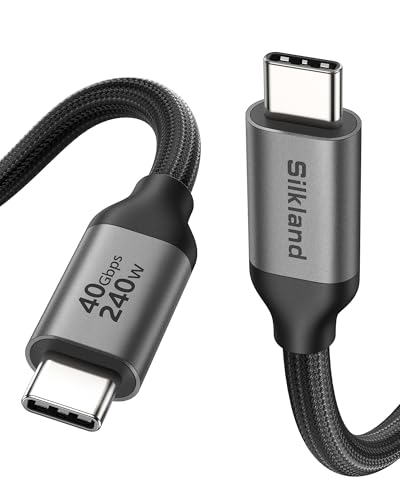
1. Silkland USB 4 Cable 6.6FT/2M for Thunderbolt 4, 40Gbps Data Transfer, 8K/5K@60Hz, 4K@240Hz, 240W Charging, Braided USB C Video Cable Compatible with MacBook, Portable Monitor, SSD, Docking, iPad
This 2m USB4 / Thunderbolt‑compatible cable is the fastest link in a compact portable office. It delivers up to 40Gbps data, supports single 8K@60Hz or high‑refresh 4K, and handles up to 240W charging with an E‑Marker for safety. Customers praise its build quality and transfer speeds, making it the essential cable for docking, portable monitors, and external SSDs.
Key Specs
- 40Gbps maximum data transfer (USB4/Thunderbolt compatible)
- Supports 8K@60Hz, 5K@60Hz, 4K@144Hz video
- Up to 240W charging (PD 3.1 with E‑Marker)
- Braided 48‑strand jacket with aluminum shell; 2m (6.6ft)
Pros
- Extremely fast transfers (40Gbps) for large files and video
- High power delivery up to 240W for most laptops
- Solid build: braided cable and aluminum connectors
Cons
- Some users find the cable stiff — flexibility varies
- Higher power/feature set requires compatible chargers and hosts
Best For: High-speed video & fast charging
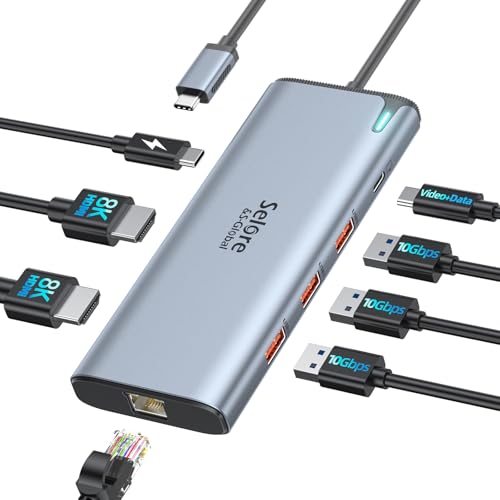
Check Latest Price on Amazon2. Docking Station USB C Video,8K Laptop Docking Station Dual Monitor 8K@60Hz 2*HDMI,USB-C Hub with USBC Video Output,4 * 10Gbps USB Port,Ethernet,100W PD for Portable Monitor,MacBook Pro/Air,Dell,HP
The Selore docking station packs a surprising number of ports into a compact chassis, driven by an Intel JHL8140 controller. It offers USB‑C video out capable of 8K@60Hz, two HDMI outputs, multiple 10Gbps USB ports, Ethernet, and up to 100W PD (85W safe continuous). Reviewers like the port density and setup ease, though some report mixed heat and transfer speed behavior under heavy load.
Key Specs
- Intel JHL8140 controller with 8K@60Hz USB‑C video out
- Dual HDMI + USB‑C video; supports dual 4K@60Hz (conditions apply)
- Up to 100W PD input (up to ~85W continuous to laptop)
- Multiple 10Gbps USB ports and Ethernet (power adapter not included)
Pros
- Very versatile port layout for travel setups
- Compact size and easy plug‑and‑play
- Good value given features versus full desktop docks
Cons
- Some users report the unit gets hot during prolonged use
- Video/data behavior depends on host port capabilities (Thunderbolt/USB4/DP Alt Mode)
Best For: Users needing many ports & compact dock
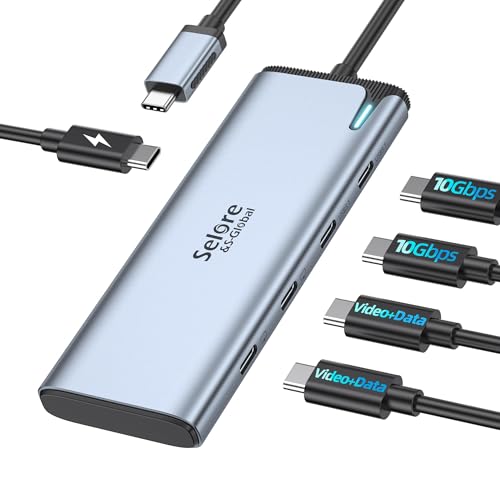
Check Latest Price on Amazon3. Selore&S-Global USB C Splitter with 4K/60Hz Video Output,USB C Hub Dual Monitor with DP Alt Mode,10Gbps Data Transfer,100W PD,Docking Station Dual Monitor for Windows Laptop,Portable Monitors
This 5‑in‑1 USB‑C splitter focuses on driving two USB‑C monitors at 4K@60Hz (MST/DP Alt Mode) while offering two 10Gbps data ports and up to 100W PD pass‑through. It's compact and well built — customers like its connectivity and compactness. Expect macOS limitations for dual MST displays and occasional mixed feedback on power delivery and transfer speeds depending on host hardware.
Key Specs
- Dual 4K@60Hz USB‑C video outputs (DP Alt Mode / MST support)
- Two 10Gbps USB‑C data ports and 100W PD (up to ~87W pass‑through)
- Compact 5‑port form factor; requires Thunderbolt 4/USB4 host for full features
Pros
- Good mix of dual-monitor support and data ports in one small unit
- Solid build and compact for travel
- Excellent value for multi-monitor portable setups
Cons
- macOS (M1/M2) may not support MST dual displays — single display only
- Some customers report inconsistent power delivery or slower transfers on certain hosts
Best For: Dual portable monitor workflows
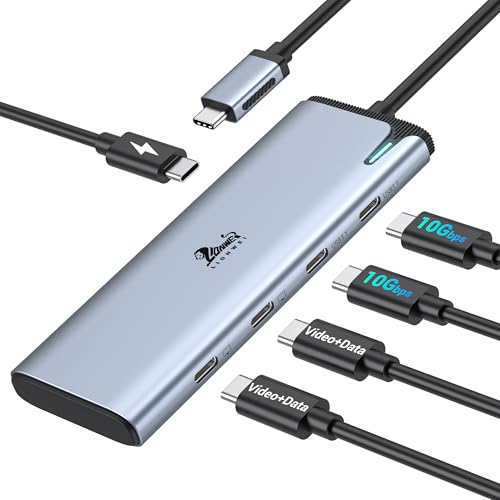
Check Latest Price on Amazon4. USB C Docking Station Dual Monitor 4K@60Hz DP Alt Mode, USB C Video Hub with 10Gbps Data Transfer, 100W PD Charging, USBC Splitter for Dell/HP/Lenovo, Portable Monitor and More Type C Devices
LIONWEI’s hub provides dual 4K@60Hz outputs via DP Alt Mode, two 10Gbps USB‑C data ports, and 100W PD pass‑through. Users report reliable connectivity and solid construction, making it a dependable mid‑range option for Windows laptops. Common concerns relate to heat under sustained load and mixed durability reports over long-term heavy use.
Key Specs
- Dual 4K@60Hz via DP Alt Mode 1.4 (Thunderbolt 4/USB4 host required)
- Two USB‑C 3.1 data ports (10Gbps) and 100W PD (about 87W pass‑through)
- MST/SST support for Windows; macOS dual‑monitor limitations
Pros
- Stable dual‑monitor performance on compatible Windows machines
- Clean device connections and build quality
- Good port selection for peripherals and storage
Cons
- Unit can run warm during heavy use
- Mixed long‑term durability reports among some users
Best For: Windows users wanting dual monitors
Check Latest Price on AmazonWhich One Should You Choose?
If budget is tight → LIONWEI USB‑C Dock (B0DRGCDDM4) offers essential dual‑monitor and PD features at a solid mid‑range value. If you need the most versatile backbone cable for monitors, docks, and high‑watt chargers → Silkland USB 4 Cable (B0D1VGG939). If you want the best mix of ports and overall value for multi‑monitor portable setups → Selore USB C Splitter (B0DRG9K3BJ). If you want the most ports and broadest feature set in a compact dock (and don’t mind investing more) → Selore 8K USB‑C Docking Station (B09B1VXDYH).
Best for Specific Scenarios
- Beachside coworking (travel light): Silkland USB4 Cable because one high‑quality cable plus a compact splitter gives video, power, and data without bulky adapters.
- Coffee shop day with two portable monitors: Selore USB C Splitter (B0DRG9K3BJ) because it’s compact and built to drive dual USB‑C monitors (when your laptop supports DP Alt Mode/USB4).
- Conference room or hotel desk with many peripherals: Selore 8K USB‑C Dock (B09B1VXDYH) because it offers HDMI, Ethernet, multiple 10Gbps ports, and higher PD — a one‑box desk replacement.
Frequently Asked Questions
Do I need a Thunderbolt 4/USB4 laptop to use these docks and splitters?
Not always — many docks support DP Alt Mode over USB‑C for single external displays. For full dual 4K@60Hz via MST or the fastest data lanes (40Gbps/8K), a Thunderbolt 4/USB4 host is typically required. Check the product notes and your laptop spec before buying.
Will these hubs charge my laptop at full speed?
They can, but only if three things match: the dock’s PD rating, the cable’s PD/E‑Marker capability, and your laptop’s charging expectations. For example, Silkland supports up to 240W but your dock and charger must also support the target wattage to deliver the highest speeds.
My hub gets warm — is that normal and is it safe?
Compact multiport hubs and docks can run warm under load because they concentrate controllers and power delivery in a small enclosure. Mild warmth is common; persistent very high heat or performance drops may indicate an issue. Look at customer feedback on thermal behavior and avoid blocking ventilation during heavy use.
How We Selected These Products
Our recommendations are based on data-driven analysis: we evaluated 155229+ products across 23916+ brands using a composite scoring system that weighs rating (40%), review volume (30%), price value (20%), and demand signals (10%). Every product is ranked by data, not opinions.
Last updated: May 13, 2026
As an Amazon Associate we earn from qualifying purchases at no extra cost to you. Full disclosure.
Ratings and review counts reflect data at time of writing and may have changed. Click through to Amazon for current information.