As an Amazon Associate we earn from qualifying purchases. Learn more.
Complete Small Dorm Desk Multi-Monitor Setup (2026)
Setting up a multi-monitor workstation in a small dorm desk can be tricky: limited depth, cluttered cables, and narrow layouts demand compact, adjustable gear. This 2026 guide shows a complete small dorm desk multi-monitor setup — focused on portable monitors, low-footprint stands, and clean cable management so you get more screen space without sacrificing stability. You’ll learn which stands work best for compact desks, how to match VESA vs magnetic mounts, what hubs and cable accessories to prioritize, and how to build the kit within different budgets. Products were chosen for build quality, adjustability, compatibility, and customer feedback on stability and ease of use.
Quick Answer
For a compact dorm multi-monitor setup the JUNEBOX Adjustable Magnetic Stand (B0F4D71RR4) is the best overall pick — strong magnetic grip, wide adjustment range, and a heavy aluminum base make it ideal for small desks. If you need a budget VESA option, the JUNEBOX Portable Monitor Stand (B0DZ6FTG13) offers a simple aluminum base with anti-loss screws and broad compatibility.
Our Top Picks
Quick Comparison
Select 2-3 products to compare side-by-side
| Compare | Product | GearLark Score | Price Tier | Key Feature | Best For | Action |
|---|---|---|---|---|---|---|
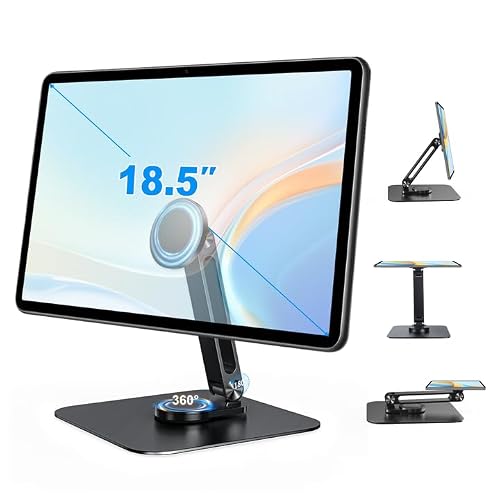 JUNEBOX Magnetic Adjustable Stand
|
Mid-Range | Built-in powerful magnets | Users who need tool-free quick mounting | Check Price | ||
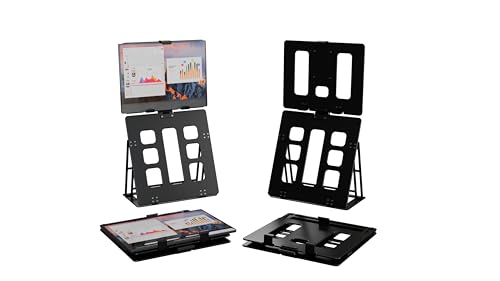 HNL Clamp Foldable Stand
|
Mid-Range | Low-footprint clamp and foldable form | Travelers and very small desks | Check Price | ||
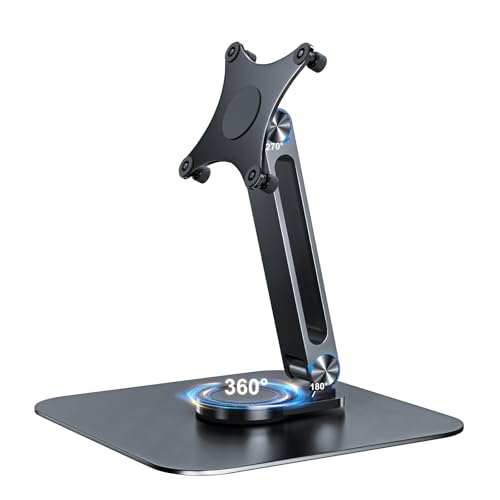 JUNEBOX VESA Stand 75x75
|
Budget | M4 anti-loss screws and free-standing aluminum base | Budget-conscious users with VESA 75x75 monitors | Check Price |
1. Adjustable Magnetic Stand Holder for 10-18.5 Inch Portable Small Monitor, Aluminum Alloy Foldable Arm Swivel Desk POS Stand Mount for iPad Air Mini Pro 12.9 13, Samsung Galaxy Tabs,Kindle
This magnetic aluminum stand pairs a heavy, rotatable base with strong built-in magnets and supplied metal rings to secure tablets or portable monitors. It's praised for solid build quality, easy device swapping, and a wide adjustment range (360° base, 180° arm, 240° head). The magnetic system is fast and convenient, but works best with flat, untextured device backs or by using the included metal rings. Overall, it’s the most flexible pick for cramped desks where quick reconfiguration matters.
Key Specs
- Magnet-based attachment; includes large and small metal rings
- Supports devices up to 6.6 lbs (3 kg)
- Fits portable monitors/tablets ~6.5"–18.5"
- 360° rotating base; 180° arm fold; 240° head tilt
Pros
- Very quick, tool-free attachment/removal with strong magnets
- Wide adjustment range for portrait/landscape and tilted setups
- Heavy aluminum base and anti-slip pads improve stability
Cons
- Requires flat, relatively untextured device back or metal ring for secure grip
- Weight limit (~6.6 lb/3 kg) rules out heavier 17–18" monitors
Best For: Users who need tool-free quick mounting
Check Latest Price on Amazon2. HNL Portable Monitor Stand, iPad & Tablet Holder, clamp Retention, Foldable, mountable Small Desk, Supports 7.75 inch to 10.75 inch Screen Width, Travel with Laptop, Black
The HNL clamp-style portable stand minimizes footprint with a short base and foldable profile that fits tight dorm desks or backpacks. It supports many tablets and portable monitors within a specified width range, uses rubber pads and iron supports for stability, and keeps parts integrated so nothing is lost. Review clues indicate solid durability and a travel-friendly size, although its clamp fit and weight limit (about 3 lbs) mean you should confirm device dimensions before buying.
Key Specs
- Supports monitors/tablets up to ~3 lbs and 0.75" thick
- Compatible monitor widths: 7.75"–10.75"
- Foldable design for travel; compact folded size
- Aluminum composite with iron support legs and rubber pads
Pros
- Extremely compact and travel-friendly
- Clamp retention reduces desk footprint and keeps monitor steady
- Durable materials and single-piece design to avoid lost parts
Cons
- Limited to lighter devices under ~3 lbs
- Narrow width compatibility—measure your monitor before purchase
Best For: Travelers and very small desks
Check Latest Price on Amazon3. Portable Monitor Stand VESA 75x75mm Holes M4 Anti-Loss Screws, Aluminum Alloy Base, Fits 7"- 18", 15.6" 16" 17" 17.3" 18" Inch Small Monitors Lay Flat, Black Desk Mount (Not Fits100x100mm)
This affordable VESA stand is a simple, no-install solution for small monitors with a 75x75 VESA pattern. The alloy base is sturdy and portable, and the unique anti-loss M4 screws reduce the chance of losing mounting screws during setup. It supports many portable monitors up to around 10 lbs and allows portrait or landscape placement, but it won’t fit 100x100mm VESA and buyers occasionally mention screw length and setup differences between monitors.
Key Specs
- Fits VESA 75x75mm mounting holes (M4 screws)
- Compatible with many monitors ~7"–18.5" and up to ~10 lbs
- Aluminum alloy free-standing base (7.75" x 7.75")
- 360° rotating base; anti-slip pads; cable channel in arm
Pros
- Very affordable and straightforward to mount
- Anti-loss M4 screws reduce installation hassle
- Stable aluminum base with 360° rotation and cable routing
Cons
- Not compatible with 100x100mm VESA patterns
- Some users report mixed fit regarding screw length and setup
Best For: Budget-conscious users with VESA 75x75 monitors
Check Latest Price on AmazonWhich One Should You Choose?
If budget is tight → choose the JUNEBOX Portable Monitor Stand (B0DZ6FTG13). If you need the fastest, most flexible tool-free workflow for switching devices → choose the JUNEBOX Adjustable Magnetic Stand (B0F4D71RR4). If you travel or need the smallest desk footprint → choose the HNL Portable Monitor Stand (B0DNDFBCP9).
Best for Specific Scenarios
- Quick device swapping: JUNEBOX Adjustable Magnetic Stand (B0F4D71RR4) because magnets let you remove and attach monitors or tablets in seconds.
- Tight desk or shared dorm: HNL Portable Monitor Stand (B0DNDFBCP9) because its clamp and foldable design keeps the desk clear and packs for travel.
- Simple, budget VESA mount: JUNEBOX Portable Monitor Stand (B0DZ6FTG13) because its anti-loss screws and aluminum base deliver stability at a low price.
Frequently Asked Questions
Can I use these stands with a laptop as a second screen?
Yes — magnetic and clamp stands are commonly used with portable second-screen monitors placed beside or above a laptop. For laptop-to-monitor video you’ll usually connect via USB-C (DisplayPort Alt Mode) or HDMI depending on your monitor. Make sure the stand fits the monitor’s size/weight and that your laptop supports the needed video output.
How do I manage cables on a small dorm desk?
Prioritize a single USB-C dock with Power Delivery to reduce power bricks, use adhesive cable clips along the desk edge and a slim under-desk tray for extra cables, and bundle cables with a short fabric sleeve. Look for stands with built-in cable channels to keep cords hidden behind the monitor.
Are magnetic stands safe for my devices?
Magnetic stands are safe when used as intended. The JUNEBOX magnetic stand includes metal rings and is designed for flat-backed devices; avoid placing magnets near sensitive removable storage or credit cards. If your device has a case, remove it or use the supplied ring to ensure a reliable magnetic bond.
How We Selected These Products
Our recommendations are based on data-driven analysis: we evaluated 155229+ products across 23916+ brands using a composite scoring system that weighs rating (40%), review volume (30%), price value (20%), and demand signals (10%). Every product is ranked by data, not opinions.
Last updated: August 03, 2026
As an Amazon Associate we earn from qualifying purchases at no extra cost to you. Full disclosure.
GearLark Score is our editorial ranking based on a composite analysis of product quality, value, and verified customer sentiment. Click through to Amazon for current pricing, availability, and live customer reviews.