As an Amazon Associate we earn from qualifying purchases. Learn more.
Complete Dorm Desk Setup for Remote Learning (2026)
Setting up a compact dorm desk for remote learning in 2026 means balancing limited space with multi-monitor needs, reliable charging, and clear audio/video. This guide outlines a complete kit focused on compact multi-monitor workflows, camera/lighting placement, and clean charging/audio solutions. You’ll find equipment selected for build quality, functionality, and dorm-friendly footprints — products were chosen from well-reviewed mounts, webcams, and multi-mount rigs that emphasize adjustability, USB connectivity, and easy installation. Read on to see role-based picks and a buying guide to assemble the whole setup.
Quick Answer
For a compact, multi-device dorm desk setup the Elgato Neo Mount (B0F6NT723J) is the best single-piece pick for positioning lights and cameras; pair it with the TOUCAN 1080P webcam (B0CHW2Z5CM) or the NearStream 2K (B0D5B4RKHY) for video, and the NEEWER rig (B0CNGK17YG) if you need a heavy-duty multi-mount solution.
Our Top Picks
Quick Comparison
Select 2-3 products to compare side-by-side
| Compare | Product | GearLark Score | Price Tier | Key Feature | Best For | Action |
|---|---|---|---|---|---|---|
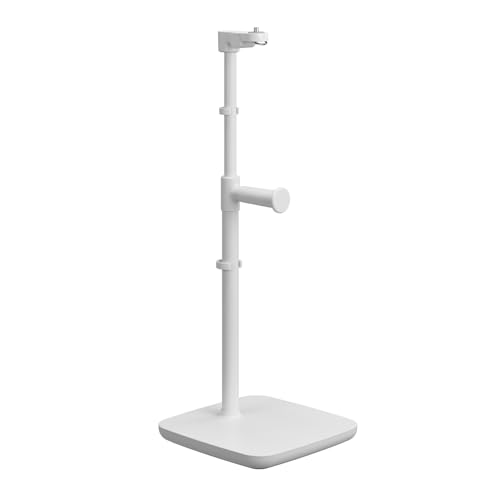 Elgato Neo Mount
|
Budget | Weighted, adjustable desk stand | Compact lighting & webcam positioning | Check Price | ||
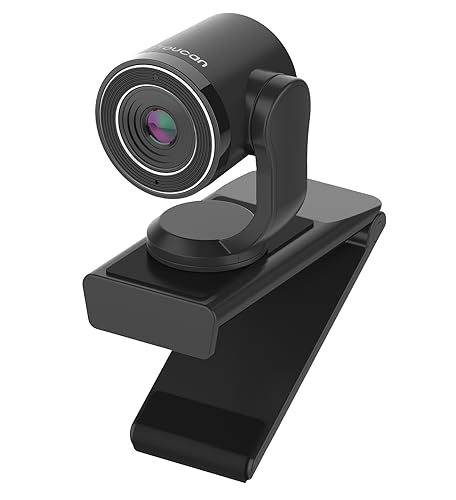 TOUCAN 1080P Webcam
|
Mid-Range | 1080p@60fps plug-and-play camera | Budget-friendly streaming & classes | Check Price | ||
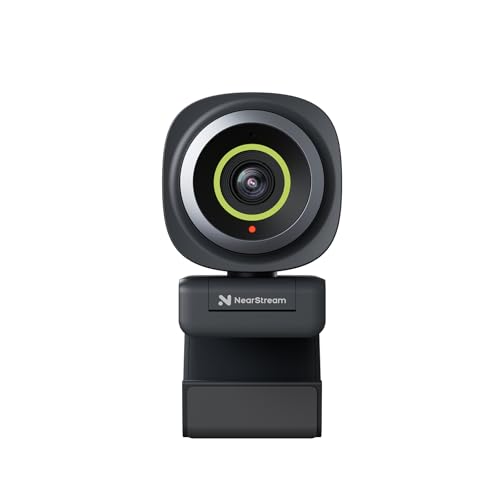 NearStream 2K Webcam
|
Mid-Range | 2K sensor with true autofocus | Sharper video & software control | Check Price | ||
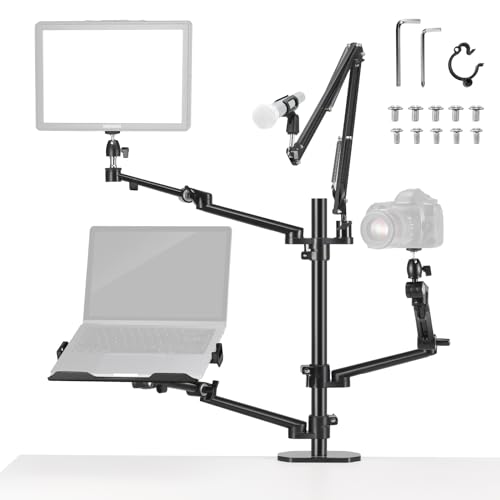 NEEWER Overhead Rig
|
Premium | Multiple articulating boom arms | Multi-device streaming & overhead shots | Check Price |
1. Elgato Neo Mount Desk Stand for Lights, Webcams, and Compact Cameras, Weighted Base, Adjustable Height & Tilt, Headset Holder, Clean White Supports up to 1.1 lb (0.5 kg)
A clean, compact desk stand built for Key Light Neo that doubles as a webcam or light mount and adds small-item organization with a headset holder and cable clips. It’s praised for professional build quality and versatility in tight dorm setups, though a few users report ball-head or extension wear over long use.
Key Specs
- Supports up to 1.1 lb (0.5 kg)
- Weighted base for wobble-free placement
- Adjustable height, tilt, and orientation
- Includes headset holder and two cable clips
Pros
- Solid, professional build and finish
- Weighted base keeps small desks stable
- Integrated headset holder and cable management
Cons
- Some reports of ball-head durability under tension
- Extension pieces can stick or require adjustment
Best For: Compact lighting & webcam positioning
Check Latest Price on Amazon2. TOUCAN 1080P Webcam with Microphone,FHD Streaming Camera with 1080P/60fps,Privacy Protection Plug Play Ultra Compact Web Cam w/ 89View for Computer/Meeting/Online Classes/Zoom/YouTube
A plug-and-play 1080p/60fps webcam that delivers crisp video and wide 89° field of view, making it an easy upgrade for video calls and online classes. Customers praise image clarity and ease of setup, though microphone reliability is mixed and a few units have reported functional issues.
Key Specs
- 1920 x 1080 at up to 60fps
- Omnidirectional noise-filtering microphone
- 89° wide-angle lens
- USB 2.0 plug-and-play with privacy flip
Pros
- Excellent picture clarity and smooth frame rates
- Simple plug-and-play USB setup
- Good value for the features offered
Cons
- Microphone quality is inconsistent across units
- Some users report device stoppage or reliability issues
Best For: Budget-friendly streaming & classes
Check Latest Price on Amazon3. NearStream 2K Webcam for PC, Full HD 1080P Webcam with Noise-Canceling Mic, Auto Focus,Software Control, Adjustable FOV, Plug&Play, Compact Web Camera for Desktop Computer for Zoom/Skype/Teams (V02AF)
A step-up webcam offering 2K capture (or 1080p@60) with true autofocus and adjustable FOV via companion software — ideal if you want a sharper image and fine control over framing. It adds an AI noise-canceling mic and flexible mounting, though it relies on software for some advanced features which can be a drawback if you prefer driverless setups.
Key Specs
- 2K FHD sensor (2MP) — 2K@30 or 1080p@60 with software
- True autofocus to keep subjects sharp
- Adjustable FOV: 60° / 75° / 95° via NearSync
- AI noise-canceling microphone and 1/4" mount hole
Pros
- Higher-resolution capture and reliable autofocus
- Customizable image settings and FOV via software
- Flexible mounting options for desk stands and booms
Cons
- Advanced features depend on companion software
- Occasional software or compatibility quirks reported
Best For: Sharper video & software control
Check Latest Price on Amazon4. NEEWER Overhead Camera Stand Desk Mount Rig with 4 Boom Arms for Photography Video Light Ring Light Phone Mount Webcam Mic Compact DSLR for Live Streaming Broadcast Online Teaching Meeting, DS007
A heavy-duty, tree-like desk mount with multiple articulating arms, VESA and device clamps, and up to 17.6 lb capacity — perfect for creators who need to mount monitors, lights, cameras and mics in one compact footprint. It’s versatile and space-saving but larger and heavier than single-purpose stands and a small number of buyers reported receiving damaged units.
Key Specs
- Supports up to 17.6 lb (8 kg)
- Center column with four articulating boom arms
- Includes laptop/tablet clamps and VESA adapter
- Aluminum alloy construction with desk clamp (10–60mm)
Pros
- Extremely versatile — mounts monitors, DSLRs, lights and mics
- Sturdy aluminum build and high load capacity
- Cable routing and multiple angle adjustments keep desk tidy
Cons
- Overkill for very small desks; heavier footprint
- Occasional reports of damaged units on arrival
Best For: Multi-device streaming & overhead shots
Check Latest Price on AmazonWhich One Should You Choose?
If you want a simple, compact way to place lights or a webcam with strong build quality → choose the Elgato Neo Mount (B0F6NT723J). If you need an affordable, plug-and-play webcam for lectures and quick streaming with very good video clarity → choose the TOUCAN 1080P (B0CHW2Z5CM). If you want sharper video, autofocus, and software control for framed presentations → choose the NearStream 2K (B0D5B4RKHY). If your workflow requires mounting multiple devices (camera, light, tablet, monitor) in one footprint and you need maximum flexibility → choose the NEEWER Overhead Rig (B0CNGK17YG).
Best for Specific Scenarios
- Daily remote classes & note-taking: TOUCAN 1080P Webcam because it’s plug-and-play and gives clear video without extra setup.
- Live demos / overhead labs: NEEWER Overhead Rig because its multi-arm design handles cameras, phones and lights for hands-on demonstrations.
- Tidy, pro-looking single-camera setup: Elgato Neo Mount because it places a light or webcam precisely with minimal desk footprint and built-in cable/headset organization.
Frequently Asked Questions
Will these mounts fit a typical dorm desk?
Most desk clamps and weighted stands are designed for standard desk thicknesses — check the product clamp range before buying. Weighted bases like the Elgato work on any flat surface, while clamp rigs (NEEWER) usually specify a thickness range (often 10–60 mm).
Do these webcams work with Mac and Windows?
Yes — TOUCAN and NearStream are broadly compatible with Windows, macOS and common video platforms. NearStream offers extra software controls for FOV and settings; TOUCAN is straightforward plug-and-play. Always check OS compatibility notes in product details.
How can I minimize cable clutter on a dorm desk?
Use mounts with integrated cable clips or routing channels, attach a compact USB hub or power strip behind monitors, and use short USB-C/PD cables for charging. Headset holders and adhesive cable organizers also reclaim desk space and reduce tangles.
How We Selected These Products
Our recommendations are based on data-driven analysis: we evaluated 155229+ products across 23916+ brands using a composite scoring system that weighs rating (40%), review volume (30%), price value (20%), and demand signals (10%). Every product is ranked by data, not opinions.
Last updated: August 04, 2026
As an Amazon Associate we earn from qualifying purchases at no extra cost to you. Full disclosure.
GearLark Score is our editorial ranking based on a composite analysis of product quality, value, and verified customer sentiment. Click through to Amazon for current pricing, availability, and live customer reviews.