As an Amazon Associate we earn from qualifying purchases. Learn more.
Complete Dorm Dual-Monitor & Charging Setup (2026 Guide)
Setting up a two-monitor productivity station in a small dorm desk means balancing power, cable routing, and outlet sharing. This guide walks students step-by-step through a complete dual-monitor & charging setup — from surge-protected power towers and long flat extension cords to cable management, docking options, and sharing tips for limited outlets. I selected and compared the most practical desk-oriented power towers on the market (tall towers and flat plug strips) based on outlet count, USB-C PD availability, cord length, surge protection and space-saving design, and summarized how each fits real dorm scenarios.
Quick Answer
For a compact, reliable dorm charging hub pick the PASSUS Power Strip Surge Protector (B0CHWC18CZ) as the best overall; it balances many AC outlets, two USB-C PD ports and a slim flat plug for shared outlets. If you need the cheapest option, the SUPERDANNY tower (B0FGYBYMGW) is the best budget pick.
Our Top Picks
Quick Comparison
Select 2-3 products to compare side-by-side
| Compare | Product | GearLark Score | Price Tier | Key Feature | Best For | Action |
|---|---|---|---|---|---|---|
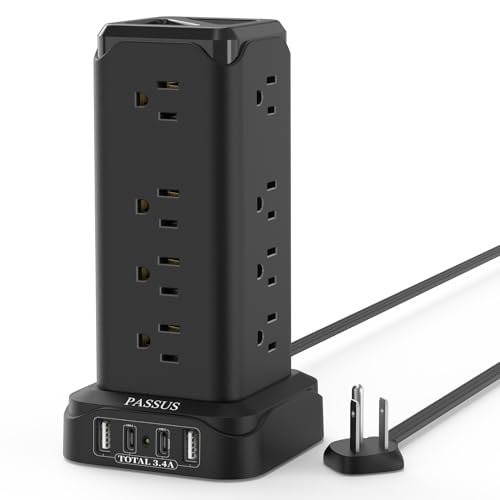 PASSUS Power Tower
|
Mid-Range | 16 AC outlets + PD20W USB‑C | Students who need many outlets | Check Price | ||
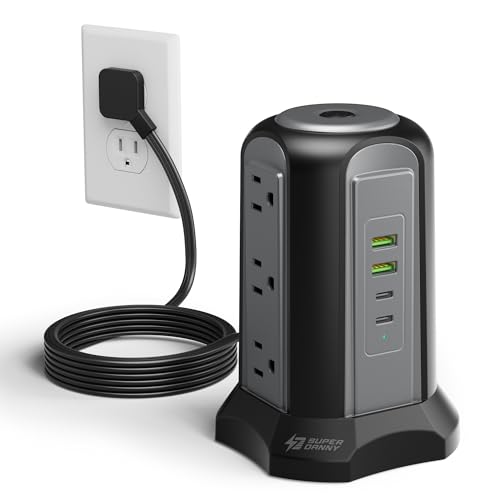 SUPERDANNY Tower
|
Budget | Compact 9 outlets + 4 USB ports | Tight budgets and small desks | Check Price | ||
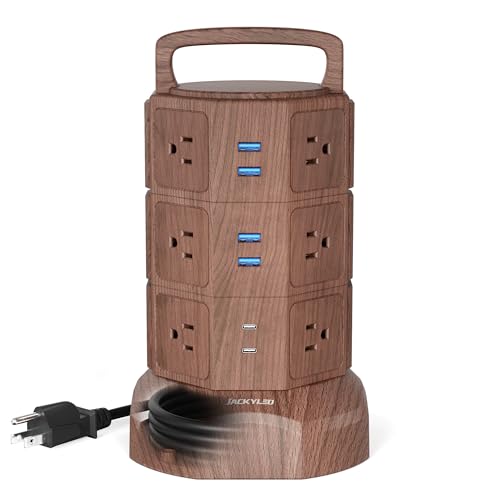 JACKYLED Tower
|
Mid-Range | Independent layer switches | Space-conscious desks & shared outlets | Check Price | ||
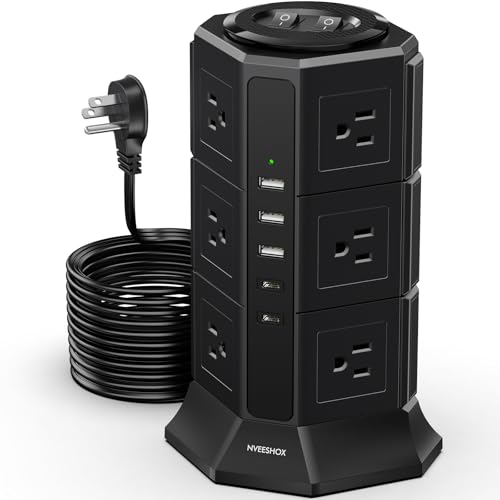 NVEESHOX Tower
|
Budget | 2.95 in extra outlet spacing | Large plugs and adapters | Check Price | ||
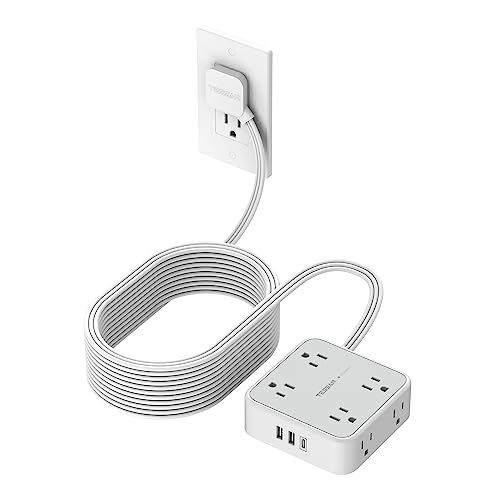 TESSAN 25ft Strip
|
Premium | 25 ft ultra-flat cord | Long cable runs to distant outlets | Check Price | ||
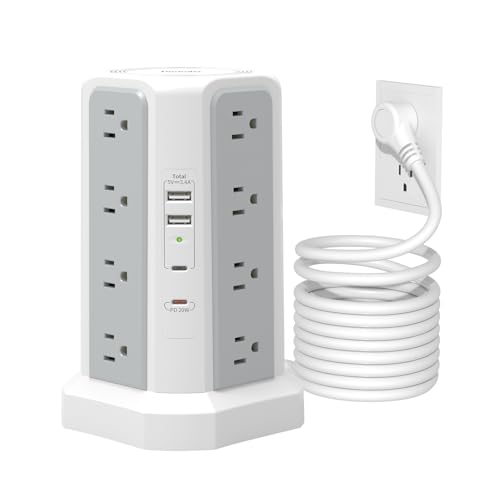 Farakara Power Tower
|
Budget | 16 outlets + 10 ft cord | High outlet demand & longer reach | Check Price |
1. Power Strip Surge Protector with 4 USB(2 USB C,PD20W) Ports,1625W|13A Long Extension Cord with 16 AC Outlets,PASSUS Power Tower Thin Flat Plug Desk Charging Station for Home Office DormRoom
The PASSUS tower is a dense desktop charging hub built for multi-device dorm desks. It combines 16 widely spaced AC outlets, two USB‑C PD ports (20W) and a slim right-angle 6 ft cord to keep furniture close to the wall — a practical mix of capacity and convenience for dual-monitor setups and chargers.
Key Specs
- 16 AC outlets (wide spacing)
- 4 USB ports (2 USB‑C, PD20W max)
- 1625W / 13A total load
- 6 ft flat, right-angle extension cord
- ABS+PC flame-retardant shell
Pros
- High outlet density for multiple monitors, chargers and peripherals
- USB‑C PD port for faster phone/tablet charging
- Slim flat plug works well in tight dorm spaces
Cons
- Tower footprint may still feel large on very small desks
- Mid-range build — long-term durability varies by use
Best For: Students who need many outlets
Check Latest Price on Amazon2. Power Strip Tower Surge Protector, SUPERDANNY Desktop Charging Station, 6.5 Ft Flat Plug Extension Cord, 9 Outlets, 4 USB (2 USB-C), 1080J, Multiple Protections Outlet Extender for Home, Office, Dorm
SUPERDANNY is a budget-friendly vertical charger that gives you nine AC outlets and four USB ports in a compact design. Its slim flat plug and 6.5 ft cord make it easy to tuck behind furniture; customers commonly praise its value and usefulness for charging multiple devices without a bulky power bar.
Key Specs
- 9 AC outlets
- 4 USB ports (2 USB‑C included)
- 6.5 ft flat extension cord
- 1080J surge protection
- Top-mounted master switch
Pros
- Very affordable option with good port mix
- Space-saving vertical layout
- Long, flat cord for flexible placement
Cons
- Lower overall outlet capacity than larger towers
- Build can feel lightweight — handle with care
Best For: Tight budgets and small desks
Check Latest Price on Amazon3. JACKYLED Power Strip Tower Surge Protector with 6.5ft Extension Cord 6 USB Ports and 12 AC Outlets Electric Charging Station for Home Office Dorm Desktop Computer Walnut and Black
JACKYLED blends a tall tower layout with energy-saving layer switches, letting you shut off specific outlet groups. With 12 AC outlets and six USB ports it’s a tidy option for two-monitor desks where you want to control what stays powered overnight or when sharing outlet access with a roommate.
Key Specs
- 12 AC outlets (wide spaced)
- 6 USB ports (total 5V/4.8A)
- 1050J surge protection
- 6.5 ft retractable cord and top handle
- Per-layer independent on/off switches
Pros
- Layered switches help manage power and save energy
- Stylish, compact vertical design
- Good mix of USB ports for small devices
Cons
- Some USB ports reported to fail over time
- Retractable mechanism adds moving parts that can wear
Best For: Space-conscious desks & shared outlets
Check Latest Price on Amazon4. Surge Protector Power Strip Tower, 10FT Ultra Flat Extension Cord with 12 AC Outlets 5 USB Ports(2 Type C), Desktop Charging Station, Flat Plug Outlet Extender for Home Office Dorm
NVEESHOX emphasizes roomy spacing — nearly 3 inches between AC ports — so big charging bricks won’t block neighboring outlets. With 12 AC outlets and five smart USB ports (including two Type‑C), this tower is a practical solution if your dual-monitor rig uses chunky adapters or multiple power bricks.
Key Specs
- 12 AC outlets with 2.95 in spacing
- 5 USB ports (3 USB‑A, 2 USB‑C)
- Dual on/off switches for sections
- 1080J surge protection
- Non-slip oversized base
Pros
- Extra-wide outlet spacing fits large adapters
- Sectioned switches reduce wasted standby power
- Solid base resists tipping
Cons
- Durability reviews are mixed — handle gently
- Lacks PD‑rated fast charging on higher wattage USB‑C
Best For: Large plugs and adapters
Check Latest Price on Amazon5. Flat Plug Long Extension Cord 25 Ft, TESSAN Power Strip Surge Protector with 8 Outlets 3 USB Ports (1 USB C), 900J Protection Desktop Charging Station for Home, Office, Dorm Room Essentials
TESSAN’s standout is the 25 ft ultra-flat cord that runs flush behind furniture or under rugs — great when dorm outlets are far from your desk. It offers eight AC outlets, one USB‑C and two USB‑A ports with wall-mountable holes and built-in surge protection for a clean, extended power run.
Key Specs
- 8 AC outlets with 1.9 in spacing
- 3 USB ports (1 USB‑C, 2 USB‑A)
- 25 ft ultra-flat extension cord
- 900J surge protection
- Wall-mountable design and flat right‑angle plug
Pros
- Very long flat cord for flexible placement
- Flat plug keeps furniture tight to the wall
- Good build quality and useful wall-mounting
Cons
- Fewer total outlets than tower options
- Premium price for a simple strip
Best For: Long cable runs to distant outlets
Check Latest Price on Amazon6. Surge Protector Power Strip Tower,10FT Long Extension Cord with Multiple Outlets 1625W 13A, Desk Charging Station with 16 Outlets and 4 USB Ports for Home, Office Desk Supplies, Dorm Room
Farakara’s tower mirrors high-capacity designs with 16 AC outlets, four USB ports and a 10 ft cord so you can place the tower away from a single wall socket. It’s a straightforward high-capacity choice when you need to power monitors, speakers, a dock and several chargers at once.
Key Specs
- 16 AC outlets
- 4 USB ports (2 USB‑C included, PD20W on one port)
- 1625W / 13A capacity
- 10 ft extension cord
- FCC & CE safety certification
Pros
- Very high outlet count for complex setups
- Long cord helps reach distant sockets
- Clear surge and overload protection features
Cons
- Larger footprint may overwhelm tiny desks
- Entry-level construction — treat gently for longevity
Best For: High outlet demand & longer reach
Check Latest Price on AmazonWhich One Should You Choose?
If budget is tight → pick the SUPERDANNY tower (B0FGYBYMGW) for an affordable, space-saving multi-port hub. If you need the best balance of outlet capacity and charging flexibility → choose the PASSUS Power Tower (B0CHWC18CZ) for many AC outlets plus PD USB‑C. If desk space and modular control matter (layered switches) → JACKYLED (B081GDXQTT) is ideal. If you have large adapters → NVEESHOX (B0DWMMW4FV) for extra outlet spacing. If outlets are far from your desk → TESSAN (B0C7KTJMJ6) with a 25 ft flat cord. If you want maximum outlet count with longer reach → Fararaka (B0DRJGCYKR) offers 16 outlets and a 10 ft cord.
Best for Specific Scenarios
- Tight shared dorm desk: SUPERDANNY (B0FGYBYMGW) because its compact vertical design and flat plug free up desk area while keeping costs low.
- Many peripherals & monitors: PASSUS (B0CHWC18CZ) because the high outlet count supports two monitors, a dock, speakers and chargers without daisy‑chaining.
- Large adapter plugs: NVEESHOX (B0DWMMW4FV) because the extra-wide 2.95 in spacing prevents blocking adjacent outlets from bulky power bricks.
Frequently Asked Questions
Do I need surge protection for my dorm dual‑monitor setup?
Yes. Surge protection helps guard monitors, external drives and docking stations from brief voltage spikes. Choose a tower or strip that lists surge joules and overload protection to protect your equipment.
Can I run a 25 ft flat cord under a rug?
Many manufacturers design ultra‑flat cords for tuck‑under runs; TESSAN’s 25 ft flat cord is intended to sit flush under rugs or along baseboards. Avoid placing cords where they’ll get pinched repeatedly and check dorm policy on running cables under flooring.
Is USB‑C PD on a power tower enough to charge my laptop?
Most USB‑C PD ports on power towers are low‑watt (e.g., 18–30W) and fine for phones/tablets. For laptop charging you generally need a dock or wall charger that provides 45–100W. If you use a dock, make sure the tower can power the dock’s AC adapter safely.
How We Selected These Products
Our recommendations are based on data-driven analysis: we evaluated 155229+ products across 23916+ brands using a composite scoring system that weighs rating (40%), review volume (30%), price value (20%), and demand signals (10%). Every product is ranked by data, not opinions.
Last updated: August 11, 2026
As an Amazon Associate we earn from qualifying purchases at no extra cost to you. Full disclosure.
GearLark Score is our editorial ranking based on a composite analysis of product quality, value, and verified customer sentiment. Click through to Amazon for current pricing, availability, and live customer reviews.