As an Amazon Associate we earn from qualifying purchases. Learn more.
Complete Holiday Travel Tech Setup — TSA-Friendly Packing, Power & Mobile Editing Workflow (2026 Guide)
Traveling with cameras, laptops and large media libraries this holiday season means two priorities: keep gear TSA-friendly and avoid bottlenecks while editing on the go. This guide walks through a complete carry-on-ready tech kit — backpacks, SSDs/enclosures, hubs, cables and packing tips — selected for durability, transfer speed, and practical travel use in 2026. Products were chosen from models that offer strong build quality, real-world cooling solutions, tool-free installs or durable enclosures, and a balance of value and performance reported by users.
Quick Answer
For an all-around holiday carry-on kit that balances durability, portability and ease of use, the ASUS Cobble Portable M.2 NVMe enclosure is our top pick. If you need the absolute fastest external NVMe performance for on-the-road editing, the Cable Matters 40Gbps USB4/Thunderbolt 4 enclosure is the speed choice.
Our Top Picks
Quick Comparison
Select 2-3 products to compare side-by-side
| Compare | Product | GearLark Score | Price Tier | Key Feature | Best For | Action |
|---|---|---|---|---|---|---|
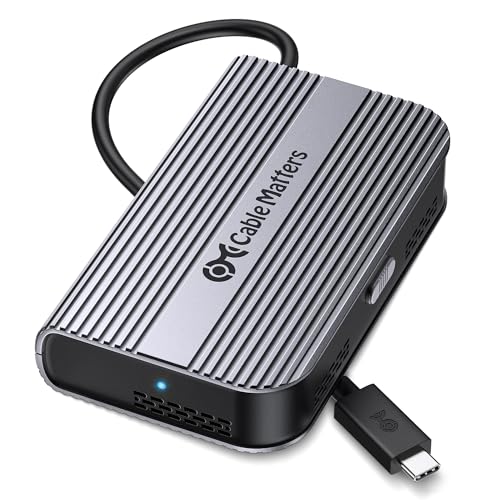 Cable Matters 40Gbps Enclosure |
Mid-Range | 40Gbps USB4 / TB4 compatibility | On‑the‑road editors who need peak speed | Check Price | ||
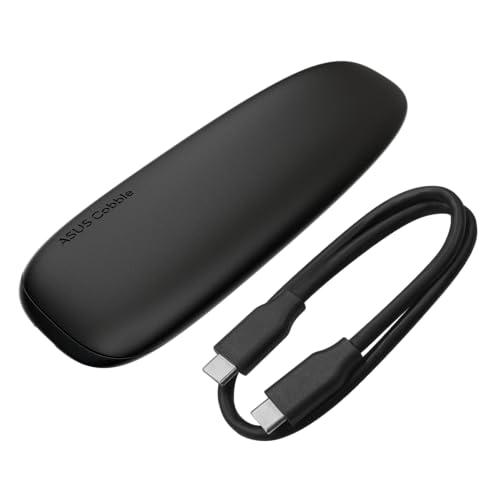 ASUS Cobble Enclosure |
Mid-Range | IP55 water/dust resistance | Travelers who want rugged portability | Check Price | ||
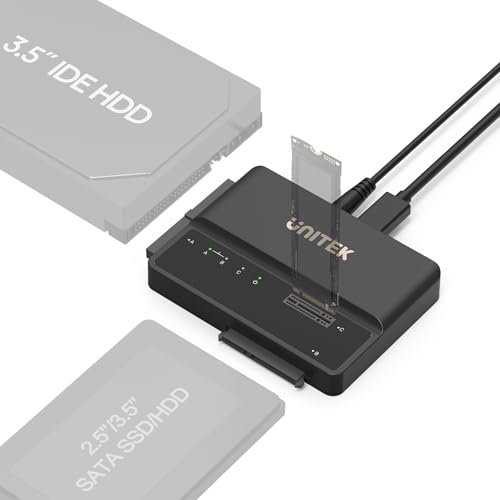 Unitek 3-in-1 Adapter |
Budget | 3-in-1 NVMe / SATA / IDE support | Budget buyers and legacy drive access | Check Price | ||
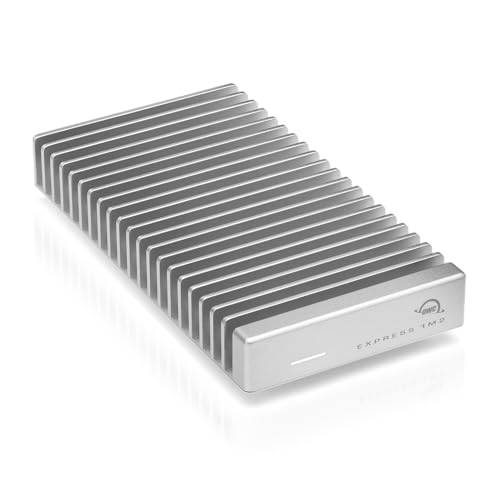 OWC 8TB Express 1M2 |
Premium | Patent heat-dissipating aluminum fins | Pro users needing large, fast portable storage | Check Price | ||
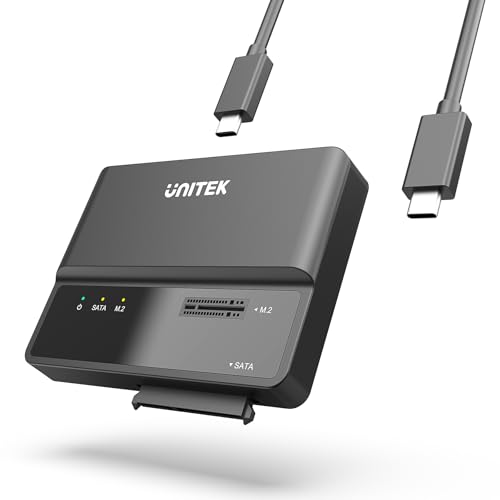 Unitek 2-in-1 Enclosure |
Mid-Range | Dual interface NVMe + SATA | Users switching between NVMe and SATA drives | Check Price | ||
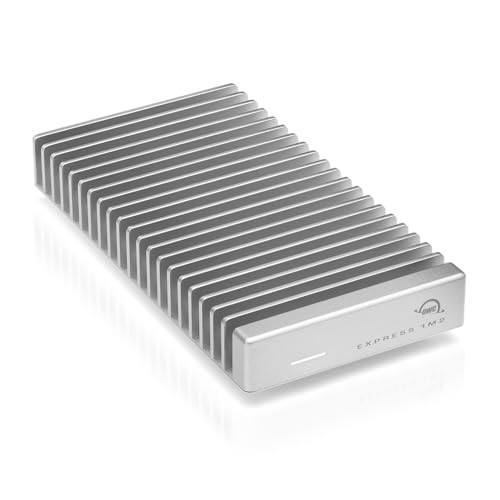 OWC 4TB Express 1M2 |
Premium | Compact, high-performance aluminum body | Apple Silicon laptop users who need fast external scratch disks | Check Price | ||
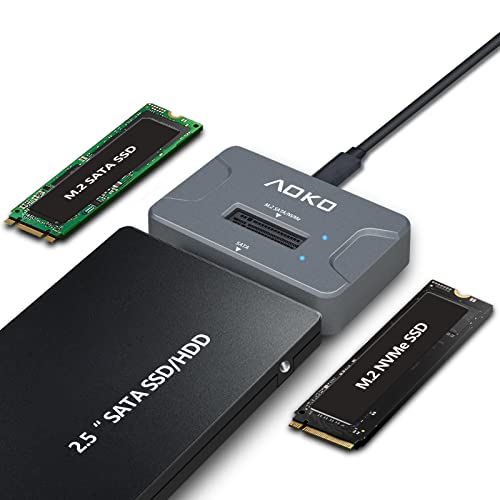 AOKO NVMe Docking Station |
Budget | Vertical design with auxiliary power Y-cable | Compact dock for light travel and quick swaps | Check Price |
1. Cable Matters 40Gbps Portable USB4 / Thunderbolt 4 SSD Enclosure for M.2 NVMe SSD - Up to Read:3800MB/s, Write:3600MB/s, NVMe Enclosure, Tool-Free, Intelligent Cooling, Thunderbolt 4/5 Compatible
Engineered for raw throughput, this enclosure targets users moving multi-GB video files quickly. It supports PCIe Gen4x4 NVMe drives, has a temperature-controlled fan for sustained transfers, and a compact foldable design for travel.
Key Specs
- Up to 40Gbps USB4 / Thunderbolt 4 & 5 compatible
- Supports PCIe Gen4x4 NVMe M.2 (single-sided)
- Read up to ~3800MB/s and write up to ~3600MB/s (tested with compatible SSD)
- Active temperature-controlled fan and dual-color transfer LED
Pros
- Class-leading transfer bandwidth for heavy media files
- Tool-free, compact/foldable design for travel
- Active cooling for more stable sustained throughput
Cons
- Not compatible with some double-sided M.2 drives
- Some users report heat retention and short built-in cable length
Best For: On‑the‑road editors who need peak speed
Check Latest Price on Amazon2. ASUS Cobble Portable M.2 NVMe PCIe SSD Enclosure, USB-C 3.2 Gen 2x1, up to 10 Gbps Transfer speeds, IP55 Water and Dust-Resistance, Thermal pad, Windows 11 and macOS Support
ASUS Cobble blends style and durability: an aluminum cover for heat spread, IP55 splash and dust resistance, and screw-free install. It offers reliable 10Gbps USB-C performance and is a strong everyday travel companion for photographers and content creators.
Key Specs
- USB-C 3.2 Gen 2x1 (up to 10Gbps)
- Supports M.2 NVMe PCIe and SATA (2242/2260/2280)
- Aluminum alloy cover for thermal dispersion
- IP55 water and dust resistance; screw-free installation
Pros
- Solid build quality with a clean, travel-friendly design
- Good thermal design with a thermal pad and metal cover
- Plug-and-play ease and versatile M.2 compatibility
Cons
- USB4/Thunderbolt-level speeds not supported (10Gbps max)
- Some users debate whether price matches perceived value
Best For: Travelers who want rugged portability
Check Latest Price on Amazon3. Unitek M.2 NVME SATA IDE Enclosure 3 in 1 Tool-Free Portable 10Gbps PCIe3.1a M.2 SATA3.1 IDE100 External Adapter USB 3.2 Hard Drive Reader for 2230/2242/2260/2280 NVME 2.5" /3.5" SATA SSD 3.5" IDE
A highly versatile, budget-friendly adapter that reads NVMe, SATA and legacy IDE drives. Tool-free installation and included power options make it useful for recovering old archives or moving data without a big investment.
Key Specs
- Supports M.2 NVMe (2230–2280), M.2 SATA, 2.5"/3.5" SATA and IDE
- USB 3.1 Gen 2 Type-C (up to 10Gbps theoretical)
- Tool-free, hot-pluggable design with LED status
- Includes 12V/2A power adapter for 3.5" drives
Pros
- Excellent value and broad compatibility with legacy drives
- Easy, tool-free setup and included power brick
- Solid transfer speeds for the price tier
Cons
- Mixed reports on functionality with some drive types
- Lacks premium enclosure materials for heavy travel abuse
Best For: Budget buyers and legacy drive access
Check Latest Price on Amazon4. OWC 8TB Express 1M2 40Gb/s Portable NVMe SSD USB4 (Thunderbolt Compatible/USB-C) Ultra Fast External SSD Drive with Aluminum Heat Sink Enclosure
OWC's Express 1M2 packages ultra-fast NVMe performance with a large aluminum heat sink and warranty-backed engineering. It's aimed at pro creators who want palm-sized but high-capacity, sustained-transfer external storage for editing on USB4/Thunderbolt hosts.
Key Specs
- Up to 40Gb/s USB4 compatibility (Thunderbolt compatible)
- Supports M.2 2280/2242/2230 NVMe SSDs (user-supplied)
- Patent heat-dissipating aluminum enclosure with large fins
- Includes 40Gb/s USB-C cable and screwdriver; enclosure warranty
Pros
- Designed for sustained speeds with excellent heat dissipation
- High-capacity options for large media libraries
- Solid construction and included accessories
Cons
- Larger footprint than basic enclosures, can add carry weight
- Premium tier pricing
Best For: Pro users needing large, fast portable storage
Check Latest Price on Amazon5. Unitek M.2 NVME SATA SSD Enclosure-2 in 1 Tool-Free Portable 10Gbps NVMe PCI-E M.2 and SATA SSD External Adapter USB 3.2 Hard Drive Reader for 2230/2242/2260/2280 NVMe and 2.5" /3.5" SSD
This Unitek model balances convenience and performance with a cooling-minded open interface design and NCQ optimization. It’s a practical mid-range choice for frequently swapping drives during travel or desktop use.
Key Specs
- USB 3.1 Gen 2 Type-C up to 10Gbps
- Supports M.2 NVMe and SATA, plus 2.5"/3.5" SATA drives
- NCQ technology to optimize data processing
- Tool-free install, LED status, includes power adapter
Pros
- Versatile compatibility for mixed-drive workflows
- Thoughtful cooling and NCQ for sustained tasks
- Good balance of features for the price
Cons
- Requires external power for 3.5" drives
- Design trades off absolute portability for flexibility
Best For: Users switching between NVMe and SATA drives
Check Latest Price on Amazon6. OWC 4TB Express 1M2 40Gb/s Portable NVMe SSD USB4 (Thunderbolt Compatible/USB-C) Ultra Fast External SSD Drive with Aluminum Heat Sink Enclosure
The 4TB Express 1M2 mirrors the 8TB model's thermal engineering and USB4 support in a slightly smaller capacity. It's a strong premium choice for MacBook and high-end laptop users who prioritize safe thermal performance and fast sustained transfers.
Key Specs
- USB4 / Thunderbolt-compatible up to 40Gb/s
- Aluminum heat-sink enclosure with large fins
- Supports M.2 NVMe 2280/2242/2230
- Includes 40Gb/s cable and screwdriver
Pros
- Excellent heat dissipation and consistent throughput
- Designed for modern USB4/Thunderbolt workflows
- Premium build and accessory bundle
Cons
- Not the smallest option for minimalist travel packs
- Premium price tier for enclosure + SSD solution
Best For: Apple Silicon laptop users who need fast external scratch disks
Check Latest Price on Amazon7. AOKO NVMe to USB 3.2(10Gbps) SSD Reader Docking Station Portable M.2 SSD to USB Adapter External NVMe SSD Enclosure for M.2 PCIe NVMe and M.2 SATA SSD, Compatible with 2.5'' SATA Dirve
AOKO offers a compact reader/dock that supports NVMe and SATA drives with a vertical layout for heat dispersion. It’s a low-cost option for users who switch drives often, though some buyers mention mixed experiences with sustained performance and heat.
Key Specs
- USB-C interface up to USB 3.2 (10Gbps theoretical)
- Supports M.2 PCIe/NVMe, M.2 SATA (2242–2280) and 2.5" SATA
- Vertical design with silicone feet and 60cm Y-cable for extra power
- Includes USB-A adapter for wider connectivity
Pros
- Very compact and compatible with multiple drive types
- Includes auxiliary power cable for high-capacity SSDs
- Good value for occasional use and small edits
Cons
- Some users report heat buildup during long transfers
- Mixed reports on transfer consistency and cable quality
Best For: Compact dock for light travel and quick swaps
Check Latest Price on AmazonWhich One Should You Choose?
If you want an all-around travel-ready enclosure with rugged features and ease of use, go with the ASUS Cobble Portable M.2 NVMe Enclosure (B0F1DXBGGK). If raw transfer speed for heavy video work is the priority, choose the Cable Matters 40Gbps USB4/Thunderbolt enclosure (B0DBYCDPWG). If your budget is tight or you need to access older SATA/IDE drives too, pick the Unitek 3-in-1 adapter (B0CPSVF358). For premium, sustained performance and large capacity, the OWC Express 1M2 models (B0CPRJ7X9Z, B0CPRD2JWZ) are the higher-end options.
Best for Specific Scenarios
- Quick airport-to-hotel edits: ASUS Cobble (B0F1DXBGGK) because it’s compact, IP55 protected and easy to install without tools.
- Sustained multicamera 4K/8K transfers: Cable Matters 40Gbps enclosure (B0DBYCDPWG) because it supports PCIe Gen4x4 speeds and active cooling for long copies.
- Recovering old backups or mixed-drive libraries: Unitek 3-in-1 adapter (B0CPSVF358) because it reads NVMe, SATA and legacy IDE drives and includes power for 3.5" disks.
Frequently Asked Questions
Can I take these enclosures and SSDs in carry-on luggage?
Yes — SSDs and small enclosures are allowed in carry-on bags. Keep drives in a padded organizer and ensure any external power bricks comply with airline rules for lithium batteries. Always follow TSA guidance for electronics and power banks.
Do I need Thunderbolt/USB4 to get fast speeds?
You only need Thunderbolt/USB4 if you want the highest available external NVMe throughput (up to 40Gbps). Many mid-range enclosures use USB-C 3.2 Gen 2x1 (up to ~10Gbps) which is plenty for photo editing and light video workflows. Match the enclosure to your laptop’s ports for best performance.
How can I prevent SSD overheating during long transfers on the road?
Choose enclosures with aluminum bodies, thermal pads or active cooling. Give the enclosure airflow (don’t bury it under clothing), use short high-quality cables to reduce loss, and if possible perform large transfers while plugged in so the host can supply stable power. For extreme loads, enclosures with fans or large fins (like OWC’s design) will perform best.
How We Selected These Products
Our recommendations are based on data-driven analysis: we evaluated 155229+ products across 23916+ brands using a composite scoring system that weighs rating (40%), review volume (30%), price value (20%), and demand signals (10%). Every product is ranked by data, not opinions.
Last updated: November 17, 2026
As an Amazon Associate we earn from qualifying purchases at no extra cost to you. Full disclosure.
GearLark Score is our editorial ranking based on a composite analysis of product quality, value, and verified customer sentiment. Click through to Amazon for current pricing, availability, and live customer reviews.