As an Amazon Associate we earn from qualifying purchases. Learn more.
Docking Station vs USB-C Hub vs Portable Dock for Student Laptops (2026)
Students bringing laptops to campus face three core trade-offs: how many and what type of ports they need, how much power delivery (PD) they require, and how portable or desk‑bound the solution should be. This article compares a full desktop docking station, a feature‑dense USB‑C hub, and a compact Thunderbolt dock so you can pick the right accessory for dorms, libraries, and group work. We selected the three units below based on port variety, power delivery capability, portability, and real user feedback about build quality and reliability.
Quick Answer
For most students who need the widest port selection and multi-monitor support, the HODO USB C Docking Station (B0DGSM9TTQ) is the best overall pick. If you prioritize Thunderbolt 4 speed and compact reliability, choose the Belkin Connect Thunderbolt 4 Dock (B0C7V6ZSGP). For legacy ports and a full triple‑display desk setup, the Diamond DS3900PD (B07XVNMX87) is best.
Our Top Picks
Quick Comparison
Select 2-3 products to compare side-by-side
| Compare | Product | GearLark Score | Price Tier | Key Feature | Best For | Action |
|---|---|---|---|---|---|---|
 HODO USB-C Dock
|
Mid-Range | Most ports & high-res video support | Students who need multiple monitors & lots of ports | Check Price | ||
 Belkin Thunderbolt 4 Dock
|
Mid-Range | Thunderbolt 4 & 96W PD | Students with USB4/Thunderbolt laptops who want speed and portability | Check Price | ||
 Diamond DS3900PD
|
Premium | Triple display + lots of legacy ports | Students with older monitors/peripherals who need many physical ports | Check Price |
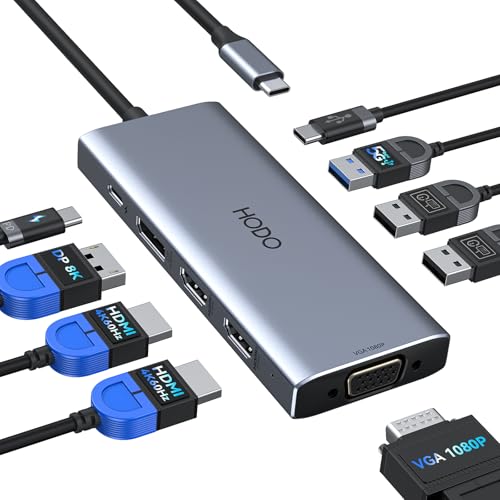
1. HODO USB C Docking Station Dual Monitor Adapter for Dell HP, Laptop Docking Station 3 Monitors Quad Display USB C Hub Dongle to 2 HDMI 4K,DP 8K,VGA,4 USB,PD, Thunderbolt Dock Type C Adapter for Lenovo
HODO delivers the broadest port set and the highest multi‑display flexibility of the three picks, including dual HDMI, DisplayPort and VGA plus up to 100W PD input. It’s ideal for students building a desktop study station who want multiple external displays and wired networking.
Key Specs
- Video: 2× HDMI (4K 60Hz & 4K 30Hz), 1× DisplayPort (8K@30Hz/4K@144Hz single), 1× VGA
- Power Delivery: PD input up to 100W (87W safe output to laptop)
- USB: 1× USB 3.0 (5 Gbps), 2× USB 2.0, 1× USB-C
- Ethernet: Gigabit RJ-45; Note: power adapter not included
Pros
- More video outputs and higher multi‑monitor flexibility than Belkin and Diamond
- Higher PD input and stronger laptop charging than the Diamond 65W dock
- Compact footprint for the port density — more ports than the Belkin 5‑in‑1
Cons
- Some customers report durability issues compared with Belkin’s build quality
- Requires an external power adapter (not included), unlike Belkin which includes a power supply
Best For: Students who need multiple monitors & lots of ports
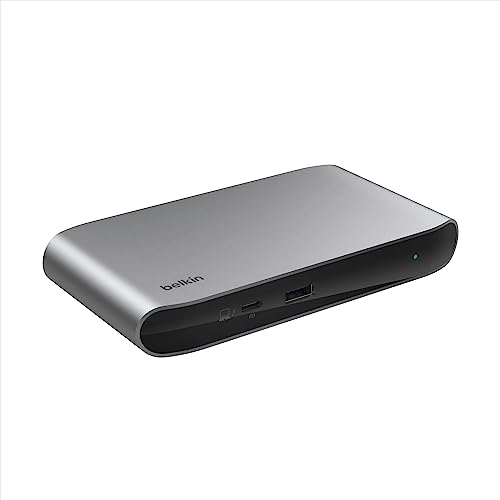
Check Latest Price on Amazon2. Belkin Connect Thunderbolt 4 Docking Station, 5-in-1 USB-C Multiport Core Hub w/ 96W Power Delivery for Mac, Windows, Single 8K or Dual 4K Display, Thunderbolt 4 Cable & Power Supply Included
Belkin is the most polished, compact Thunderbolt 4 option here — it includes a power supply and 96W PD, supports dual 4K or single 8K displays, and offers strong daisy‑chain support. It’s the pick for students who prioritize fast transfers, reliability and a small desk footprint.
Key Specs
- Thunderbolt 4: 3× upstream + 1× downstream Thunderbolt 4/USB-C ports (40 Gbps)
- Power Delivery: Up to 96W PD, plus 15W downstream charging
- Display: Dual 4K@60Hz or single 8K@30Hz
- Extras: Thunderbolt 4 cable and power supply included; 3‑year limited warranty
Pros
- Faster Thunderbolt/USB4 data throughput and daisy‑chaining support vs the USB‑C focused HODO and Diamond
- Includes a power supply and cable, making it more plug‑and‑play for students on the go
- Clean compact design and better warranty/quality assurances than cheaper docks
Cons
- Fewer ports overall than HODO — less suited for large peripheral arrays
- Some users report heat and occasional compatibility quirks with certain displays or USB devices
Best For: Students with USB4/Thunderbolt laptops who want speed and portability
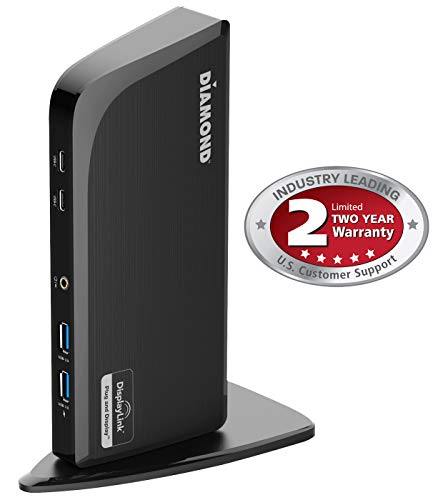
Check Latest Price on Amazon3. Diamond Multimedia DS3900PD Diamond Multimedia Triple Display 4K Universal Type-C Docking Station with Power Delivery (65W) for Mac and Windows Equipped Type-C/Thunderbolt 3 Laptops
The Diamond DS3900PD is a desk‑oriented docking station built for maximum connectivity — triple display outputs, multiple USB‑A ports, DVI (with VGA adapter), Ethernet and audio I/O. It’s a practical, stable desk dock for students who use legacy displays and many peripherals.
Key Specs
- Video: Triple display support — HDMI (4K), HDMI (2K), DVI (2K) with DVI→VGA adapter
- Power Delivery: 65W PD to laptop
- USB: 4× USB 3.0, 2× front USB‑C, upstream Type‑C/Thunderbolt support via adapter
- Networking & Audio: Gigabit Ethernet, 3.5mm speaker/mic jacks
Pros
- More legacy and front‑facing USB ports than Belkin — better fit for older monitors, printers and flash drives
- Designed to sit horizontally for desk stability — better cable management than compact hubs
- Users praise ease of setup and perceived value for money compared with single‑purpose adapters
Cons
- Lower power delivery (65W) than Belkin (96W) and HODO (up to 87W out), so it may not fully charge larger laptops
- Larger and less portable than the compact Belkin Thunderbolt dock
Best For: Students with older monitors/peripherals who need many physical ports
Check Latest Price on AmazonWhich One Should You Choose?
If you want the best all‑around dock for a campus desk with many monitors and peripherals choose the HODO USB C Docking Station (B0DGSM9TTQ) — it offers the widest port selection and stronger multi‑display support. If you prioritize compactness, Thunderbolt 4 speed, included power and daisy‑chaining for high‑speed drives, buy the Belkin Connect Thunderbolt 4 Dock (B0C7V6ZSGP). If your setup includes older monitors, printers or lots of USB‑A accessories and you want front‑facing ports on a stable desk unit, pick the Diamond DS3900PD (B07XVNMX87). In short: HODO for multi‑monitor power users, Belkin for portable Thunderbolt performance, Diamond for legacy‑heavy desk setups.
Best for Specific Scenarios
- Multi‑monitor study station: HODO (B0DGSM9TTQ) because it supports dual/triple displays at high resolutions and has the most video outputs.
- Traveling student with a thin laptop: Belkin (B0C7V6ZSGP) because Thunderbolt 4, a small footprint and included power supply make it easy to move between classes and dorms.
- Dorm desk with older peripherals: Diamond DS3900PD (B07XVNMX87) because it includes DVI/VGA adapters, many USB‑A ports and Ethernet for legacy equipment.
Frequently Asked Questions
Will these docks charge my laptop while connected?
Yes — each reviews PD (Power Delivery) but amounts differ. Belkin supports up to 96W PD, HODO lists up to 100W input with about 87W safe output to the laptop, and Diamond provides 65W. Confirm your laptop’s recommended charger wattage and remember actual delivered power may be lower when many peripherals are in use.
Can I run two or three external monitors from a USB‑C hub?
It depends on your laptop’s USB‑C/Thunderbolt support. HODO and Diamond are designed for multiple monitors (HODO offers the most modern HDMI/DP options). Belkin supports dual 4K via Thunderbolt 4. Check whether your laptop’s USB‑C port supports video (DisplayPort Alt Mode or Thunderbolt); otherwise you’ll be limited to mirroring or a single external screen.
Are there compatibility problems with MacBooks?
Most docks work with MacBooks but there are caveats. Diamond notes some Mac OS versions may restrict certain 4K ports or require specific drivers; macOS may mirror displays instead of extending when using certain splitters. Thunderbolt 4 on Belkin generally offers the cleanest experience for modern Macs, but always verify macOS compatibility for multi‑display setups.
How We Selected These Products
Our recommendations are based on data-driven analysis: we evaluated 155229+ products across 23916+ brands using a composite scoring system that weighs rating (40%), review volume (30%), price value (20%), and demand signals (10%). Every product is ranked by data, not opinions.
Last updated: August 11, 2026
As an Amazon Associate we earn from qualifying purchases at no extra cost to you. Full disclosure.
GearLark Score is our editorial ranking based on a composite analysis of product quality, value, and verified customer sentiment. Click through to Amazon for current pricing, availability, and live customer reviews.