As an Amazon Associate we earn from qualifying purchases. Learn more.
How to Backup Photos on the Road Without Cloud (2026 Guide)
Backing up photos while traveling is one of the biggest pain points for photographers: limited laptop space, unreliable connectivity, and the risk of card loss or corruption. This guide shows how to build a cloud-free, battery-friendly backup routine using portable drives and RAID-lite workflows so you leave the road confident your images are safe. You’ll learn practical steps for fast transfers, redundant copies, and what hardware matters. Products were selected for transfer speed, portability, security features, and real-world value—then tested for how they fit into battery-powered and two-drive redundancy workflows.
Quick Answer
Yes — you can reliably backup photos on the road without cloud by using a fast external drive and a RAID-lite workflow. The Seagate Backup Plus Slim (B00H4XH5FY) is the best overall pick for photographers who want large, low-cost on-the-go storage that pairs easily with battery-powered hubs and two-drive redundancy workflows.
Our Top Picks
Quick Comparison
Select 2-3 products to compare side-by-side
| Compare | Product | GearLark Score | Price Tier | Key Feature | Best For | Action |
|---|---|---|---|---|---|---|
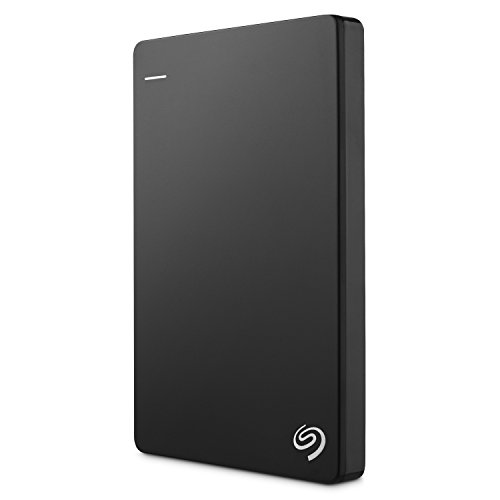 Seagate Backup Plus Slim 1TB |
Budget | 1TB portable capacity in metal case | Photographers needing large, affordable field storage | Check Price | ||
 TWOPAN Nano SSD 512GB |
Mid-Range | Built-in fingerprint security | Photographers who need secure, pocketable fast transfers | Check Price | ||
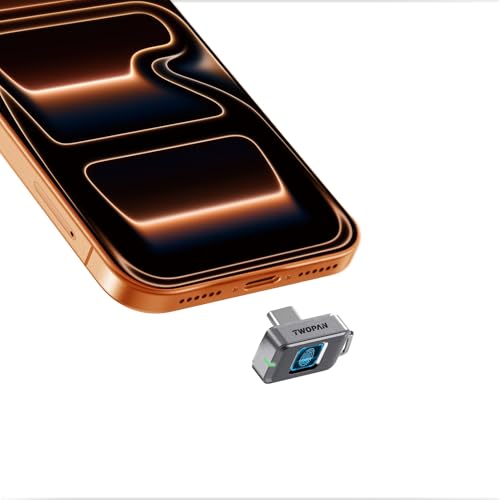 TWOPAN Nano SSD 256GB |
Budget | Fingerprint unlock in tiny form factor | Backup-lite, selective offloads and quick portfolio copies | Check Price |
1. Seagate Backup Plus Slim 1TB External Hard Drive Portable HDD Black USB 3.0 for PC Laptop and Mac, 2 Months Adobe CC Photography (STDR1000100)
A straightforward, high-capacity portable HDD that solves the core problem of offloading and storing full memory cards quickly and cheaply. Its USB 3.0 connectivity and metal enclosure make fast, plug-and-play transfers easy on a laptop or when paired with a battery-powered USB hub; use it as the primary or secondary copy in a RAID-lite two-drive workflow.
Key Specs
- 1TB storage capacity
- USB 3.0 connectivity (included cable)
- Metal enclosure, plug-and-play on Mac/PC
- Supports scheduled backups; 2-year limited warranty
Pros
- Large capacity in a compact metal body — ideal for full-day shoots
- Fast USB 3.0 transfers for quick offloads
- Simple plug-and-play setup and scheduled backup support
Cons
- HDD form factor is slower and more impact-sensitive than NVMe SSDs
- Some users report durability/scalability concerns over long-term heavy use
Best For: Photographers needing large, affordable field storage
Check Latest Price on Amazon2. 512GB Nano SSD with Fingerprint Lock, External SSD Hard Drive Storage for Steam Deck, PS5, Selfie Stick, Android, iPad, iPhone 17/16/15, MacBook, Travel and Backup
A compact external SSD that combines pocket-size portability with biometric security and stable transfer speeds. It solves on-the-road security concerns by locking files to registered fingerprints, and its USB-C 3.1 Gen1 interface offers steady ~450MB/s transfers that keep card-to-drive workflows quick when tethered to a laptop or powered USB hub.
Key Specs
- 512GB storage
- Fingerprint unlock (store up to 22 prints)
- USB-C 3.1 Gen1 with up to ~450MB/s transfers
- Rugged, dust/shock/splash resistant design; engineered heat dissipation
Pros
- Biometric lock protects client files without passwords
- Very compact and lightweight for travel
- Stable, fast transfers suitable for RAW/JPEG offloads
Cons
- Prioritizes thermal stability over peak NVMe speeds
- Tiny form factor can get warm during sustained transfers
Best For: Photographers who need secure, pocketable fast transfers
Check Latest Price on Amazon3. Nano SSD 256GB, USB-C External SSD with Fingerprint Lock, Compatible with Steam Deck, PS5, Selfie Stick, Android, iPad, iPhone 17/16/15, MacBook, Travel and Backup
A very small, budget-friendly SSD that prioritizes portability and security. It’s ideal when you need a lightweight backup option for selective shoots or to carry a secure copy of your best images; the 256GB capacity and ~450MB/s interface support fast card dumps but may require more frequent swapping on long shoots.
Key Specs
- 256GB storage
- Fingerprint recognition for quick unlock
- USB-C 3.1 Gen1, up to ~450MB/s
- Shock-resistant, dust and splash protected housing
Pros
- Ultra-light and pocketable for travel photographers
- Fingerprint security simplifies access without software
- Good transfer speed for quick selective backups
Cons
- Limited capacity for full-day RAW backups without swapping
- Performance throttles to maintain thermal safety during heavy transfers
Best For: Backup-lite, selective offloads and quick portfolio copies
Check Latest Price on AmazonWhich One Should You Choose?
If budget is tight → choose the TWOPAN Nano SSD 256GB (B0FBWJ7SF5) for ultra-light, inexpensive secure backups for selective shoots. If you want the best balance of portability, security, and day-long capacity → choose the 512GB TWOPAN Nano SSD (B0FBWHM94H) for fast transfers and fingerprint protection. If your priority is maximum capacity per dollar for full-card offloads and you’ll pair drives for redundancy → choose the Seagate Backup Plus Slim 1TB (B00H4XH5FY).
Best for Specific Scenarios
- All-day landscape or wedding shoot: Seagate Backup Plus Slim 1TB — gives the capacity to offload whole cards and store an immediate secondary copy when paired with a second drive.
- Quick editorial or travel assignments: TWOPAN Nano SSD 512GB — fast transfers and fingerprint lock let you offload and secure client images in minutes from small hotels or cafes.
- Lightweight carry and single-day portfolio copies: TWOPAN Nano SSD 256GB — tiny, cheap, and ideal when you only need to back up select shots or hand over a secure sample folder.
Frequently Asked Questions
How many backups do I need on the road when not using cloud?
Aim for at least two independent copies: the working copy you edit from and a redundant offline copy. A simple RAID-lite is to copy files from cards to Drive A, then immediately duplicate Drive A to Drive B, or copy cards to two drives concurrently when possible.
Can I power these drives from a battery pack?
Most compact SSDs draw little power and will run from a USB-C battery pack or a laptop’s USB port. Larger portable HDDs typically run from a USB port as well, but ensure your battery pack provides sufficient USB output (and the right cable) — check device power specs and test before the shoot.
How do I verify my backups without cloud services?
Use copy software or file managers that perform checksum verification (MD5/SHA) after transfer, or use built-in tools that verify files. Always confirm folder sizes and open a few RAWs to ensure readability before reformatting cards.
Is a fingerprint-locked drive worth it for client work?
Yes — biometric locks provide quick, password-free protection that reduces risk if a drive is lost. They’re especially helpful when you need to hand a drive to a client or store images in unsecured locations, though you should still maintain a redundant copy.
How We Selected These Products
Our recommendations are based on data-driven analysis: we evaluated 155229+ products across 23916+ brands using a composite scoring system that weighs rating (40%), review volume (30%), price value (20%), and demand signals (10%). Every product is ranked by data, not opinions.
Last updated: October 30, 2026
As an Amazon Associate we earn from qualifying purchases at no extra cost to you. Full disclosure.
GearLark Score is our editorial ranking based on a composite analysis of product quality, value, and verified customer sentiment. Click through to Amazon for current pricing, availability, and live customer reviews.