As an Amazon Associate we earn from qualifying purchases. Learn more.
How to Build a Compact Work-From-Anywhere Monitor Setup (2026)
If you move between dorms, coffee shops, libraries and short-term rentals, a compact work-from-anywhere monitor setup makes laptop multitasking seamless without bulky hardware. This guide walks students and frequent movers through a complete kit: a portable monitor (or dual), a small USB-C hub for ports, power solutions, and travel-ready cables and stands. Products here were chosen for portability, plug-and-play ease, compatibility across Windows/Mac/Chrome, and customer feedback on build quality and value. I prioritized options that balance lightweight design with reliable connectivity so you can set up fast and work longer between charges.
Quick Answer
Yes — for a balance of portability, picture quality, and everyday reliability the Ingnok 15.6" Dual Portable Monitor (B0DXL3SKTW) is the best single-piece pick; pair it with a compact USB-C hub and a high-capacity USB-C PD power bank to create a complete work-from-anywhere kit.
Our Top Picks
Quick Comparison
Select 2-3 products to compare side-by-side
| Compare | Product | GearLark Score | Price Tier | Key Feature | Best For | Action |
|---|---|---|---|---|---|---|
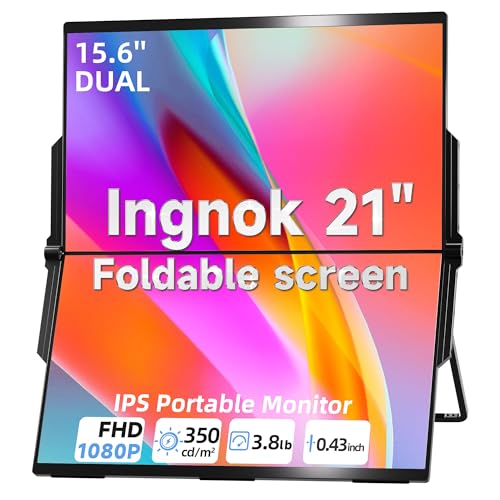 Ingnok 15.6" Dual Monitor
|
Mid-Range | Foldable stacked dual-monitor design | Frequent movers who need dual screens | Check Price | ||
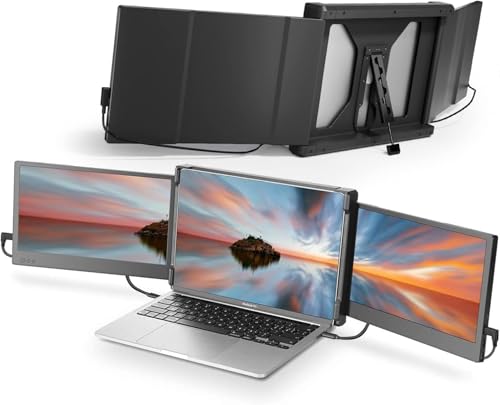 Teamgee 12" Dual Extender
|
Mid-Range | Compact dual 12" IPS screens with built-in speakers | Traveling pros who need stable dual displays | Check Price | ||
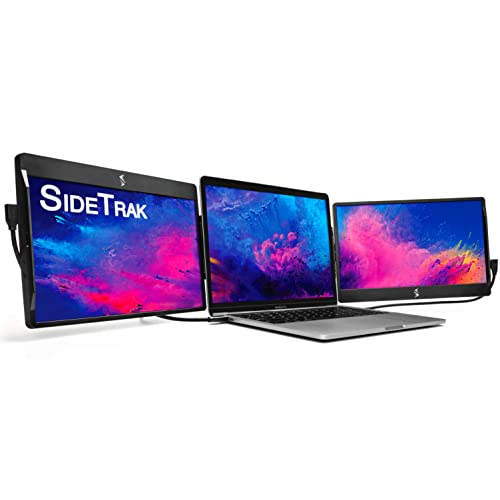 SideTrak Swivel 12.5"
|
Premium | Patented 360° swivel hinge and magnetic attach | Power users wanting a true triple-screen laptop setup | Check Price | ||
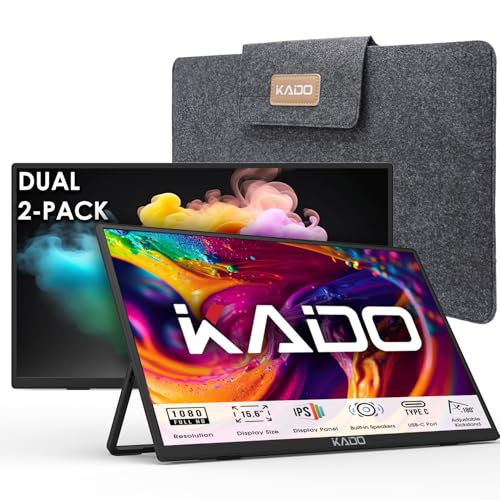 Kado Dual 15.6" Pack
|
Budget | Two 15.6" FHD monitors included | Budget-conscious users who want two large portable screens | Check Price | ||
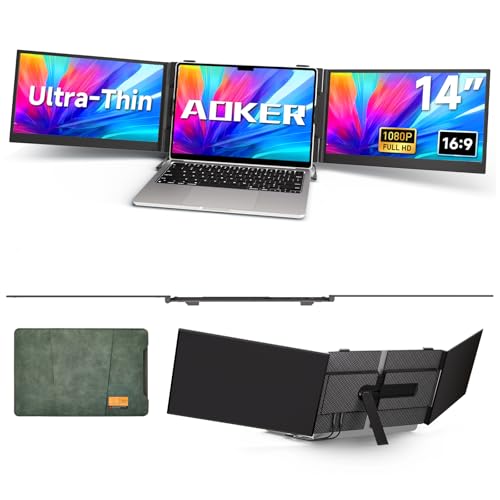 AOKER 14" Triple Extender
|
Premium | Ultra-thin 14" panel with travel cable kit | Users needing a lightweight single extender for 14-17" laptops | Check Price | ||
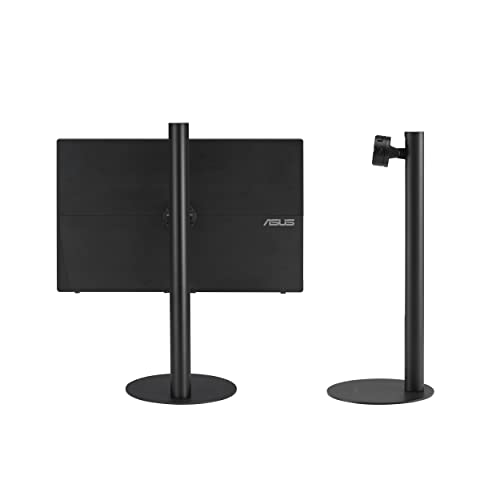 ASUS ZenScreen Stand
|
Budget | Tilt, pivot and height adjustment with tripod socket | Users wanting ergonomic height and angle control | Check Price |
1. Laptop Screen Extender 15.6" 1080P Dual USB-C HDMI, Foldable Stacked Design,Dual Portable Monitors Compatible with Windows/Mac, Easy Setup
The Ingnok 15.6" dual portable monitor delivers full HD panels with a slim foldable design and a single-cable USB-C connection for quick plug-and-play use. Customers praise its color and portability while some report mixed long-term reliability, but the 18-month warranty and easy setup make it a strong everyday pick for students and remote workers.
Key Specs
- 15.6" FHD (1920x1080) displays
- Single Type-C plug-and-play connection (USB-C/HDMI support)
- 100% sRGB coverage, 1200:1 contrast
- Built-in 180° adjustable stand and auto-rotate gravity sensor
- 18-month warranty, 30-day returns
Pros
- Great color and picture clarity for FHD panels
- Compact foldable design fits in laptop bags
- Simple single-cable setup for most laptops
Cons
- Some users report durability or functionality drop after extended use
- May need supplemental power on less capable USB-C ports
Best For: Frequent movers who need dual screens
Check Latest Price on Amazon2. Teamgee 12" Laptop Screen Extender, Dual Display Triple Setup, Portable Monitor for 13"16" Laptops, USB-C/HDMI/USB-A Plug & Play, Ideal for Remote Work & Multitasking
Teamgee's long-running dual-screen extender is designed for steady, plug-and-play multi-monitor setups with flexible connection options (USB-C/HDMI/USB-A). Reviewers like the durable build, clear picture and included features like eye-care mode, though cable complexity can stump less technical users.
Key Specs
- Dual 12" Full HD IPS displays
- Compatibility: requires two full-function USB-C or USB-C + HDMI + USB-A combinations
- Built-in speakers and brightness/eye-care controls
- Rotates up to 210° and folds flat for travel
Pros
- Solid build and consistent picture quality
- Good portability and flexible rotation
- Straightforward plug-and-play for supported ports
Cons
- Compatibility depends on specific laptop ports; not universal
- Multiple cables can complicate setup for some users
Best For: Traveling pros who need stable dual displays
Check Latest Price on Amazon3. SideTrak Swivel 12.5" Portable Monitor for Laptop, Patented Swivel Hinge, Triple Screen Laptop Setup | FHD Dual Screen w/Kickstand, USB-C & HDMI, Mac, PC, Chrome Compatible (Triple Monitor)
SideTrak's Swivel excels at creating a triple-monitor workflow by magnetically attaching and swiveling around the laptop. It's a premium, well-engineered option for multitaskers, though some users caution about magnet strength, cord durability, and the occasional need for supplemental power.
Key Specs
- 12.5" FHD portable display
- Patented swivel hinge with 360°/270° rotation
- Attaches via magnetic plate; connects USB-C/USB-A/HDMI
- Built-in kickstand and autorotate support
Pros
- Very flexible viewing angles and swivel mechanism
- Convenient attachable design for true triple-screen setups
- Works across Mac, PC, and Chrome OS
Cons
- Mixed reports on magnet strength and long-term durability
- Connection cables can be a weak point and may need replacement
Best For: Power users wanting a true triple-screen laptop setup
Check Latest Price on Amazon4. Kado Dual Portable Monitor Setup - 2-Pack 15.6'' FHD 1080p, Ultra-Slim Laptop Monitor 1920x1080 with Built-in Speakers, IPS Display 180 Kickstand Stacked Desktop Setup Office Gaming Daytrading
Kado offers a two-monitor pack at a budget price, giving generous 15.6" FHD IPS panels and multiple ports (HDMI, USB-C). Buyers like the value, light weight and included cords; it's an efficient way to get big screen real estate on a tight budget.
Key Specs
- Dual 15.6" FHD (1920x1080) IPS panels
- HDMI and USB-C connectivity
- Built-in speakers and 180° kickstand
- Lightweight, travel-friendly design
Pros
- Excellent value for a dual-monitor pack
- Large 15.6" screens with clear visuals
- Includes necessary cords for quick setup
Cons
- Build and long-term durability are modest compared with premium options
- May need extra power or a hub with limited-laptop ports
Best For: Budget-conscious users who want two large portable screens
Check Latest Price on Amazon5. Triple Laptop Screen Extender - Ultra Thin 14" Monitor IPS FHD 1080P Portable Display for 13"-17" Laptops Compatible with Compatible with Windows Mac Chrome Surface Travel Work Setup
AOKER's 14" ultra-thin screen extender focuses on lightweight portability and broad compatibility (including M1/M2/M3 Macs) with a helpful travel cable kit. Customers praise its ease of setup and portability, making it a solid choice for students and consultants on the move.
Key Specs
- 14" FHD IPS display, 300 nits brightness
- 4.5mm thin, ~2.2 lb weight
- Includes travel cable kit (USB-C, USB-A, HDMI adapters)
- 0–180° rotation and broad OS compatibility
Pros
- Exceptionally thin and lightweight for travel
- Comes with a comprehensive cable kit for many laptops
- Works with modern Macs and many systems
Cons
- Premium tier price for a single panel
- Not a dual-monitor solution on its own
Best For: Users needing a lightweight single extender for 14-17" laptops
Check Latest Price on Amazon6. ASUS ZenScreen Stand MTS02D - Ergonomic Stand for Portable Monitors, Tilt, Pivot, Height adjustments, 1/4 Tripod Socket Compatible, Work from Home Setup, Home Office,Black
The ASUS ZenScreen Stand is a compact ergonomic solution to raise portable monitors to eye level with tilt, pivot and height adjustments and a 1/4" tripod socket. Many users report solid build quality and portability, though a few mention wiggle or holding issues depending on monitor weight.
Key Specs
- Tilt, pivot and height adjustments
- Supports monitors ~590g–1150g
- 1/4" tripod socket compatibility
- Compact dimensions and ~2 lb net weight
Pros
- Improves ergonomics and reduces neck strain
- Compact and easy to pack for travel
- Well-built for most portable monitors
Cons
- Some users report the stand can have wiggle at certain angles
- Weight limits mean larger monitors may not be fully secure
Best For: Users wanting ergonomic height and angle control
Check Latest Price on AmazonWhich One Should You Choose?
If budget is tight → Kado Dual 15.6" (B0DP9F6BXJ) gives the most screen space for the price. If you need maximum portability with reliable single-cable setup → Ingnok 15.6" Dual Monitor (B0DXL3SKTW) balances size, color, and convenience. If premium flexibility and a true triple-screen workflow are important → SideTrak Swivel 12.5" (B08VPXVCDP) offers unique swivel/magnetic attachment features. If you travel extremely light and want an ultra-thin panel → AOKER 14" (B0DRFM43KN) is the best single lightweight extender. For ergonomic support → pair any monitor with the ASUS ZenScreen Stand (B0BSMZK7HD).
Best for Specific Scenarios
- Student dorms & campus work: Kado Dual 15.6" (B0DP9F6BXJ) because it gives large screens and good value for study sessions and group projects.
- Frequent movers & coffee shop workers: Ingnok 15.6" (B0DXL3SKTW) because its foldable stacked design and single-cable setup speed up transitions between locations.
- Presentations and collaborative meetings: SideTrak Swivel 12.5" (B08VPXVCDP) because its magnetic swivel hinge and attachable design make sharing and reconfiguring fast.
Frequently Asked Questions
Do portable monitors work with MacBooks (M1/M2/M3)?
Many modern portable monitors support Macs via USB-C DisplayPort Alt Mode or HDMI using an adapter. Check the monitor's compatibility notes; some models explicitly list support for M1/M2/M3 chips. If your Mac uses Thunderbolt/USB-C, a single USB-C cable usually handles display and power, but confirm the monitor supports macOS plug-and-play.
What kind of hub do I need for a dual-monitor portable setup?
Choose a compact USB-C hub or dock that includes at least one HDMI or DisplayPort and multiple USB-A ports plus PD pass-through (60–100W depending on your laptop). If your laptop lacks two full-function USB-C ports, the hub will let you run multiple monitors and charge simultaneously.
How do I avoid flaky connections or monitors that stop working?
Use high-quality, short USB-C/HDMI cables and a PD-capable hub if you rely on a single laptop port. Look for monitors with solid customer feedback on connectivity and a reasonable warranty. If a monitor needs supplemental power, use a USB-C PD power bank or an AC adapter to stabilize the signal.
How We Selected These Products
Our recommendations are based on data-driven analysis: we evaluated 155229+ products across 23916+ brands using a composite scoring system that weighs rating (40%), review volume (30%), price value (20%), and demand signals (10%). Every product is ranked by data, not opinions.
Last updated: August 03, 2026
As an Amazon Associate we earn from qualifying purchases at no extra cost to you. Full disclosure.
GearLark Score is our editorial ranking based on a composite analysis of product quality, value, and verified customer sentiment. Click through to Amazon for current pricing, availability, and live customer reviews.