As an Amazon Associate we earn from qualifying purchases. Learn more.
How to Get Reliable Wired Internet in Dorms (2026 Guide)
Slow, unreliable dorm Wi‑Fi is a common pain — buffering lectures, laggy video calls, and slow uploads. This guide shows step‑by‑step how to add a wired Ethernet connection in shared housing: the adapters, small switches, and cabling choices that actually improve speed and stability without violating dorm rules. You'll learn which adapters work with modern USB‑C laptops, when to pick a compact dock versus a single‑port dongle, and how to run cables safely in hallways or through rooms. Products were chosen for real‑world functionality, build quality, and how well they solve slow Wi‑Fi in cramped shared spaces.
Quick Answer
Yes — using a USB‑C Ethernet adapter or a compact docking station like the Dockteck USB‑C 6‑in‑1 Multiport Adapter (ASIN B0B521HLDX) brings stable wired internet to most dorm laptops, with options for higher 5GbE speeds (SABRENT) or budget 5Gb adapters (Minthouz).
Our Top Picks
Quick Comparison
Select 2-3 products to compare side-by-side
| Compare | Product | GearLark Score | Price Tier | Key Feature | Best For | Action |
|---|---|---|---|---|---|---|
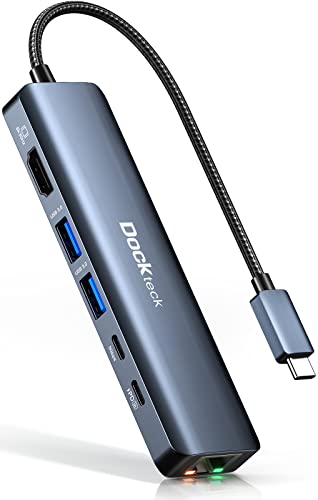 Dockteck 6‑in‑1 USB‑C Hub
|
Premium | Gigabit Ethernet + 100W PD | Laptops needing ports + stable wired net | Check Price | ||
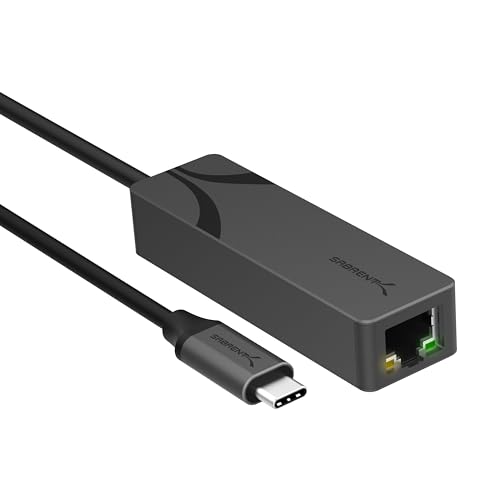 SABRENT 5GbE USB‑C Adapter
|
Premium | True 5GbE throughput | Users needing multi‑gigabit wired speeds | Check Price | ||
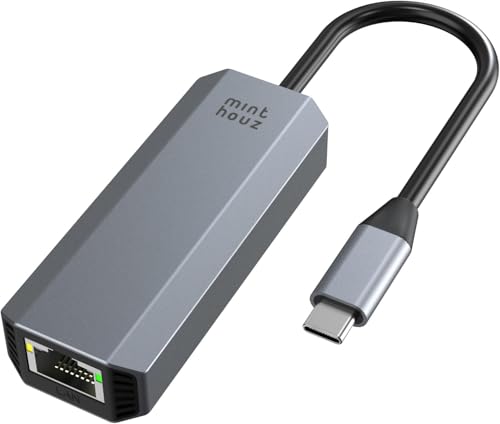 Minthouz 5Gb USB‑C Adapter
|
Budget | Affordable 5Gb support | Budget buyers who want faster wired links | Check Price | ||
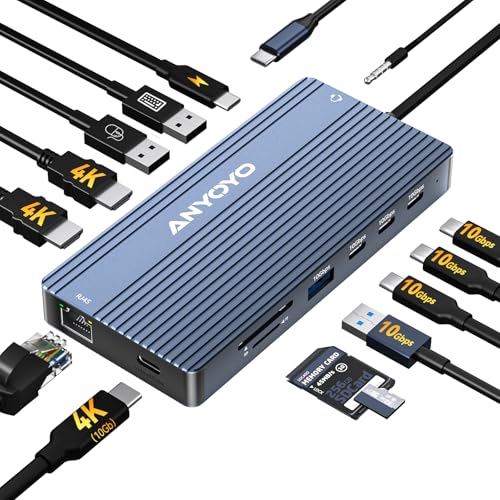 ANYOYO 14‑in‑1 Dock
|
Budget | Triple display + gigabit LAN | Users needing many ports and external monitors | Check Price | ||
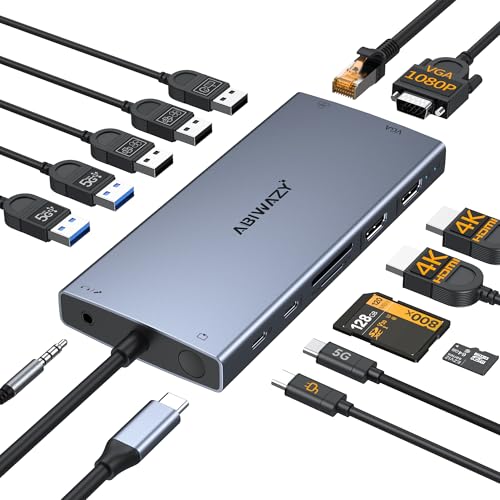 ABIWAZY 10‑in‑1 Hub
|
Budget | 4K HDMI + Gigabit Ethernet | MacBook/Windows users needing ports and wired LAN | Check Price |
1. Dockteck USB-C 6 in 1 Multiport Adapter - 8K HDMI, 2 USB-A 5 Gbps, 100W PD, 1Gbps Ethernet for MacBook Pro, Air, HP, XPS and More
A full‑function USB‑C hub that solves dorm Wi‑Fi problems by providing a dedicated 1Gbps RJ45 port for stable connections while keeping your laptop charged. Its aluminum build packs HDMI and multiple USB ports so you can use wired internet alongside external monitors and peripherals without carrying separate dongles.
Key Specs
- 1 Gbps RJ45 Ethernet port
- 100W USB‑C power delivery (85W pass‑through)
- 8K/4K HDMI output
- 2 x USB‑A 3.0 + USB‑C data port
Pros
- Provides stable wired internet plus charging — reduces Wi‑Fi dependency
- All‑in‑one setup minimizes adapters and keeps desk tidy
- Aluminum build feels solid and travel‑friendly
Cons
- Reported to run warm during heavy use
- Some users report intermittent compatibility with particular hosts
Best For: Laptops needing ports + stable wired net
Check Latest Price on Amazon2. SABRENT USB-C to 5G Ethernet Adapter 5GbE Optimized, USB 3.1 Gen 1+ Required, Clear Compatibility, Aluminum Body, Plug-and-Play for Data-Capable USB-C Devices (NT-C5GA)
If dorm LAN or campus switches support multi‑gigabit links, the SABRENT adapter unlocks 5Gbps wired speeds to bypass congested Wi‑Fi. It's a compact aluminum dongle that negotiates down to 2.5/1Gbps when needed and is built for portable, high‑bandwidth tasks like large backups and high‑res streaming.
Key Specs
- True 5GbE (requires compatible host & cabling)
- Auto‑negotiates to 2.5/1Gbps/100Mbps
- Aluminum housing for heat dissipation
- Plug‑and‑play on Windows/macOS (drivers for some OS)
Pros
- Delivers multi‑gigabit speeds when network supports it
- Rugged aluminum body helps with heat and longevity
- Easy setup for supported systems
Cons
- Requires USB host and network hardware that support 5GbE
- Some users report intermittent disconnects or compatibility edge cases
Best For: Users needing multi‑gigabit wired speeds
Check Latest Price on Amazon3. Minthouz 5Gbps USB-C to Ethernet Adapter, RJ45 to USB C 5 Gigabit LAN Network Adapter, Grey Aluminum Case Ethernet to USB Network Dongle Compatible with Laptops, Computers, MacBook, Surface and More
A wallet‑friendly 5Gbps dongle that brings faster wired access to dorm laptops without breaking the bank. It uses a modern RTL chip in an aluminum case for reasonable thermal performance and offers Wake‑on‑LAN — handy for remote access or quick wakeups during group projects.
Key Specs
- Supports 5Gbps/2.5Gbps/1Gbps/100Mbps
- RTL8157 chip for stability
- Wake‑on‑LAN support
- Aluminum casing with network speed LED
Pros
- Great value for multi‑gigabit capability
- Compact, durable aluminum housing
- Includes Wake‑on‑LAN for remote access
Cons
- May require driver update on some systems
- Compatibility with some devices (e.g., certain tablets/consoles) is limited
Best For: Budget buyers who want faster wired links
Check Latest Price on Amazon4. ANYOYO USB C Docking Station Dual Monitor 14-in-1 Docking Station 3 Monitor(2 HDMI+ Video Out) 10Gbps (4*USB-C+1A) +PD100W+Ethernet+SD/TF Laptop Dock Multiport Adapter for Dell/HP/Lenovo/Thinkpad
This 14‑in‑1 docking station solves dorm Wi‑Fi problems by centralizing wired Ethernet, power, and multiple displays — perfect for a desktop‑style study setup. It’s practical for students who want one cable to connect a laptop, monitor(s), and wired network at a dorm desk.
Key Specs
- Gigabit Ethernet (10/100/1000 Mbps)
- 100W USB‑C PD (85W output typical)
- 2 HDMI + 1 USB‑C video outputs (supports multiple displays on Windows)
- Multiple USB‑C/USB‑A ports and SD/TF card slots
Pros
- Combines wired networking and many ports in one unit
- Good for turning a laptop into a study workstation
- Offers high data port speeds for peripherals
Cons
- Host must support full‑function USB‑C (DP Alt Mode/Thunderbolt)
- Some users report mixed results with video output and power under heavy loads
Best For: Users needing many ports and external monitors
Check Latest Price on Amazon5. ABIWAZY USB C Hub Ethernet for MacBook Pro/Air, 10 in 1 USB C Multiport Adapter with 4K HDMI, Ethernet Gigabit, 100W PD, USB-C Data Port and SD/TF Slot for Dell XPS, iMac, iPad Pro, Galaxy (Black)
A compact 10‑in‑1 hub that gives dorm users a reliable Gigabit Ethernet port plus HDMI and charging — helping you avoid flaky Wi‑Fi during classes or streaming. It’s known for solid build quality and straightforward plug‑and‑play for most workflows.
Key Specs
- Gigabit RJ45 Ethernet
- 4K@60Hz HDMI
- 100W PD charging pass‑through
- Multiple USB‑A and USB‑C data ports, SD/MicroSD slots
Pros
- Good port selection for laptops and tablets
- Well constructed and easy to use
- Value oriented — replaces several single adapters
Cons
- Some reports of intermittent speed or HDMI issues
- Power supply can be insufficient for certain monitor setups
Best For: MacBook/Windows users needing ports and wired LAN
Check Latest Price on AmazonWhich One Should You Choose?
If budget is tight → Minthouz 5Gbps USB‑C to Ethernet Adapter (B0DZH9TDFD). If you need portable multi‑gigabit speed → SABRENT USB‑C to 5G Ethernet Adapter (B0DQ9QGQYR). If you want the most convenient all‑in‑one solution (ports + charging + stable wired internet) → Dockteck USB‑C 6 in 1 Multiport Adapter (B0B521HLDX).
Best for Specific Scenarios
- Streaming & Video Calls: Dockteck because its Gigabit Ethernet plus pass‑through power keeps your laptop charged and your video stable during long calls.
- Large file transfers or backups: SABRENT because it supports true 5GbE when the network and cable allow, cutting transfer times significantly.
- Cheap, quick fix for flaky Wi‑Fi: Minthouz because it gives near multi‑gigabit speeds at a budget price and is compact for campus life.
Frequently Asked Questions
Can I run an Ethernet cable through hallways in my dorm?
Often yes, but check your dorm rules first. Use flat Cat6/Cat6a cable and secure it with low‑adhesive cable clips or a cable cover along baseboards to avoid tripping hazards. Avoid drilling; tape can loosen or leave residue. When in doubt, ask residence life for permission.
Will a USB‑C adapter always improve my speed?
A wired adapter will generally provide a more stable connection and lower latency than congested Wi‑Fi. Actual speed gains depend on the dorm network and switch: if the wall jack tops out at 100Mbps, a 5GbE adapter won’t increase throughput. Verify the network port speed and use appropriate cabling.
Do I need a driver for these adapters?
Many modern hubs and adapters are plug‑and‑play on Windows and macOS, but some 5GbE adapters or older OS setups may require a driver download. Check the product compatibility notes before buying and keep manufacturer drivers handy if your device asks for them.
How We Selected These Products
Our recommendations are based on data-driven analysis: we evaluated 155229+ products across 23916+ brands using a composite scoring system that weighs rating (40%), review volume (30%), price value (20%), and demand signals (10%). Every product is ranked by data, not opinions.
Last updated: August 15, 2026
As an Amazon Associate we earn from qualifying purchases at no extra cost to you. Full disclosure.
GearLark Score is our editorial ranking based on a composite analysis of product quality, value, and verified customer sentiment. Click through to Amazon for current pricing, availability, and live customer reviews.