As an Amazon Associate we earn from qualifying purchases. Learn more.
Mechanical vs Membrane: Best Keyboards for Remote Classes (2026)
Choosing between mechanical and membrane-style keyboards for remote classes means balancing typing feel, noise during video calls, and long-term durability. This guide compares three popular mid-range membrane keyboards — the Corsair K55 CORE, Lenovo Legion K310, and HyperX Alloy Core RGB — focusing on what matters for students and professionals who spend hours on video calls and note-taking. Products were selected for their strong reputations in quiet operation, spill resistance, and customer feedback on build and functionality. Read on to see direct side-by-side comparisons, a detailed buying breakdown, and a clear recommendation for different needs.
Quick Answer
For most remote classes the HyperX Alloy Core RGB is the best overall pick for 2026 — it balances quiet, comfortable key feel and a durable frame for long sessions. If you want the quietest keys for video calls choose the Lenovo Legion K310; if you want customizable RGB and strong spill protection on a budget pick the Corsair K55 CORE.
Our Top Picks
Quick Comparison
Select 2-3 products to compare side-by-side
| Compare | Product | GearLark Score | Price Tier | Key Feature | Best For | Action |
|---|---|---|---|---|---|---|
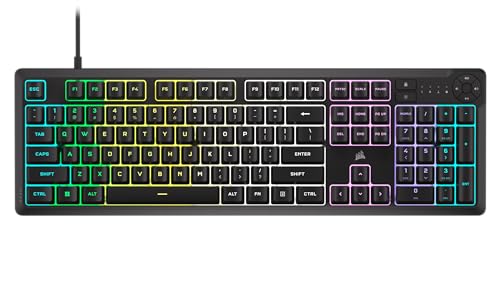 Corsair K55 CORE
|
Mid-Range | Ten-zone programmable RGB | Value-minded users who want RGB and macros | Check Price | ||
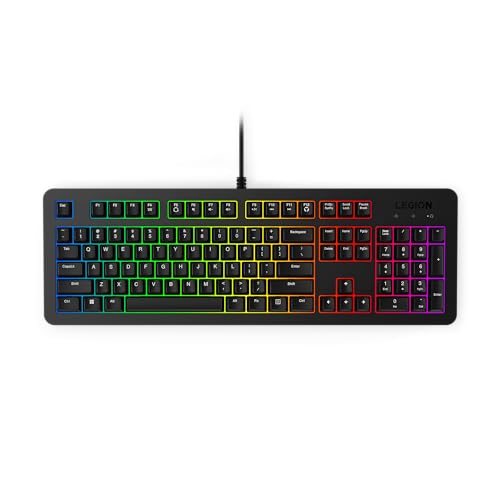 Lenovo Legion K310
|
Mid-Range | Quiet membrane switches & compact design | Users needing the quietest action for calls | Check Price | ||
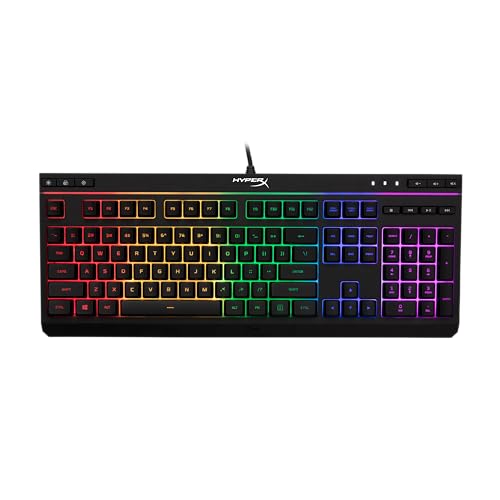 HyperX Alloy Core RGB
|
Mid-Range | Durable reinforced frame | Durability and comfortable typing for long sessions | Check Price |
1. Corsair K55 CORE RGB Membrane Wired Gaming Keyboard Quiet, Responsive Switches Spill Resistance Ten-Zone RGB Media Keys iCUE Compatible QWERTY NA PC, Mac Black
The K55 CORE blends quiet membrane switches with deep RGB customization and solid spill resistance, making it a practical pick for long remote sessions where lighting and media control matter. It’s feature-rich for the tier, though a minority of users report durability issues with certain keys over time.
Key Specs
- Quiet responsive membrane switches
- Ten-zone RGB backlighting (iCUE compatible)
- 300ml spill resistance
- 12-key rollover, 1000Hz polling
- Dedicated media buttons
Pros
- More RGB customization (10-zone) than the Lenovo K310
- Better advertised spill resistance (300ml) than the HyperX Alloy Core
- Stronger macro and dedicated media control compared with K310’s Fn-based controls
Cons
- Some users report keys failing after extended use—less consistent durability than HyperX
- Build not as rigid as HyperX’s reinforced frame
Best For: Value-minded users who want RGB and macros
Check Latest Price on Amazon2. Lenovo Legion K310 RGB Wired Gaming Keyboard - Ultra-Fast Reaction Time with Tactile Keys, Quiet Key Membrane Switches, Silent Operation, RGB Illumination - Water Resistant & Compact Design
The Legion K310 prioritizes silent operation and a compact footprint, with water-resistant draining holes and a reported 20 million key lifecycle. It’s an excellent choice for video calls and tight desks, though RGB is less customizable and some buyers note mixed functionality experiences.
Key Specs
- Quiet membrane key switches
- 5-zone RGB illumination
- 24-key rollover
- Water-resistant exterior with draining holes
- 20 million key lifecycles claimed
Pros
- Quieter key action for video calls than the louder HyperX option
- More compact, space-saving layout than the Corsair K55
- Durability-focused specs (20M key life, draining holes) compared with Corsair
Cons
- RGB less customizable than Corsair’s 10-zone system
- Some mixed reports of functionality and brightness consistency
Best For: Users needing the quietest action for calls
Check Latest Price on Amazon3. HyperX Alloy Core RGB Membrane Gaming Keyboard, Comfortable Quiet Silent Keys with RGB LED Lighting Effects, Spill Resistant, Dedicated Media Keys, Compatible with Windows 10/8.1/8/7 Black
HyperX Alloy Core RGB pairs a comfortable, quiet key feel with a reinforced frame that tends to hold up well for extended use. Its signature light bar and simple RGB effects suit class setups where reliable build and practical controls trump deep customization.
Key Specs
- Quiet responsive membrane keys
- Signature light bar with 6 preset RGB effects
- Spill resistant (tested to ~120ml)
- Durable solid frame and anti-ghosting
- Dedicated media and quick-access buttons
Pros
- More rigid, reinforced frame and perceived durability than the Corsair K55
- Comfortable tactile feel suited to long note-taking sessions
- Sensible media and quick-access controls rival Corsair’s layout
Cons
- Some users find it slightly louder than the Lenovo K310
- RGB customization is more limited than Corsair’s ten-zone system
Best For: Durability and comfortable typing for long sessions
Check Latest Price on AmazonWhich One Should You Choose?
If budget is tight → Choose the Corsair K55 CORE (B0CP6BR96G). It delivers the most RGB and macro features for the mid-range price tier and offers stronger spill protection, making it a smart value pick for students who like customization.
If you need the quietest keyboard for long video calls → Choose the Lenovo Legion K310 (B0CV915WG6). The K310 is tuned for silent operation, has a compact footprint for small desks, and includes water-draining protection geared toward durability.
If premium durability and long typing comfort matter most → Choose the HyperX Alloy Core RGB (B07HRNKTCM). Its reinforced frame, comfortable key feel, and practical controls make it the best overall balance for heavy note-taking and everyday remote-class use.
Best for Specific Scenarios
- Quiet video calls: Lenovo Legion K310 — tuned membrane switches and a compact, silent profile minimize background noise during long class sessions.
- Customizable setup & macros: Corsair K55 CORE — ten-zone RGB and dedicated media/macro keys let you personalize lighting and shortcuts for productivity.
- Durability for daily typing: HyperX Alloy Core RGB — reinforced frame and stable build make it ideal for long-term note-taking and heavy use.
Frequently Asked Questions
Are membrane keyboards better than mechanical for remote classes?
Membrane keyboards are generally quieter and less expensive, making them well-suited for video calls and long note-taking sessions where noise and cost matter. Mechanical keyboards provide stronger tactile feedback and longevity but can be louder; choose based on whether quiet operation or tactile feel is your priority.
Will these keyboards be noisy on a Zoom or Teams call?
All three are membrane designs and relatively quiet compared with many mechanical boards. The Lenovo Legion K310 is the quietest of the bunch, followed by the HyperX and Corsair. If you frequently speak on calls, mute/unmute shortcuts and a good headset will further reduce perceived keyboard noise.
Do these keyboards handle spills and long-term use?
Each model offers some spill-resistance: Corsair advertises higher liquid tolerance, Lenovo includes draining holes, and HyperX uses a reinforced frame. While spill-resistant features reduce risk, they aren’t a guarantee—clean spills quickly and avoid soaking the keyboard. Durability varies across units; reinforced frames and solid construction (as in the HyperX) typically last longer for daily heavy use.
How We Selected These Products
Our recommendations are based on data-driven analysis: we evaluated 155229+ products across 23916+ brands using a composite scoring system that weighs rating (40%), review volume (30%), price value (20%), and demand signals (10%). Every product is ranked by data, not opinions.
Last updated: August 31, 2026
As an Amazon Associate we earn from qualifying purchases at no extra cost to you. Full disclosure.
GearLark Score is our editorial ranking based on a composite analysis of product quality, value, and verified customer sentiment. Click through to Amazon for current pricing, availability, and live customer reviews.