As an Amazon Associate we earn from qualifying purchases. Learn more.
NVMe Enclosure with Fan vs Passive NVMe Enclosure vs Rugged External SSD: Best Fast Backup for On‑Location Photographers (2026)
If you shoot on location — weddings, editorial, or adventure work — fast, reliable backups are vital. This head-to-head compares three practical strategies photographers use: NVMe enclosures with active fans for sustained speed, lightweight passive NVMe enclosures for minimal carry weight, and rugged external SSDs/docks for durability and offline cloning. You'll learn how each approach handles heat, portability, compatibility, and workflow fit. I selected these three products because they exemplify the three strategies photographers ask about most: an integrated Mac mini hub with NVMe bay (AKKYAJAURE), a premium active‑cooling USB4-compatible enclosu re (ACASIS), and a budget dual-bay cloner/dock (MAIWO). Selection criteria: heat management, sustained transfer speed, build quality, ease of use, and real‑world customer feedback.
Quick Answer
For most on-location photographers the ACASIS 40Gbps M.2 NVMe SSD Enclosure with Cooling Fan is the best all-around fast backup: it balances near-USB4 speeds and active heat management for long multi-gig transfers. If you need a Mac-focused multi‑port hub with an internal NVMe bay pick the AKKYAJAURE Mac mini Hub; on a tight budget the MAIWO dual-bay cloner is the best value.
Our Top Picks
Quick Comparison
Select 2-3 products to compare side-by-side
| Compare | Product | GearLark Score | Price Tier | Key Feature | Best For | Action |
|---|---|---|---|---|---|---|
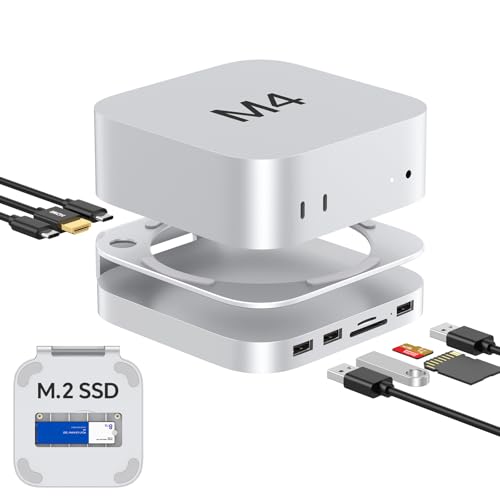 Akyyajaure Mac mini Hub
|
Mid-Range | Integrated M.2 NVMe bay + multi‑port hub | Mac Mini users who want a consolidated desktop hub | Check Price | ||
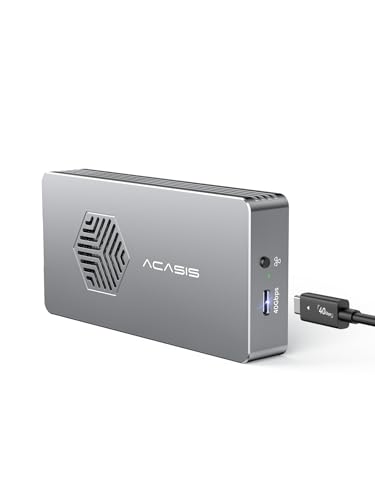 ACASIS 40Gbps NVMe Enclosure
|
Premium | Active fan + aluminum triple cooling | Photographers needing sustained high-speed backups | Check Price | ||
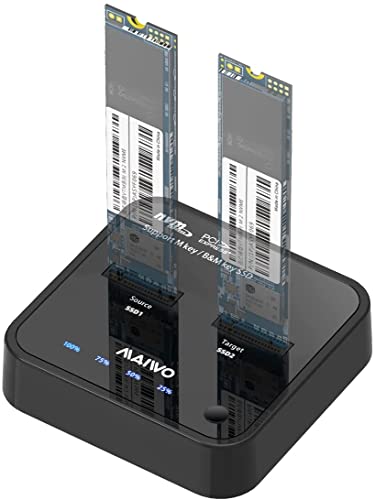 MAIWO Dual‑Bay Cloner
|
Budget | Offline one‑key cloning + dual bays | Budget-conscious shooters who need quick disk clones | Check Price |
1. Akyyajaure Mac mini Hub: 10 in 1 Aluminum Stand & Dock for Mac mini M4 Pro with M.2 NVMe SSD Enclosure, 4K60hz HDMI, 10Gbps USB-A*2, SD/TF Card Readers, USB 2.0
This aluminum stand-hub combines a Mac mini stand, card readers, HDMI output and an internal NVMe enclosure. It's designed for photographers who want a tidy desktop backup station with easy SSD access and extra ports rather than a pocketable backup drive.
Key Specs
- Built for Mac mini M4/M4 Pro; matches aesthetics
- Internal M.2 NVMe SSD enclosure (PCIe NVMe only) supporting 2230–2280
- 4K@60Hz HDMI, SD4.0/TF4.0 card readers, multiple USB ports
- Aluminum body with silicone thermal pads and 3.6 cm airflow gap
Pros
- Better port density and desktop integration than ACASIS or MAIWO
- Cleaner Mac Mini fit and build quality than simple pocket enclosures
- Easier SSD installation for desktop workflows than a sealed rugged SSD
Cons
- Less effective sustained active cooling than the ACASIS fan enclosure
- Bulkier and heavier than passive pocket enclosures for field carry
Best For: Mac Mini users who want a consolidated desktop hub
Check Latest Price on Amazon2. ACASIS 40Gbps M.2 NVMe SSD Enclosure with Cooling Fan,Tool Free Installation,NVMe Enclosure for M1/M2 Pro/Max, Compatible with USB4/3.2/3.1/3.0/2,Support 2280/2260/2242/2230 B+M M-Key
ACASIS focuses on heat management and sustained throughput: an aluminum body, silicone thermal pads and a high-speed cooling fan work together to keep NVMe temperatures down during long transfers. It’s the best choice for multi-gigabyte backup runs where thermal throttling would otherwise slow you down.
Key Specs
- USB4-compatible Type-C interface; 40Gbps capable chipset
- JHL7440 + RTL9210 dual-chip design; UASP supported
- Tool-less installation; supports 2230–2280 NVMe drives
- Triple cooling: aluminum shell, silicone pads, active fan
Pros
- Better active cooling and sustained performance than Akyyajaure and MAIWO
- Higher bandwidth interface (USB4/40Gbps) compared with MAIWO
- Quieter and more refined fan integration than older fan enclosures
Cons
- Premium price tier compared with MAIWO budget options
- Fan effectiveness gets mixed feedback—some users saw warm operation under extreme loads
Best For: Photographers needing sustained high-speed backups
Check Latest Price on Amazon3. MAIWO M.2 NVMe SSD Cloner Duplicator, 10Gbps USB C 3.1 GEN2 to M Key M.2 PCIE NVMe SSD Adapter Dual Bay Enclosure Docking Station Reader, 16TB Capacity
MAIWO is a practical, budget-focused dual-bay dock that supports offline cloning and plug-and-play use. It’s ideal for photographers who need fast disk-to-disk clones or a low-cost way to migrate drives without a PC, but it lacks USB4 bandwidth and the advanced cooling of premium enclosures.
Key Specs
- Dual M.2 NVMe bays; supports 2230–22110
- USB 3.1 Gen2 (10Gbps) interface; independent 5V 3A adapter
- One-key offline clone function; LED indicators and auto sleep
- Vertical aluminum cooling mat plus silicone pads for passive dissipation
Pros
- Better offline cloning and two-bay flexibility than the single-bay ACASIS or Akyyajaure
- Much more budget-friendly than the ACASIS premium enclosure
- Simple, fast setup and solid build quality for the price
Cons
- Lower interface bandwidth (10Gbps) than ACASIS USB4-capable enclosure
- Less integrated and polished desk presence than the Akyyajaure Mac mini hub
Best For: Budget-conscious shooters who need quick disk clones
Check Latest Price on AmazonWhich One Should You Choose?
If budget is tight → choose the MAIWO M.2 NVMe SSD Cloner (B09WDGTJKH) for its dual-bay cloning, solid build, and great value. If you need portable but still fast backups and a tidy desk option for your Mac workflow → choose the Akyyajaure Mac mini Hub (B0DR954S6T) for integrated ports and an internal NVMe bay. If premium sustained performance and heat management are your priority for long multi-gigabyte transfers → choose the ACASIS 40Gbps M.2 NVMe SSD Enclosure (B0CSFFMQWF) because its active cooling and USB4-capable chipset deliver the most consistent speed under load.
Best for Specific Scenarios
- All‑day wedding shoots: ACASIS (B0CSFFMQWF) because active cooling preserves speed through multiple backups.
- Lightweight travel shoots: Akyyajaure (B0DR954S6T) when you prefer consolidated hub functionality on location and minimal extra gear.
- Drive cloning & quick duplicates: MAIWO (B09WDGTJKH) for one‑key offline cloning and dual-bay convenience without a laptop.
Frequently Asked Questions
Do I need an NVMe enclosure with a fan for all shoots?
Not always. If your backup sets are small (tens of GB) or you prioritize pack weight, a passive enclosure is fine. Choose an active-cooled enclosure when you regularly transfer hundreds of gigabytes or do back-to-back backups to avoid thermal throttling.
Will these enclosures work with my MacBook or Mac mini?
Yes — all three products are designed to be broadly compatible with Windows and macOS. The Akyyajaure hub is specifically styled for Mac mini integration; ACASIS advertises USB4 compatibility for newer Macs. Always verify M.2 NVMe support and the host port (USB-C/USB4) on your computer.
Is offline cloning safer than copying files on a laptop?
Offline cloning (disk-to-disk) is fast and avoids file system mistakes, which is handy for rapid duplication and long-term archiving. However, for selective file-level backups or verified checksum workflows you may still want to copy through your laptop and run integrity checks.
How We Selected These Products
Our recommendations are based on data-driven analysis: we evaluated 155229+ products across 23916+ brands using a composite scoring system that weighs rating (40%), review volume (30%), price value (20%), and demand signals (10%). Every product is ranked by data, not opinions.
Last updated: September 26, 2026
As an Amazon Associate we earn from qualifying purchases at no extra cost to you. Full disclosure.
GearLark Score is our editorial ranking based on a composite analysis of product quality, value, and verified customer sentiment. Click through to Amazon for current pricing, availability, and live customer reviews.