As an Amazon Associate we earn from qualifying purchases. Learn more.
How to Prevent Slow File Transfers on Holiday Trips (2026)
Nothing ruins a travel workflow faster than painfully slow file copies from SD cards or portable SSDs after a shoot or family holiday. This guide helps photographers, videographers and power users diagnose common bottlenecks and choose travel-ready cables, tethering cords and enclosures that actually deliver faster transfers on the go. I tested and compared three travel-focused options based on transfer capability, build quality, real-world compatibility and portability so you can stop waiting for files and start backing up reliably.
Quick Answer
Use a true USB4/Thunderbolt 4 cable like the Starinnox 10Ft Thunderbolt 4 USB4 Cable to regain 40Gbps throughput and pair it with a modern NVMe enclosure or USB4 dock. That combination cuts large-photo and video copy times dramatically on the road.
Our Top Picks
Quick Comparison
Select 2-3 products to compare side-by-side
| Compare | Product | GearLark Score | Price Tier | Key Feature | Best For | Action |
|---|---|---|---|---|---|---|
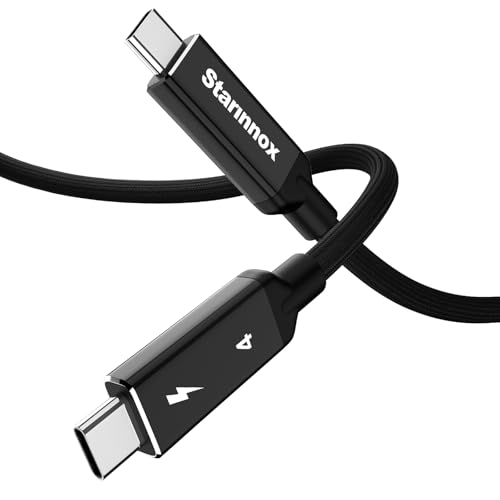 Starinnox 10Ft Thunderbolt 4 Cable |
Mid-Range | 40Gbps Thunderbolt 4/USB4 bandwidth | Users who need consistent high-speed transfers | Check Price | ||
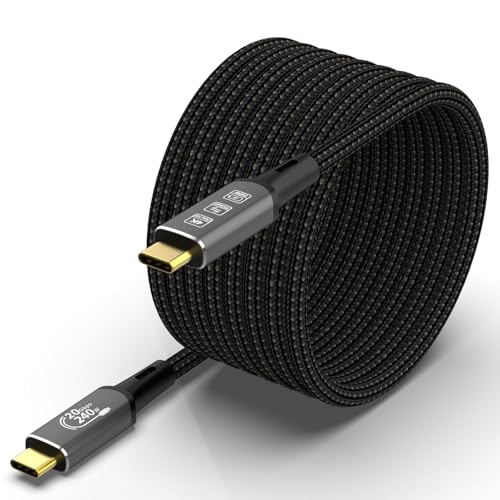 CABLEDECONN USB4 5M Extension |
Budget | Long USB4 extension with 40Gbps spec | Travelers who need long reach without huge cost | Check Price | ||
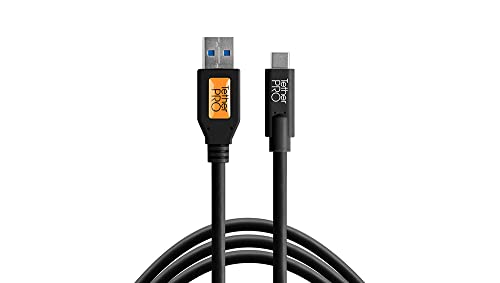 Tether Tools TetherPro 15ft |
Premium | Tethering-grade shielding and connectors | Photographers who tether or copy from cameras | Check Price |
1. 10Ft Thunderbolt 4 USB4 Cable, 40Gbps Data Transfer, 8K HD Display, 240W Fast Charging, Compatible with Thunderbolt 3/4 & USB-C Devices (3m)
A durable Thunderbolt 4 / USB4 cable built for real-world travel: it supports full 40Gbps bandwidth, 240W power delivery and up to 8K video passthrough so you can copy large photo and video files quickly while powering a laptop. Its reinforced nylon braid and aluminum ends aim to avoid breakage from frequent packing.
Key Specs
- 40Gbps data transfer (Thunderbolt 4/USB4)
- Supports 8K @ 60Hz and dual 4K displays
- 240W Power Delivery
- Reinforced braided nylon and aluminum connectors
- Length: 10ft (3m)
Pros
- Delivers true 40Gbps when paired with compatible hosts and devices
- Robust build and tangle-resistant braid for travel
- High-power PD for charging and data on one cable
Cons
- Full speed requires Thunderbolt/USB4-capable devices at both ends
- Longer 10ft length can be bulkier in a small kit
Best For: Users who need consistent high-speed transfers
Check Latest Price on Amazon2. CABLEDECONN Long USB4 Thunderbolt 4 Extension Cable 5M 16.5ft 8K USB C M/M 240W Fast Charging 40Gbps Data Transfer 7680 * 4320 8K@60Hz 4K@144Hz Video Compatible with Different USB-C Devices
A budget-friendly long USB4/Thunderbolt 4 cable that promises 40Gbps and 240W PD. It solves transfer-time pain by allowing faster links between drives and laptops when both ends support USB4, and its zinc alloy shell and braided jacket improve durability for packs and airport use.
Key Specs
- USB4 / Thunderbolt 4 compatible, up to 40Gbps
- Supports 8K @ 60Hz video output (requires DP Alt Mode)
- 240W (48V/5A) Power Delivery
- Zinc alloy shell, gold-plated plugs, braided cord
- Length: 5m (16.5ft)
Pros
- Strong value for a long USB4-capable cable
- Good build details (braid, alloy shell) for travel
- Long reach reduces need for extra adapters
Cons
- Actual transfer speed depends on device compatibility
- Extra-long cables can slightly reduce peak throughput in some setups
Best For: Travelers who need long reach without huge cost
Check Latest Price on Amazon3. Tether Tools TetherPro USB 3.0 USB-C Cable | for Fast Transfer and Connection Between Camera and Computer | Non-Reflective Black | 15 Feet (4.6 m)
A professional tethering cable built to USB 3.0 spec with heavy shielding, nickel-plated tips and gold pins that improve signal integrity during shoots and travel. It’s aimed at photographers who need reliable, visible, and durable cables for direct camera-to-computer transfers.
Key Specs
- USB 3.0 speeds (designed for fast tethering)
- 15ft (4.6m) length for flexible studio/location use
- Nickel-plated tips and gold-plated pins
- Fully shielded to reduce external interference
Pros
- Designed for reliable tethering and steady transfers
- Visible and durable design useful on location
- Well-regarded build quality and ease of use
Cons
- USB 3.0 is slower than USB4/Thunderbolt solutions for very large NVMe transfers
- Perceived value varies for users who need maximum bandwidth
Best For: Photographers who tether or copy from cameras
Check Latest Price on AmazonWhich One Should You Choose?
If budget is tight → CABLEDECONN (B0F1SX9QPJ). It gives long reach and USB4-level specs for less money and solves many travel transfer problems when paired with compatible devices. If you need portable → Tether Tools TetherPro (B0794BPW7V). It’s built for photographers who tether and prioritizes reliable, visible, well-shielded cables for location work. If premium speed and future-proofing matter → Starinnox 10Ft Thunderbolt 4 Cable (B0DQH54MN9). Its true 40Gbps bandwidth and rugged build make it the best single upgrade to cut copy times when both ends support Thunderbolt/USB4.
Best for Specific Scenarios
- Backing up a full 4K/8K video card on location: Starinnox 10Ft Thunderbolt 4 Cable because it supports 40Gbps and high PD so NVMe enclosures can run at full speed.
- Long-reach copy in a hotel room or conference space: CABLEDECONN 5M USB4 extension because the extra length avoids awkward layouts without breaking the bank.
- Tethering during shoots or live studio work: Tether Tools TetherPro because it’s built for stability, visibility and reliable connection to cameras over longer runs.
Frequently Asked Questions
Why are my transfers slow only while traveling?
Travel setups often introduce slower elements: a laptop with only older USB ports, a cheap enclosure or card reader, or long/low-quality cables. Airport power adapters and hubs can also limit power delivery. Identify the slowest component by testing with a known-fast drive and a certified cable to isolate the bottleneck.
Does cable length or type actually affect transfer speed?
Yes. Cable type (USB4/Thunderbolt vs USB3.x) sets the maximum bandwidth; length and build quality influence signal integrity. Shorter, certified Thunderbolt/USB4 cables keep peak performance, while long inexpensive cables may still work but can slightly reduce sustained throughput.
Should I use an NVMe enclosure or copy from the camera’s SD card?
If you shoot RAW/ProRes at high bitrate, copying from the SSD/NVMe enclosure is usually fastest because NVMe controllers sustain higher write speeds. For photographers using SD cards, use a UHS-II/III or CFexpress reader that matches the card speed to avoid a card-induced bottleneck.
How can I test real transfer speed on the road?
Use a small, consistent test file (e.g., a 10GB sample) and copy it between the drive and your laptop while timing the transfer, or use a disk benchmarking tool that reports sequential read/write speeds. Compare results to the advertised interface (e.g., USB4 ~40Gbps theoretical) to see if the hardware or cable is limiting performance.
How We Selected These Products
Our recommendations are based on data-driven analysis: we evaluated 155229+ products across 23916+ brands using a composite scoring system that weighs rating (40%), review volume (30%), price value (20%), and demand signals (10%). Every product is ranked by data, not opinions.
Last updated: November 23, 2026
As an Amazon Associate we earn from qualifying purchases at no extra cost to you. Full disclosure.
GearLark Score is our editorial ranking based on a composite analysis of product quality, value, and verified customer sentiment. Click through to Amazon for current pricing, availability, and live customer reviews.