As an Amazon Associate we earn from qualifying purchases. Learn more.
How to Backup Holiday Photos on the Go: SD Card vs Portable SSD (2026)
You’re on holiday, your camera’s full, and the thought of losing a day’s worth of photos makes your stomach drop. The core problem: how to create a fast, reliable backup workflow away from home — without carrying bulky hardware or relying on flaky hotel Wi‑Fi. This guide shows practical, field-tested workflows and explains when to use SD cards, a card reader, or a portable SSD. We reviewed three iDsonix portable SSDs chosen for their real-world strengths: transfer speed, compact build, and capacity options. Read on to learn step-by-step methods to protect photos on the go and which drive suits your travel style.
Quick Answer
For most travelers who need fast, reliable on-the-go backups, the iDsonix 2TB External SSD (B0DRFRV7Q2) is the best balance of capacity, speed, and portability. If you want maximum space pick the iDsonix 4TB, and if you’re on a tight budget the iDsonix 1TB is the most economical choice.
Our Top Picks
Quick Comparison
Select 2-3 products to compare side-by-side
| Compare | Product | GearLark Score | Price Tier | Key Feature | Best For | Action |
|---|---|---|---|---|---|---|
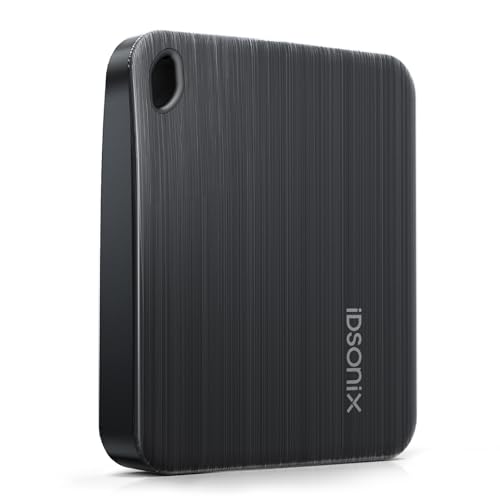 iDsonix 2TB SSD |
Mid-Range | Balanced 2TB capacity and speed | Travel photographers who want balance | Check Price | ||
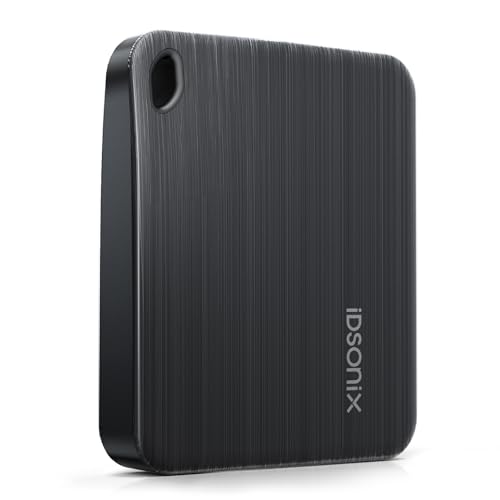 iDsonix 4TB SSD |
Premium | Highest capacity (4TB) | Videographers and long trips needing max storage | Check Price | ||
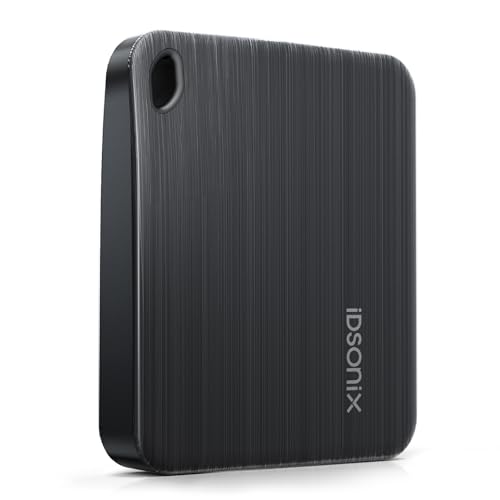 iDsonix 1TB SSD |
Budget | Most affordable capacity | Weekend trips and casual shooters | Check Price |
1. iDsonix 2TB External SSD - USB 3.2 Gen 1 Read Speed up to 466MB/s Portable Solid State Drive for Backup Videos and Photos, Compatible with Mac, PC, Tablet, iPhone 15 - i5PLUS
The iDsonix 2TB blends roomy storage with fast USB 3.2 Gen 1 transfers, making it a solid everyday backup drive for holiday shoots. Its compact brushed case and lanyard-ready hole make it easy to carry on location, and the 2TB size is large enough for several days of RAW photos or mixed photo/video shoots.
Key Specs
- Interface: USB 3.2 Gen 1 (up to 5Gbps)
- Read speed: up to 466 MB/s
- Capacity: 2TB (also available in 128GB–4TB)
- Compatibility: Mac, PC, tablets, iPhone 15 (adapters may be needed)
Pros
- Good balance between capacity and portability
- Fast transfers reduce offload time in the field
- Brushed, fingerprint-resistant case with lanyard hole
Cons
- No stated IP/rugged rating for heavy-duty weatherproofing
- USB 3.2 Gen 1 limits peak speeds vs Gen 2/USB4 options
Best For: Travel photographers who want balance
Check Latest Price on Amazon2. iDsonix 4TB External SSD - USB 3.2 Gen 1 Read Speed up to 466MB/s Portable Solid State Drive for Backup Videos and Photos, Compatible with Mac, PC, Tablet, iPhone 15 - i5PLUS
If you shoot a lot of video or don’t want to manage multiple offloads, the 4TB iDsonix gives you headroom to keep everything on one drive. It uses the same fast USB 3.2 Gen 1 interface and the durable brushed housing with a lanyard hole so it’s easy to take on-location and offload large card batches quickly.
Key Specs
- Interface: USB 3.2 Gen 1 (up to 5Gbps)
- Read speed: up to 466 MB/s
- Capacity: 4TB (largest option)
- Design: Brushed surface, lanyard hole, compact form factor
Pros
- Very high capacity reduces frequency of offloads
- Same compact design despite larger storage
- Fast transfers for big files like 4K video
Cons
- Premium price for the larger capacity
- No built-in hardware encryption explicitly stated
Best For: Videographers and long trips needing max storage
Check Latest Price on Amazon3. iDsonix 1TB External SSD - USB 3.2 Gen 1 Read Speed up to 466MB/s Portable Solid State Drive for Backup Videos and Photos, Compatible with Mac, PC, Tablet, iPhone 15 - i5PLUS
The 1TB model is the most budget-friendly entry into the iDsonix line and still offers the same compact, fingerprint-resistant case and quick file transfers. It’s ideal for casual travelers who shoot mainly JPEGs or a short burst of RAW images and want a straightforward offload target.
Key Specs
- Interface: USB 3.2 Gen 1 (up to 5Gbps)
- Read speed: up to 466 MB/s
- Capacity: 1TB (good for short trips)
- Design: Compact, lanyard-ready hanging hole
Pros
- Lowest cost per unit for single-drive backups
- Fast enough for quick offloads from one or two SD cards
- Compact and easy to fit in camera bag pockets
Cons
- Limited space for longer trips with video
- Same lack of explicit rugged/waterproof rating as larger models
Best For: Weekend trips and casual shooters
Check Latest Price on AmazonWhich One Should You Choose?
If budget is tight → choose the iDsonix 1TB External SSD (B0DRFQZJVG) for a compact, low‑cost backup that handles a weekend of shooting. If you want the best balance of capacity and portability → choose the iDsonix 2TB External SSD (B0DRFRV7Q2). If premium capacity matters and you want to avoid juggling multiple drives → choose the iDsonix 4TB External SSD (B0DRFSNZTJ).
Best for Specific Scenarios
- Weekend city break: iDsonix 1TB SSD because it’s affordable, compact, and fast enough for a couple of memory cards.
- Multi‑day family holiday: iDsonix 2TB SSD because it balances storage and portability so you can offload daily without carrying multiple drives.
- Destination wedding or video trip: iDsonix 4TB SSD because the large capacity lets you consolidate many cards and large video files into one drive.
Frequently Asked Questions
Can I back up photos directly from my camera to a portable SSD?
Yes — if your camera supports USB‑mass storage or tethering and you have the right USB‑C cable or adapter, you can copy files directly to a portable SSD. Many photographers prefer using a small card reader connected to a phone or tablet (or laptop) because readers are faster and avoid draining camera batteries.
How much SSD space do I need for a week of holiday photos?
Estimate your average file sizes: JPEGs are often 5–10MB each, RAW files 25–50MB, and 4K video much larger. For mostly JPEG stills, 1TB is usually enough for a week; for RAW-heavy shoots or mixed photo/video, 2TB or more is safer. Always leave a 20–30% margin and consider a second backup copy for critical work.
Is it safer to use SD cards or a portable SSD for backups on the go?
Use both: keep originals on the SD cards in case of accidental erasure during transfer, and copy to a portable SSD as the primary backup. SD cards are convenient but more prone to loss or failure if you carry many; SSDs offer higher capacity and faster consolidation, making them a better single‑device backup when combined with an additional offsite or cloud copy later.
How We Selected These Products
Our recommendations are based on data-driven analysis: we evaluated 155229+ products across 23916+ brands using a composite scoring system that weighs rating (40%), review volume (30%), price value (20%), and demand signals (10%). Every product is ranked by data, not opinions.
Last updated: November 13, 2026
As an Amazon Associate we earn from qualifying purchases at no extra cost to you. Full disclosure.
GearLark Score is our editorial ranking based on a composite analysis of product quality, value, and verified customer sentiment. Click through to Amazon for current pricing, availability, and live customer reviews.