As an Amazon Associate we earn from qualifying purchases. Learn more.
How to Reduce Webcam Glare and Improve Online Class Lighting (2026)
Glare, flat faces, and uneven lighting make online classes look unprofessional and make it harder for students to focus. This guide is for teachers, tutors and students who want practical fixes — from repositioning lights to choosing mounts, monitor light bars, and webcams with built-in correction. I tested and compared mounts, monitor lights and webcams based on adjustability, build quality, ease of installation and how effectively they reduce reflections and harsh shadows. Below are products that actually solve common lighting problems and a buying guide to help you pick the right combo for your setup.
Quick Answer
The easiest way to cut webcam glare and improve image quality is to add adjustable, diffused lighting and reposition your camera — our top pick is the NEEWER Camera Desk Mount (B0B4B314CG) because its overhead arm and secure clamp let you place lights and webcams at glare-free angles while keeping everything stable.
Our Top Picks
Quick Comparison
Select 2-3 products to compare side-by-side
| Compare | Product | GearLark Score | Price Tier | Key Feature | Best For | Action |
|---|---|---|---|---|---|---|
 NEEWER Desk Mount
|
Mid-Range | Adjustable overhead arm with 1/4" mounts | Overhead shots and adjustable lighting setups | Check Price | ||
 UBeesize Light Bars
|
Premium | Dual monitor light bars for even illumination | Reducing shadows and eye strain on large monitors | Check Price | ||
 NUROUM V15-AFL
|
Premium | Built-in ring light + auto light correction | Low-light rooms and simple plug-and-play setups | Check Price | ||
 Pozliv Overhead Mount
|
Budget | Articulating arm with 6" dimmable ring light | Budget overhead shots and quick setups | Check Price |
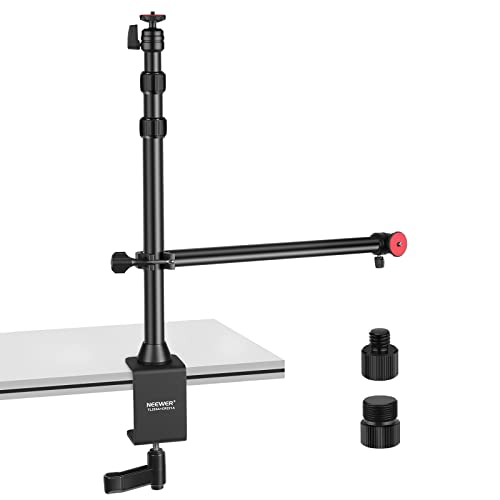
1. NEEWER Camera Desk Mount with Overhead Camera Mounting Arm and 1/4" Ball Head, 17" - 41" Adjustable Tabletop Light Stand with C Clamp for DSLR Camera, Ring Light, Webcam, Photo Video Shooting
The NEEWER desk mount solves glare and shadow issues by letting you raise and angle a light or webcam well above the monitor. Its telescopic tube and 360° ball head let you position a fill light to eliminate screen reflections and move the camera to a flattering angle without wobble.
Key Specs
- Adjustable height: 17" (44cm) to 41" (103cm)
- Standard 1/4" screws on vertical & horizontal heads
- Holding arm load capacity: 1kg (2.2lbs)
- Clamp range: 0–3.5" (0–9cm)
Pros
- Sturdy build and stable clamp reduce wobble
- Highly adjustable for overhead and angled lighting
- Versatile 1/4" mounts accept lights, webcams, phones
Cons
- Holding arm capacity is limited for heavier gear
- Requires loosening knobs to change height with arm attached
Best For: Overhead shots and adjustable lighting setups
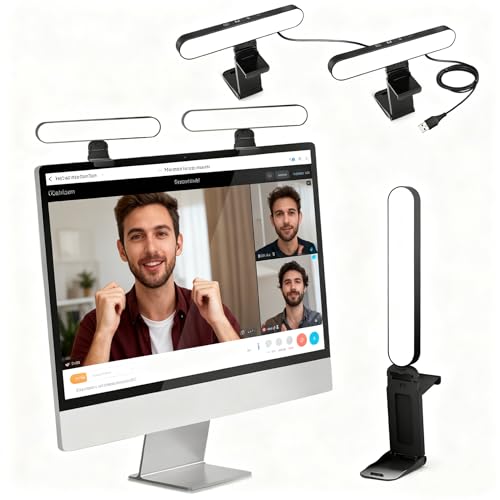
Check Latest Price on Amazon2. UBeesize Video Conference Lighting, LED Streaming Light for Video Calls, Webcam Light with Adjustable Monitor Mount, Zoom Lighting for Computer, Laptop Ring Light for Video Recording, Double Kit
The UBeesize double monitor light bars provide wide, even illumination across your face and workspace, which reduces harsh contrasts and camera exposure swings that cause glare. The adjustable brightness and 360/180 rotation let you aim light to fill shadows without reflecting off your screen.
Key Specs
- Two monitor light bars included
- Three brightness levels with touch control
- 360° horizontal / 180° vertical adjustment
- Bracket fits monitor widths 1.55–2.35 inches
Pros
- Delivers even, flattering light that minimizes harsh reflections
- Easy setup and tidy cable accessories included
- Flexible rotation lets you target light without repositioning monitor
Cons
- Premium tier cost compared with basic single lights
- Bracket may not suit extremely thin or thick monitors
Best For: Reducing shadows and eye strain on large monitors
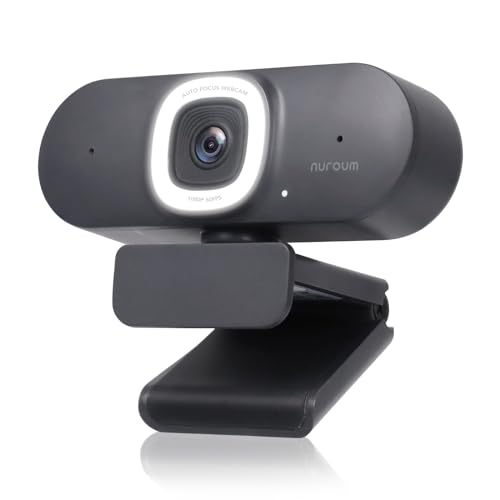
Check Latest Price on Amazon3. NUROUM V15-AFL Streaming Webcam with Ring Light, Autofocus Webcam for PC w/Dual Mic, 1080P 60fps, 75 FOV&Light Correction, USB Web Camera Plug&Play for Zoom/Teams/OBS/Xsplit, Streaming, Grey
This webcam adds a built-in adjustable ring light and automatic exposure correction so your face stays well-lit without extra lamps. Autofocus and color boost help keep you sharp while the touch controls and privacy cover make the unit easy to use for teachers who need a no-fuss upgrade from a laptop camera.
Key Specs
- 1080P/60fps video with 4MP CMOS sensor
- 3-level adjustable ring light with touch control
- Autofocus and auto light correction
- Dual noise-canceling microphones, USB 2.0 plug
Pros
- Built-in light and auto-correction improve low-light video
- Plug-and-play setup and privacy controls
- Good value for a webcam with integrated lighting
Cons
- Some users report mixed color accuracy
- Microphone performance varies by environment
Best For: Low-light rooms and simple plug-and-play setups
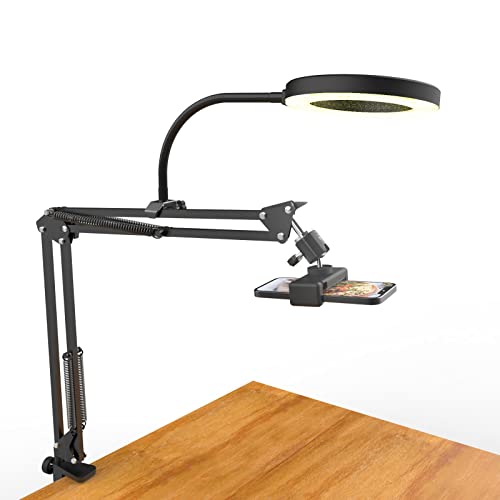
Check Latest Price on Amazon4. Overhead Camera Mount with Ring Light, Flexible Articulating Phone Arm Stand Compatible with iPhone, Logitech Webcam, Desk Tripod for YouTube Live Stream Cooking Nail Video Recording
On a tight budget, the Pozliv arm gives you top-down angles and a small ring light to reduce ceiling glare and brighten subjects. Its flexible joints let you steer the light to avoid reflective hotspots on screens and whiteboards, though brightness and long-term durability are mixed.
Key Specs
- 6-inch ring light with 3 modes × 10 brightness levels
- USB powered (works with power banks, wall chargers)
- Clamp fits desks up to 5.2cm (2 inches)
- Max load capacity: 3 lbs
Pros
- Affordable and easy to assemble for basic lighting needs
- Flexible arm offers many shooting angles
- Good value for beginners and casual users
Cons
- Build quality and clamp security are inconsistent
- Light can be underpowered for larger rooms
Best For: Budget overhead shots and quick setups
Check Latest Price on AmazonWhich One Should You Choose?
If budget is tight → Pozliv (B09ZNNY165) is a cost-effective start for overhead angles and basic fill light. If you want a flexible mounting system to position lights and camera precisely → NEEWER (B0B4B314CG) offers a sturdy arm and multiple mounting points. If your priority is even front lighting and reducing shadows from the screen → UBeesize (B0DFLMYSS6) dual monitor bars produce wide, flattering illumination. If you need a simple upgrade without extra lights → NUROUM V15-AFL (B0CLNRVWM9) combines a webcam and ring light with auto-correction for low-light rooms.
Best for Specific Scenarios
- Bright window behind you (reflections on screen): UBeesize (B0DFLMYSS6) because the monitor light bars fill your face and reduce the camera's exposure swing without adding a competing backlight.
- Top-down demonstrations or writing on paper: NEEWER (B0B4B314CG) because the overhead arm positions a camera or light directly above the work area to eliminate side reflections and shadows.
- Small-budget remote teacher: Pozliv (B09ZNNY165) because its articulating arm and USB ring light give flexible angles and basic fill light at low cost.
Frequently Asked Questions
How do I stop my webcam from picking up glare on my glasses or screen?
Move or angle your light so it doesn't reflect directly into the camera — place a soft fill light slightly above and to the side of the camera, or use a monitor light bar aimed downward. Diffusing the light (softbox or frosted cover) reduces hotspots on glasses and glossy screens.
Should I use a ring light or a monitor light bar for online classes?
Use a ring light if you need a compact, face-focused source that minimizes shadows for single-subject shots. Choose a monitor light bar or dual bars when you want even, wide illumination across your desk that reduces monitor contrast and overall glare.
Can a webcam’s auto light correction fix glare problems?
Auto light correction helps exposure and low-light conditions but won’t eliminate glare caused by strong reflections. It’s best combined with proper light placement and diffusion — a webcam like the NUROUM adds correction, but positioning a monitor bar or mount to change the light angle is still needed.
Where should I place lights to minimize reflections during screen sharing?
Place lights above and slightly to the side of the camera so the angle of incidence misses the screen and lens. Avoid placing bright lights directly behind or in front of a glossy monitor; instead, use softer, angled fill lighting to keep the screen readable without causing camera glare.
How We Selected These Products
Our recommendations are based on data-driven analysis: we evaluated 155229+ products across 23916+ brands using a composite scoring system that weighs rating (40%), review volume (30%), price value (20%), and demand signals (10%). Every product is ranked by data, not opinions.
Last updated: September 03, 2026
As an Amazon Associate we earn from qualifying purchases at no extra cost to you. Full disclosure.
GearLark Score is our editorial ranking based on a composite analysis of product quality, value, and verified customer sentiment. Click through to Amazon for current pricing, availability, and live customer reviews.